https://github.com/crazywolf13/streamlink-webui
a simple web-ui to the well-known streamlink cli application
https://github.com/crazywolf13/streamlink-webui
fastapi python streamlink streamlink-gui streamlink-webui vuejs webui
Last synced: about 1 year ago
JSON representation
a simple web-ui to the well-known streamlink cli application
- Host: GitHub
- URL: https://github.com/crazywolf13/streamlink-webui
- Owner: CrazyWolf13
- License: agpl-3.0
- Created: 2023-08-04T12:44:33.000Z (almost 3 years ago)
- Default Branch: main
- Last Pushed: 2025-05-21T20:19:14.000Z (about 1 year ago)
- Last Synced: 2025-06-15T06:53:40.982Z (about 1 year ago)
- Topics: fastapi, python, streamlink, streamlink-gui, streamlink-webui, vuejs, webui
- Language: Python
- Homepage: https://hub.docker.com/r/crazywolf13/streamlink-webui
- Size: 36.5 MB
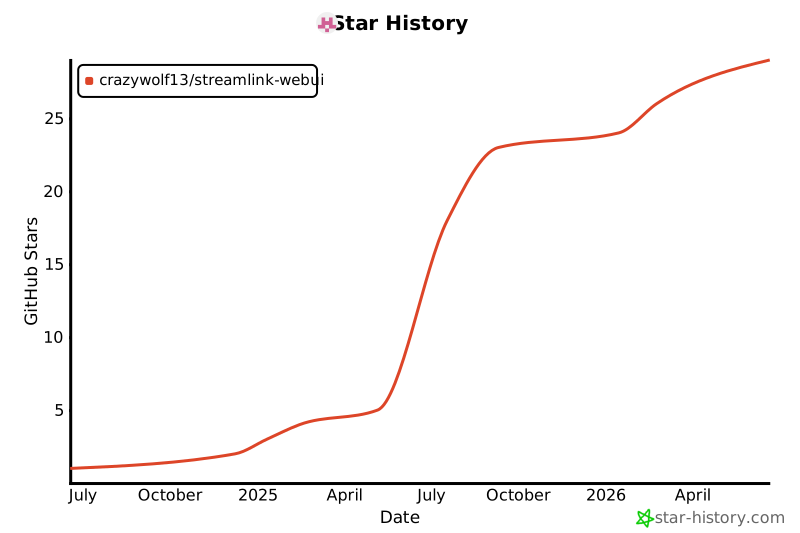
- Stars: 17
- Watchers: 1
- Forks: 1
- Open Issues: 1
-
Metadata Files:
- Readme: README.md
- License: LICENSE
Awesome Lists containing this project
README
# Streamlink WebUI
This repository currently contains the code for an application which simplifies the download of Twitch Streams.
I used a FastAPI backend and a Vue.js frontend.
This project is in early-early alpha, so any reviews, bug reports or feature request are highly appreciated.
## Table of Contents
- [Streamlink WebUI](#streamlink-webui)
- [Table of Contents](#table-of-contents)
- [Features](#features)
- [Showcase](#showcase)
- [Start job section](#start-job-section)
- [Running jobs section](#running-jobs-section)
- [Installation](#installation)
- [Docker](#docker)
- [Behind a domain](#behind-a-domain)
- [Proxmox](#proxmox)
- [Bare Metal](#bare-metal)
- [Configuration](#configuration)
- [API Endpoints](#api-endpoints)
- [Logging](#logging)
- [License](#license)
- [License for Included Software](#license-for-included-software)
- [Streamlink](#streamlink)
- [Acknowledgements](#acknowledgements)
## Features
- Use a frontend to record Twitch streams.
- Schedule recordings to start automatically when a channel goes live.
- View all currently running or scheduled recordings.
- Display Twitch avatars.
## Showcase
### Start job section

### Running jobs section

# Installation
## Docker
Docker images are available on Docker Hub.
```bash
docker pull crazywolf13/streamlink-webui:latest
```
```bash
docker run -p 8000:8000 -dit \
--name streamlink-webui \
-e CLIENT_ID='your_client_id' \
-e CLIENT_SECRET='your_client_secret' \
-v /path/to/downloads:/app/downloads \
crazywolf13/streamlink-webui
```
### Behind a domain
Example with a reverse proxy and domain setup:
```bash
docker run -p 8000:8000 -dit \
--name streamlink-webui \
-e CLIENT_ID='your_client_id' \
-e CLIENT_SECRET='your_client_secret' \
-e BASE_URL='https://sub.domain.com' \
-e REVERSE_PROXY=True \
-v /path/to/downloads:/app/downloads \
crazywolf13/streamlink-webui
```
## Proxmox
Streamlink-WebUI is available on Community Scripts, a set of easy installer scripts for Proxmox LXC: https://community-scripts.github.io/ProxmoxVE/scripts?id=streamlink-webui
## Bare Metal
1. Clone the repository:
```bash
git clone https://github.com/CrazyWolf13/streamlink-webui.git
cd streamlink-webui/backend/src
```
2. Install the required packages:
```bash
pip install -r requirements.txt
```
3. Build the frontend
```bash
cd ../../frontend/src
npm install
npm install -g yarn
yarn build
```
4. Create a Twitch API Key to fetch live status and user avatars:
1. Go to the [Twitch Developer Portal](https://dev.twitch.tv/console/apps).
2. Sign in if prompted.
3. Click on "Register Your Application".
4. Provide a name for your app and select "Application Integration".
5. Enter `https://localhost` as the OAuth Redirect URL.
6. You will receive a Client ID and Client Secret.
7. In the root directory of the project, create a `.env` file and add the following:
```
CLIENT_ID='your_client_id'
CLIENT_SECRET='your_client_secret'
DOWNLOAD_PATH='/home//Download'
```
5. Run FastAPI:
```bash
cd ../../backend/src
fastapi run main.py
```
## Configuration
- The application uses Streamlink to handle the streams.
- The database is initialized with SQLAlchemy.
- Logs are stored in the `./logs` directory, and the database schema is configured in `db_schema.py`.
## API Endpoints
Visit /docs endpoint to get an overview of all api endpoints and how to use them.
## Logging
- Logs are created for each download task with detailed information about the streaming and recording process.
- Global logs are stored in `./logs/application-.log`.
- Each download task gets its own log file named based on the stream's filename, stored in the `./logs` directory.
## License
This project is licensed under the BSD 2-Clause License.
[License](./LICENSE)
## License for Included Software
#### Streamlink
This project is built upon software from the Streamlink project, which is licensed under the BSD 2-Clause License. See below for the full license text:
[Third-Party-Licenses](./third-party-licenses)
## Acknowledgements
We would like to thank the authors and maintainers of [Streamlink](https://github.com/streamlink/streamlink) for their excellent work at maintaining streamlink. Streamlink is invaluable to our project, and we appreciate your dedication to the open-source community.
Thank you!
---
Developed by CrazyWolf13 with ❤️
## ⭐ Star History