https://github.com/creativetimofficial/ct-astro-launch-ui-pro
AstroLaunch UI Pro - Ready to use components
https://github.com/creativetimofficial/ct-astro-launch-ui-pro
astro material-tailwind react tailwind typescript
Last synced: 9 months ago
JSON representation
AstroLaunch UI Pro - Ready to use components
- Host: GitHub
- URL: https://github.com/creativetimofficial/ct-astro-launch-ui-pro
- Owner: creativetimofficial
- Created: 2023-08-30T10:02:21.000Z (almost 3 years ago)
- Default Branch: main
- Last Pushed: 2023-09-27T14:21:47.000Z (over 2 years ago)
- Last Synced: 2025-04-19T08:10:18.402Z (about 1 year ago)
- Topics: astro, material-tailwind, react, tailwind, typescript
- Homepage: https://www.creative-tim.com/astro
- Size: 6.84 KB
- Stars: 3
- Watchers: 2
- Forks: 1
- Open Issues: 1
-
Metadata Files:
- Readme: README.md
- Changelog: CHANGELOG.MD
Awesome Lists containing this project
README
# Welcome to [AstroLaunch UI Pro](https://www.creative-tim.com/astro/launch-ui-pro/)
 [](https://github.com/creativetimofficial/ct-astro-launch-ui-pro/issues?q=is%3Aopen+is%3Aissue) [](https://github.com/creativetimofficial/ct-astro-launch-ui-pro/issues?q=is%3Aissue+is%3Aclosed)
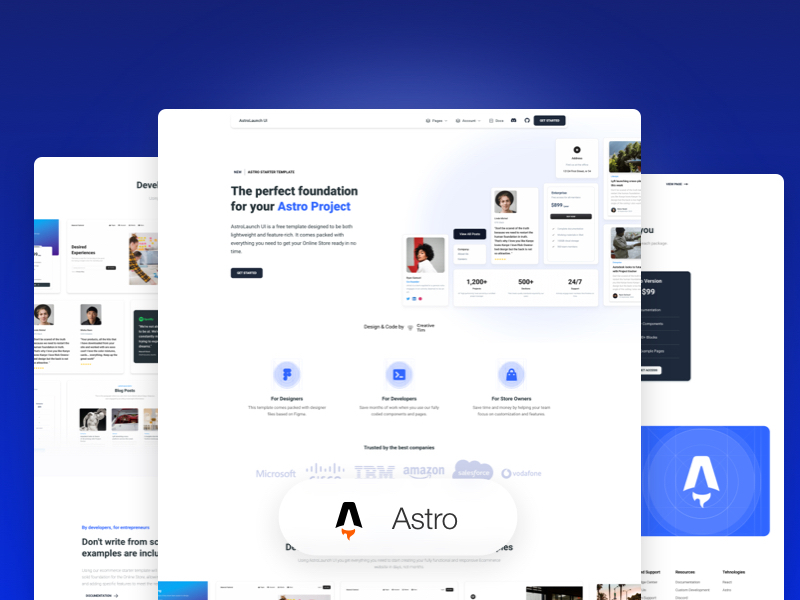
## Description
Introducing **AstroLaunch UI Pro**, the ultimate starter template for your startup web project. Built on Astro's next-gen island architecture, AstroLaunch UI Pro offers a sleek and modern design with a wide range of components and features to help you create a stunning online store.
**Main Features**
Build your startuo website quickly and efficiently with:
- 70+ fully coded elements
- 15 fully coded example pages
- 30+ blocks
- Responsive design
**Example Pages**
We created a set of pre-built pages to help you get inspired or show something to your clients. See them below:
- [Landing Page](https://demos.creative-tim.com/astro-launch-ui/landing/): Designed to introduce the website's purpose and encourage the user to take an action.
- [Dashboard Page](https://demos.creative-tim.com/astro-launch-ui/dashboard/): It's designed to give the user all the information they need to make a purchase decision or to overview an application's status.
- [Billing Page](https://demos.creative-tim.com/astro-launch-ui/billing/): Includes a summary of the items in the cart and a form for billing and shipping information.
- more+
AstroLaunch UI Pro has everything you need to create the website of your dreams.
## 🚀 Project Structure
Inside of your Astro project, you'll see the following folders and files:
```
/
├── CHANGELOG.MD
├── README.md
├── assets
│ ├── css
│ │ ├── input.css
│ │ └── material-tailwind.css
│ ├── js
│ │ └── astro-launch-ui.min.js
│ └── scss
│ └── loading-dot.css
├── astro.config.mjs
├── create-free-demo.js
├── hooks/
├── package.json
├── public/
├── src
│ ├── components/
│ ├── env.d.ts
│ ├── example.tsx
│ ├── header.tsx
│ ├── layouts
│ │ └── Layout.astro
│ ├── pages/
│ │ ├── 404.astro
│ │ ├── 500.astro
│ │ ├── about.astro
│ │ ├── billing.astro
│ │ ├── blog-post.astro
│ │ ├── blog.astro
│ │ ├── coming-soon.astro
│ │ ├── dashboard.astro
│ │ ├── index.astro
│ │ ├── landing.astro
│ │ ├── login.astro
│ │ ├── marketing.astro
│ │ ├── reset.astro
│ │ ├── signup.astro
│ │ ├── teams.astro
│ │ └── terms.astro
├── tailwind.config.js
└── tsconfig.json
```
Astro looks for `.astro` or `.md` files in the `src/pages/` directory. Each page is exposed as a route based on its file name.
There's nothing special about `src/components/`, but that's where we like to put any Astro/React/Vue/Svelte/Preact components.
Any static assets, like images, can be placed in the `public/` directory.
## 🧞 Commands
All commands are run from the root of the project, from a terminal:
| Command | Action |
| :--------------------- | :------------------------------------------------- |
| `npm install` | Installs dependencies |
| `npm run dev` | Starts local dev server at `localhost:3000` |
| `npm run build` | Build your production site to `./dist/` |
| `npm run preview` | Preview your build locally, before deploying |
| `npm run astro ...` | Run CLI commands like `astro add`, `astro preview` |
| `npm run astro --help` | Get help using the Astro CLI |
#### Social Media
Twitter:
Facebook:
Dribbble:
TikTok:
Instagram:
## 👀 Want to learn more?
Feel free to check [our documentation](https://www.creative-tim.com/learning-lab/astro/overview/astro-launch-ui) or jump into our [Discord server](https://discord.com/invite/WCvQWMwT).