https://github.com/cristopher1/generator-koa2-simple-api-generator
Yeoman generator to create a simple base structure for api rest based in koa2 framework.
https://github.com/cristopher1/generator-koa2-simple-api-generator
api base-structure es6 eslint husky koa2 prettier rest yeoman-generator
Last synced: 5 months ago
JSON representation
Yeoman generator to create a simple base structure for api rest based in koa2 framework.
- Host: GitHub
- URL: https://github.com/cristopher1/generator-koa2-simple-api-generator
- Owner: cristopher1
- License: mit
- Created: 2024-04-06T16:13:41.000Z (about 2 years ago)
- Default Branch: main
- Last Pushed: 2024-04-07T20:51:44.000Z (about 2 years ago)
- Last Synced: 2025-02-01T17:44:44.154Z (over 1 year ago)
- Topics: api, base-structure, es6, eslint, husky, koa2, prettier, rest, yeoman-generator
- Language: JavaScript
- Homepage: https://www.npmjs.com/package/generator-koa2-simple-api-generator
- Size: 247 KB
- Stars: 0
- Watchers: 1
- Forks: 0
- Open Issues: 0
-
Metadata Files:
- Readme: README.md
- License: LICENSE
Awesome Lists containing this project
README
Welcome to generator-koa2-simple-api-generator 👋




> Yeoman generator to create a simple base structure for api rest based in koa2 framework.
### 🏠 [Homepage](https://github.com/cristopher1/generator-koa2-simple-api-generator)
This generator was created using [generator-esmodules-generator](https://www.npmjs.com/package/generator-esmodules-generator) version 1.0.3
If you want to use a tool with more settings, see [generator-koa2-api-generator](https://github.com/cristopher1/generator-koa2-api-generator)
### What's changed? See [generator-koa2-simple-api-generator releases](https://github.com/cristopher1/generator-koa2-simple-api-generator/releases)
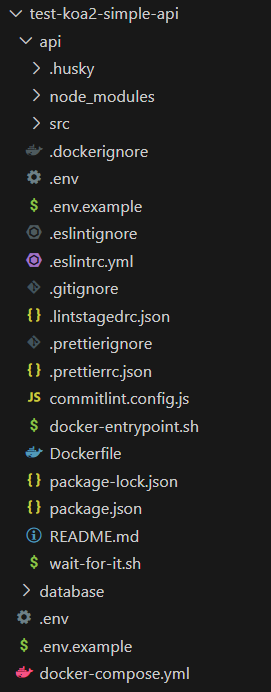
Example of a generator created by `generator-koa2-simple-api-generator`:
### [Index](#index)
- [Installation](#installation)
- [Prerequisites](#prerequisites)
- [Arguments and options](#arguments-and-options)
- [Project structure](#structure)
- [Generators included](#generators-included)
- [The question: Do you want to automatically run the scripts that configure the package, then installing the dependencies?](#configuring-the-project-automatically)
- [The scripts in package.json](#scripts)
- [Getting To Know Yeoman](#know-yeoman)
- [Author](#author)
- [Contributing](#contributing)
- [Show your support](#support)
- [License](#license)
First, install [Yeoman](http://yeoman.io) and generator-koa2-simple-api-generator using [npm](https://www.npmjs.com/) (we assume you have pre-installed [node.js](https://nodejs.org/)).
```bash
npm install -g yo
npm install -g generator-koa2-simple-api-generator
```
Then generate your new project:
```bash
yo koa2-simple-api-generator project_name
```
First, you must create a folder, then you enter it using the terminal. Finally you runs.
```bash
yo koa2-simple-api-generator project_name
```
Example:
```console
PS C:\Users\...\new_koa2_api_project> yo koa2-simple-api-generator project_name
```
The generator-koa2-simple-api-generator include one argument called **projectName**. **projectName** is a required argument:
For example: If you want to create a new koa2 api called koa2_api_project (projectName = koa2_api_project), you should use:
```bash
yo koa2-simple-api-generator koa2_api_project
```
The generator-koa2-simple-api-generator include various options, these are:
| option | value | default | description | example |
| :---------------- | :-----: | :-----: | :--------------------------------------------------------------------------------------------------------------------- | :---------------------------------------------------------------------------------- |
| runGitInit | Boolean | false | Run git init automatically, then installing the dependencies | `yo koa2-simple-api-generator project_name --runGitInit` |
| runPackageScripts | Boolean | false | Run the scripts that configure the package, then installing the dependencies | `yo koa2-simple-api-generator project_name --runPackageScripts` |
| useDocker | Boolean | false | Add docker support using DockerFile, .dockerignore and others | `yo koa2-simple-api-generator project_name --useDocker` |
| nodeVersion | Number | 16 | Node version used in DockerFile. (FROM nodeVersion). Recommended to use node 16, 18, 20 or 21 | `yo koa2-simple-api-generator project_name --nodeVersion=21` |
| projectFolderName | String | api | Project folder name used in DockerFile. (WORKDIR /usr/src/projectFolderName) | `yo koa2-simple-api-generator project_name --projectFolderName=project_folder_name` |
| useDockerCompose | String | false | Add Docker Compose support. | `yo koa2-simple-api-generator project_name --useDockerCompose` |
| databaseName | String | null | Select the database to which the application will connect. Accepts the values: postgresql, mysql, mariadb and mongodb. | `yo koa2-simple-api-generator project_name --databaseName=postgresql` |
The project generated by generator-koa2-api-generator includes:
**Default project structure**
- **api (folder)**: In this folder there are project configurations and the src folder that contains the source code
- **.husky (folder)**: Contains git hook used by husky
- **.env (file)**: Contains the API environment variables.
- **.env.example (file)**: Contains an example of API environment variables used to create a .env file.
- **.eslintignore (file)**: Files and folders ignored by eslint.
- **.eslintrc.yml (file)**: Configuration used by eslint.
- **.gitignore (file)**: Files ignored by git.
- **.lintstagedrc.json (file)**: Configuration used by lintstaged.
- **.prettierignore (file)**: Files and folders ignored by prettier.
- **.prettierrc.json (file)**: Configuration used by prettier.
- **commitlint.config.js (file)**: Congiguration used by commitlint.
- **package.json (file)**: Contains dependencies, dev dependencies, scripts, etc.
- **README.md (file)**: Documentation generated by generator-koa2-simple-api-generator.
- **src (folder)**: Contains the source code:
- **config (folder)**: Contains configuration files, for example database.js (contains environment varibles used by sequelize) and jwt.js (contains environment variables used by jsonwebtoken).
- **routes (folder)**: Contains the koa routers used by the project.
- **authentication (folder)**: Contains functions and routers to authenticate the users with json web token.
- **user (folder)**: Contains functions and routes to register, obtain and modify an user. Uses default model user
- **index.js (file)**: Contains the main koa2 router with prefix 'api/v1' and mounts the others routers.
- **api.js (file)**: Creates and configures the Koa object and it exports the Koa object.
- **server.js (file)**: Mounts the API and runs the server.
**Added docker support**:
When the Docker support is activate (--useDocker is used), the following files are added to default project in api folder:
- **.dockerignore (file)**: Files and folders ignore to Docker.
- **Dockerfile (file)**: Used to create a docker image.
- **docker-entrypoint.sh (file)**: Contains scripts to run migrations in development mode. Used by ENTRYPOINT in Dockerfile.
- **wait-for-it.sh (file)**: More information, see [wait-for-it.sh in github](https://github.com/vishnubob/wait-for-it). Script used to wait for the database to be enabled to receive connections.
**Added docker compose support**:
When the Docker Compose support is activate (--useDockerCompose is used), the following files and folders are added to default.
- **api/.env (file)**: Adds the values corresponding to the database environment variables, for example for postgresql, adds the following environment variables:
```
DB_USERNAME=admin
DB_PASSWORD=admin
DB_NAME=api
DB_HOST=database
DB_PORT=5432
DATABASE_URL=postgresql://admin:admin@database:5432/api
```
- **database (folder)**: Contains files used to create and cofigure the database.
- **.dockerignore (file)**: Files and folders ignored by docker.
- **.env (file)**: Environment variables used the database in docker.
- **.env.example (file)**: Contains an example of database environment variables used to create a .env file.
- **Dockerfile (file)**: Used to create docker image.
- **In the root folder**:
- **docker-compose.yml (file)**: Used to deploy the docker container (API and database), contains the volumen and environment variables used by the API and database, publish the API ports, etc.
- **.env (file)**: Contains the environment variables to configure docker-compose.yml file.
- **.env.example (file)**: Contains an example of docker-compose.yml environment variables used to create a .env file.
The generators included are:
`koa2-simple-api-generator:app` used by `yo koa2-simple-api-generator`: It is the generator used by default.
`koa2-simple-api-generator:docker`: It is used to add support for Docker. It accepts the options `--useDocker`, `--nodeVersion` and `--projectFolderName`.
`koa2-simple-api-generator:docker_compose`: It is used to add support for Docker Compose. It accepts the options `--useDockerCompose` and `--databaseName`.
## The question: Do you want to automatically run the scripts that configure the package, then installing the dependencies?
When you selects the true value, the following scripts ubicated in the package.json are executed:
- `init`
- `format:fix`
If you selects the false value, if you want to use husky, you must run `npm run init`.
## The scripts in package.json
The more important scripts added into the package.json created by this generator are:
- `"init"`: Runs the commands necessary to initialize the package, for example `init:husky`.
- `"dev"`: Runs the application in development mode using nodemon and dotenv.
- `"start"`: Runs the application using node.
- `"format"`: Checks the format using prettier.
- `"format:fix"`: Fixes the format using prettier.
- `"lint"`: static code analysis using eslint.
- `"lint:fix"`: Fixes the code using eslint.
- `"commitlint"`: Runs commitlint. It is used into .husky/commit-msg file. It is called by the commit-msg hook. See [git hook](https://www.atlassian.com/git/tutorials/git-hooks#:~:text=The%20commit%2Dmsg%20hook%20is,file%20that%20contains%20the%20message.).
- `"lint-staged"`: Runs lint-staged. It is used into .husky/pre-commit file. It is called by the pre-commit hook. See [git hook](https://www.atlassian.com/git/tutorials/git-hooks#:~:text=The%20commit%2Dmsg%20hook%20is,file%20that%20contains%20the%20message.).
- `"quality-check"`: Runs `npm run format && npm run lint`. It is used into .husky/pre-push file. It is called by the pre-push hook See [git hook](https://www.atlassian.com/git/tutorials/git-hooks#:~:text=The%20commit%2Dmsg%20hook%20is,file%20that%20contains%20the%20message.).
- Yeoman has a heart of gold.
- Yeoman is a person with feelings and opinions, but is very easy to work with.
- Yeoman can be too opinionated at times but is easily convinced not to be.
- Feel free to [learn more about Yeoman](http://yeoman.io/).
👤 **Cristopher Jiménez Meza**
- Github: [@cristopher1](https://github.com/cristopher1)
Contributions, issues and feature requests are welcome!
Feel free to check [issues page](https://github.com/cristopher1/generator-koa2-simple-api-generator/issues). You can also take a look at the [contributing guide](https://github.com/cristopher1/generator-koa2-simple-api-generator/blob/master/CONTRIBUTING.md).
Give a ⭐️ if this project helped you!
Copyright © 2024 [Cristopher Jiménez Meza](https://github.com/cristopher1).
This project is [MIT](https://github.com/cristopher1/generator-koa2-simple-api-generator/blob/master/LICENSE) licensed.
---
_This README was generated with ❤️ by [readme-md-generator](https://github.com/kefranabg/readme-md-generator)_