https://github.com/crocofied/CoreObs
Dashboard to manage your entire server infrastructure
https://github.com/crocofied/CoreObs
dashboard monitoring server-management
Last synced: 5 months ago
JSON representation
Dashboard to manage your entire server infrastructure
- Host: GitHub
- URL: https://github.com/crocofied/CoreObs
- Owner: crocofied
- License: mit
- Created: 2025-04-11T10:28:24.000Z (over 1 year ago)
- Default Branch: main
- Last Pushed: 2026-02-13T23:23:02.000Z (5 months ago)
- Last Synced: 2026-02-14T05:25:25.779Z (5 months ago)
- Topics: dashboard, monitoring, server-management
- Language: TypeScript
- Homepage: https://corecontrol.xyz
- Size: 10.6 MB
- Stars: 1,275
- Watchers: 10
- Forks: 34
- Open Issues: 0
-
Metadata Files:
- Readme: README.md
- Contributing: .github/CONTRIBUTING.md
- Funding: .github/FUNDING.yml
- License: LICENSE
- Code of conduct: .github/CODE_OF_CONDUCT.md
Awesome Lists containing this project
README
https://discord.gg/gMSgHZDHyy

# CoreControl
The only dashboard you'll ever need to manage your entire server infrastructure. Keep all your server data organized in one central place, easily add your self-hosted applications with quick access links, and monitor their availability in real-time with built-in uptime tracking. Designed for simplicity and control, it gives you a clear overview of your entire self-hosted setup at a glance.
[](https://www.buymeacoffee.com/corecontrol)
[](https://github.com/sponsors/crocofied)
## Features
- Dashboard: A clear screen with all the important information about your servers (WIP)
- Servers: This allows you to add all your servers (including Hardware Information), with Quicklinks to their Management Panels
- Applications: Add all your self-hosted services to a clear list and track their up and down time
- Networks: Generate visually stunning network flowcharts with ease.
## Screenshots
Login Page:

Dashboard Page:

Servers Page:

Server Detail Page

Applications Page:

Uptime Page:

Network Page:

Settings Page:

## Roadmap
- [X] Edit Applications, Applications searchbar
- [X] Uptime History
- [X] Notifications
- [X] Simple Server Monitoring
- [ ] Improved Network Flowchart with custom elements (like Network switches)
- [ ] Advanced Settings (Disable Uptime Tracking & more)
## Deployment
Simply run this compose.yml:
```yml
services:
web:
image: haedlessdev/corecontrol:latest
ports:
- "3000:3000"
environment:
JWT_SECRET: RANDOM_SECRET # Replace with a secure random string
DATABASE_URL: "postgresql://postgres:postgres@db:5432/postgres"
agent:
image: haedlessdev/corecontrol-agent:latest
environment:
DATABASE_URL: "postgresql://postgres:postgres@db:5432/postgres"
depends_on:
db:
condition: service_healthy
db:
image: postgres:17
restart: always
environment:
POSTGRES_USER: postgres
POSTGRES_PASSWORD: postgres
POSTGRES_DB: postgres
volumes:
- postgres_data:/var/lib/postgresql/data
healthcheck:
test: ["CMD-SHELL", "pg_isready -U postgres"]
interval: 2s
timeout: 2s
retries: 10
volumes:
postgres_data:
```
#### Default Login
__E-Mail:__ admin@example.com\
__Password:__ admin
## Tech Stack & Credits
The application is build with:
- Next.js & Typescript
- Go (used for the agent)
- Tailwindcss with [shadcn](shadcn.com)
- PostgreSQL with [Prisma ORM](https://www.prisma.io/)
- Icons by [Lucide](https://lucide.dev/)
- Flowcharts by [React Flow](https://reactflow.dev/)
- Application icons by [selfh.st/icons](https://selfh.st/icons)
- Monitoring Tool by [Glances](https://github.com/nicolargo/glances)
- and a lot of love ❤️
## Star History
[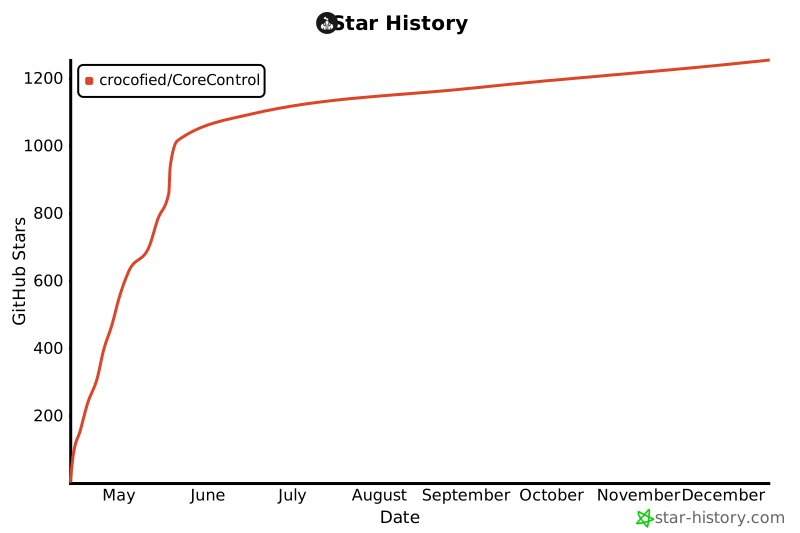](https://www.star-history.com/#crocofied/CoreControl&Date)
## License
Licensed under the [MIT License](https://github.com/crocofied/CoreControl/blob/main/LICENSE).