https://github.com/crossmint/ios-sdk
https://github.com/crossmint/ios-sdk
Last synced: 10 months ago
JSON representation
- Host: GitHub
- URL: https://github.com/crossmint/ios-sdk
- Owner: Crossmint
- Created: 2023-01-12T05:20:32.000Z (over 3 years ago)
- Default Branch: main
- Last Pushed: 2023-01-14T17:27:04.000Z (over 3 years ago)
- Last Synced: 2025-05-31T10:48:54.132Z (about 1 year ago)
- Language: Swift
- Size: 35.2 KB
- Stars: 0
- Watchers: 1
- Forks: 1
- Open Issues: 0
-
Metadata Files:
- Readme: README.md
Awesome Lists containing this project
README
# Crossmint iOS SDK
A library of components for displaying a list of NFTs as well as the details of an NFT.
## Installation
Installation is currently supported only via Swift Package Manager. To add this package to your Xcode project, follow these steps:
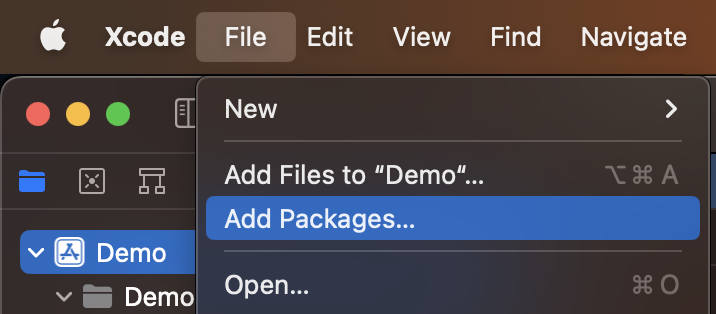
1. Click the `File` menu and select `Add Packages`
2. In the search box at the top-right, enter `https://github.com/Crossmint/iOS-SDK` and click `Add Package`

3. Once the next pop-up loads, ensure that the proper target is selected and click `Add Package` one more time
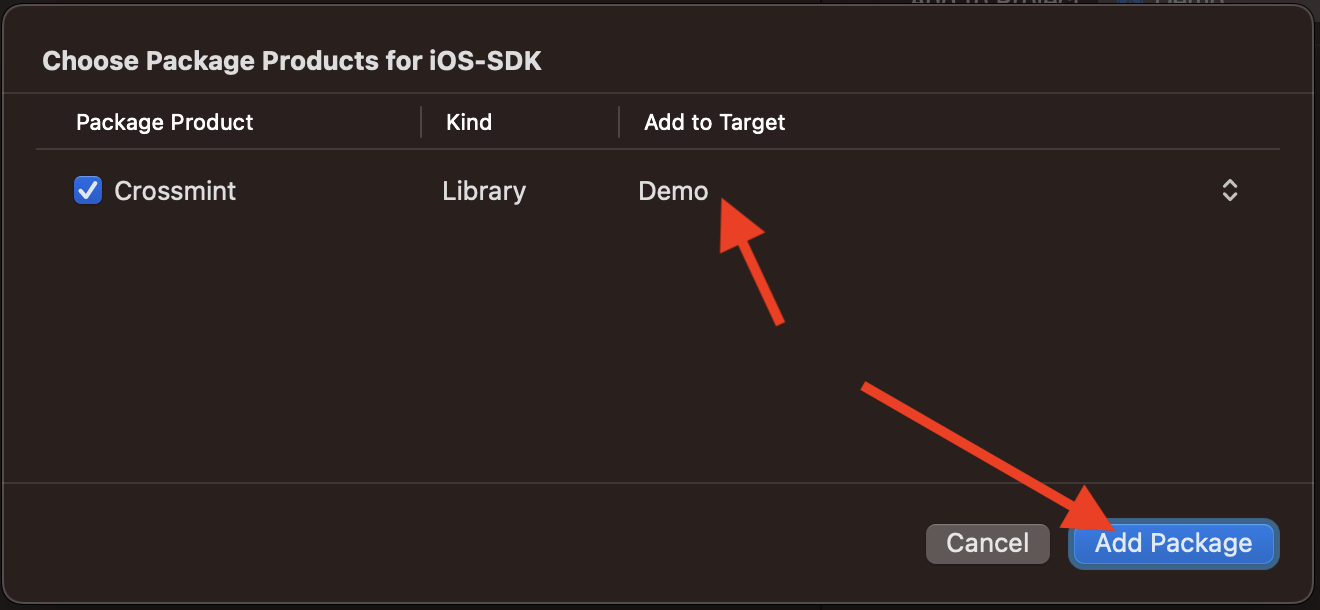
Congrats! The package has now been added and is ready to be used in your project.
## Usage
High-level descriptions are provided below, clone this repository locally and check out the example app.
Included in the demo is a real-world code example to fetch NFTs from an API and display their contents in-app.
Use `NFTsCollectionViewController` to display a list of NFTs:
```swift
let nftsViewController = NFTsCollectionViewController()
nftsViewController.nfts = [
.solana(
SolanaNFT(
mintHash: "123",
metadata: SolanaNFT.Metadata(
name: "The NFT",
symbol: "NF",
image: "https://twitter.com/crossmint/photo",
attributes: [.init(traitType: "color", value: "blue")]
)
)
),
.evm(
EVMNFT(
chain: .polygon,
contractAddress: "0x01",
tokenId: "1",
metadata: EVMNFT.Metadata(
image: "https://twitter.com/crossmint/photo",
collection: NFT.Collection(name: "Great collectiojn"),
name: "The other NFT",
description: "A fantastic NFT",
attributes: [.init(traitType: "color", value: "green")]
)
)
)
]
```
Set the `onNFTSelected` callback to respond to an NFT being tapped:
```swift
nftsViewController.onNFTSelected = { nft in
let nftDetailsViewController = NFTDetailViewController(nft: nft)
self.present(nftDetailsViewController, animated: true)
}
```