https://github.com/crowdstrike/gcp-vm-manager-os-policy
https://github.com/crowdstrike/gcp-vm-manager-os-policy
Last synced: 5 months ago
JSON representation
- Host: GitHub
- URL: https://github.com/crowdstrike/gcp-vm-manager-os-policy
- Owner: CrowdStrike
- License: mit
- Created: 2024-02-27T21:20:07.000Z (over 2 years ago)
- Default Branch: main
- Last Pushed: 2025-12-12T18:09:18.000Z (7 months ago)
- Last Synced: 2025-12-13T09:53:41.413Z (7 months ago)
- Language: Go
- Size: 1.48 MB
- Stars: 2
- Watchers: 4
- Forks: 1
- Open Issues: 5
-
Metadata Files:
- Readme: README.md
- License: LICENSE
Awesome Lists containing this project
README
# cs-policy
A helper tool for deploying CrowdStrike OS Policies to GCP Zones. This tool automates many of the manual steps required to create & deploy OS Policies to GCP VMs.
The tool does the following:
- Downloads the N-1 version of the CrowdStrike Falcon Sensor
- Uploads the CrowdStrike Falcon Sensors to the GCP Storage Bucket of your choice
- Generates a OS Policy template for your environment
- Creates a OS Policy Assignment in the GCP Zones of your choice

## Supported Operating Systems
The CrowdStrike OS Policy currently supports the following operating systems:
| Operating System | Architecture |
| -------------------------------------------------------- | ------------ |
| Red Hat Enterprise Linux 7 | x86_64 |
| Red Hat Enterprise Linux 8 | x86_64 |
| Red Hat Enterprise Linux 9 | x86_64 |
| Red Hat Enterprise Linux 10 | x86_64 |
| Oracle Linux 7 | x86_64 |
| Oracle Linux 8 | x86_64 |
| Oracle Linux 9 | x86_64 |
| Oracle Linux 10 | x86_64 |
| CentOS 8 | x86_64 |
| CentOS 9 | x86_64 |
| CentOS 10 | x86_64 |
| SUSE Linux Enterprise Server 12 | x86_64 |
| SUSE Linux Enterprise Server 15 | x86_64 |
| Ubuntu 16.04, 18.04, 20.04, 22.04, 24.04 | x86_64 |
| Debian 9, 10, 11, 12, 13 | x86_64 |
| All Windows Versions supported by the CrowdStrike Sensor | x86_64 |
> Note: For supported Windows versions, check the CrowdStrike documentation.
## Requirements
- CrowdStrike API Keys with the `Sensor Download` scope
- [gcloud cli](https://cloud.google.com/sdk/gcloud) installed
- Project with VM Manager setup
- GCP permissions to create OS Policy Assignments and upload files to the target GCP Storage Bucket
### GCP VM Manager
OS Policy is a feature of GCP VM Manager. In order to use OS Policies to deploy the CrowdStrike Falcon Sensor, you must setup VM Manager. See the [GCP VM Manager documentation](https://cloud.google.com/compute/docs/vm-manager) for more information about VM Manager and how to set it up.
### Generate API Keys
1. In the CrowdStrike console, navigate to **Support and resources** > **API Clients & Keys**. Click **Add new API Client**.
2. Add the following api scopes:
| Scope | Permission | Description |
| --------------- | ---------- | ---------------------------------------------------------------------------------- |
| Sensor Download | *READ* | Allows the tool to download the sensor and grab your CID from the CrowdStrike API. |
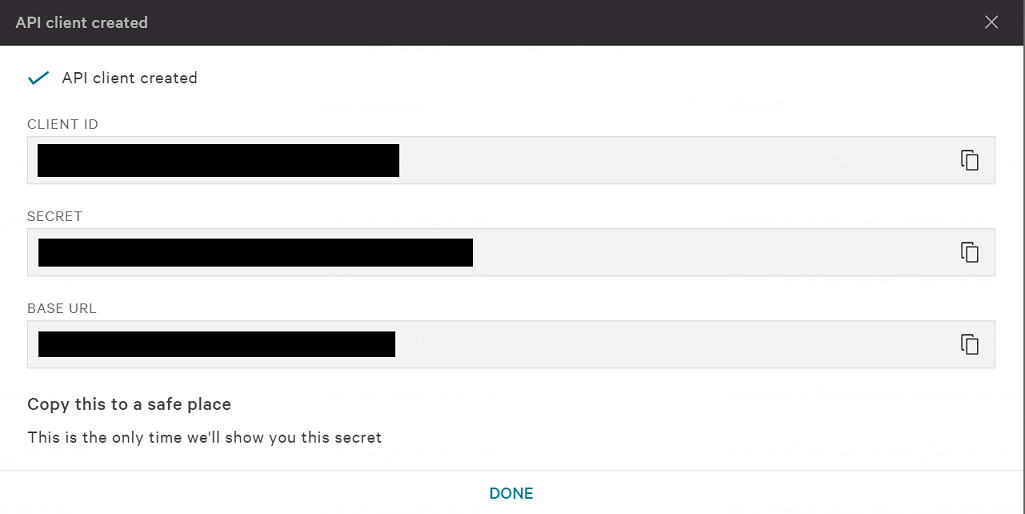
3. Click **Add** to create the API client. The next screen will display the API **CLIENT ID**, **SECRET**, and **BASE URL**. You will need all three for the next step.
picture
> [!IMPORTANT]
> This page is only shown once. Make sure you copy **CLIENT ID**, **SECRET**, and **BASE URL** to a secure location.
4. Use `BASE_URL` to infer the `FALCON_CLOUD` value.
| BASE URL | FALCON_CLOUD |
| ---------------------------------------- | ------------ |
| `https://api.crowdstrike.com` | `us-1` |
| `https://api.us-2.crowdstrike.com` | `us-2` |
| `https://api.eu-1.crowdstrike.com` | `eu-1` |
| `https://api.laggar.gcw.crowdstrike.com` | `us-gov-1` |
## Installation
[Download release binaries](https://github.com/CrowdStrike/gcp-os-policy/releases/latest) that match your platform
## Usage
1. Authenticate with the gcloud CLI.
```bash
gcloud auth application-default login
```
> Note: There are other ways to authenticate with GCP like using a service account. Use whichever method is best for your environment. The `cs-policy` tool will find the credentials and use them.
2. Set the project to the project you want to deploy the OS Policies to.
```bash
gcloud config set project cs-policy
```
3. OPTIONAL: Export the CrowdStrike API keys as environment variables. Alternatively you can provide the keys as command line arguments. See `cs-policy create --help` for more information.
```bash
export FALCON_CLIENT_ID=********
export FALCON_CLIENT_SECRET=********
export FALCON_CLOUD=********
```
> [!IMPORTANT]
> `FALCON_CLOUD` supports the following values `autodiscover`, `us-1`, `us-2`, `eu-1`, `us-gov-1`. If not provided, the tool will default to `autodiscover`.
4. Run the tool.
```bash
cs-policy create --bucket=example-bucket --zones=us-central1-a,us-central1-b --linux-install-params='--tags="Washington/DC_USA,Production" --aph=proxy.example.com --app=8080' --windows-install-params='GROUPING_TAGS="Washington/DC_USA,Production" APP_PROXYNAME=proxy.example.com APP_PROXYPORT=8080'
```
Use the `--help` flag to see all available options and more examples.
```bash
cs-policy --help
```