https://github.com/crunnna/blocketing-mod
Syncs chat and commands between Discord and Minecraft
https://github.com/crunnna/blocketing-mod
blocketing chat communication discord discord-bot fabric fabric-mod java minecraft mod
Last synced: 9 months ago
JSON representation
Syncs chat and commands between Discord and Minecraft
- Host: GitHub
- URL: https://github.com/crunnna/blocketing-mod
- Owner: crunnna
- License: mit
- Created: 2024-12-30T19:54:35.000Z (over 1 year ago)
- Default Branch: main
- Last Pushed: 2025-09-30T20:57:35.000Z (10 months ago)
- Last Synced: 2025-09-30T22:24:29.363Z (10 months ago)
- Topics: blocketing, chat, communication, discord, discord-bot, fabric, fabric-mod, java, minecraft, mod
- Language: Java
- Homepage:
- Size: 1.58 MB
- Stars: 3
- Watchers: 1
- Forks: 0
- Open Issues: 0
-
Metadata Files:
- Readme: README.md
- License: LICENSE
Awesome Lists containing this project
README
Blocketing
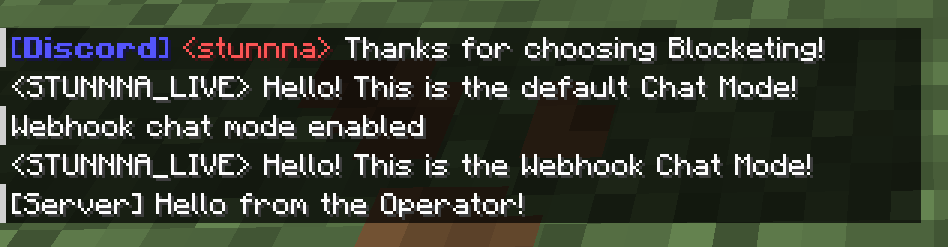
Blocketing is a Fabric mod for seamless communication between a Discord channel and a Minecraft server, enabling bidirectional message synchronization and command execution.
[]()
[](https://fabricmc.net/)
[](https://modrinth.com/mod/blocketing)
[](https://github.com/crunnna/blocketing-mod/releases)
---
## 📚 Table of Contents
- [Features](#-features)
- [Installation](#-installation)
- [Permissions](#-permissions)
- [Configuration](#-configuration-commands)
- [Player-Chat Webhook Mode](#-player-chat-webhook-mode)
- [Need Help?](#-need-help)
---
## ✨ Features
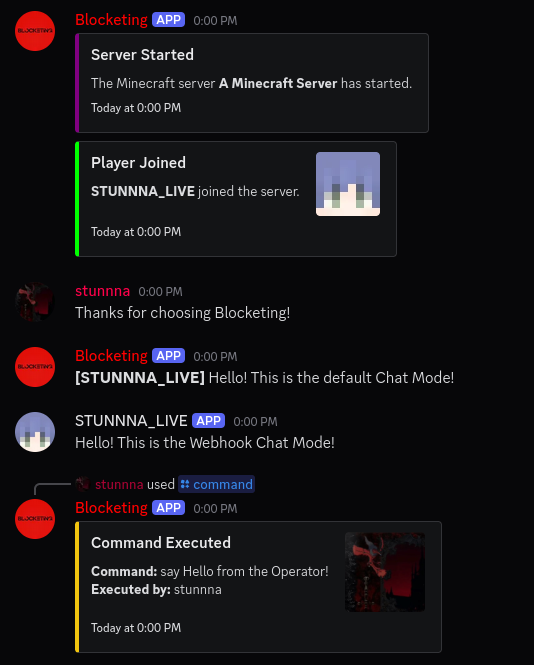
- ✅ Syncs Minecraft and Discord messages in both directions 💬
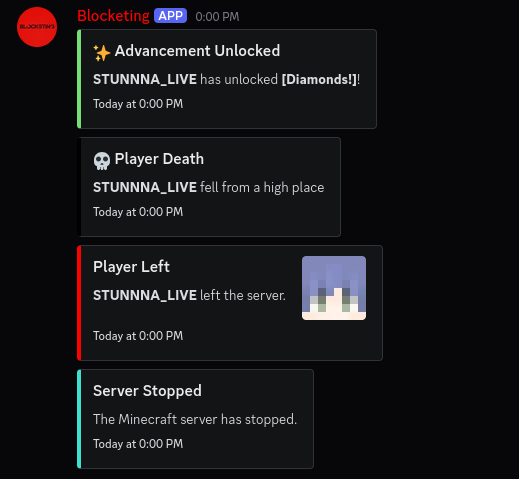
- ✅ Join/Leave notifications with player avatars 🖼️
- ✅ Server start/stop announcements 🚀
- ✅ Toggle sending advancement and death messages to Discord 🏆
- ✅ Run Minecraft commands from Discord (permission-based) 🛠️
- ✅ Player chat webhook mode (with avatar & name) 👨
- ✅ In-game configuration via commands 🎮
- ✅ Update notifications for new mod versions 🔔
- ✅ Paginated player list and server status via Discord slash commands 📊
---
## 🚀 Installation
### 🔨 1. Install the Mod
1. **Download the latest .jar** from the [Releases Page](https://github.com/crunnna/blocketing-mod/releases).
2. **Place the `.jar` file in your server’s `mods/` folder**.
3. **Start the Minecraft server** with **Fabric**.
4. **Configure the bot** using the in-game commands (see below).
### 🤖 2. Set up the Discord Bot
- **Create a new Discord bot application** in the **[Discord Developer Portal](https://discord.com/developers/applications)**.
- **Add** the bot to your Discord server.
- **Copy** the **`bot token`** for later configuration.
---
## 🛡️ Permissions
- **Minecraft**: `/blocketing` commands require permission **level 4 (OP)**.
- **Discord**: For `/console` via Discord, the user must have the configured **OP role** (if set).
---
## ⚙️ Configuration Commands
All configuration is done in-game using `/blocketing` commands (OP only):
### Setup Discord Integration
- `/blocketing setup token `
Set the Discord bot token.
- `/blocketing setup guild `
Set the Discord server (guild) ID.
- `/blocketing setup channel `
Set the Discord channel ID for message sync.
- `/blocketing setup op_role `
Set the Discord role ID required to run `/console` from Discord.
- `/blocketing setup webhook_url `
Set the Discord webhook URL for player chat webhook mode.
- `/blocketing setup`
List available setup commands.
### Feature Toggles
- `/blocketing toggle advancements`
Enable/disable sending advancement messages to Discord.
- `/blocketing toggle deaths`
Enable/disable sending death messages to Discord.
- `/blocketing toggle player_chat_mode`
Enable/disable player chat webhook mode (uses webhook for chat, with player avatar and name).
- `/blocketing toggle update-info`
Enable/disable update notifications for new mod versions.
- `/blocketing toggle discord_chat_log`
Enable/disable logging of Discord chat messages to the server console.
- `/blocketing toggle`
List available toggles.
### Other Commands
- `/blocketing reload`
Reload the configuration and restart the Discord bot.
---
## 👥 Discord Slash Commands
- `/status`
Show server status (TPS, MSPT, CPU, RAM, uptime, version).
- `/players`
Show online players (paginated, with navigation buttons).
- `/console `
Run a Minecraft command from Discord (requires OP role if set).
---
## 💬 Player-Chat Webhook Mode
When enabled, Minecraft chat messages are sent to Discord using a webhook, displaying the player's name and avatar.
To enable, set a webhook URL and use `/blocketing toggle player_chat_mode`.
---
## 🔔 Notifications
- **Join/Leave**: Player join/leave events are announced in Discord with player avatars.
- **Advancements/Deaths**: Advancement and death messages can be toggled.
- **Server Start/Stop**: Server start/stop events are announced in Discord.
- **Update Info**: OPs and Discord can be notified when a new mod version is available.
---
## ❓ Need Help?
Feel free to ask questions or open an [issue](https://github.com/crunnna/blocketing-mod/issues).
---