https://github.com/crytic/slither-action
https://github.com/crytic/slither-action
Last synced: about 1 year ago
JSON representation
- Host: GitHub
- URL: https://github.com/crytic/slither-action
- Owner: crytic
- License: agpl-3.0
- Created: 2022-02-10T10:25:49.000Z (over 4 years ago)
- Default Branch: main
- Last Pushed: 2025-03-21T23:18:41.000Z (over 1 year ago)
- Last Synced: 2025-05-07T23:35:38.142Z (about 1 year ago)
- Language: Shell
- Size: 253 KB
- Stars: 136
- Watchers: 2
- Forks: 22
- Open Issues: 9
-
Metadata Files:
- Readme: README.md
- License: LICENSE
- Codeowners: CODEOWNERS
Awesome Lists containing this project
README
# Slither Action
This action allows you to run the [Slither static
analyzer](https://github.com/crytic/slither) against your project, from within a
GitHub Actions workflow.
To learn more about [Slither](https://github.com/crytic/slither) itself, visit
its [GitHub repository](https://github.com/crytic/slither) and [wiki
pages](https://github.com/crytic/slither/wiki).
- [How to use](#how-to-use)
- [Github Code Scanning integration](#github-code-scanning-integration)
- [Examples](#examples)
## How to use
Create `.github/workflows/slither.yml`:
```yaml
name: Slither Analysis
on: [push]
jobs:
analyze:
runs-on: ubuntu-latest
steps:
- uses: actions/checkout@v4
- uses: crytic/slither-action@v0.4.1
```
### Options
| Key | Description
|------------------|------------
| `ignore-compile` | If set to true, the Slither action will not attempt to compile the project. False by default. See [Advanced compilation](#advanced-compilation).
| `fail-on` | Cause the action to fail if Slither finds any issue of this severity or higher. See [action fail behavior](#action-fail-behavior).
| `node-version` | The version of `node` to use. If this field is not set, the latest version will be used.
| `sarif` | If provided, the path of the SARIF file to produce, relative to the repo root (see [Github Code Scanning integration](#github-code-scanning-integration)).
| `slither-args` | Extra arguments to pass to Slither.
| `slither-config` | The path to the Slither configuration file. By default, `./slither.config.json` is used if present. See [Configuration file](https://github.com/crytic/slither/wiki/Usage#configuration-file).
| `slither-version`| The version of slither-analyzer to use. By default, the latest release in PyPI is used.
| `slither-plugins`| A `requirements.txt` file to install with `pip` alongside Slither. Useful to install custom plugins.
| `solc-version` | The version of `solc` to use. If this field is not set, the version will be guessed from project metadata. **This only has an effect if you are not using a compilation framework for your project** -- i.e., if `target` is a standalone `.sol` file.
| `target` | The path to the root of the project to be analyzed by Slither. It can be a directory or a file, and it defaults to the repo root.
### Advanced compilation
If the project requires advanced compilation settings or steps, set
`ignore-compile` to true and follow the compilation steps before running
Slither. You can find an example workflow that uses this option in the
[examples](#examples) section.
### Action fail behavior
The Slither action supports a `fail-on` option, based on the `--fail-*` flags
added in Slither 0.8.4. To maintain the current action behavior, this option
defaults to `all`. The following table summarizes the action behavior across
different Slither versions. You may adjust this option as needed for your
workflows. If you are setting these options on your config file, set `fail-on:
config` to prevent the action from overriding your settings.
| `fail-on` | Slither <= 0.8.3 | Slither > 0.8.3
|--------------------|---------------------------|----------------
| `all` / `pedantic` | Fail on any finding | Fail on any finding
| `low` | Fail on any finding | Fail on any finding >= low
| `medium` | Fail on any finding | Fail on any finding >= medium
| `high` | Fail on any finding | Fail on any finding >= high
| `none` | Do not fail on findings † | Do not fail on findings
| `config` | Determined by config file | Determined by config file
† Note that if you use `fail-on: none` with Slither 0.8.3 or earlier, certain
functionality may not work as expected. In particular, Slither will not produce
a SARIF file in this case. If you require `fail-on: none` behavior with the
SARIF integration, consider adding [`continue-on-error:
true`](https://docs.github.com/es/actions/using-workflows/workflow-syntax-for-github-actions#jobsjob_idstepscontinue-on-error)
instead to the action step.
### Using a different Slither version
If the latest Slither release has a bug that does not let you analyze your
project, you may want to use a different Slither version. The action lets you
use an older version (or, if a fix is available, an unreleased Slither version)
to analyze your code. You can use the `slither-version` option to specify a
custom Slither release. This option can take different values:
- a `slither-analyzer` PyPI release version number (e.g. `"0.8.3"`). Slither
will be installed from PyPI in this case.
- a Git ref from [crytic/slither](https://github.com/crytic/slither) such as a
branch, tag, or full commit hash (e.g. `"dev"`, `"refs/heads/dev"`,
`"refs/tags/0.8.3"` or `"f962d6c4eefcd4d5038a781875b826948f222b31"`). Slither
will be installed from source in this case.
### Triaging results
Add `// slither-disable-next-line DETECTOR_NAME` before the finding, or use the
[Github Code Scanning integration](#github-code-scanning-integration).
### Staying up to date
We suggest enabling [Dependabot version updates for
actions](https://docs.github.com/en/code-security/dependabot/working-with-dependabot/keeping-your-actions-up-to-date-with-dependabot)
to get notified of new action releases. You can do so by creating
`.github/dependabot.yml` in your repository with the following content:
```yaml
version: 2
updates:
- package-ecosystem: "github-actions"
directory: "/"
schedule:
interval: "daily"
```
## Github Code Scanning integration
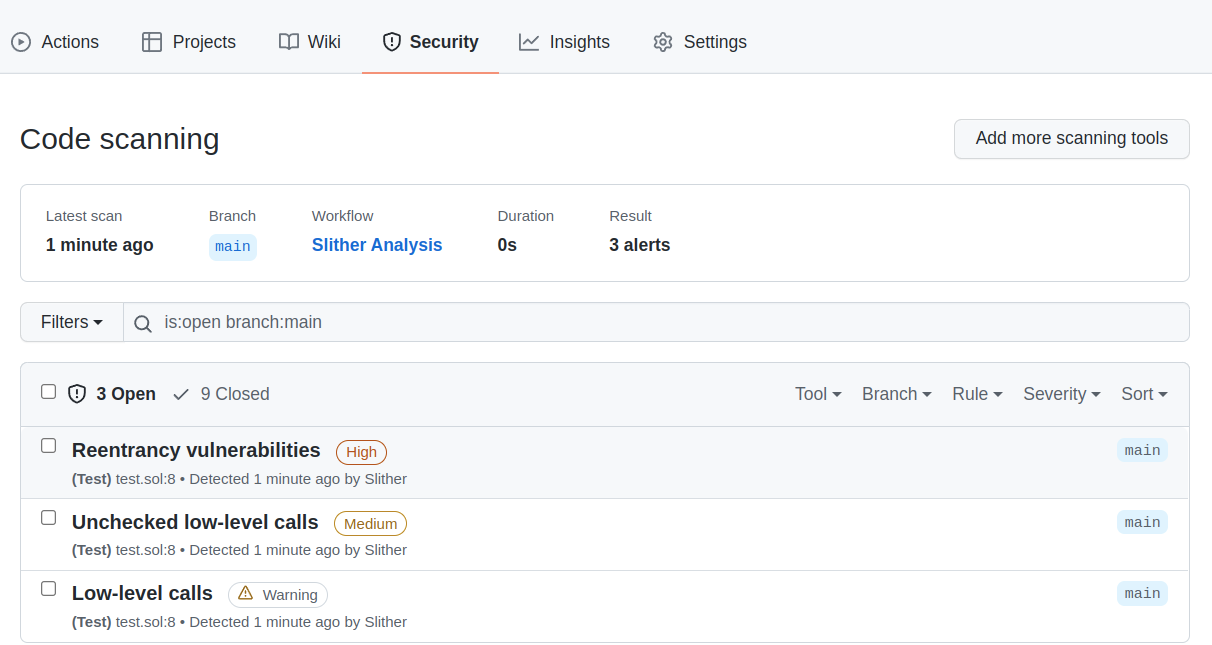
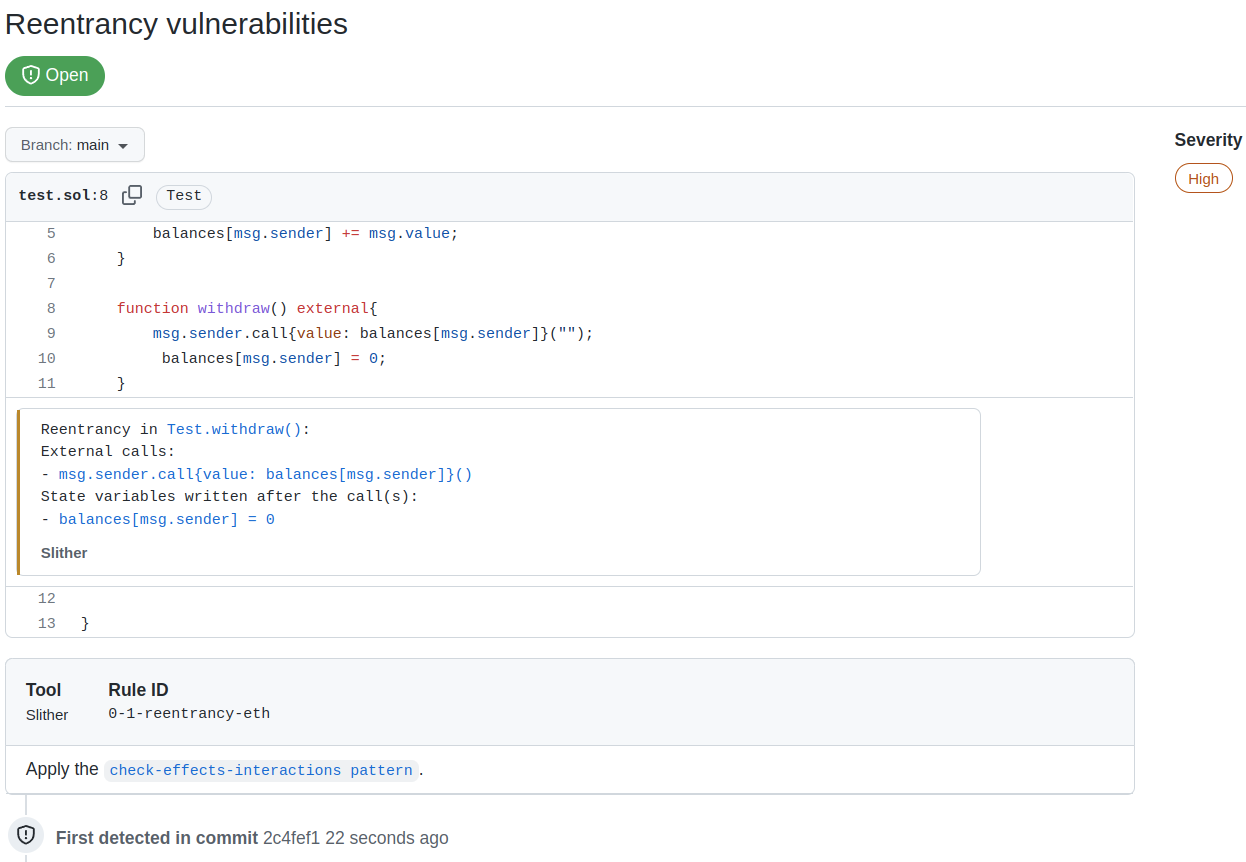
The action supports the Github Code Scanning integration, which will push
Slither's alerts to the Security tab of the Github project (see [About code
scanning](https://docs.github.com/en/code-security/code-scanning/automatically-scanning-your-code-for-vulnerabilities-and-errors/about-code-scanning)).
This integration eases the triaging of findings and improves the continuous
integration.
### Code Scanning preview
#### Findings Summary
#### Findings Details
### How to use
To enable the integration, use the `sarif` option, and upload the Sarif file to `codeql-action`:
```yaml
name: Slither Analysis
on: [push]
jobs:
analyze:
runs-on: ubuntu-latest
steps:
- uses: actions/checkout@v4
- name: Run Slither
uses: crytic/slither-action@v0.4.1
id: slither
with:
sarif: results.sarif
fail-on: none
- name: Upload SARIF file
uses: github/codeql-action/upload-sarif@v3
with:
sarif_file: ${{ steps.slither.outputs.sarif }}
```
Here:
- `fail-on: none` is required to let the SARIF upload step run if Slither finds issues
- `id: slither` is the name used to reference the step later on (e.g., in `steps.slither.outputs.sarif`)
## Examples
### Example workflow: simple action
The following is a complete GitHub Actions workflow example. It will trigger on
pushes to the repository, and leverage the Node.js integration in the Slither
action to install the latest `node` version, install dependencies, and build the
project that lives in `src/`. Once that is complete, Slither will run its
analysis. The workflow will fail if findings are found.
```yaml
name: Slither Analysis
on: [push]
jobs:
analyze:
runs-on: ubuntu-latest
steps:
- uses: actions/checkout@v4
- uses: crytic/slither-action@v0.4.1
with:
target: 'src/'
```
### Example workflow: Hardhat and SARIF
The following is a complete GitHub Actions workflow example. It will trigger
with commits on `main` as well as any pull request opened against the `main`
branch. It leverages the NodeJS integration in the Slither action to set up
NodeJS 16.x and install project dependencies before running Slither on the
project. Slither will output findings in SARIF format, and those will get
uploaded to GitHub.
We include `fail-on: none` on the Slither action to avoid failing the run if
findings are found.
```yaml
name: Slither Analysis
on:
push:
branches: [ main ]
pull_request:
branches: [ main ]
jobs:
analyze:
runs-on: ubuntu-latest
permissions:
contents: read
security-events: write
steps:
- name: Checkout repository
uses: actions/checkout@v4
- name: Run Slither
uses: crytic/slither-action@v0.4.1
id: slither
with:
node-version: 16
sarif: results.sarif
fail-on: none
- name: Upload SARIF file
uses: github/codeql-action/upload-sarif@v3
with:
sarif_file: ${{ steps.slither.outputs.sarif }}
```
### Example workflow: Brownie and SARIF
The following is a complete GitHub Actions workflow example. It will trigger
with commits on `main` as well as any pull request opened against the `main`
branch. It leverages the Python integration in the Slither action to set up a
virtual environment and install project dependencies before running Slither on
the project. Slither will output findings in SARIF format, and those will get
uploaded to GitHub.
We also include `fail-on: none` on the Slither action to avoid failing the run
if findings are found.
```yaml
name: Slither Analysis
on:
push:
branches: [ main ]
pull_request:
branches: [ main ]
jobs:
analyze:
runs-on: ubuntu-latest
permissions:
contents: read
security-events: write
steps:
- name: Checkout repository
uses: actions/checkout@v4
- name: Run Slither
uses: crytic/slither-action@v0.4.1
id: slither
with:
sarif: results.sarif
fail-on: none
- name: Upload SARIF file
uses: github/codeql-action/upload-sarif@v3
with:
sarif_file: ${{ steps.slither.outputs.sarif }}
```
### Example workflow: Dapp
The following is a complete GitHub Actions workflow example meant to illustrate
the usage of the Slither action when the compilation framework is not based on
Node or Python. It will trigger with commits on `main` as well as any pull
request opened against the `main` branch. To be able to build the project, it
will configure Node and Nix on the runner and install project dependencies. Once
the environment is ready, it will build the project (using `make build` via
`nix-shell`) and finally run Slither on the project using the GitHub action.
In this example, we leverage `ignore-compile` to avoid building the project as
part of the Slither action execution. Slither will expect the project to be
pre-built when this option is set. This allows us to use compilation frameworks
that are not Node or Python-based, such as Dapp, together with the Slither
action.
```yaml
name: Slither Analysis
on:
push:
branches: [ main ]
pull_request:
branches: [ main ]
jobs:
analyze:
runs-on: ubuntu-latest
steps:
- name: Checkout repository
uses: actions/checkout@v4
with:
submodules: recursive
- name: Set up Node
uses: actions/setup-node@v4
- name: Install Yarn
run: npm install --global yarn
- name: Install Nix
uses: cachix/install-nix-action@v26
- name: Configure Cachix
uses: cachix/cachix-action@v14
with:
name: dapp
- name: Install dependencies
run: nix-shell --run 'make'
- name: Build the contracts
run: nix-shell --run 'make build'
- name: Run Slither
uses: crytic/slither-action@v0.4.1
with:
ignore-compile: true
```
### Example workflow: Markdown report
The following GitHub Actions workflow example will create/update pull requests
with the contents of Slither's Markdown report. Useful for when [GitHub Advanced
Security](https://docs.github.com/en/get-started/learning-about-github/about-github-advanced-security)
(required for the SARIF feature) is unavailable.
```yaml
name: Slither Analysis
on:
push:
branches: [ master ]
pull_request:
jobs:
analyze:
runs-on: ubuntu-latest
steps:
- name: Checkout repository
uses: actions/checkout@v4
- name: Run Slither
uses: crytic/slither-action@v0.4.1
id: slither
with:
node-version: 16
fail-on: none
slither-args: --checklist --markdown-root ${{ github.server_url }}/${{ github.repository }}/blob/${{ github.sha }}/
- name: Create/update checklist as PR comment
uses: actions/github-script@v7
if: github.event_name == 'pull_request'
env:
REPORT: ${{ steps.slither.outputs.stdout }}
with:
script: |
const script = require('.github/scripts/comment')
const header = '# Slither report'
const body = process.env.REPORT
await script({ github, context, header, body })
```
`.github/scripts/comment.js`:
```js
module.exports = async ({ github, context, header, body }) => {
const comment = [header, body].join("\n");
const { data: comments } = await github.rest.issues.listComments({
owner: context.repo.owner,
repo: context.repo.repo,
issue_number: context.payload.number,
});
const botComment = comments.find(
(comment) =>
// github-actions bot user
comment.user.id === 41898282 && comment.body.startsWith(header)
);
const commentFn = botComment ? "updateComment" : "createComment";
await github.rest.issues[commentFn]({
owner: context.repo.owner,
repo: context.repo.repo,
body: comment,
...(botComment
? { comment_id: botComment.id }
: { issue_number: context.payload.number }),
});
};
```
### Example workflow: external plugins
The following is a modification of the "simple action" example from earlier.
This example uses the `slither-plugins` property to point to a pip
[requirements](https://pip.pypa.io/en/stable/reference/requirements-file-format/)
file that gets installed alongside Slither. In this example, the requirements
file installs the example plugin provided in the Slither repository, but this
can be modified to install extra third-party or in-house detectors.
```yaml
name: Slither Analysis
on: [push]
jobs:
analyze:
runs-on: ubuntu-latest
steps:
- uses: actions/checkout@v4
- uses: crytic/slither-action@v0.4.1
with:
target: 'src/'
slither-plugins: requirements-plugins.txt
```
`requirements-plugins.txt`:
```text
slither_my_plugin @ git+https://github.com/crytic/slither#egg=slither_my_plugin&subdirectory=plugin_example
```