https://github.com/cryxnet/deepmcpagent
Model-agnostic plug-n-play LangChain/LangGraph agents powered entirely by MCP tools over HTTP/SSE.
https://github.com/cryxnet/deepmcpagent
agent-framework agentic-ai agents ai ai-agents ai-framework artificial-intelligence autonomous-agents deep-agents developer-tools langchain langgraph llm-agents mcp opensource-agents python react-agents
Last synced: 7 months ago
JSON representation
Model-agnostic plug-n-play LangChain/LangGraph agents powered entirely by MCP tools over HTTP/SSE.
- Host: GitHub
- URL: https://github.com/cryxnet/deepmcpagent
- Owner: cryxnet
- License: apache-2.0
- Created: 2025-08-29T13:49:43.000Z (11 months ago)
- Default Branch: main
- Last Pushed: 2025-10-18T13:02:42.000Z (9 months ago)
- Last Synced: 2025-10-18T15:26:51.035Z (9 months ago)
- Topics: agent-framework, agentic-ai, agents, ai, ai-agents, ai-framework, artificial-intelligence, autonomous-agents, deep-agents, developer-tools, langchain, langgraph, llm-agents, mcp, opensource-agents, python, react-agents
- Language: Python
- Homepage: https://cryxnet.github.io/DeepMCPAgent/
- Size: 205 KB
- Stars: 631
- Watchers: 5
- Forks: 94
- Open Issues: 0
-
Metadata Files:
- Readme: README.md
- Changelog: CHANGELOG.md
- Contributing: CONTRIBUTING.md
- License: LICENSE
- Code of conduct: CODE_OF_CONDUCT.md
Awesome Lists containing this project
- awesome-LangGraph - cryxnet/deepmcpagent - first agent framework (LangChain/LangGraph) over HTTP/SSE |  | (🛠️ Developer Tools / 🟩 Development Tools 🛠️)
README

🤖 DeepMCPAgent
Model-agnostic LangChain/LangGraph agents powered entirely by MCP tools over HTTP/SSE.





Discover MCP tools dynamically. Bring your own LangChain model. Build production-ready agents—fast.
📚 Documentation • 🛠 Issues
## ✨ Why DeepMCPAgent?
- 🔌 **Zero manual tool wiring** — tools are discovered dynamically from MCP servers (HTTP/SSE)
- 🌐 **External APIs welcome** — connect to remote MCP servers (with headers/auth)
- 🧠 **Model-agnostic** — pass any LangChain chat model instance (OpenAI, Anthropic, Ollama, Groq, local, …)
- ⚡ **DeepAgents (optional)** — if installed, you get a deep agent loop; otherwise robust LangGraph ReAct fallback
- 🛠️ **Typed tool args** — JSON-Schema → Pydantic → LangChain `BaseTool` (typed, validated calls)
- 🧪 **Quality bar** — mypy (strict), ruff, pytest, GitHub Actions, docs
> **MCP first.** Agents shouldn’t hardcode tools — they should **discover** and **call** them. DeepMCPAgent builds that bridge.
---
## 🚀 Installation
Install from [PyPI](https://pypi.org/project/deepmcpagent/):
```bash
pip install "deepmcpagent[deep]"
```
This installs DeepMCPAgent with **DeepAgents support (recommended)** for the best agent loop.
Other optional extras:
- `dev` → linting, typing, tests
- `docs` → MkDocs + Material + mkdocstrings
- `examples` → dependencies used by bundled examples
```bash
# install with deepagents + dev tooling
pip install "deepmcpagent[deep,dev]"
```
⚠️ If you’re using **zsh**, remember to quote extras:
```bash
pip install "deepmcpagent[deep,dev]"
```
---
## 🚀 Quickstart
### 1) Start a sample MCP server (HTTP)
```bash
python examples/servers/math_server.py
```
This serves an MCP endpoint at: **[http://127.0.0.1:8000/mcp](http://127.0.0.1:8000/mcp)**
### 2) Run the example agent (with fancy console output)
```bash
python examples/use_agent.py
```
**What you’ll see:**

---
## 🧑💻 Bring-Your-Own Model (BYOM)
DeepMCPAgent lets you pass **any LangChain chat model instance** (or a provider id string if you prefer `init_chat_model`):
```python
import asyncio
from deepmcpagent import HTTPServerSpec, build_deep_agent
# choose your model:
# from langchain_openai import ChatOpenAI
# model = ChatOpenAI(model="gpt-4.1")
# from langchain_anthropic import ChatAnthropic
# model = ChatAnthropic(model="claude-3-5-sonnet-latest")
# from langchain_community.chat_models import ChatOllama
# model = ChatOllama(model="llama3.1")
async def main():
servers = {
"math": HTTPServerSpec(
url="http://127.0.0.1:8000/mcp",
transport="http", # or "sse"
# headers={"Authorization": "Bearer "},
),
}
graph, _ = await build_deep_agent(
servers=servers,
model=model,
instructions="Use MCP tools precisely."
)
out = await graph.ainvoke({"messages":[{"role":"user","content":"add 21 and 21 with tools"}]})
print(out)
asyncio.run(main())
```
> Tip: If you pass a **string** like `"openai:gpt-4.1"`, we’ll call LangChain’s `init_chat_model()` for you (and it will read env vars like `OPENAI_API_KEY`). Passing a **model instance** gives you full control.
---
## 🤝 Cross-Agent Communication
DeepMCPAgent v0.5 introduces **Cross-Agent Communication** — agents that can _talk to each other_ without extra servers, message queues, or orchestration layers.
You can now attach one agent as a **peer** inside another, turning it into a callable tool.
Each peer appears automatically as `ask_agent_` or can be reached via `broadcast_to_agents` for parallel reasoning across multiple agents.
This means your agents can **delegate**, **collaborate**, and **critique** each other — all through the same MCP tool interface.
It’s lightweight, model-agnostic, and fully transparent: every peer call is traced like any other tool invocation.
---
### 💻 Example
```python
import asyncio
from deepmcpagent import HTTPServerSpec, build_deep_agent
from deepmcpagent.cross_agent import CrossAgent
async def main():
# 1️⃣ Build a "research" peer agent
research_graph, _ = await build_deep_agent(
servers={"web": HTTPServerSpec(url="http://127.0.0.1:8000/mcp")},
model="openai:gpt-4o-mini",
instructions="You are a focused research assistant that finds and summarizes sources.",
)
# 2️⃣ Build the main agent and attach the peer as a tool
main_graph, _ = await build_deep_agent(
servers={"math": HTTPServerSpec(url="http://127.0.0.1:9000/mcp")},
model="openai:gpt-4.1",
instructions="You are a lead analyst. Use peers when you need research or summarization.",
cross_agents={
"researcher": CrossAgent(agent=research_graph, description="A web research peer.")
},
trace_tools=True, # see all tool calls + peer responses in console
)
# 3️⃣ Ask a question — the main agent can now call the researcher
result = await main_graph.ainvoke({
"messages": [{"role": "user", "content": "Find recent research on AI ethics and summarize it."}]
})
print(result)
asyncio.run(main())
```
🧩 **Result:**
Your main agent automatically calls `ask_agent_researcher(...)` when it decides delegation makes sense, and the peer agent returns its best final answer — all transparently handled by the MCP layer.
---
### 💡 Use Cases
- Researcher → Writer → Editor pipelines
- Safety or reviewer peers that audit outputs
- Retrieval or reasoning specialists
- Multi-model ensembles combining small and large LLMs
No new infrastructure. No complex orchestration.
Just **agents helping agents**, powered entirely by MCP over HTTP/SSE.
> 🧠 One framework, many minds — **DeepMCPAgent** turns individual LLMs into a cooperative system.
---
## 🖥️ CLI (no Python required)
```bash
# list tools from one or more HTTP servers
deepmcpagent list-tools \
--http name=math url=http://127.0.0.1:8000/mcp transport=http \
--model-id "openai:gpt-4.1"
# interactive agent chat (HTTP/SSE servers only)
deepmcpagent run \
--http name=math url=http://127.0.0.1:8000/mcp transport=http \
--model-id "openai:gpt-4.1"
```
> The CLI accepts **repeated** `--http` blocks; add `header.X=Y` pairs for auth:
>
> ```
> --http name=ext url=https://api.example.com/mcp transport=http header.Authorization="Bearer TOKEN"
> ```
---
## Full Architecture & Agent Flow
### 1) High-level Architecture (modules & data flow)
```mermaid
flowchart LR
%% Groupings
subgraph User["👤 User / App"]
Q["Prompt / Task"]
CLI["CLI (Typer)"]
PY["Python API"]
end
subgraph Agent["🤖 Agent Runtime"]
DIR["build_deep_agent()"]
PROMPT["prompt.py\n(DEFAULT_SYSTEM_PROMPT)"]
subgraph AGRT["Agent Graph"]
DA["DeepAgents loop\n(if installed)"]
REACT["LangGraph ReAct\n(fallback)"]
end
LLM["LangChain Model\n(instance or init_chat_model(provider-id))"]
TOOLS["LangChain Tools\n(BaseTool[])"]
end
subgraph MCP["🧰 Tooling Layer (MCP)"]
LOADER["MCPToolLoader\n(JSON-Schema ➜ Pydantic ➜ BaseTool)"]
TOOLWRAP["_FastMCPTool\n(async _arun → client.call_tool)"]
end
subgraph FMCP["🌐 FastMCP Client"]
CFG["servers_to_mcp_config()\n(mcpServers dict)"]
MULTI["FastMCPMulti\n(fastmcp.Client)"]
end
subgraph SRV["🛠 MCP Servers (HTTP/SSE)"]
S1["Server A\n(e.g., math)"]
S2["Server B\n(e.g., search)"]
S3["Server C\n(e.g., github)"]
end
%% Edges
Q -->|query| CLI
Q -->|query| PY
CLI --> DIR
PY --> DIR
DIR --> PROMPT
DIR --> LLM
DIR --> LOADER
DIR --> AGRT
LOADER --> MULTI
CFG --> MULTI
MULTI -->|list_tools| SRV
LOADER --> TOOLS
TOOLS --> AGRT
AGRT <-->|messages| LLM
AGRT -->|tool calls| TOOLWRAP
TOOLWRAP --> MULTI
MULTI -->|call_tool| SRV
SRV -->|tool result| MULTI --> TOOLWRAP --> AGRT -->|final answer| CLI
AGRT -->|final answer| PY
```
---
### 2) Runtime Sequence (end-to-end tool call)
```mermaid
sequenceDiagram
autonumber
participant U as User
participant CLI as CLI/Python
participant Builder as build_deep_agent()
participant Loader as MCPToolLoader
participant Graph as Agent Graph (DeepAgents or ReAct)
participant LLM as LangChain Model
participant Tool as _FastMCPTool
participant FMCP as FastMCP Client
participant S as MCP Server (HTTP/SSE)
U->>CLI: Enter prompt
CLI->>Builder: build_deep_agent(servers, model, instructions?)
Builder->>Loader: get_all_tools()
Loader->>FMCP: list_tools()
FMCP->>S: HTTP(S)/SSE list_tools
S-->>FMCP: tools + JSON-Schema
FMCP-->>Loader: tool specs
Loader-->>Builder: BaseTool[]
Builder-->>CLI: (Graph, Loader)
U->>Graph: ainvoke({messages:[user prompt]})
Graph->>LLM: Reason over system + messages + tool descriptions
LLM-->>Graph: Tool call (e.g., add(a=3,b=5))
Graph->>Tool: _arun(a=3,b=5)
Tool->>FMCP: call_tool("add", {a:3,b:5})
FMCP->>S: POST /mcp tools.call("add", {...})
S-->>FMCP: result { data: 8 }
FMCP-->>Tool: result
Tool-->>Graph: ToolMessage(content=8)
Graph->>LLM: Continue with observations
LLM-->>Graph: Final response "(3 + 5) * 7 = 56"
Graph-->>CLI: messages (incl. final LLM answer)
```
---
### 3) Agent Control Loop (planning & acting)
```mermaid
stateDiagram-v2
[*] --> AcquireTools
AcquireTools: Discover MCP tools via FastMCP\n(JSON-Schema ➜ Pydantic ➜ BaseTool)
AcquireTools --> Plan
Plan: LLM plans next step\n(uses system prompt + tool descriptions)
Plan --> CallTool: if tool needed
Plan --> Respond: if direct answer sufficient
CallTool: _FastMCPTool._arun\n→ client.call_tool(name, args)
CallTool --> Observe: receive tool result
Observe: Parse result payload (data/text/content)
Observe --> Decide
Decide: More tools needed?
Decide --> Plan: yes
Decide --> Respond: no
Respond: LLM crafts final message
Respond --> [*]
```
---
### 4) Code Structure (types & relationships)
```mermaid
classDiagram
class StdioServerSpec {
+command: str
+args: List[str]
+env: Dict[str,str]
+cwd: Optional[str]
+keep_alive: bool
}
class HTTPServerSpec {
+url: str
+transport: Literal["http","streamable-http","sse"]
+headers: Dict[str,str]
+auth: Optional[str]
}
class FastMCPMulti {
-_client: fastmcp.Client
+client(): Client
}
class MCPToolLoader {
-_multi: FastMCPMulti
+get_all_tools(): List[BaseTool]
+list_tool_info(): List[ToolInfo]
}
class _FastMCPTool {
+name: str
+description: str
+args_schema: Type[BaseModel]
-_tool_name: str
-_client: Any
+_arun(**kwargs) async
}
class ToolInfo {
+server_guess: str
+name: str
+description: str
+input_schema: Dict[str,Any]
}
class build_deep_agent {
+servers: Mapping[str,ServerSpec]
+model: ModelLike
+instructions?: str
+returns: (graph, loader)
}
StdioServerSpec <|-- ServerSpec
HTTPServerSpec <|-- ServerSpec
FastMCPMulti o--> ServerSpec : uses servers_to_mcp_config()
MCPToolLoader o--> FastMCPMulti
MCPToolLoader --> _FastMCPTool : creates
_FastMCPTool ..> BaseTool
build_deep_agent --> MCPToolLoader : discovery
build_deep_agent --> _FastMCPTool : tools for agent
```
---
> These diagrams reflect the current implementation:
>
> - **Model is required** (string provider-id or LangChain model instance).
> - **MCP tools only**, discovered at runtime via **FastMCP** (HTTP/SSE).
> - Agent loop prefers **DeepAgents** if installed; otherwise **LangGraph ReAct**.
> - Tools are typed via **JSON-Schema ➜ Pydantic ➜ LangChain BaseTool**.
> - Fancy console output shows **discovered tools**, **calls**, **results**, and **final answer**.
---
## 🧪 Development
```bash
# install dev tooling
pip install -e ".[dev]"
# lint & type-check
ruff check .
mypy
# run tests
pytest -q
```
---
## 🛡️ Security & Privacy
- **Your keys, your model** — we don’t enforce a provider; pass any LangChain model.
- Use **HTTP headers** in `HTTPServerSpec` to deliver bearer/OAuth tokens to servers.
---
## 🧯 Troubleshooting
- **PEP 668: externally managed environment (macOS + Homebrew)**
Use a virtualenv:
```bash
python3 -m venv .venv
source .venv/bin/activate
```
- **404 Not Found when connecting**
Ensure your server uses a path (e.g., `/mcp`) and your client URL includes it.
- **Tool calls failing / attribute errors**
Ensure you’re on the latest version; our tool wrapper uses `PrivateAttr` for client state.
- **High token counts**
That’s normal with tool-calling models. Use smaller models for dev.
---
## 📄 License
Apache-2.0 — see [`LICENSE`](/LICENSE).
---
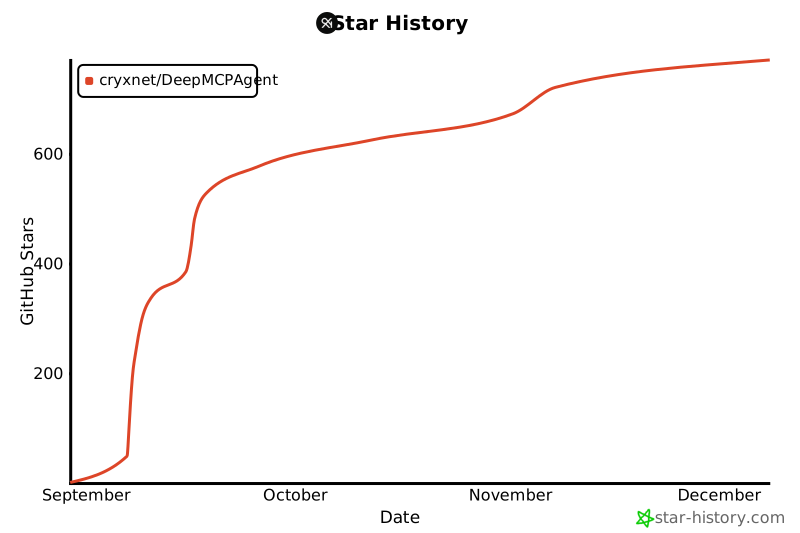
## ⭐ Stars
## 🙏 Acknowledgments
- The [**MCP** community](https://modelcontextprotocol.io/) for a clean protocol.
- [**LangChain**](https://www.langchain.com/) and [**LangGraph**](https://www.langchain.com/langgraph) for powerful agent runtimes.
- [**FastMCP**](https://gofastmcp.com/getting-started/welcome) for solid client & server implementations.
```
```