https://github.com/csabdulahad/winpower
⚡A bundle of CLI tools that powers Windows users!
https://github.com/csabdulahad/winpower
batch powershell windows
Last synced: about 2 months ago
JSON representation
⚡A bundle of CLI tools that powers Windows users!
- Host: GitHub
- URL: https://github.com/csabdulahad/winpower
- Owner: csabdulahad
- License: mit
- Created: 2023-05-20T23:32:43.000Z (about 3 years ago)
- Default Branch: main
- Last Pushed: 2023-09-30T21:54:57.000Z (almost 3 years ago)
- Last Synced: 2025-02-03T21:53:30.537Z (over 1 year ago)
- Topics: batch, powershell, windows
- Language: PowerShell
- Homepage:
- Size: 5.81 MB
- Stars: 1
- Watchers: 1
- Forks: 0
- Open Issues: 1
-
Metadata Files:
- Readme: README.md
- License: LICENSE
Awesome Lists containing this project
README
# WinPower from RootData21 Team
A simply, powerful, awesome command-line interface (CLI) software has an array of tools crafted using batch and PowerShell scripts. WinPower effortlessly streamlines
a wide range of mundane and time-consuming tasks, freeing you from their drudgery.
**So that you get POWER from WinPower!**
# How to Install
### 1. Using installer
Being a command line or terminal level tool, winpower can be installed in many ways. However, we recommend
using installer which makes the installation process very simple & error free.
Just download the latest version using the link below.
[](https://raw.githubusercontent.com/csabdulahad/winpower/master/download/WinPower.exe)
### 2. Custom installation
Like all software, WinPower can also be installed manually. For this you need to download the [WinPower zip](https://raw.githubusercontent.com/csabdulahad/winpower/master/download/WinPower.zip) file and follow the following steps.
#### Extract WinPower to C:/
After downloading the zip file, extract the files to C drive and make sure that after extracting the files
are placed under "winpower" folder so that the folder is located at the following location.
```
c:/winpower
```
#### Run the "wp_setup.cmd"
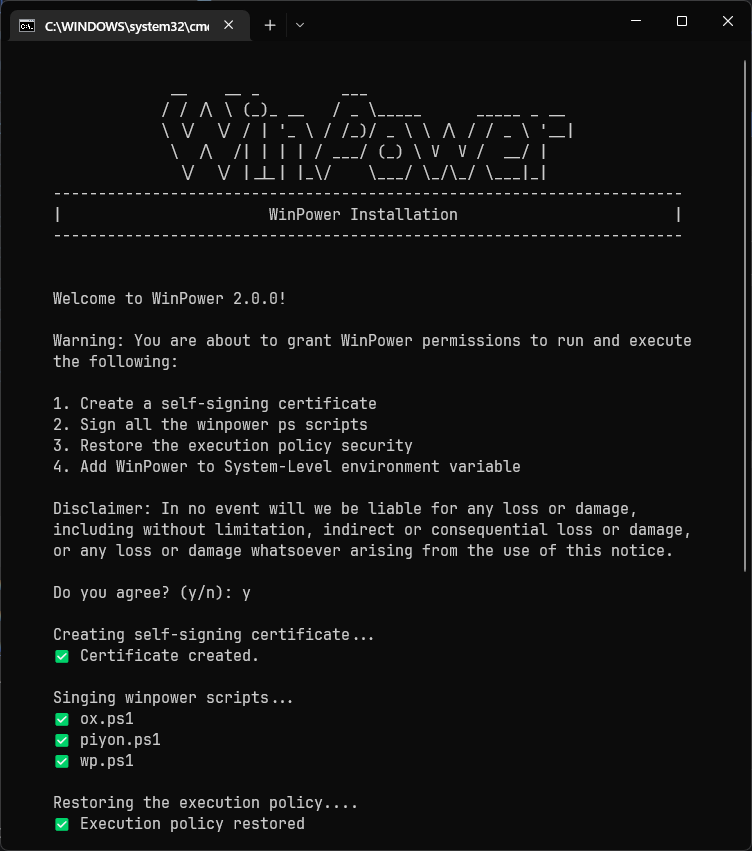
Inside the winpower folder, there is a folder named **"cmd"** in which there is a file called "wp_setup.cmd", double click the file and continue the instructions from there.
The installation window looks like the following (May differ after major/minor update).
#### Validate installation
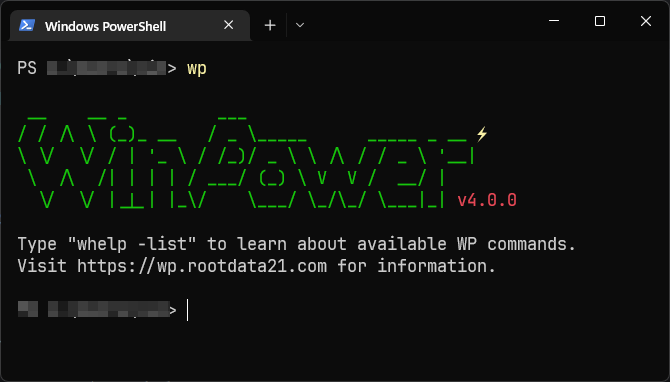
Finally, open up a terminal and run the following command.
```
wp -v
```
You should get output like the following.
# Available Commands/Functions
For a complete available commands & argument lists, you can run the **"whelp"** command with **-list** flag as shown below.

# Donation/Support
If you find this project helpful then why don't you buy the developer a cup of tea? Any amount of donation is appreciated. Please follow the link to donate by using PayPal.
[PayPal Payment](https://paypal.me/rootdata21?country.x=GB&locale.x=en_GB)