https://github.com/csontikka/ha-syncthing-extended
Home Assistant integration for Syncthing — sensors, controls and services for your Syncthing instance
https://github.com/csontikka/ha-syncthing-extended
hacs home-assistant homeassistant-integration syncthing
Last synced: 2 months ago
JSON representation
Home Assistant integration for Syncthing — sensors, controls and services for your Syncthing instance
- Host: GitHub
- URL: https://github.com/csontikka/ha-syncthing-extended
- Owner: Csontikka
- License: mit
- Created: 2026-04-05T19:44:26.000Z (3 months ago)
- Default Branch: master
- Last Pushed: 2026-04-08T20:27:16.000Z (3 months ago)
- Last Synced: 2026-04-08T20:27:57.174Z (3 months ago)
- Topics: hacs, home-assistant, homeassistant-integration, syncthing
- Language: Python
- Size: 516 KB
- Stars: 1
- Watchers: 0
- Forks: 0
- Open Issues: 0
-
Metadata Files:
- Readme: README.md
- License: LICENSE
- Codeowners: CODEOWNERS
Awesome Lists containing this project
README
# Syncthing Extended — Home Assistant Integration


[](https://github.com/hacs/integration)
[](https://github.com/Csontikka/ha-syncthing-extended/blob/master/LICENSE)
[](https://sonarcloud.io/summary/new_code?id=Csontikka_ha-syncthing-extended)
[](https://sonarcloud.io/summary/new_code?id=Csontikka_ha-syncthing-extended)
[](https://sonarcloud.io/summary/new_code?id=Csontikka_ha-syncthing-extended)
[](https://buymeacoffee.com/Csontikka)
> **Note:** For best viewing experience, read this documentation on [GitHub](https://github.com/Csontikka/ha-syncthing-extended).
Full-featured Home Assistant integration for [Syncthing](https://syncthing.net). Monitor folder sync status, device connectivity and traffic, trigger rescans, and pause/resume folders and devices — all from your HA dashboard. Supports multiple Syncthing instances simultaneously.
## Why this instead of the built-in integration?
The core Syncthing integration creates only one sensor per folder showing its state. That's it.
This integration adds:
| Feature | Built-in | This |
|---------|----------|------|
| Folder state sensor | ✅ | ✅ |
| Folder completion % | ⚠️ attr only | ✅ dedicated sensor |
| Bytes / files needed | ⚠️ attr only | ✅ dedicated sensor |
| Folder size & file count | ⚠️ attr only | ✅ dedicated sensor |
| Pull error detection | ⚠️ attr only | ✅ dedicated sensor |
| Last scan / last file | ❌ | ✅ |
| Device online/offline | ❌ | ✅ |
| Device connection type | ❌ | ✅ |
| Per-device traffic stats | ❌ | ✅ |
| Total traffic sensors | ❌ | ✅ |
| Scan trigger (button + service) | ❌ | ✅ |
| Pause / resume folder | ❌ | ✅ |
| Pause / resume device | ❌ | ✅ |
| Multi-instance support | ❌ | ✅ |
| UI config (no YAML) | ✅ | ✅ |
## Screenshots
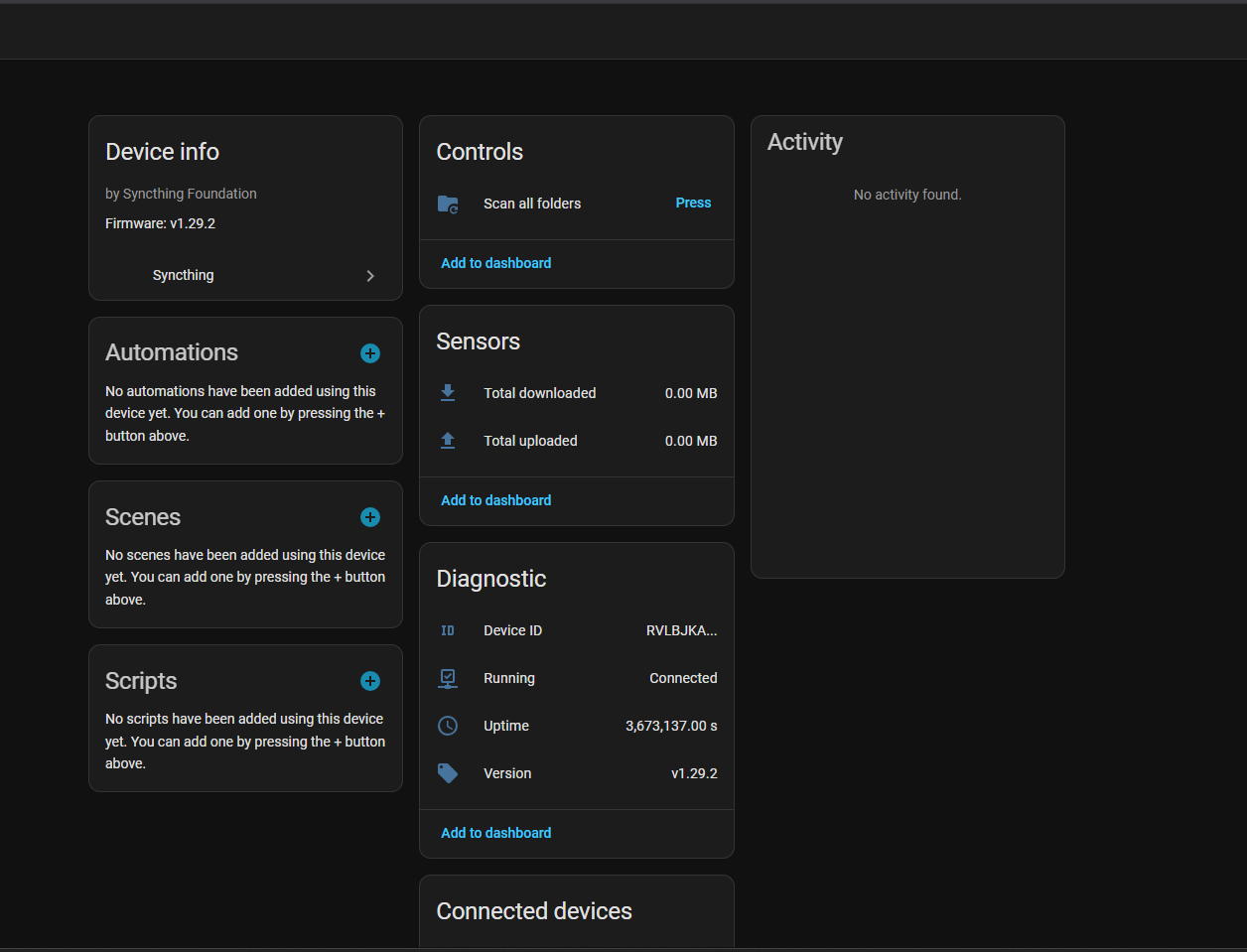
**System device** — version, uptime, running state, total traffic and scan button:
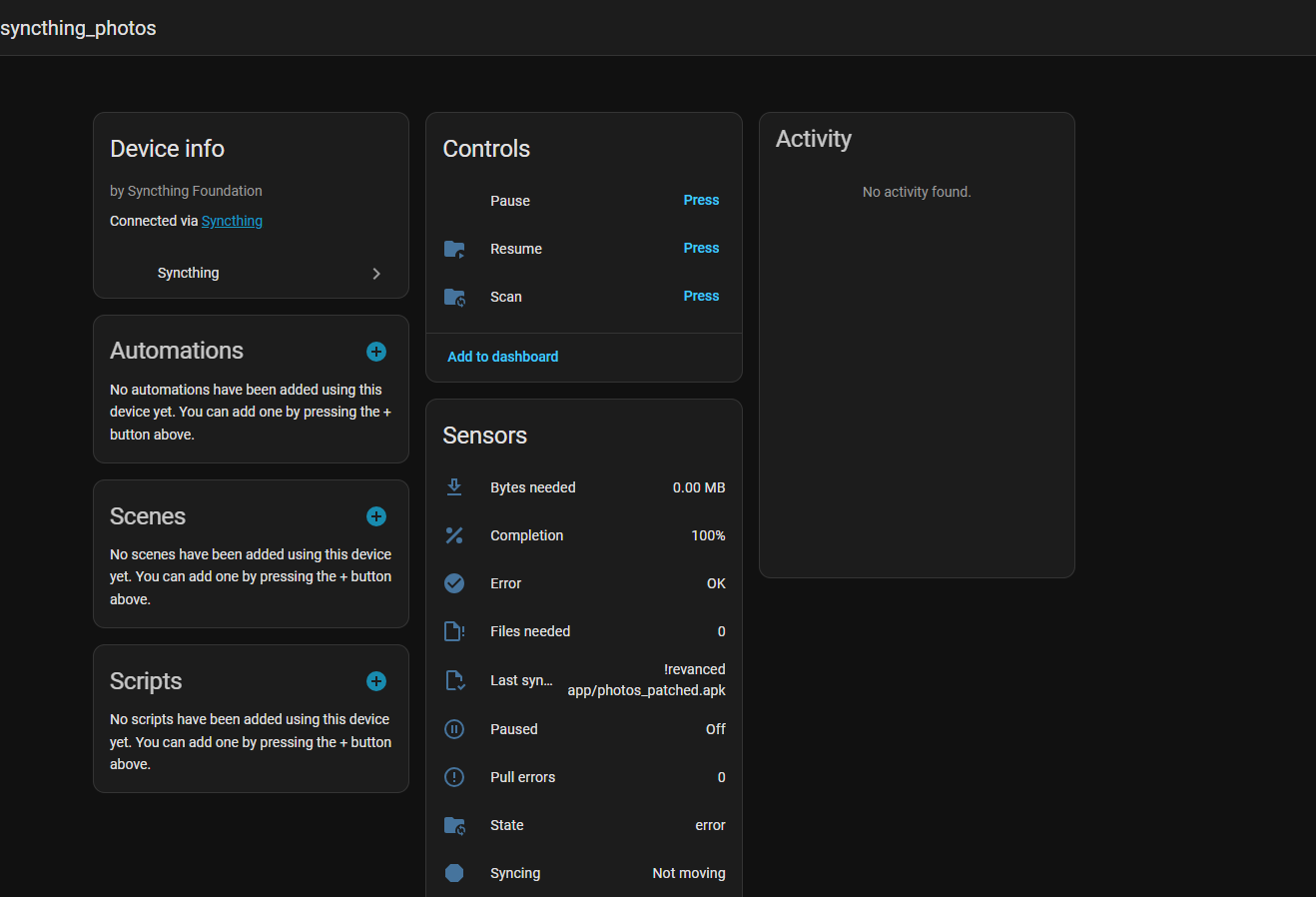
**Folder** — sync state, completion, controls and all folder sensors:
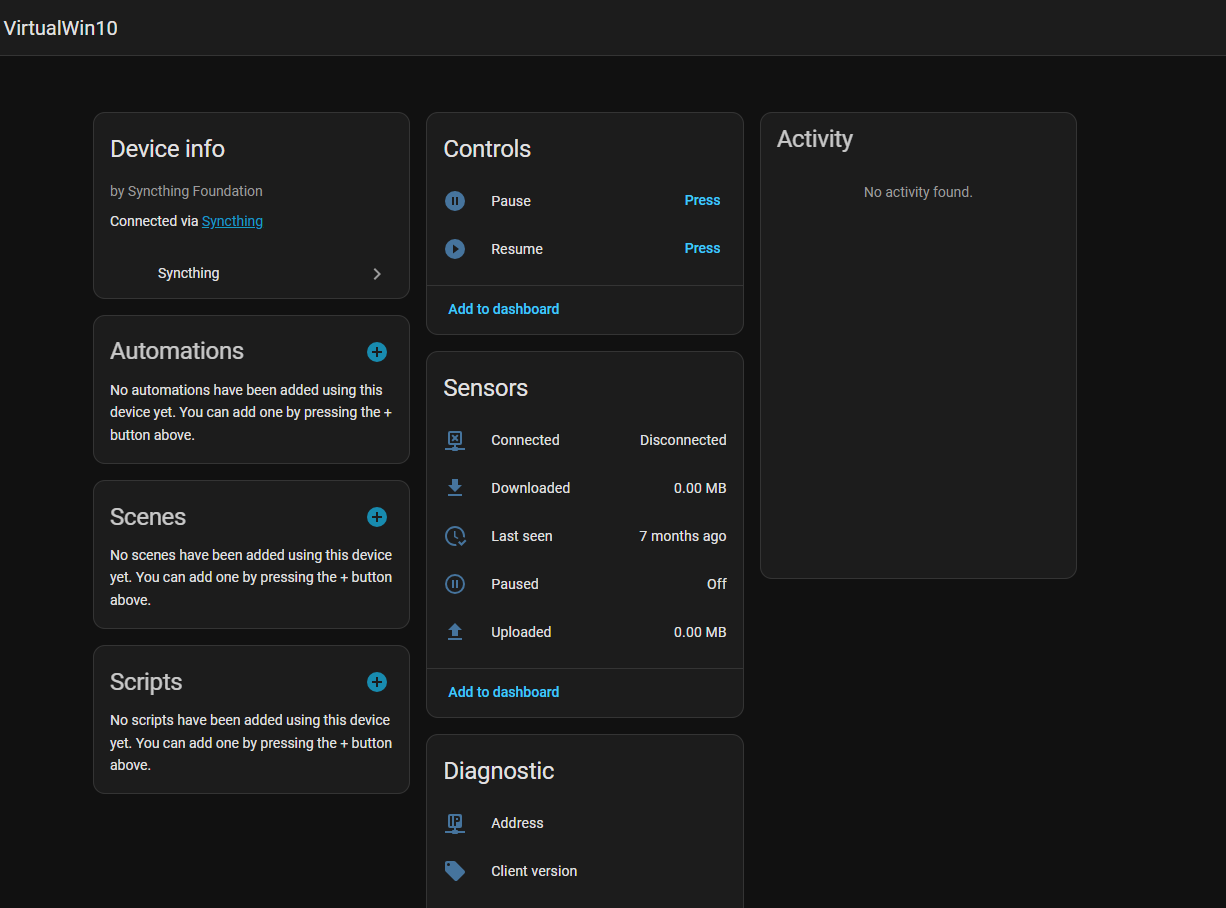
**Remote device** — connectivity, traffic, pause/resume controls and diagnostic sensors:
## Installation
### HACS (recommended)
1. Open HACS → Integrations
2. Click the three-dot menu → **Custom repositories**
3. Add `https://github.com/Csontikka/ha-syncthing-extended` with category **Integration**
4. Click **Download**
5. Restart Home Assistant
After setup, the integration appears in Settings → Integrations:

### Manual
1. Copy `custom_components/syncthing_extended/` to your HA `config/custom_components/` directory
2. Restart Home Assistant
## Configuration
1. Go to **Settings → Integrations → Add Integration**
2. Search for **Syncthing**
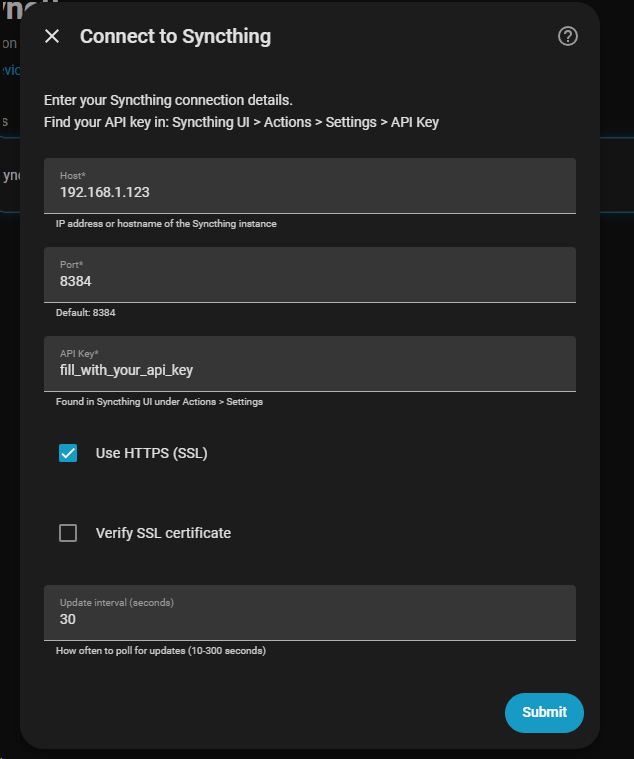
3. Enter your connection details:
| Parameter | Required | Default | Description |
|-----------|----------|---------|-------------|
| Host | Yes | — | IP address or hostname of the Syncthing instance |
| Port | Yes | `8384` | Syncthing GUI/API port |
| API Key | Yes | — | Found in Syncthing UI: Actions → Settings → API Key |
| Use HTTPS | No | `false` | Connect using HTTPS instead of HTTP |
| Verify SSL | No | `false` | Validate the HTTPS certificate (requires Use HTTPS) |
| Update interval | No | `30` | How often to poll for updates, in seconds (10–300) |
### Finding your API key
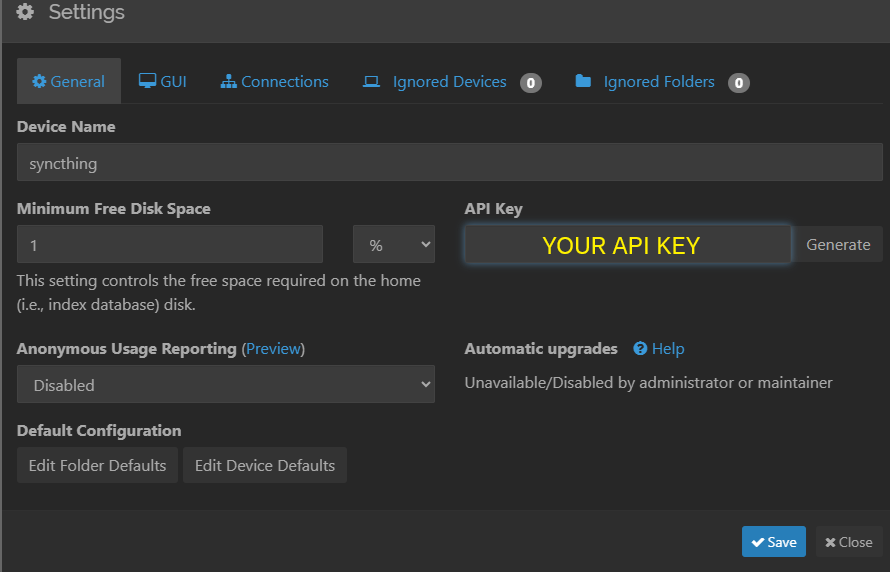
- **Syncthing UI**: Actions → Settings → right panel → API Key
- **Linux**: `~/.local/state/syncthing/config.xml` → `…`
- **Proxmox LXC**: `/root/.local/state/syncthing/config.xml`
### Remote access requirement
Syncthing must listen on a non-localhost address. If bound to `127.0.0.1:8384`, change it to `0.0.0.0:8384` in Syncthing GUI (Settings → GUI Listen Addresses) and restart Syncthing.
### Options
After setup you can change the **Update interval** via **Settings → Integrations → Syncthing → Configure**.
### Re-authentication
If your API key changes, Home Assistant will show a re-authentication prompt. Click **Re-authenticate** and enter the new API key — no need to delete and re-add the integration.
## Entities
### System (one per Syncthing instance)
| Entity | Type | Description |
|--------|------|-------------|
| Running | Binary sensor | `on` when Syncthing is reachable |
| Version | Sensor | Syncthing version string |
| Uptime | Sensor | Uptime in seconds |
| Device ID | Sensor | This instance's Syncthing device ID |
| Total downloaded | Sensor | Total bytes received (all devices) |
| Total uploaded | Sensor | Total bytes sent (all devices) |
### Per folder
| Entity | Type | Description |
|--------|------|-------------|
| State | Sensor | `idle` / `syncing` / `scanning` / `error` |
| Completion | Sensor | Sync completion percentage |
| Bytes needed | Sensor | Bytes remaining to sync |
| Files needed | Sensor | File count remaining to sync |
| Error | Binary sensor | `on` when pull errors > 0 |
| Syncing | Binary sensor | `on` when state is `syncing` |
| Paused | Binary sensor | `on` when folder is paused |
| Scan | Button | Trigger immediate rescan |
| Pause | Button | Pause this folder |
| Resume | Button | Resume this folder |
| Total size | Sensor | Total folder size |
| Total files | Sensor | Total file count |
| Pull errors | Sensor | Number of pull errors |
| Last scan | Sensor | Timestamp of last folder scan |
| Last synced file | Sensor | Filename of last synced file |
### Per device (sync partners)
| Entity | Type | Description |
|--------|------|-------------|
| Connected | Binary sensor | `on` when device is online |
| Paused | Binary sensor | `on` when device is paused |
| Downloaded | Sensor | Bytes received from this device |
| Uploaded | Sensor | Bytes sent to this device |
| Pause | Button | Pause sync with this device |
| Resume | Button | Resume sync with this device |
| Connection type | Sensor | `tcp-client`, `relay-server`, `quic-client`, etc. |
| Address | Sensor | Remote IP:port |
| Client version | Sensor | Syncthing version on remote device |
| Last seen | Sensor | Timestamp of last connection |
## Services
| Service | Parameters | Description |
|---------|-----------|-------------|
| `syncthing_extended.scan_folder` | `folder_id` | Trigger rescan of one folder |
| `syncthing_extended.scan_all` | — | Trigger rescan of all folders |
| `syncthing_extended.pause_folder` | `folder_id` | Pause a specific folder |
| `syncthing_extended.resume_folder` | `folder_id` | Resume a specific folder |
| `syncthing_extended.pause_device` | `device_id` | Pause sync with a device |
| `syncthing_extended.resume_device` | `device_id` | Resume sync with a device |
| `syncthing_extended.pause_all` | — | Pause all devices |
| `syncthing_extended.resume_all` | — | Resume all devices |
### Example automation
```yaml
automation:
- alias: "Alert when Syncthing folder has errors"
trigger:
- platform: state
entity_id: binary_sensor.syncthing_extended_folder_documents_error
to: "on"
action:
- service: notify.mobile_app
data:
message: "Syncthing: Documents folder has sync errors!"
- alias: "Scan after backup completes"
trigger:
- platform: state
entity_id: sensor.backup_status
to: "completed"
action:
- service: syncthing_extended.scan_all
- alias: "Alert when device offline for 1 hour"
trigger:
- platform: state
entity_id: binary_sensor.syncthing_extended_device_nas_connected
to: "off"
for: "01:00:00"
action:
- service: notify.mobile_app
data:
message: "Syncthing: NAS has been offline for 1 hour"
```
## Performance & Database Tips
This integration creates many entities per folder and device. If you notice increased database size, we recommend the following:
### Disable unused entities
We recommend disabling entities you don't actively use:
**Settings → Devices & Services → Syncthing** → click the device → find the entity → toggle it off.
Disabled entities are not polled and generate no history.
### Exclude from recorder
High-frequency numeric sensors (traffic counters, uptime, bytes needed) can accumulate a lot of history. If you only need the current values and don't require historical data, we recommend excluding them from the recorder in `configuration.yaml`:
```yaml
recorder:
exclude:
entity_globs:
- sensor.syncthing_extended_*_in_bytes
- sensor.syncthing_extended_*_out_bytes
- sensor.syncthing_extended_*_uptime
- sensor.syncthing_extended_*_bytes_needed
```
Or exclude the entire integration and re-include only what you want to track:
```yaml
recorder:
exclude:
entity_globs:
- sensor.syncthing_extended_*
- binary_sensor.syncthing_extended_*
include:
entity_globs:
- binary_sensor.syncthing_extended_*_running
- binary_sensor.syncthing_extended_*_error
- sensor.syncthing_extended_*_state
```
## Troubleshooting
### Diagnostics Export
Download the integration diagnostics file for bug reports — it includes integration state and the last 1000 debug log entries.
1. Go to **Settings → Devices & Services**
2. Find **Syncthing** → click the integration
3. Click the **three-dot menu** → **Download diagnostics**
4. Attach the `.json` file to your [GitHub issue](https://github.com/Csontikka/ha-syncthing-extended/issues)
### Debug Logs
To see detailed logs in the HA log viewer, add to `configuration.yaml`:
```yaml
logger:
default: info
logs:
custom_components.syncthing_extended: debug
```
This enables per-request API traces, coordinator update summaries, and button/service call tracking.
## Removal
1. Go to **Settings → Devices & Services → Syncthing**
2. Click the three-dot menu → **Delete**
3. Optionally remove `custom_components/syncthing_extended/` and restart HA
## Supported languages
Available in 30 languages:


## Supported versions
- Home Assistant 2024.1.0+
- Syncthing v1.20.0+
## Support
Found a bug or have an idea? [Open an issue](https://github.com/Csontikka/ha-syncthing-extended/issues) — feedback and feature requests are welcome!
If you find this integration useful, consider [buying me a coffee](https://buymeacoffee.com/Csontikka).