https://github.com/csontikka/ha-telink-manager
Telink Manager — a Home Assistant panel to configure PVVX/ATC firmware Telink BLE thermometers over ESPHome Bluetooth proxies (read/write, backup/restore/clone, compare, bulk read, battery).
https://github.com/csontikka/ha-telink-manager
atc ble bluetooth hacs home-assistant homeassistant integration pvvx telink thermometer
Last synced: 27 days ago
JSON representation
Telink Manager — a Home Assistant panel to configure PVVX/ATC firmware Telink BLE thermometers over ESPHome Bluetooth proxies (read/write, backup/restore/clone, compare, bulk read, battery).
- Host: GitHub
- URL: https://github.com/csontikka/ha-telink-manager
- Owner: Csontikka
- License: apache-2.0
- Created: 2026-06-24T20:23:45.000Z (30 days ago)
- Default Branch: master
- Last Pushed: 2026-06-24T20:42:40.000Z (30 days ago)
- Last Synced: 2026-06-24T22:13:06.994Z (30 days ago)
- Topics: atc, ble, bluetooth, hacs, home-assistant, homeassistant, integration, pvvx, telink, thermometer
- Language: JavaScript
- Size: 1.02 MB
- Stars: 0
- Watchers: 0
- Forks: 0
- Open Issues: 0
-
Metadata Files:
- Readme: README.md
- License: LICENSE
- Codeowners: CODEOWNERS
- Security: SECURITY.md
Awesome Lists containing this project
README
# Telink Manager — Home Assistant Integration


[](https://github.com/hacs/integration)
[](https://github.com/Csontikka/ha-telink-manager/blob/master/LICENSE)
[](https://buymeacoffee.com/Csontikka)
> **Note:** For the best viewing experience, read this documentation on [GitHub](https://github.com/Csontikka/ha-telink-manager).
A Home Assistant admin panel for configuring **Telink BLE thermometers** running [PVVX/ATC custom firmware](https://github.com/pvvx/ATC_MiThermometer) (LYWSD03MMC, MHO-C401, CGG1, and similar `A4:C1:38:*` devices). Scan, read and write every device setting straight over your existing **ESPHome / Shelly Bluetooth proxies** (or a local Bluetooth adapter) — no extra hardware, no cloud, no separate app.
This is a **panel-only** integration: it adds one sidebar entry and creates **no entities, sensors or polling**. Your thermometers keep advertising to the regular Bluetooth/BTHome integration exactly as before — Telink Manager only connects on demand when you read or write a device.
> **This configures thermometers — it does not flash firmware.** Your devices must already be running PVVX or ATC firmware. To convert a stock Xiaomi thermometer, flash it first with the [PVVX web flasher](https://pvvx.github.io/ATC_MiThermometer/TelinkMiFlasher.html); then this panel can read and write its settings.
## Features
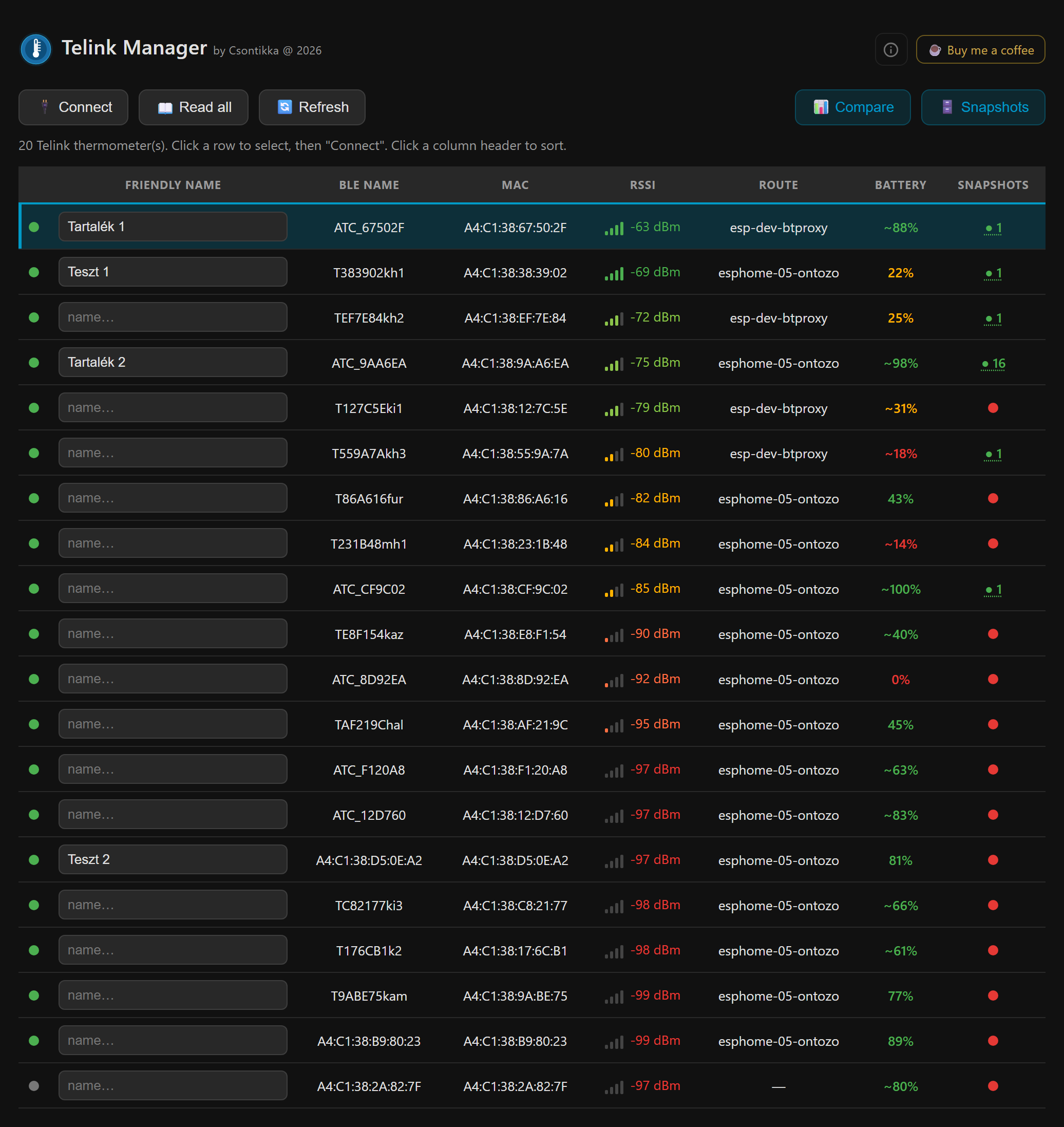
- **Scan / Refresh** — discover every PVVX/ATC thermometer your proxies can see, with live RSSI, connectable state and battery level (parsed from the advertisement).
- **Friendly names** — assign and persist a human name per device (stored in HA, independent of the device's own BLE name).
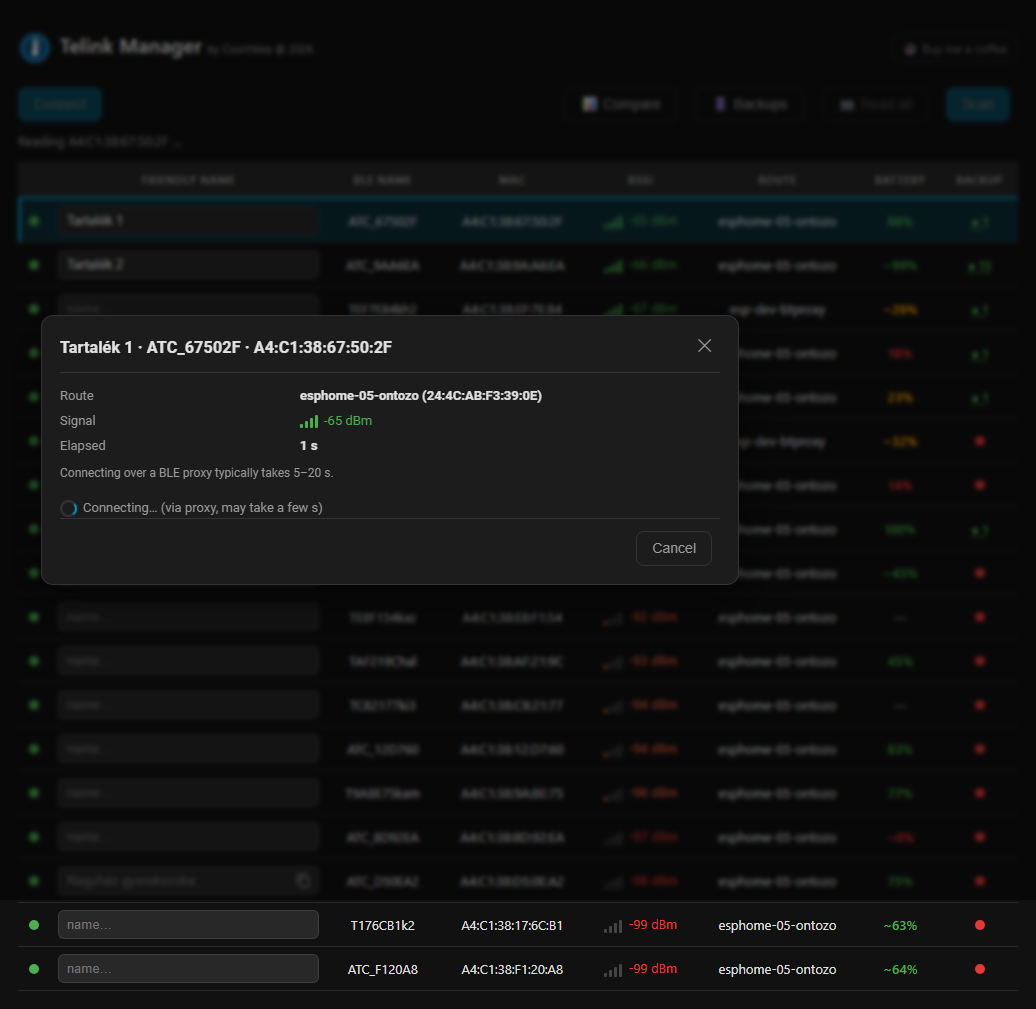
- **Connect & read** — pull the full configuration blob plus device name, comfort thresholds, sensor calibration and bind key.
- **Write (safe settings)** — device name, comfort zones, RTC clock, LCD/display options, advertising interval, sensor calibration (and reset to factory calibration).
- **Temporary LCD overlay** — push a custom number to the screen without persisting it.
- **Dangerous settings** (clearly flagged, admin-only) — custom MAC address, encryption bind key, factory reset and reboot.
- **RAW command** — send an arbitrary command to the PVVX config characteristic (for experimentation).
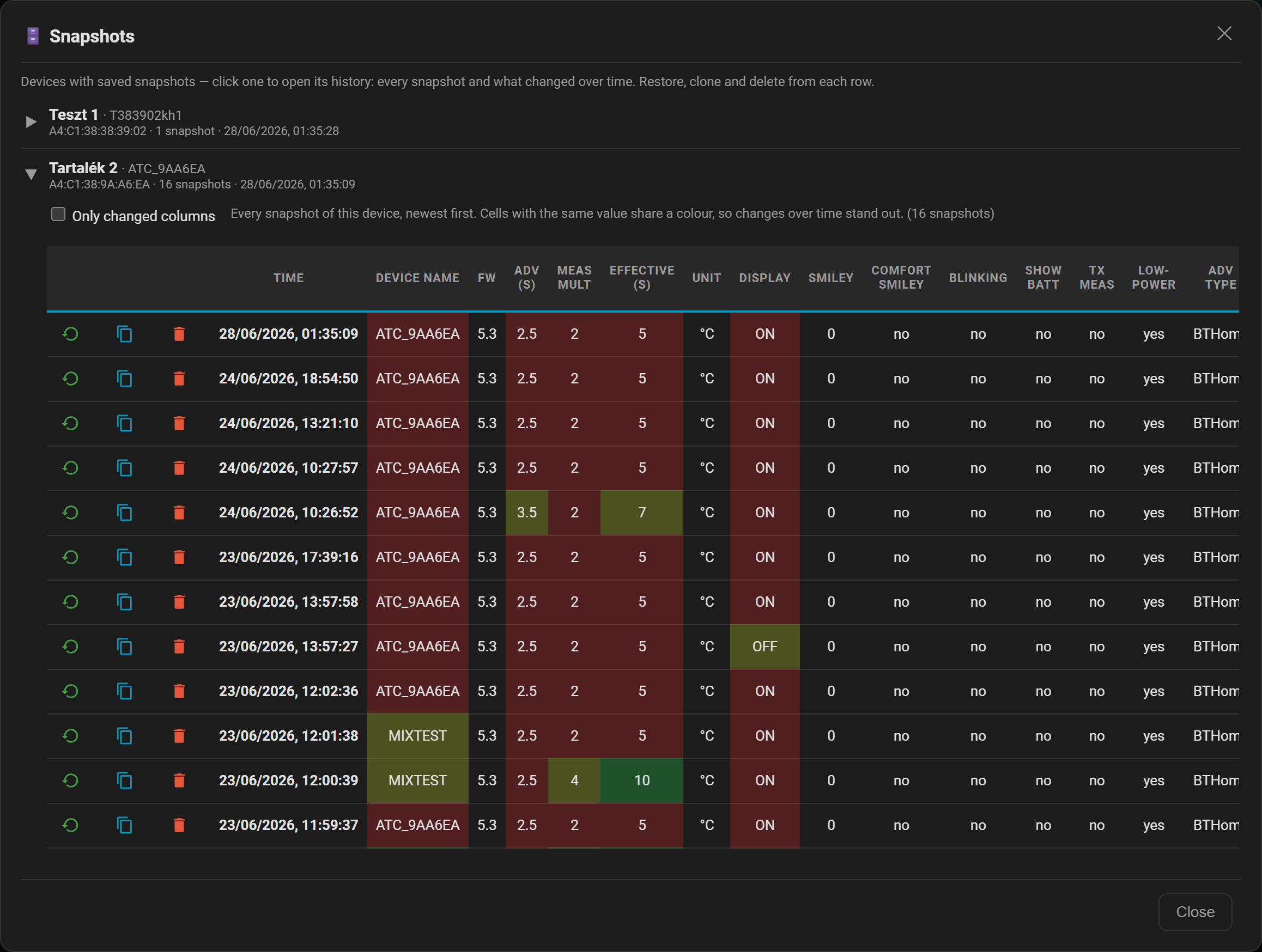
- **Snapshots / History** — every read and every change is snapshotted server-side automatically (with de-duplication and a history limit). Browse each device's **history** of snapshots, **restore** any snapshot back onto the same device, or **clone** a configuration onto another device (the MAC is never cloned). A safety snapshot of the target is always taken before an overwrite, so any restore is reversible.
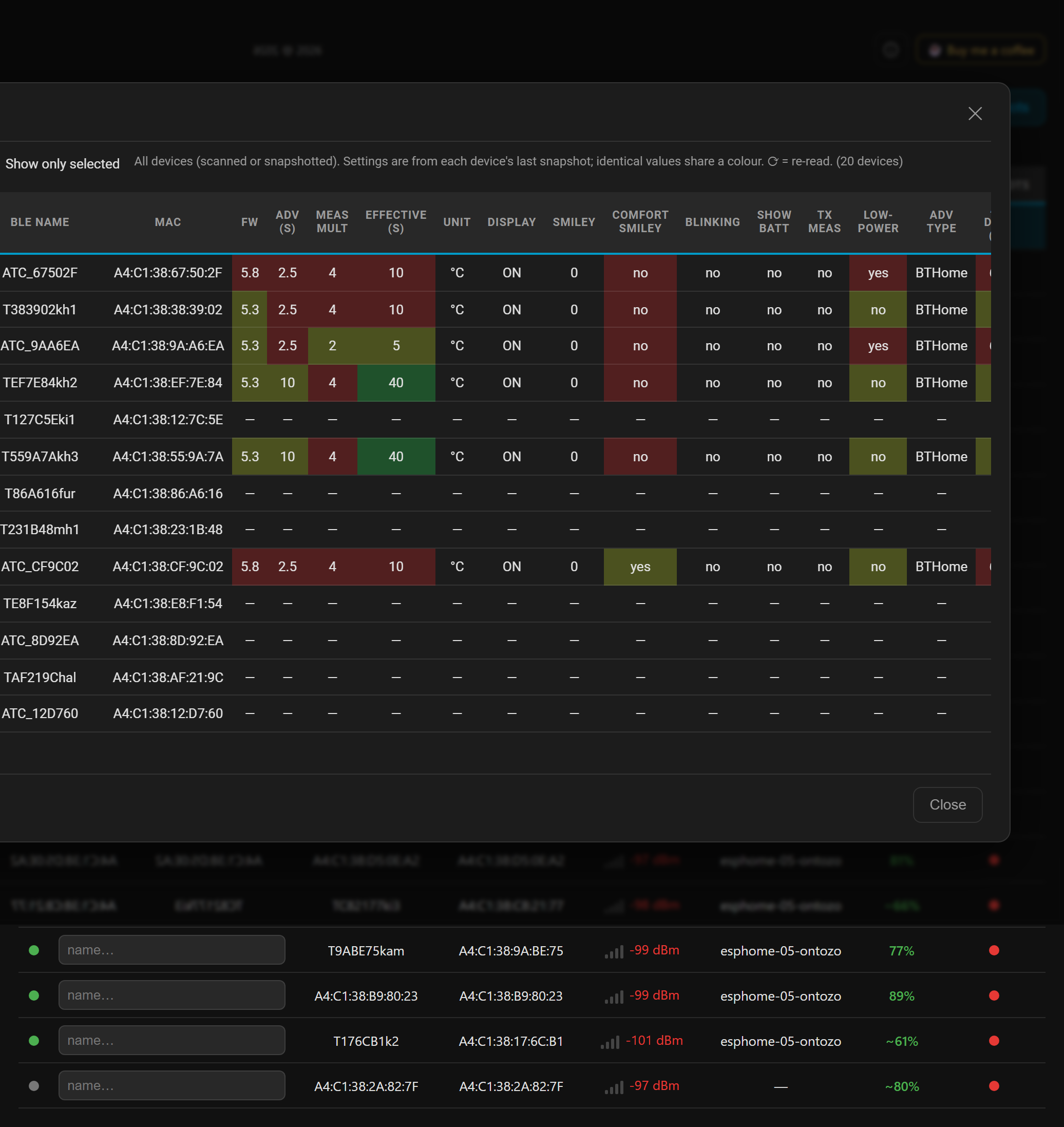
- **Compare & Snapshots** — a matrix view comparing the latest config of all snapshotted devices, and a per-device **Snapshots** matrix showing every snapshot and what changed over time (with restore, clone and delete on each row) — all without touching BLE.
- **Read all** — a server-side bulk job that reads every device in parallel, grouped by proxy, with retries. It survives page refresh and navigation (progress is polled from the server) so you can walk away and come back.
- **Battery column** — estimated charge and voltage from the advertisement, colour-coded.
## Screenshots
**Main panel** — scan results with friendly names, RSSI, battery and per-device actions:
**Device configuration** — read and edit the full PVVX configuration (display, measurement, advertising):
**Compare** — every device's settings side by side, differences highlighted (from snapshots, no connection):
**Snapshots** — each device's history as a change matrix; expand a device to see every snapshot and what changed over time, with restore, clone and delete on each row (no connection needed):
## Requirements
- Home Assistant **2024.7.0** or newer.
- At least one working **Bluetooth proxy** (ESPHome `bluetooth_proxy` with `active: true`, or a Shelly Gen2/Plus device acting as a proxy) **or** a local Bluetooth adapter, within range of the thermometers. Writing settings requires an **active**, connectable proxy.
- Thermometers flashed with **PVVX or ATC custom firmware** (stock Xiaomi firmware is not supported).
### Bluetooth proxies
Reading, and especially **writing**, happens over a GATT **connection** — so the proxy must be able to make **active connections**, not just forward advertisements:
- **ESPHome:** set `active: true` on the `bluetooth_proxy:` component. A passive proxy (`active: false`) can still scan and show battery from advertisements, but **cannot connect or configure** a device.
- **Shelly Gen2/Plus:** enable its Bluetooth gateway / proxy so Home Assistant can connect through it.
A minimal ESPHome proxy:
```yaml
esp32_ble_tracker:
bluetooth_proxy:
active: true # let Home Assistant open GATT connections — required to configure devices
```
Tips:
- **Leave the scan interval/window at the ESPHome defaults.** A near-100% scan duty cycle looks good for discovery but starves the radio of the time it needs for connections — which is exactly what this integration relies on. (Optionally add `esp32_ble_tracker: scan_parameters: active: true` for nicer advertised names; that's separate from `bluetooth_proxy: active`.)
- An ESP32 proxy handles roughly **3 active connections at once**. "Read all" reads serially within one proxy and in parallel across proxies, so **more proxies = faster bulk reads and better coverage**.
- Place a proxy close enough that devices read **better than -80 dBm** (shown in the RSSI column). Weak links are the number-one cause of failed connects and writes.
## Installation
### HACS (recommended)
1. Open HACS → **Integrations**.
2. Click the three-dot menu → **Custom repositories**.
3. Add `https://github.com/Csontikka/ha-telink-manager` with category **Integration**.
4. Click **Download**.
5. Restart Home Assistant.
### Manual
1. Copy `custom_components/telink_manager/` to your HA `config/custom_components/` directory.
2. Restart Home Assistant.
## Setup
1. Go to **Settings → Devices & Services → Add Integration**.
2. Search for **Telink Manager** and select it.
3. Confirm — there is nothing to configure. A **Telink Manager** entry appears in the sidebar (admin users only).
That's it. Open the panel and press **Scan**.
## Usage notes & safety
- **Reading is always safe.** It opens a short BLE connection, reads the configuration and disconnects cleanly.
- **Writing safe settings** (name, comfort, time, display, calibration) cannot brick a device — the worst case is a failed write you can simply retry.
- **Dangerous settings change device identity:**
- **Custom MAC** — after a reboot the thermometer advertises under the new MAC, so Home Assistant (and any BTHome sensors) will see it as a *new* device. Update your other integrations accordingly.
- **Bind key** — changing the encryption key will break decryption for any integration still using the old key.
- **Factory reset** — clears all custom configuration back to firmware defaults.
- These actions are grouped, labelled as dangerous, and require admin access to the panel.
- **Clone never copies the MAC.** Cloning writes a source device's settings onto a *different* target device while leaving the target's own MAC intact, so you never end up with two devices sharing one address.
- If a write fails or a device "disappears" mid-operation, it is usually a weak proxy link — move the device closer to a proxy, or use a proxy with a stronger signal, and retry.
## Known limitations
- **Configures, doesn't flash.** This panel reads and writes settings on devices already running PVVX/ATC firmware. It cannot flash firmware (use the [PVVX web flasher](https://pvvx.github.io/ATC_MiThermometer/TelinkMiFlasher.html)) and does not support stock Xiaomi firmware.
- **It is not a sensor integration.** Temperature and humidity reach Home Assistant through the built-in **Bluetooth/BTHome** integration — Telink Manager creates no sensors. It only configures the device.
- **An active (connectable) proxy is required** to read or write. A passive proxy only forwards advertisements (so you get scan and battery, but no connection) — see [Bluetooth proxies](#bluetooth-proxies).
- **No BLE pairing / PIN.** Home Assistant's Bluetooth proxies cannot perform BLE pairing, so a device PIN is intentionally not settable here — setting one would lock this panel out, recoverable only with a hardware flasher.
- **Encrypted advertisements** cannot be decoded without the bind key (this affects the BTHome sensor side, not configuration through this panel).
- **Validated on the Xiaomi LYWSD03MMC.** Telink Manager talks to the PVVX/ATC firmware's config protocol (the same `0x55` characteristic on every supported device), not a per-model format, so it is expected to work across the wider PVVX/ATC family (MHO-C401, CGG1, CGDK2, …). It is, however, currently field-tested only on the LYWSD03MMC; the one display-specific feature is the temporary LCD overlay, whose number layout targets that screen.
## Removal
1. Go to **Settings → Devices & Services → Telink Manager**.
2. Click the three-dot menu → **Delete**. The sidebar panel is removed.
3. Optionally delete `custom_components/telink_manager/` and restart Home Assistant.
Saved friendly names and backups are kept in HA storage; they are only removed if you delete the corresponding `.storage/telink_manager_*` files.
## Troubleshooting
Most connection problems are **range / Bluetooth-proxy** issues rather than bugs in this integration. Work through these first.
### Common issues
- **Scan finds nothing** — you need at least one Bluetooth proxy in range: an ESPHome device with `bluetooth_proxy` and `active: true`, a Shelly Gen2/Plus acting as a proxy, or a local Bluetooth adapter. Check the thermometer is powered and advertising (it should also show up in Home Assistant's normal Bluetooth/BTHome).
- **A device won't connect / "Connecting…" times out** — almost always a weak link. Move the thermometer or a proxy closer (aim for better than **-80 dBm** in the RSSI column), make sure the chosen proxy is **active** and connectable, and retry. Writing needs a stronger link than reading.
- **Write shows "not verified" / a setting didn't stick** — usually the link dropped mid-write; retry with a stronger signal. A few values are clamped or rejected by the firmware itself.
- **A device "disappears" mid-operation / "no connectable"** — no proxy can reach it right now (out of range or asleep). Bring it closer to a proxy and Scan again.
- **The panel isn't in the sidebar** — it is **admin-only**; log in with an admin account.
### Is the problem here, in your Bluetooth, or in the firmware?
Before opening an issue, run the **reference test** with the official PVVX tool. It talks to the *same* firmware over Web Bluetooth — straight from a phone or laptop, **with no Home Assistant and no proxy in between**:
👉 **[PVVX TelinkMiFlasher](https://pvvx.github.io/ATC_MiThermometer/TelinkMiFlasher.html)** — open it in Chrome/Edge, hold the device close, and try the same connect / read / write.
- **The flasher can't do it either** → the problem is the **device, its firmware, or your Bluetooth**, not this integration. If it looks like a firmware bug, report it to the [PVVX firmware project](https://github.com/pvvx/ATC_MiThermometer) — this integration cannot fix what the firmware does.
- **The flasher works fine right next to the device, but this integration keeps failing even with a strong proxy nearby** → that is worth a bug report **here** (attach the debug log below).
This keeps every report — yours and mine — pointed at the layer that actually owns the bug.
### Debug logging
Enable debug logging by adding to `configuration.yaml`:
```yaml
logger:
default: info
logs:
custom_components.telink_manager: debug
```
This logs every BLE connection attempt, which proxy was chosen, and the raw bytes exchanged with each device.
When the reference test above points at the integration, [open an issue](https://github.com/Csontikka/ha-telink-manager/issues) with: your Home Assistant version, what you did, the RSSI shown, which proxy was used, and the debug log around the failure.
## Privacy & telemetry
Telink Manager collects **no telemetry and never phones home**. It runs entirely inside your Home Assistant instance: it talks only to your thermometers (over your own Bluetooth proxies) and stores friendly names and backups in your local HA storage. No usage data, device identifiers (including BLE MAC addresses), or analytics are sent to the developer or any third party.
The only place this integration ever appears in any statistics is Home Assistant's own [Analytics](https://www.home-assistant.io/integrations/analytics/), which is **opt-in**, anonymized and aggregated. If you have enabled HA Analytics, this integration's name and version are included — exactly like every other custom integration — and show up only as anonymous totals on the public [analytics dashboard](https://analytics.home-assistant.io/integrations/). You can turn it off at any time in **Settings → System → Analytics**.
## Support
Found a bug or have an idea? [Open an issue](https://github.com/Csontikka/ha-telink-manager/issues) — feedback and feature requests are welcome.
If any of these sound familiar, consider [buying me a coffee](https://buymeacoffee.com/Csontikka) ☕:
- Saved you a lap around the house to push new settings to every device.
- Helped you figure out why one thermometer reports half as often as the others.
- Means you no longer have to explain to your family why you're crawling behind the radiator with a laptop.
- One integration, zero thermometer safaris.
## Credits
Built on the excellent open-firmware work that makes these thermometers configurable:
- [pvvx/ATC_MiThermometer](https://github.com/pvvx/ATC_MiThermometer) — the PVVX firmware and the BLE configuration protocol this integration speaks to, released under a permissive (no-restriction) license.
- [Aaron Christophel (atc1441)](https://github.com/atc1441/ATC_MiThermometer) — the original ATC custom firmware and advertising format that opened up these devices in the first place.
This integration is an independent client for that firmware: it does not include or redistribute the firmware itself, and is not affiliated with Telink, Xiaomi, pvvx or atc1441.