https://github.com/csprance/gecs
Godot Entity Component System - GECS
https://github.com/csprance/gecs
ecs entity-component-system godot
Last synced: 2 months ago
JSON representation
Godot Entity Component System - GECS
- Host: GitHub
- URL: https://github.com/csprance/gecs
- Owner: csprance
- License: cc0-1.0
- Created: 2024-10-30T03:38:08.000Z (over 1 year ago)
- Default Branch: main
- Last Pushed: 2026-03-18T14:49:01.000Z (3 months ago)
- Last Synced: 2026-03-18T16:31:48.608Z (3 months ago)
- Topics: ecs, entity-component-system, godot
- Language: GDScript
- Homepage:
- Size: 110 MB
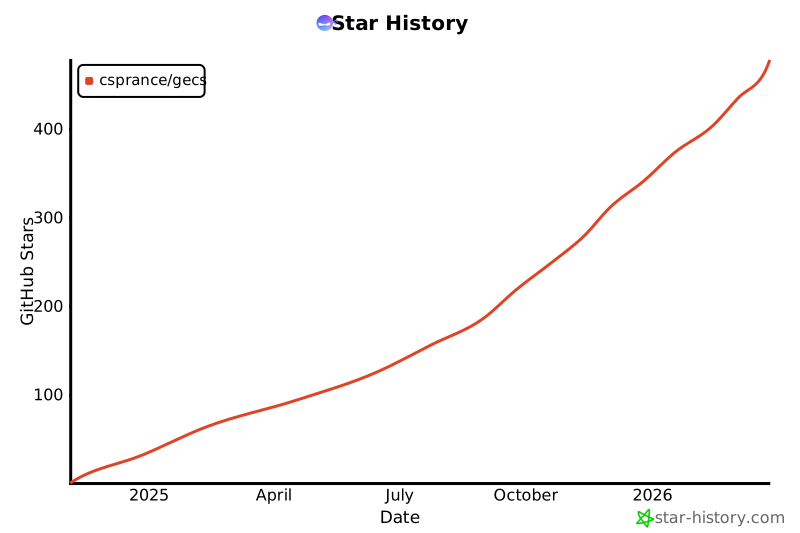
- Stars: 457
- Watchers: 5
- Forks: 24
- Open Issues: 5
-
Metadata Files:
- Readme: README.md
- Changelog: CHANGELOG.md
- License: LICENSE
Awesome Lists containing this project
README
# GECS
> **Entity Component System for Godot 4.x**
Build scalable, maintainable games with clean separation of data and logic. GECS integrates seamlessly with Godot's node system while providing powerful query-based entity filtering.
## Key Features
- 🎯 **Godot Integration** - Works with nodes, scenes, and editor
- 🚀 **High Performance** - Optimized queries with automatic caching
- 🔧 **Flexible Queries** - Find entities by components, relationships, or properties
- 🔍 **Debug Viewer** - Real-time inspection and performance monitoring
- 📦 **Editor Support** - Visual component editing and scene integration
- 🎮 **Battle Tested** - Used in games being actively developed
- 🌐 **Multiplayer** - GECS goes Multiplayer! Check out the [GECS Network Module](addons/gecs/network/README.md)
## Requirements
Godot 4.x (tested with 4.6+)
## Installation
### Option A: Godot Asset Library
Search for **"GECS"** in the Godot editor AssetLib tab and click Install.
### Option B: Manual Copy
Download the release zip, copy `addons/gecs/` into your project, then enable the plugin in **Project Settings > Plugins**.
### Option C: Git Submodule
```bash
git submodule add -b release-v6.8.1 https://github.com/csprance/gecs.git addons/gecs
```
Then enable the plugin in **Project Settings > Plugins**.
## Quick Start
```gdscript
# All component properties need a default value or Godot will error on export
# Pattern 1: @export var with default (no constructor needed)
class_name C_Health extends Component
@export var max_health: int = 100
@export var current_health: int = 100
# Pattern 2: _init() with parameter AND a default on the property
class_name C_Velocity extends Component
@export var direction: Vector3 = Vector3.ZERO
func _init(v: Vector3 = Vector3.ZERO) -> void:
direction = v
# Create entities and add components
var player = Entity.new()
player.add_component(C_Health.new())
player.add_component(C_Velocity.new(Vector3(5, 0, 0)))
var target = Entity.new()
target.add_component(C_Health.new())
target.add_component(C_Velocity.new(Vector3(-5, 0, 0)))
# Add entities to the world
ECS.world.add_entity(player)
ECS.world.add_entity(target)
# Add relationships between entities
player.add_relationship(Relationship.new(C_AllyTo.new(), target))
# Systems define which entities to process
class_name VelocitySystem extends System
func query() -> QueryBuilder:
return q.with_all([C_Velocity])
func process(entities: Array[Entity], components: Array, delta: float) -> void:
for entity in entities:
var vel := entity.get_component(C_Velocity) as C_Velocity
entity.position += vel.direction * delta
# Register the system and start processing
ECS.world.add_system(VelocitySystem.new())
func _process(delta: float) -> void:
ECS.process(delta)
```
## Quick Start Steps
1. **Install**: Download to `addons/gecs/` and enable in Project Settings
2. **Follow Guide**: [Get your first ECS project running in 5 minutes →](addons/gecs/docs/GETTING_STARTED.md)
3. **Learn More**: [Understand core ECS concepts →](addons/gecs/docs/CORE_CONCEPTS.md)
## Complete Documentation
**All documentation is located in the addon folder:**
**→ [Complete Documentation Index](addons/gecs/README.md)**
### Quick Navigation
- **[Getting Started](addons/gecs/docs/GETTING_STARTED.md)** - Build your first ECS project (5 min)
- **[Core Concepts](addons/gecs/docs/CORE_CONCEPTS.md)** - Understand Entities, Components, Systems, Relationships (20 min)
- **[Best Practices](addons/gecs/docs/BEST_PRACTICES.md)** - Write maintainable ECS code (15 min)
- **[Troubleshooting](addons/gecs/docs/TROUBLESHOOTING.md)** - Solve common issues quickly
### Advanced Features
- **[Component Queries](addons/gecs/docs/COMPONENT_QUERIES.md)** - Advanced property-based filtering
- **[Relationships](addons/gecs/docs/RELATIONSHIPS.md)** - Entity linking and associations
- **[Observers](addons/gecs/docs/OBSERVERS.md)** - Reactive systems for component changes
- **[Performance Optimization](addons/gecs/docs/PERFORMANCE_OPTIMIZATION.md)** - Make your games run fast
## Example Games
- **[GECS-101](https://github.com/csprance/gecs-101)** - A simple example
- **[Zombies Ate My Neighbors](https://github.com/csprance/gecs/tree/zombies-ate-my-neighbors/game)** - Action arcade game
- **[Breakout Clone](https://github.com/csprance/gecs/tree/breakout/game)** - Classic brick breaker
## Community
- **Discord**: [Join our community](https://discord.gg/eB43XU2tmn)
- **Issues**: [Report bugs or request features](https://github.com/csprance/gecs/issues)
- **Discussions**: [Ask questions and share projects](https://github.com/csprance/gecs/discussions)
## License
MIT - See [LICENSE](LICENSE) for details.
---
_GECS is provided as-is. If it breaks, you get to keep both pieces._
[](https://star-history.com/#csprance/gecs&Date)