https://github.com/cssnr/zipline-android
Zipline Android Client Application for a Diced/Zipline v4 ShareX Server to Upload, Download and Manage Files and Short URLs.
https://github.com/cssnr/zipline-android
android android-application
Last synced: 5 months ago
JSON representation
Zipline Android Client Application for a Diced/Zipline v4 ShareX Server to Upload, Download and Manage Files and Short URLs.
- Host: GitHub
- URL: https://github.com/cssnr/zipline-android
- Owner: cssnr
- License: gpl-3.0
- Created: 2025-04-10T05:25:37.000Z (over 1 year ago)
- Default Branch: master
- Last Pushed: 2025-10-31T00:28:34.000Z (9 months ago)
- Last Synced: 2025-10-31T01:23:59.154Z (9 months ago)
- Topics: android, android-application
- Language: Kotlin
- Homepage: https://zipline-android.cssnr.com
- Size: 932 KB
- Stars: 10
- Watchers: 1
- Forks: 0
- Open Issues: 1
-
Metadata Files:
- Readme: README.md
- Funding: .github/FUNDING.yml
- License: LICENSE
- Security: SECURITY.md
Awesome Lists containing this project
README
[](https://github.com/cssnr/zipline-android/releases/latest/download/app-release.apk)
[](https://github.com/cssnr/zipline-android/releases/latest)
[](https://github.com/cssnr/zipline-android/actions/workflows/lint.yaml)
[](https://github.com/cssnr/zipline-android/actions/workflows/release.yaml)
[](https://github.com/cssnr/zipline-android/blob/master/gradle/libs.versions.toml#L2)
[](https://zipline-android.cssnr.com/)
[](https://github.com/cssnr/zipline-android/pulse)
[](https://github.com/cssnr/zipline-android?tab=readme-ov-file#readme)
[](https://github.com/cssnr/zipline-android?tab=readme-ov-file#readme)
[](https://github.com/cssnr/zipline-android/graphs/contributors)
[](https://github.com/cssnr/zipline-android/issues)
[](https://github.com/cssnr/zipline-android/discussions)
[](https://github.com/cssnr/zipline-android/forks)
[](https://github.com/cssnr/zipline-android/stargazers)
[](https://cssnr.github.io/)
[](https://discord.gg/wXy6m2X8wY)
[](https://ko-fi.com/cssnr)
[](https://zipline-android.cssnr.com/)
# Zipline Upload
- [Install](#Install)
- [Setup](#Setup)
- [Features](#Features)
- [Planned](#Planned)
- [Known Issues](#Known-Issues)
- [Troubleshooting](#troubleshooting)
- [Screenshots](#Screenshots)
- [Support](#Support)
- [Development](#Development)
- [Building](#Building)
- [Contributing](#Contributing)
Zipline Android Client Application to Upload, Share, Download and Manage Files and Short URLs
for the [Diced/Zipline](https://github.com/diced/zipline) v4 ShareX Upload Server.
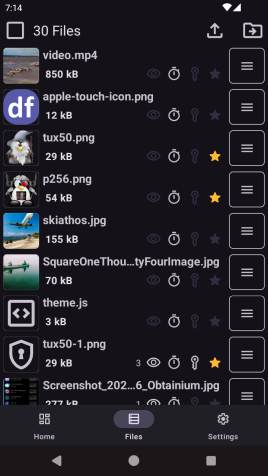
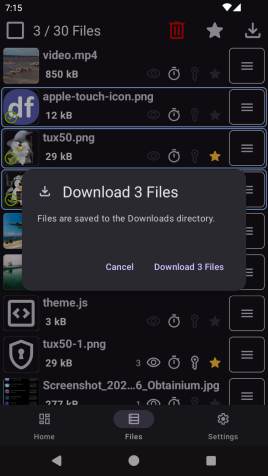
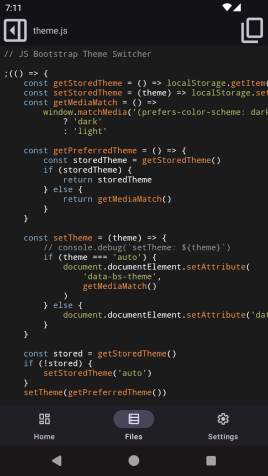
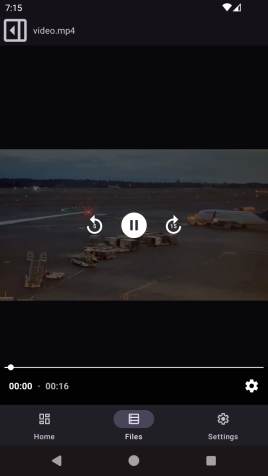
Includes a Native File List for Viewing, Editing and Downloading files locally.
Plus User Management to edit Username, Password, Avatar, TOTP, and more...
Native Kotlin Android Application with a Mobile First Design.
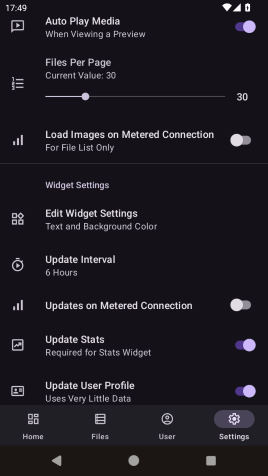
Everything is cached and images are not downloaded over metered connections unless enabled.
User profile and stats widget are updated in the background with a user configurable task.
_We are also developing a browser addon for all major browsers including Firefox Android:
[Zipline Web Extension](https://github.com/cssnr/zipline-extension?tab=readme-ov-file#readme)_
[](https://zipline-android.cssnr.com/)
## Install
> [!NOTE]
> Google Play is in Closed Testing. To be included see [this discussion](https://github.com/cssnr/zipline-android/discussions/25).
[](https://github.com/cssnr/zipline-android/releases/latest/download/app-release.apk)
[](https://apps.obtainium.imranr.dev/redirect?r=obtainium://add/https://github.com/cssnr/zipline-android)
[](https://play.google.com/store/apps/details?id=org.cssnr.zipline)
📲 Click to View QR Codes 📸 Supports Android 8 (API 26) 2017 +
[](https://github.com/cssnr/zipline-android/releases/latest/download/app-release.apk)
[](https://apps.obtainium.imranr.dev/redirect?r=obtainium://add/https://github.com/cssnr/zipline-android)
[](https://play.google.com/store/apps/details?id=org.cssnr.zipline)
[](https://github.com/cssnr/zipline-android/releases/latest)
[](https://github.com/cssnr/zipline-android/releases)
_Note: If installing directly, you may need to allow installation of apps from unknown sources.
For more information, see [Release through a website](https://developer.android.com/studio/publish#publishing-website)._
View Manual Steps to Install from Unknown Sources
Note: Downloading and Installing the [apk](https://github.com/cssnr/zipline-android/releases/latest/download/app-release.apk)
should take you to the settings area to allow installation if not already enabled. Otherwise:
1. Go to your device settings.
2. Search for "Install unknown apps" or similar.
3. Choose the app you will install the apk file from.
- Select your web browser to install directly from it.
- Select your file manager to open it, locate the apk and install from there.
4. Download the [Latest Release](https://github.com/cssnr/zipline-android/releases/latest/download/app-release.apk).
5. Open the download apk in the app you selected in step #3.
6. Choose Install and Accept any Play Protect notifications.
7. The app is now installed. Proceed to the [Setup](#Setup) section below.
[](https://zipline-android.cssnr.com/)
### Setup
1. [Install](#Install) and open the app on your device.
2. Log in as you normally would on the website.
3. Done! You can now share and open files with Zipline.
4. Optionally add a Stats Widget to your Home Screen.
**To use**, share or open any file(s), text, or URL and choose the Zipline app.
Preview the item(s), set upload options, verify and submit.
The results will be shown and copied to the clipboard.
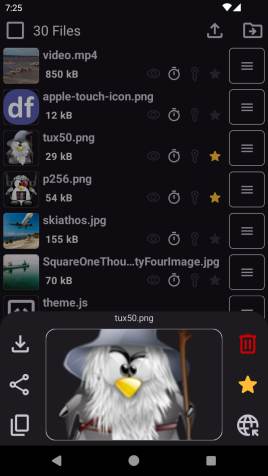
The Files List can be used to view, edit, download, or delete any file or files.
The User Page can be used to edit your profile, avatar, and execute server actions if administrator.
> [!TIP]
> Please [let us know](#support) if you run into any
> [issues](https://github.com/cssnr/zipline-extension/issues).
> **All bugs** that can be reproduced, **will be fixed!**
## Features
Features are documented [on the website](https://zipline-android.cssnr.com/guides/features).
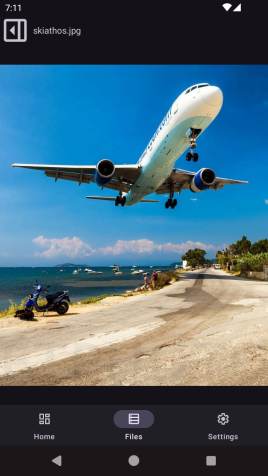
- Share or Open any File, Media, Text or URL
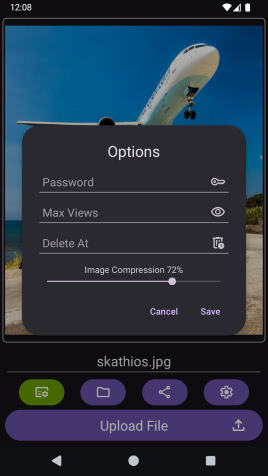
- Preview, Edit and set Options before Uploading
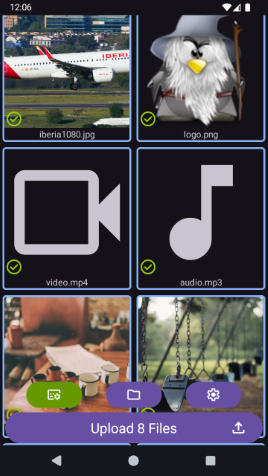
- Native File List with Multi-Select, Edit and Delete
- User and Server Management Page with Avatar Cropper
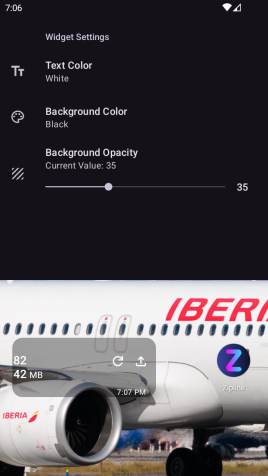
- Home Screen Widget with File Stats and App Shortcuts
- User Configurable Background Update Task for Stats
- Supports Two-Factor Authentication and Custom Headers
### Planned
- Update User Page UX
- Add Short URL Management
- Add AppBar to Replace Bottom Navigation
- Add Remaining Upload Options (ref: [upload-options](https://zipline.diced.sh/docs/guides/upload-options))
- Improve File List
- Add Grid View Selector
- Add Remaining File Options (ref: [file](https://zipline.diced.sh/docs/api/models/file))
### Known Issues
- After deleting files and then scrolling in the file list it skips the number of files deleted when loading.
- _After deleting files, scroll to the top and pull down to refresh._
- If your sessions get deleted you are logged out of the WebView (Home).
- _The WebView is being deprecated and future updates will rely less on this._
- Android 8 (API 26-27) crashes when downloading a file due to a permissions error.
- _Single files can be downloaded from the Home WebView. No work around for bulk downloads._
- Please [Open a New Issue](https://github.com/cssnr/zipline-extension/issues) if you don't see yours.
### Troubleshooting
- Most navigation and display issues can be fixed by fully closing the app and restarting it.
- If you encounter a reproducible issue please [report it as a bug](https://github.com/cssnr/zipline-extension/issues).
- If you encounter issues with the media in the file list, try clearing the application cache.
- If you encounter issues with authentication, try clearing the application data (resets settings and auth).
- If all of the above fail, try re-installing the application and [let us know what happened](https://github.com/cssnr/zipline-extension/issues).
If you are having trouble using the app, support is available via [GitHub](#support) or [Discord](https://discord.gg/wXy6m2X8wY).
[](https://zipline-android.cssnr.com/)
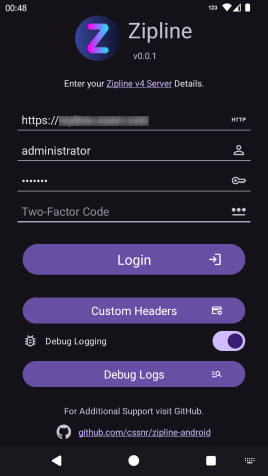
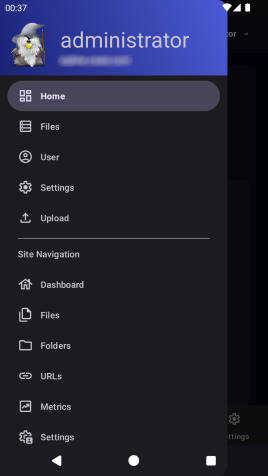
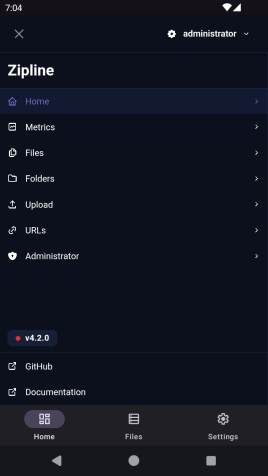
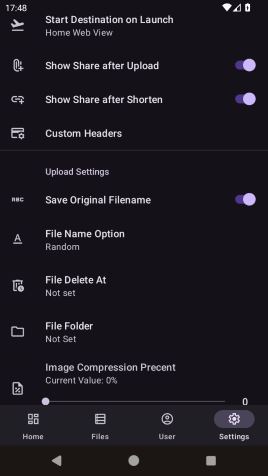
## Screenshots
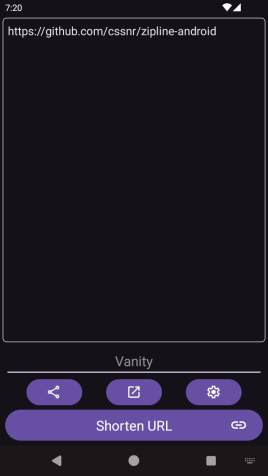
A slideshow is available [on the website](https://zipline-android.cssnr.com/guides/features#screenshots).
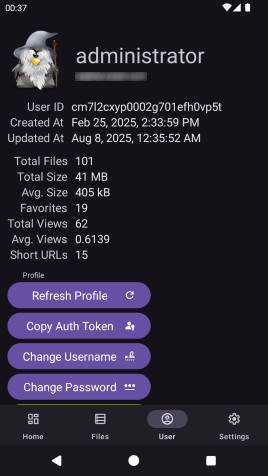
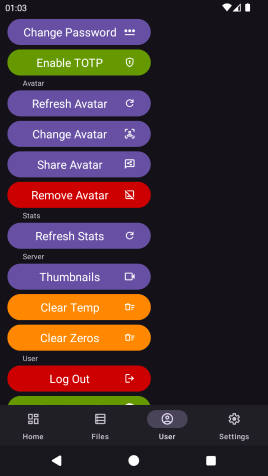
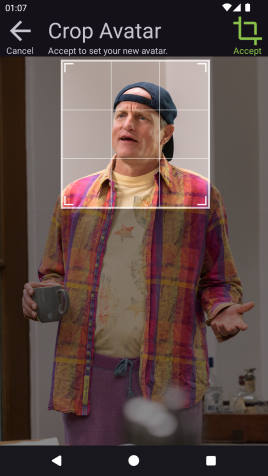
## Support
[](https://zipline-android.cssnr.com/)
For general help or to request a feature, see:
- Q&A Discussion: https://github.com/cssnr/zipline-android/discussions/categories/q-a
- Request a Feature: https://github.com/cssnr/zipline-android/discussions/categories/feature-requests
If you are experiencing an issue/bug or getting unexpected results, you can:
- Report an Issue: https://github.com/cssnr/zipline-android/issues
- Chat with us on Discord: https://discord.gg/wXy6m2X8wY
- Provide General Feedback: [https://cssnr.github.io/feedback/](https://cssnr.github.io/feedback/?app=Zipline%20Android%20App)
# Development
This section briefly covers running and building in [Android Studio](#Android-Studio) and the [Command Line](#Command-Line).
To update the Website/Docs go here: https://github.com/cssnr/zipline-android-docs
## Building
To build the app you must first add a [Google Services](#Google-Services) file and optionally prepare highlightjs.
1. Building this app requires a valid `app/google-services.json` file. For more info see [Google Services](#Google-Services).
2. To build the text preview run `bash .github/scripts/prepare.sh` or manually add highlightjs to:
`assets/preview/dist`
Proceed to [Android Studio](#Android-Studio) or [Command Line](#Command-Line) below.
### Android Studio
[](https://developer.android.com/build/releases/gradle-plugin#android_gradle_plugin_and_android_studio_compatibility)
1. Download and Install Android Studio: https://developer.android.com/studio
2. Ensure that usb or wifi debugging is enabled in the Android developer settings and verify.
3. Then build or run the app on your device.
- Import the Project
- Run Gradle Sync
To Run: Select a device and press Play ▶️
To Build:
- Select the Build Variant (debug or release)
- Build > Generate App Bundles or APK > Generate APKs
### Command Line
> [!WARNING]
> This section is not complete.
> For more details on building see the [release.yaml](.github/workflows/release.yaml).
Ensure you both ADB and SDK Tools installed and accessible.
- [Android Debug Bridge](https://developer.android.com/tools/adb)
- [Android SDK Platform Tools](https://developer.android.com/tools/releases/platform-tools#downloads)
**Build a release:**
```shell
./gradlew assemble
```
_Note: Use `gradlew.bat` for Windows._
**Ensure device is connected:**
```shell
$ adb devices
List of devices attached
RF9M33Z1Q0M device
```
**Install to device:**
```shell
$ cd app/build/outputs/apk/debug
$ adb -s RF9M33Z1Q0M install app-debug.apk
```
_Note: you may have to uninstall before installing due to different certificate signatures._
### Google Services
Location: `app/google-services.json`
This app uses Firebase Google Services. Building requires a valid `google-services.json` file in the `app` directory.
You must add `org.cssnr.zipline` to a Firebase campaign here: https://firebase.google.com/
To enable/disable Firebase DebugView use the following commands:
```shell
# set
adb shell setprop debug.firebase.analytics.app org.cssnr.zipline
# unset
adb shell setprop debug.firebase.analytics.app .none.
# check
adb shell getprop debug.firebase.analytics.app
```
Only 1 app can be in debug mode at a time and this must be set every restart.
Note: Firebase is disabled in debug builds.
See the `manifestPlaceholders` in the [build.gradle.kts](app/build.gradle.kts) file debug config.
# Contributing
All contributions are welcome including [bug reports](https://github.com/cssnr/zipline-extension/issues),
[feature requests](https://github.com/cssnr/zipline-android/discussions/categories/feature-requests),
or [pull requests](https://github.com/cssnr/zipline-extension/discussions) (please start a discussion).
### Zipline Projects
- [Zipline Web Extension](https://github.com/cssnr/zipline-extension?tab=readme-ov-file#readme)
[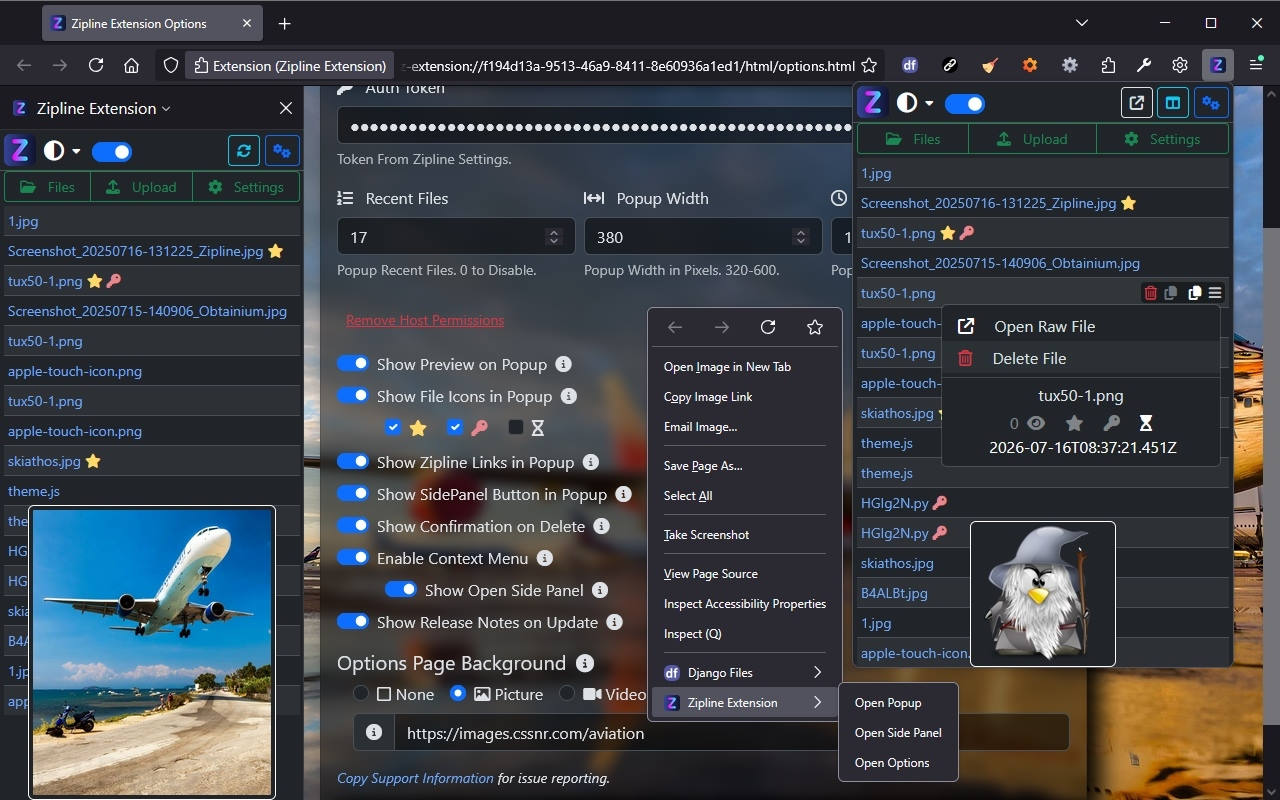](https://github.com/cssnr/zipline-extension?tab=readme-ov-file#readme)
- [Zipline CLI](https://github.com/cssnr/zipline-cli?tab=readme-ov-file#readme) - _Only Supports v3_
### Related Projects
You can also star this project on GitHub and support other related projects:
- [Django Files Server](https://github.com/django-files/django-files?tab=readme-ov-file#readme)
- [Django Files iOS App](https://github.com/django-files/ios-client?tab=readme-ov-file#readme)
- [Django Files Android App](https://github.com/django-files/android-client?tab=readme-ov-file#readme)
- [Django Files Web Extension](https://github.com/django-files/web-extension?tab=readme-ov-file#readme)
Additional Android projects:
- [NOAA Weather Android](https://github.com/cssnr/noaa-weather-android?tab=readme-ov-file#readme)
- [Remote Wallpaper Android](https://github.com/cssnr/remote-wallpaper-android?tab=readme-ov-file#readme)
- [Tibs3DPrints Android](https://github.com/cssnr/tibs3dprints-android?tab=readme-ov-file#readme)
Please consider making a donation to support the development of this project
and [additional](https://cssnr.com/) open source projects.
[](https://ko-fi.com/cssnr)
For a full list of current projects visit: [https://cssnr.github.io/](https://cssnr.github.io/)