https://github.com/cstefanache/tfjs-model-view
Tensorflow.JS Net Viewer
https://github.com/cstefanache/tfjs-model-view
d3 deeplearning neural-networks tensorflow-experiments tensorflowjs visualization
Last synced: 9 months ago
JSON representation
Tensorflow.JS Net Viewer
- Host: GitHub
- URL: https://github.com/cstefanache/tfjs-model-view
- Owner: cstefanache
- License: mit
- Created: 2019-02-04T14:37:34.000Z (over 7 years ago)
- Default Branch: master
- Last Pushed: 2022-12-10T04:16:57.000Z (over 3 years ago)
- Last Synced: 2025-01-29T04:36:13.405Z (over 1 year ago)
- Topics: d3, deeplearning, neural-networks, tensorflow-experiments, tensorflowjs, visualization
- Language: JavaScript
- Homepage:
- Size: 9.57 MB
- Stars: 24
- Watchers: 2
- Forks: 1
- Open Issues: 19
-
Metadata Files:
- Readme: README.md
- License: LICENSE
Awesome Lists containing this project
README
# tfjs-model-view
__tfjs-model-view__ is a library for _in browser_ visualization of neural network intended for use with TensorFlow.js.
Features:
* Automatically render of the neural net
* Automatically update weights/biases/values
The library also aims to be flexible and make it easy for you to incorporate.
## Demos
- [Movielens recommendation using Tensorflow.js](https://beta.observablehq.com/@cstefanache/movielens-recommendation-using-tensorflow-js)
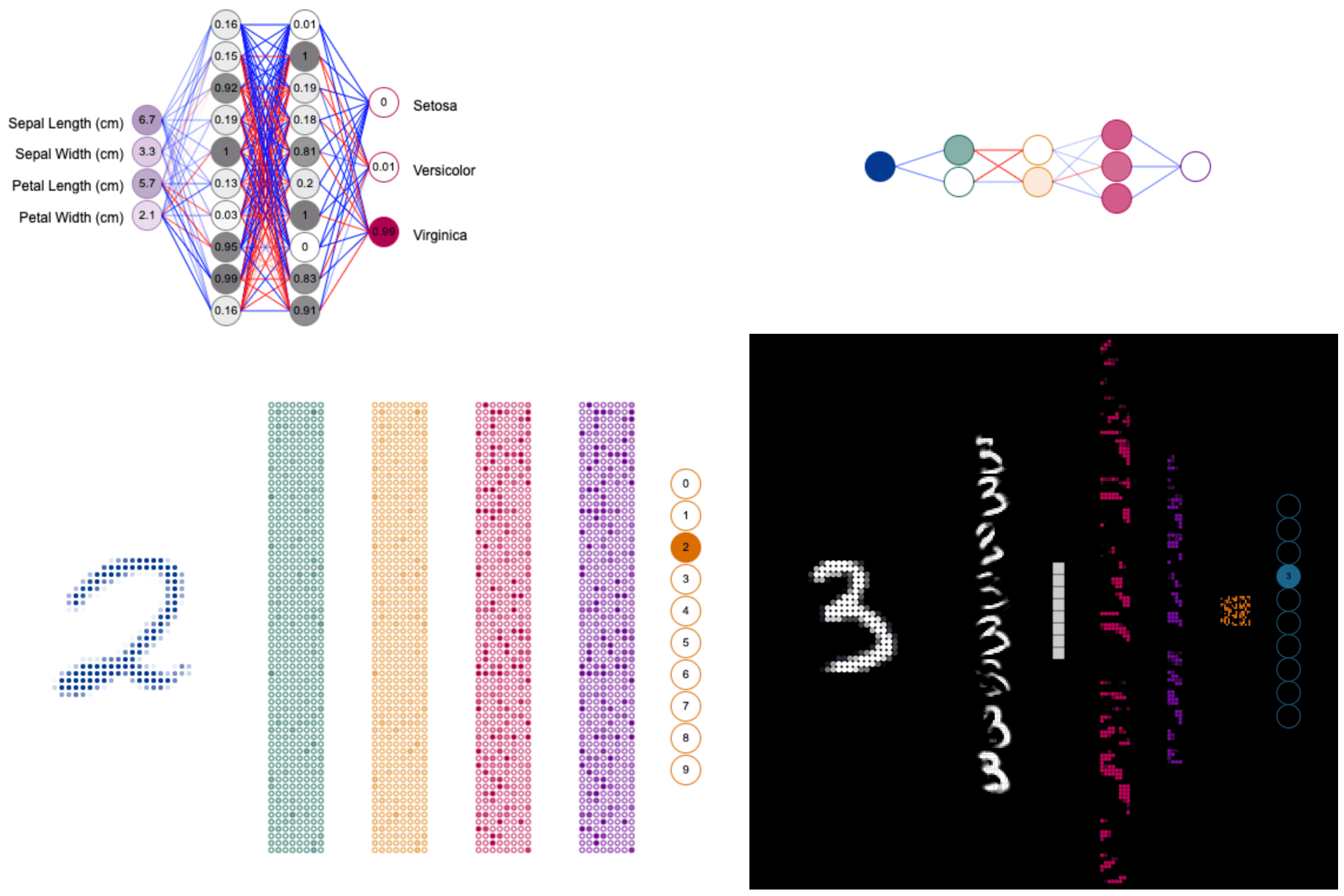
- [Iris Prediction with Custom Node Renderer](https://beta.observablehq.com/@cstefanache/tensorflow-js-model-viewer-iris)
- [MNIST Prediction](https://beta.observablehq.com/@cstefanache/mnist-tensorflow-js-network-view-tfjs-model-view)
- [Multiple Input Rendering](https://beta.observablehq.com/@cstefanache/tensorflow-js-model-view-multiple-input-test)
## Sample rendering output
## Usage
Simple:
```
new ModelView(model)
```
Customized:
```
new ModelView(model, {
printStats: true,
radius: 25,
renderLinks: true,
xOffset: 100,
renderNode(ctx, node) {
const { x, y, value } = node;
ctx.font = '10px Arial';
ctx.fillStyle = '#000';
ctx.textAlign = 'center';
ctx.textBaseline = 'middle';
ctx.fillText(Math.round(value * 100) / 100, x, y);
},
onBeginRender: renderer => {
const { renderContext } = renderer;
renderContext.fillStyle = '#000';
renderContext.textAlign = 'end';
renderContext.font = '12px Arial';
renderContext.fillText('Sepal Length (cm)', 110, 110);
renderContext.fillText('Sepal Width (cm)', 110, 136);
renderContext.fillText('Petal Length (cm)', 110, 163);
renderContext.fillText('Petal Width (cm)', 110, 190);
renderContext.textAlign = 'start';
renderContext.fillText('Setosa', renderer.width - 60, 95);
renderContext.fillText('Versicolor', renderer.width - 60, 150);
renderContext.fillText('Virginica', renderer.width - 60, 205);
},
layer: {
'dense_Dense1_input': {
domain: [0, 8],
color: [165, 130, 180]
},
'dense_Dense1/dense_Dense1': {
color: [125, 125, 125]
},
'dense_Dense2/dense_Dense2': {
color: [125, 125, 125]
},
'dense_Dense3/dense_Dense3': {
nodePadding: 30
}
}
});
```
Customizing:
```
new ModelView(model, {
/** renders the list of layers **/
printStats: true,
/** Default domain for color intensity **/
domain: [0, 1],
/** Default node radius **/
radius: 6,
/** Default node padding **/
nodePadding: 2,
/** Default layer padding **/
layerPadding: 20,
/** Default group padding **/
groupPadding: 1,
/** Horizontal padding **/
xPadding: 10,
/** Vertical padding **/
yPadding: 10,
/** Render links between layers **/
renderLinks: false,
/** Stroke node outer circle **/
nodeStroke: true,
/** custom render node function **/
renderNode: (ctx, node, nodeIdx) => {...},
/** If present will be executed before node rendering **/
onBeginRender: renderer => { ... },
/** If present will be executed after all node rendering is finished **/
onEndRender: renderer => { ... },
/** Personalized layer configuration **/
/** All defaults can be overridden for each layer individually **/
layer: {
'layerName': {
/** Any property mentioned above **/
/** Reshape layer to antoher [cols, rows, groups] layout **/
reshape: [4, 4, 8]
}
}
});
```
## Installation
You can install this using npm with
```
npm install tfjs-model-view
```
or using yarn with
```
yarn add tfjs-model-view
```
## Building from source
To build the library, you need to have node.js installed. We use `yarn`
instead of `npm` but you can use either.
First install dependencies with
```
yarn
```
or
```
npm install
```
You can start the dev environment using
```
yarn dev
```
or
```
npm run dev
```
## Sample Usage
## Issues
Found a bug or have a feature request? Please file an [issue](https://github.com/cstefanache/tfjs-model-view/issues/new)