https://github.com/cumulus13/ddf
A powerful command-line utility for analyzing, managing, and editing Docker Compose files with rich terminal output and advanced features.
https://github.com/cumulus13/ddf
docker docker-compose yaml
Last synced: about 2 months ago
JSON representation
A powerful command-line utility for analyzing, managing, and editing Docker Compose files with rich terminal output and advanced features.
- Host: GitHub
- URL: https://github.com/cumulus13/ddf
- Owner: cumulus13
- License: mit
- Created: 2025-10-04T16:18:14.000Z (9 months ago)
- Default Branch: master
- Last Pushed: 2025-12-05T16:57:42.000Z (7 months ago)
- Last Synced: 2026-05-03T01:38:11.319Z (about 2 months ago)
- Language: Python
- Size: 6.44 MB
- Stars: 1
- Watchers: 0
- Forks: 0
- Open Issues: 0
-
Metadata Files:
- Readme: README.md
- Changelog: CHANGELOG.md
- Contributing: docs/contributing.rst
- License: LICENSE
Awesome Lists containing this project
README
# DDF - Enhanced Docker Compose Tools/Utility
[](https://github.com/cumulus13/ddf/blob/main/LICENSE)
[](https://ddf.readthedocs.io/en/latest/?badge=latest)
**DDF** is a powerful command-line tool for analyzing, managing, and editing Docker Compose files configurations with advanced features like intelligent caching, server mode operation, automatic backups, and sophisticated file editing capabilities.
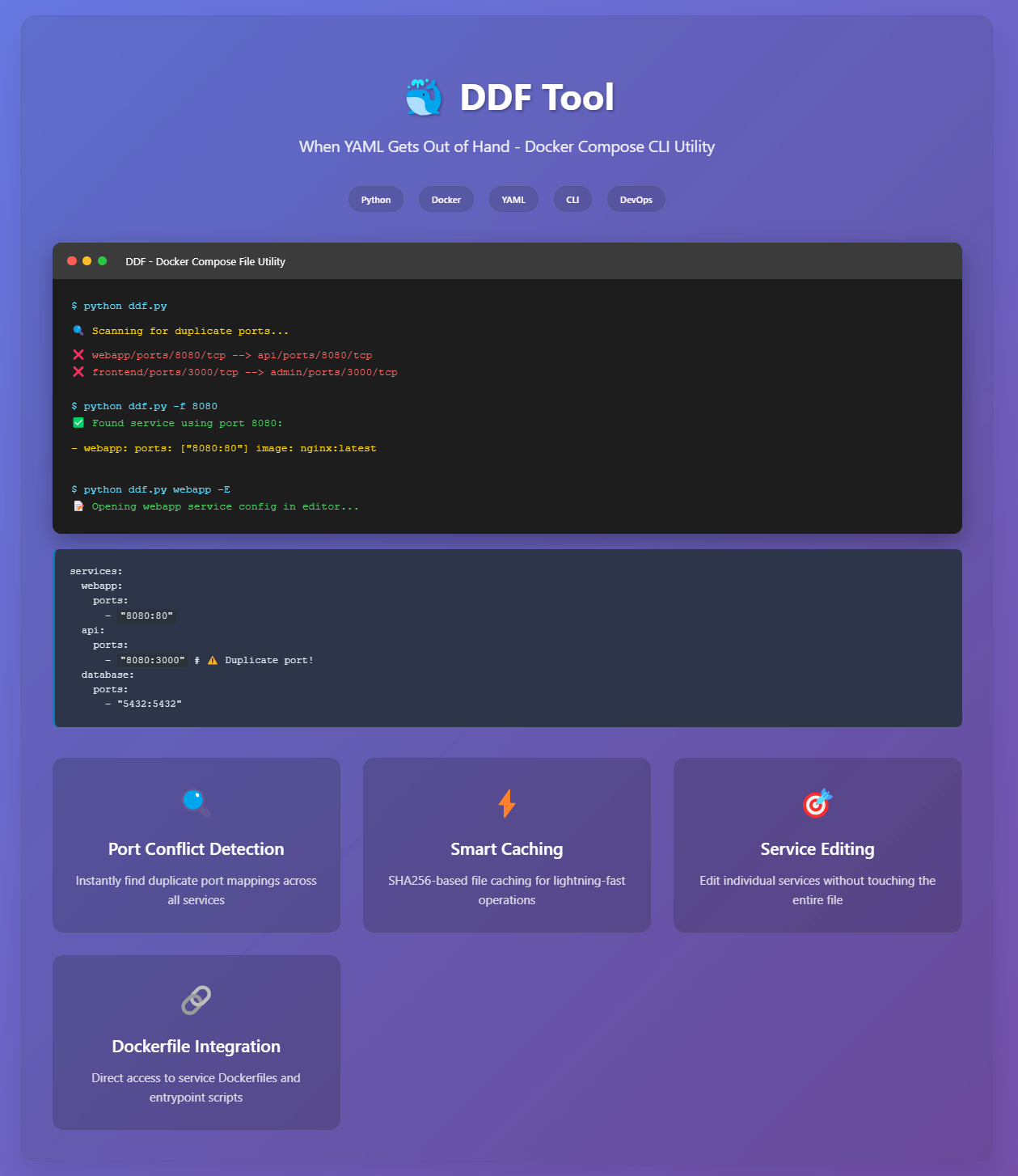
## 🚀 Features
- **Service Management**: List, view, edit, duplicate, copy, rename, remove, and create services
- **Port Analysis/Management**: Find duplicate ports **: Find duplicate ports and resolve conflicts easily, check port usage across services
- **Resource Inspection**: View volumes, devices, hostnames, and port configurations
- **Dockerfile Integration**: Read, edit, copy, and set Dockerfiles associated with services
- **Entrypoint Management**: View and edit entrypoint scripts
- **File Management**: Read and edit files referenced in Dockerfile COPY commands
- **Pattern Matching**: Powerful wildcard and regex support for service names
- **File Monitoring**: Real-time file change detection for non-blocking editors
- **Rich Terminal Output**: Colorized syntax highlighting and formatted display
- **Pattern Matching**: Support for wildcards, regex, and substring matching for service names
- **Intelligent Caching**: Multiple cache backends (Redis, Memcached, Pickle) for improved performance
- **Advanced Editing**: Support for multiple editors with real-time change detection
- **Automatic Backups**: Create and restore backups before making changes
- **Detached Mode**: Open editors in separate terminal windows
- **Server Mode**: Background server with system tray integration for seamless operation
## 📦 Installation
### Prerequisites
- Python 3.6+
- Required Python packages:
```bash
pip install pyyaml rich pydebugger configset rich-argparse clipboard gntplib redis richcolorlog
```
### Setup
```bash
pip install git+https://github.com/cumulus13/ddf
```
#### With All Features
```bash
pip install git+https://github.com/cumulus13/ddf[all]
```
#### Specific Features
```bash
# Cache backends (Redis, Memcached)
pip install git+https://github.com/cumulus13/ddf[cache]
# Server mode with tray icon
pip install git+https://github.com/cumulus13/ddf[server]
# File monitoring
pip install git+https://github.com/cumulus13/ddf[monitoring]
```
## 🔧 Configuration
There is `ddf.ini` file in the same directory as `ddf.py` edit as you want or Create new one `ddf.ini` file in the same directory as `ddf.py`:
```ini
[docker-compose]
file = /path/to/docker-compose.yml
root_path = /path/to/project
[editor]
names = nvim, vim, nano
[cache]
backend = redis
enabled = true
ttl = 3600
redis_host = localhost
redis_port = 6379
[backup]
directory = /path/to/backups
[server]
active = false
host = 127.0.0.1
port = 9876
```
There is `ddf.ini` file in the same directory as `ddf.py` edit as you want:
```ini
[docker-compose]
file = /path/to/your/docker-compose.yml
root_path = /path/to/your/project/root
[editor]
names = nvim,nano,vim
...
```
- `file`: Path to the default Docker Compose YAML file.
- `root_path`: Project root directory (defaults to `c:\PROJECTS` on Windows if exists, else current directory).
- `names`: Comma-separated list of preferred editors.
## 🎯 Quick Start
```bash
# List all services
ddf -L
# Find duplicate ports
ddf
# Edit a service
ddf myservice -E
# Edit Dockerfile
ddf myservice -e
# Show service details
ddf myservice -d
# Find port usage
ddf -f 8080
```
## Usage
### Basic Syntax
```bash
ddf [service_name] [options]
```
### 🖥️ Server Mode
Start DDF in server mode for background operation:
```bash
# Start server
ddf --server-mode &
# Enable in config
cat >> ddf.ini << EOF
[server]
active = true
EOF
# All editing commands now run through server
ddf myservice -E
```
## 📚 Documentation
Full documentation is available at [ddf.readthedocs.io](https://ddf.readthedocs.io)
- [Installation Guide](https://ddf.readthedocs.io/en/latest/installation.html)
- [Quick Start](https://ddf.readthedocs.io/en/latest/quickstart.html)
- [Configuration](https://ddf.readthedocs.io/en/latest/configuration.html)
- [Usage Guide](https://ddf.readthedocs.io/en/latest/usage.html)
- [API Reference](https://ddf.readthedocs.io/en/latest/api/core.html)
## 💡 Usage Examples
### Find and Fix Port Conflicts
```bash
# Find duplicates
ddf
# Output: ❌ web/8080/tcp --> api/8080/tcp
# Inspect services
ddf web -P
ddf api -P
# Edit service to fix
ddf api -E
```
### Service Management
```bash
# Create new service
ddf newservice -n
# Duplicate service
ddf oldservice -dd newservice
# Rename service
ddf oldname -rn newname
# Remove service
ddf myservice -rm
```
### List all services
```bash
ddf -L
```
### Filter services by pattern
```bash
ddf -L -F web* app
```
### Show service details
```bash
ddf webapp -d
```
### Find duplicate ports
```bash
ddf
```
### Find services using port 8080
```bash
ddf -f 8080
```
### Check if port 3000 is duplicated
```bash
ddf -p 3000
```
### List ports for a service
```bash
ddf webapp -l
```
### Show volumes for services with "web" in name
```bash
ddf web -vol
```
### Show hostnames
```bash
ddf webapp -hn
```
### Edit a service configuration
```bash
ddf webapp -E
```
### Advanced Editing
```bash
# Edit in detached terminal
ddf myservice -E -dt
# Edit multiple services simultaneously
ddf service1 -E -dt
ddf service2 -E -dt
ddf service3 -E -dt
# Edit Dockerfile
ddf myservice -e
# Edit entrypoint script
ddf myservice -ed
```
### Read Dockerfile for a service
```bash
ddf webapp -r
```
### Edit Dockerfile
```bash
ddf webapp -e
```
### Set Dockerfile path
```bash
ddf webapp -sd ./custom/Dockerfile
```
### Edit entrypoint script
```bash
ddf webapp -ed
```
### Read file from Dockerfile COPY
```bash
ddf webapp -rf entrypoint.sh
```
### Edit file from Dockerfile COPY
```bash
ddf webapp -ef config.conf
```
### Create a new service
```bash
ddf new-service -n
```
### Duplicate a service
```bash
ddf webapp -dd webapp-staging
```
### Rename a service
```bash
ddf webapp -rn webapp-prod
```
### Copy service to clipboard
```bash
ddf webapp -cs
```
### Copy Dockerfile to clipboard
```bash
ddf webapp -cd
```
### Remove a service
```bash
ddf webapp -rm
```
### Show version
```bash
ddf -v
```
## Advanced Features
### Pattern Matching
DDF supports flexible service name matching:
- **Exact match**: `webapp`
- **Wildcard**: `web*` (matches webapp, webserver, etc.)
- **Substring**: `app` (matches webapp, myapp, etc.)
- **Regex**: Use with `-F` (e.g., `-F '^web.*$'`)
### Intelligent File Resolution
- Automatically locates Dockerfiles based on service build context
- Resolves entrypoint scripts from Dockerfile COPY instructions
- Supports relative and absolute paths
- Creates new Dockerfiles if missing when editing
### Rich Output
- Syntax-highlighted YAML, Dockerfile, and script content
- Colorized port conflict detection
- Formatted service listings with visual indicators
### Caching System
- File content caching based on SHA256 hashes
- Improved performance for repeated operations
- Automatic cache invalidation on file changes
## Configuration Details
### Default Paths
- Default Docker Compose file: `docker-compose.yml` in current directory or `c:\PROJECTS\docker-compose.yml`
- Default project root: `c:\PROJECTS` (if exists on Windows), else current directory
- Default editors: `nvim`, `nano`, `vim`
### Editor Priority
The utility tries editors in this order:
1. Custom editors from `ddf.ini`
2. `nano`
3. `nvim`
4. `vim`
## Error Handling
DDF provides comprehensive error handling for:
- Missing or invalid YAML files
- Non-existent services
- File permission issues
- Invalid port configurations
- Missing Dockerfiles or entrypoint scripts
- Editor availability
## Output Examples
### Duplicate Port Detection
```
webapp/ports/8080/tcp --> api/ports/8080/tcp
```
### Service Port Listing
```
Ports for service 'webapp':
- 8080:80
- 443:443
```
### Volume Display
```
webapp:
volumes:
- ./src:/app/src
- ./logs:/var/log/app
```
### Hostname Display
```
- webapp: hostname: app.example.com
```
## Limitations
- Editor detection is platform-dependent
- Some features require specific Docker Compose file structures
- File paths in COPY commands must be resolvable relative to build context
## 🤝 Contributing
Contributions are welcome! Please feel free to submit a Pull Request.
1. Fork the repository
2. Create your feature branch (`git checkout -b feature/AmazingFeature`)
3. Commit your changes (`git commit -m 'Add some AmazingFeature'`)
4. Push to the branch (`git push origin feature/AmazingFeature`)
5. Open a Pull Request
## 📝 License
This project is licensed under the MIT License - see the [LICENSE](LICENSE) file for details.
## Support
For issues, feature requests, or questions:
1. Check existing documentation
2. Review error messages carefully
3. Ensure proper YAML syntax in Docker Compose files
4. Verify file permissions and paths
## Tips
- Use `-L` to list all services before working with specific ones
- Pattern matching is case-sensitive
- Always backup your Docker Compose files before editing
- Use the duplicate feature to create staging/development variants
- The clipboard copy feature is useful for sharing configurations
- Use `-F` with regex for precise service filtering
## 👤 Author
[Hadi Cahyadi](mailto:cumulus13@gmail.com)
[](https://www.buymeacoffee.com/cumulus13)
[](https://ko-fi.com/cumulus13)
[Support me on Patreon](https://www.patreon.com/cumulus13)
## 🙏 Acknowledgments
- Built with [Rich](https://github.com/Textualize/rich) for beautiful terminal output
- Uses [PyYAML](https://pyyaml.org/) for YAML parsing
- Inspired by the need for better Docker Compose management tools
## 📊 Project Status
DDF is actively maintained and under continuous development. Feel free to report issues or suggest features on the [issue tracker](https://github.com/cumulus13/ddf/issues).