https://github.com/cwqt/refract
Generate Prisma from TypeScript
https://github.com/cwqt/refract
prisma typescript
Last synced: 12 months ago
JSON representation
Generate Prisma from TypeScript
- Host: GitHub
- URL: https://github.com/cwqt/refract
- Owner: cwqt
- License: gpl-3.0
- Created: 2022-04-24T22:30:44.000Z (about 4 years ago)
- Default Branch: main
- Last Pushed: 2024-01-31T21:00:55.000Z (over 2 years ago)
- Last Synced: 2025-07-14T19:04:15.292Z (12 months ago)
- Topics: prisma, typescript
- Language: TypeScript
- Homepage:
- Size: 278 KB
- Stars: 95
- Watchers: 2
- Forks: 6
- Open Issues: 2
-
Metadata Files:
- Readme: README.md
- Changelog: CHANGELOG.md
- License: LICENSE
Awesome Lists containing this project
README
# refract
Generate [Prisma](https://www.prisma.io) from TypeScript
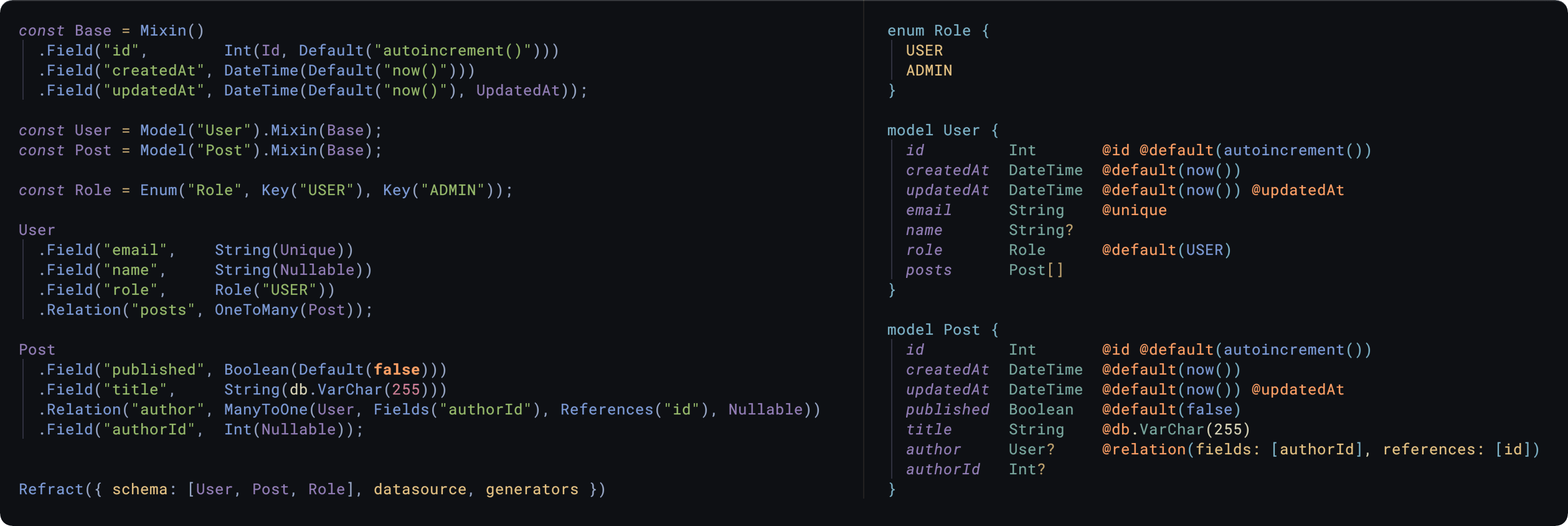
## Installation
```shell
npm i -D @cwqt/refract
yarn add -D @cwqt/refract
```
## Usage
See [here for a full demo](./DEMO.md).
- [Models](#model)
- [Scalars](#scalars)
- [`@db` attributes](#--db--attributes)
- [Relationships](#relationships)
- [Examples](#examples)
- [OneToOne](#onetoone)
- [Implicit ManyToMany](#implicit-manytomany)
- [Ambiguous relations](#ambiguous-relations)
- [Referentials Actions](#referentials-actions)
- [Enums](#enums)
- [Blocks](#blocks)
- [Mixins](#mixins)
- [Handling circular relationships](#handling-circular-relationships)
---
Use the `Refract` default export of this package to generate a Prisma file.
```typescript
// schema.ts
// Import the entry-point
import Refract from '@cwqt/refract';
// Import your custom Models
import { Roles, User, Posts } from './models';
Refract({
// Supply models/enums for generation
schema: [Roles, User, Posts],
// https://www.prisma.io/docs/reference/api-reference/prisma-schema-reference#datasource
datasource: {
provider: 'postgresql',
url: 'env("DATABASE_URL")',
shadowDatabaseUrl: 'env("DATABASE_SHADOW_URL")',
referentialIntegrity: 'prisma',
},
// https://www.prisma.io/docs/reference/api-reference/prisma-schema-reference#generator
generators: [
{
provider: 'prisma-client-js',
previewFeatures: ['referentialIntegrity'],
engineType: 'library',
binaryTargets: ['native'],
},
],
// Define output path for generated Prisma file
output: path.join(process.cwd(), 'schema.prisma'),
});
```
A command like `npx ts-node schema.ts` will run this TypeScript code & generate
the resulting Prisma file at the `output` path.
# Models
```typescript
const User = Model('User', 'This is an optional comment');
User.Field('id', Int(Id, Default('autoincrement()')), 'The primary key');
// // This is an optional comment
// model User {
// // The primary key
// id Int @id @default(autoincrement())
// }
```
`Model` uses a fluid interface, so you can chain the following methods:
- `.Field(name, scalar)`: Add a scalar column to a Model
- `.Relation(name, relation)`: Add a relationship to a Model
- `.Block(compound)`: Add a block field, e.g. `@@id`, `@@unique`, `@@map`
- `.Mixin(mixin)`: Inherit columns from a Mixin for compositional Models
- `.Raw(value)`: Escape hatch into writing raw Prisma
# Scalars
Scalars are the types of data that the column contains, `Int`, `String`
etc. You can define & re-use Scalars wherever in your models
```typescript
const PrimaryKey = Int(Id, Default('autoincrement()'));
// id Int @id @default("autoincrement()")
m.Field('id', PrimaryKey);
```
## Modifiers
Modifiers are functions/objects that append attributes to a column e.g.
```typescript
// String? @default("Hello World")
String(Default('Hello World'), Nullable);
// Int @id @unique @default(autoincrement())
Int(Id, Unique, Default('autoincrement()'));
// DateTime @default(now()) @updatedAt
DateTime(Default('now()'), UpdatedAt);
```
Certain modifiers are constrained to certain scalars, the mapping is:
- `String`: Unique, Id, Default(string | 'auto()'), Limit(number)
- `Int`: Unique, Id, Default('cuid' | 'autoincrement()' | 'uuid()' | number)
- `Float`: Unique, Default(number)
- `BigInt`: Unique, Default(BigInt)
- `Bytes`: Unique
- `Decimal`: Unique
- `Boolean`: Unique
- `DateTime`: Default('now()'), UpdatedAt
- `Unsupported`
Additionally all scalars can use: Nullable, Map, Ignore, Raw & Array modifiers.
The `Raw()` modifier can be used as an escape hatch:
```typescript
// String @db.ObjectId
String(Raw('@db.ObjectId'));
```
## `@db` attributes
Currently there's support for `mysql`, `postgresql`, `cockroachdb` & `mongodb` `@db`
attributes, and can be used like all the other modifiers.
```typescript
import { MySql as db } from '@cwqt/refract';
// email String @db.VarChar(255)
m.Field('email', String(db.VarChar(255)));
```
Check `src/public/db/mysql.ts` (`mongo.ts`/`postgresql.ts`/`cockroach.ts`) for list of mappings between scalar types &
attributes.
# Relationships
- `OneToMany` (model, name?, ...modifiers)
- Nullable
- `OneToOne` (model, name?, fields, references, ...modifiers)
- `OneToOne` (model, name?, ...modifiers)
- Nullable, OnUpdate(Action), OnDelete(Action)
- `ManyToOne` (model, name?, fields, references, ...modifiers)
- Nullable, OnUpdate(Action), OnDelete(Action)
Where `Action` is one of: `Cascade`, `Restrict`, `NoAction`, `SetNull`, `SetDefault`
## Examples
### OneToOne
```typescript
const User = Model('User');
const Something = Model('Something');
Something
.Field('id', PrimaryKey)
// Holds foreign key
.Field('userId', Int())
.Relation('user', OneToOne(User, Fields('userId'), References('id')));
// Alternatively you can do Fields('userId', Int()) to avoid the extra
// .Field() call, this'll add the column to the model for you
User
.Field('id', PrimaryKey)
.Relation('thingy', OneToOne(Something));
```
### Implicit ManyToMany
```typescript
const Post = Model('Post');
const Category = Model('Category');
Post
.Field('id', Int(Id, Default('autoincrement()')))
.Relation('categories', OneToMany(Category));
Category
.Field('id', Int(Id, Default('autoincrement()')))
.Relation('posts', OneToMany(Post));
```
### [Ambiguous relations](https://www.prisma.io/docs/concepts/components/prisma-schema/relations#disambiguating-relations)
The 2nd parameter of the Relation can be a string & explicitly denote the name
of the relation.
```typescript
// pinnedBy User? @relation(name: "PinnedPost", fields: [pinnedById], references: [id])
m.Relation(
'pinnedBy',
OneToOne(
User,
'PinnedPost',
Fields('pinnedById'),
References('id'),
Nullable,
),
);
```
### Referentials Actions
`OnUpdate` & `OnDelete` modifiers can be used as follows:
```typescript
// tag Tag? @relation(fields: [tagId], references: [id], onUpdate: Cascade, onDelete: Cascade)
m.Relation(
'tag',
ManyToOne(
Fields('tagId'),
References('id'),
OnUpdate('Cascade'),
OnDelete('Cascade'),
Nullable,
),
);
```
# Enums
Composed of two parts:
- `Enum(name, comment?, ...Key)`
- `Key(value, ...modifiers, comment?)`
- Map
```typescript
const Animal = Enum(
'Animal',
Key('Seacow'),
Key('Capybara'),
Key('Otter', Map('otter')),
);
// fave Animal @default(Seacow)
// null Animal?
model
.Field('fave', Animal('Seacow'))
.Field('null', Animal());
const WithComment = Enum(
"Foo", "This is with a comment",
Key("Bar", "Another comment")
);
// // This is with a comment
// enum Foo {
// // Another comment
// Bar
// }
```
# Blocks
Used for adding fields like `@@map`, `@@id`, `@@fulltext` etc.
```typescript
import { Compound, Mongo as db } from '@cwqt/refract';
// Creating a compound index
model
.Field('id', Int(Id, Default('autoincrement()')))
.Field('authorId', Int())
.Relation('author', ManyToOne(User, Fields('authorId'), References('id')))
.Block(Compound.Id('id', 'authorId'));
// e.g. in MongoDB schemas
Model('User')
.Field('id', String(Id, db.ObjectId, Map('_id')))
.Block(Compound.Map('users'));
```
# Mixins
Allows you to re-use groups of fields, compositional models.
```typescript
const Timestamps = Mixin()
.Field('createdAt', DateTime(Default('now()')))
.Field('updatedAt', DateTime(Nullable, UpdatedAt));
const User = Model('User').Field('id', PrimaryKey).Mixin(Timestamps);
// User will now have `createdAt` & `updatedAt` columns
```
## Programmatic usage
```typescript
const prisma = Refract.generate({
datasource: {...},
generators: [...],
schema
})
console.log(prisma); // schema.prisma contents
```
---
# Handling circular relationships
At some point you'll want to split the schema across files, which introduces issues with circular relationships when you're importing for `.Relation()`s in Node
One way to get around this is to have a file with all the models/enums defined, and have files import those & apply the fields, e.g.
```typescript
// models.ts ------------------------------
const User = Model("User");
const Post = Model("Posts");
// ... and all the other Models
// users.ts ------------------------------
import { User, Post } from './models'
User
.Field("id", Int(Id, Default("autoincrement()")))
.Relation("posts", OneToMany(Post))
// posts.ts ------------------------------
import { User, Post } from './models'
Post
.Field("id", Int(Id, Default("autoincrement()")))
.Field("authorId", Int())
.Relation("author", ManyToOne(User, Fields("authorId"), References("id")))
// refract.ts ------------------------------
import * as schema from './models'
// IMPORTANT: import the model files which performs the `.Field()`, `.Relation()`
// etc. calls, thereby adding the columns to the models
import "./posts";
import "./users";
Refract({
datasource: {...},
generators: [...],
schema
})
```