https://github.com/cyberdemon73/flipperzero-nrf24monitor
A real-time SPI communication tester for NRF24L01+ modules on Flipper Zero, featuring hardware status monitoring and register reading capabilities.
https://github.com/cyberdemon73/flipperzero-nrf24monitor
flipper-plugin flipperzero nrf24l01 nrf24l01plus
Last synced: 5 months ago
JSON representation
A real-time SPI communication tester for NRF24L01+ modules on Flipper Zero, featuring hardware status monitoring and register reading capabilities.
- Host: GitHub
- URL: https://github.com/cyberdemon73/flipperzero-nrf24monitor
- Owner: CyberDemon73
- Created: 2025-04-02T18:26:03.000Z (over 1 year ago)
- Default Branch: main
- Last Pushed: 2025-04-02T20:28:20.000Z (over 1 year ago)
- Last Synced: 2025-06-04T21:27:26.038Z (about 1 year ago)
- Topics: flipper-plugin, flipperzero, nrf24l01, nrf24l01plus
- Language: C
- Homepage:
- Size: 12.7 KB
- Stars: 2
- Watchers: 2
- Forks: 0
- Open Issues: 0
-
Metadata Files:
- Readme: README.md
Awesome Lists containing this project
README
# NRF24L01+ Tester for Flipper Zero
A real-time SPI communication tester for NRF24L01+ modules on Flipper Zero, featuring hardware status monitoring and register reading capabilities.
## Features
- **Real-time monitoring** of NRF24L01+ connection status
- **Register reading** (SETUP_AW) with live updates
- **Hardware diagnostics** for SPI communication
- **Clean UI** with visual connection indicators
- **Safe thread handling** with mutex protection
## Hardware Requirements
- Flipper Zero
- NRF24L01+ module (3.3V version)
- Breadboard and jumper wires
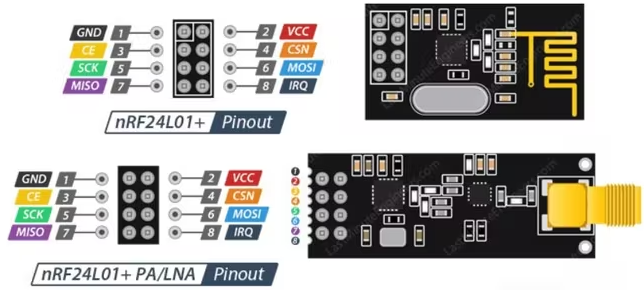
## Wiring Diagram
| NRF24L01+ Pin | Flipper Zero Pin |
|---------------|------------------|
| GND | GND |
| VCC | 3.3V |
| CE | PA6 |
| CSN | PC3 |
| SCK | PA4 |
| MOSI | PA7 |
| MISO | PA5 |
| IRQ | Not connected |
## Setup
1. Clone the repository:
```bash
git clone https://github.com/CyberDemon73/flipperzero-nrf24monitor.git
cd flipperzero-nrf24monitor
```
2. Build and deploy:
```bash
./fbt launch_app APPSRC=applications_user/flipperzero-nrf24monitor
```
## Installation
You can download the fap file directly from the repo and put it on the flipper through Qflipper desktop application.
## Usage
1. Launch the app from Flipper Zero's application menu
2. View real-time connection status:
- Green `○ +` = Connected
- Red `○ -` = Disconnected
3. Monitor SETUP_AW register value
4. Press OK to exit
## UI Overview
```
┌──────────────────────────────┐
│ NRF24L01+ Monitor │
├──────────────────────────────┤
│ ○ + CONNECTED │
│ │
│ ╭────────────────────────╮ │
│ │ SETUP_AW: 0x03 │ │
│ ╰────────────────────────╯ │
├──────────────────────────────┤
│ [ OK to Exit ] │
└──────────────────────────────┘
```
## Real Example
#### Connected

#### Disconnected

## Technical Details
- **SPI Interface**: External bus at 8MHz
- **Update Rate**: 100ms
- **Tested Register**: SETUP_AW (0x03)
- **Thread Safety**: Mutex-protected data access
## Troubleshooting
| Symptom | Solution |
|---------|----------|
| "NO SIGNAL" status | Check power (3.3V only) |
| Register shows 0xFF | Verify SPI wiring |
| Register shows 0x00 | Check CE/CSN connections |
| App crashes | Ensure proper mutex handling |
## License
MIT License - See [LICENSE](LICENSE) for details
---
**Contributions welcome!** Please submit issues or PRs for improvements.