https://github.com/cyberfantics/rock-paper-vision
https://github.com/cyberfantics/rock-paper-vision
ai computer-vision opencv python rock-paper-scissors
Last synced: about 2 months ago
JSON representation
- Host: GitHub
- URL: https://github.com/cyberfantics/rock-paper-vision
- Owner: cyberfantics
- Created: 2024-11-27T11:36:30.000Z (over 1 year ago)
- Default Branch: main
- Last Pushed: 2024-12-02T08:11:59.000Z (over 1 year ago)
- Last Synced: 2025-03-24T16:14:41.829Z (over 1 year ago)
- Topics: ai, computer-vision, opencv, python, rock-paper-scissors
- Language: Python
- Homepage:
- Size: 12.5 MB
- Stars: 0
- Watchers: 1
- Forks: 0
- Open Issues: 0
-
Metadata Files:
- Readme: README.md
Awesome Lists containing this project
README
# Rock-Paper-Vision
Welcome to **Rock-Paper-Vision**, a computer vision-based implementation of the classic Rock-Paper-Scissors game. This project uses OpenCV and CvZone's Hand Tracking Module to recognize hand gestures, enabling players to compete against an AI in real time.
---
## ScreenShots


---
## Features
- **Real-time hand tracking**: Detects gestures using your webcam.
- **AI opponent**: AI makes random moves for competitive gameplay.
- **Interactive UI**: Displays live scores and visual feedback with a custom background.
- **Hand gestures supported**:
- **Rock**: All fingers folded.
- **Paper**: All fingers open.
- **Scissors**: Only index and middle fingers open.
---
## How It Works
1. **Hand Tracking**:
- Uses `cvzone.HandTrackingModule` for detecting and interpreting hand gestures.
2. **Gameplay**:
- Recognizes the player's gesture.
- Generates a random AI move.
- Compares gestures to determine the winner based on traditional rules:
- Rock beats Scissors.
- Scissors beats Paper.
- Paper beats Rock.
3. **Scoring**:
- Updates and displays the score for both player and AI in real time.
- Visual feedback enhances the game experience.
---
## Installation and Setup
### Requirements
- **Python 3.8 or higher**
- **Libraries** (install via `pip`):
```bash
pip install opencv-python cvzone
```
### Steps
#### Clone This Repository
```
git clone https://github.com/cyberfantics/Rock-Paper-Vision.git
cd Rock-Paper-Vision
```
#### Run File Using
```python main.py```
---
# Controls
- **Play:** Press `P` to start the game.
- **Quit:** Press `Q` to exit the game.
- **Restart:** Press `R` to restart the game.
- **Record Game:** Press `S` to record the Game.
- **Open Camera:** Press `C` to Open Camera.
- **Record Game:** Press `I` to See Instructions Of Game.
---
## Video Demo
Check out the gameplay video on YouTube:
[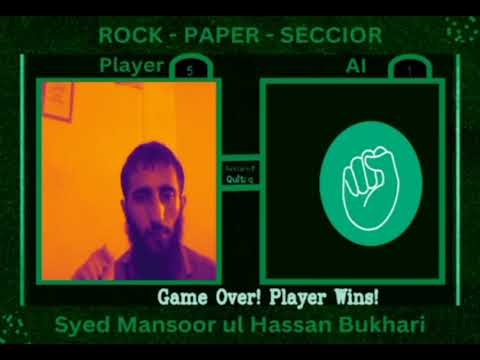](https://www.youtube.com/watch?v=imOyABws1ro)
---
# Author
**Syed Mansoor ul Hassan Bukhari**
[GitHub](https://github.com/cyberfantics) | [LinkedIn](https://www.linkedin.com/in/mansoor-bukhari/)
---
Enjoy the game! 🎮