https://github.com/d2r2/go-si7021
Golang library to interact with Silicon Labs Si7021 relative humidity and temperature sensor via I2C-bus from Raspberry PI.
https://github.com/d2r2/go-si7021
embedded-linux golang gpio i2c i2c-sensors raspberry-pi
Last synced: about 1 year ago
JSON representation
Golang library to interact with Silicon Labs Si7021 relative humidity and temperature sensor via I2C-bus from Raspberry PI.
- Host: GitHub
- URL: https://github.com/d2r2/go-si7021
- Owner: d2r2
- License: mit
- Created: 2018-03-27T03:56:20.000Z (over 8 years ago)
- Default Branch: master
- Last Pushed: 2018-12-22T16:50:24.000Z (over 7 years ago)
- Last Synced: 2025-04-03T08:03:25.462Z (over 1 year ago)
- Topics: embedded-linux, golang, gpio, i2c, i2c-sensors, raspberry-pi
- Language: Go
- Homepage:
- Size: 1.61 MB
- Stars: 6
- Watchers: 2
- Forks: 1
- Open Issues: 0
-
Metadata Files:
- Readme: README.md
- License: LICENSE
Awesome Lists containing this project
README
Silicon Labs Si7021 relative humidity and temperature sensor
============================================================
[](https://travis-ci.org/d2r2/go-si7021)
[](https://goreportcard.com/report/github.com/d2r2/go-si7021)
[](https://godoc.org/github.com/d2r2/go-si7021)
[](./LICENSE)
Si7021 ([pdf reference](https://raw.github.com/d2r2/go-si7021/master/docs/Si7021-A20.pdf)) high accuracy temperature and relative humidity sensor. Easily integrated with Arduino and Raspberry PI due to i2c communication interface:
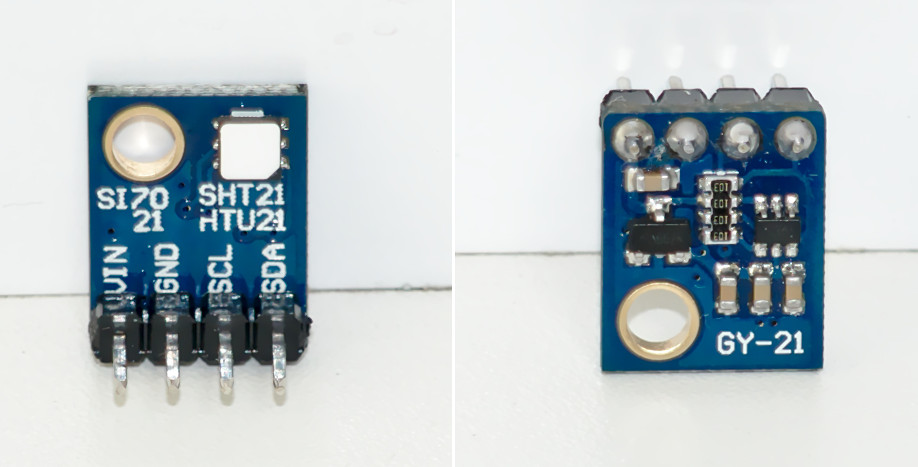
This sensor has extra feature - integrated heater which could be helpful in some specific application (such as periodic condensate removal, for example).
Here is a library written in [Go programming language](https://golang.org/) for Raspberry PI and counterparts, which gives you in the output relative humidity and temperature values (making all necessary i2c-bus interacting and values computing).
Golang usage
------------
```go
func main() {
// Create new connection to i2c-bus on 1 line with address 0x40.
// Use i2cdetect utility to find device address over the i2c-bus
i2c, err := i2c.NewI2C(0x40, 1)
if err != nil {
log.Fatal(err)
}
defer i2c.Close()
sensor := si7021.NewSi7021()
rh, t, err := sensor.ReadRelativeHumidityAndTemperature(i2c)
if err != nil {
log.Fatal(err)
}
log.Printf("Relative humidity and temperature = %v%%, %v*C\n", rh, t)
```
Getting help
------------
GoDoc [documentation](http://godoc.org/github.com/d2r2/go-si7021)
Installation
------------
```bash
$ go get -u github.com/d2r2/go-si7021
```
Troubleshooting
--------------
- *How to obtain fresh Golang installation to RPi device (either any RPi clone):*
If your RaspberryPI golang installation taken by default from repository is outdated, you may consider
to install actual golang manually from official Golang [site](https://golang.org/dl/). Download
tar.gz file containing armv6l in the name. Follow installation instructions.
- *How to enable I2C bus on RPi device:*
If you employ RaspberryPI, use raspi-config utility to activate i2c-bus on the OS level.
Go to "Interfacing Options" menu, to active I2C bus.
Probably you will need to reboot to load i2c kernel module.
Finally you should have device like /dev/i2c-1 present in the system.
- *How to find I2C bus allocation and device address:*
Use i2cdetect utility in format "i2cdetect -y X", where X may vary from 0 to 5 or more,
to discover address occupied by peripheral device. To install utility you should run
`apt install i2c-tools` on debian-kind system. `i2cdetect -y 1` sample output:
```
0 1 2 3 4 5 6 7 8 9 a b c d e f
00: -- -- -- -- -- -- -- -- -- -- -- -- --
10: -- -- -- -- -- -- -- -- -- -- -- -- -- -- -- --
20: -- -- -- -- -- -- -- -- -- -- -- -- -- -- -- --
30: -- -- -- -- -- -- -- -- -- -- -- -- -- -- -- --
40: -- -- -- -- -- -- -- -- -- -- -- -- -- -- -- --
50: -- -- -- -- -- -- -- -- -- -- -- -- -- -- -- --
60: -- -- -- -- -- -- -- -- -- -- -- -- -- -- -- --
70: -- -- -- -- -- -- 76 --
```
Contact
-------
Please use [Github issue tracker](https://github.com/d2r2/go-si7021/issues) for filing bugs or feature requests.
License
-------
Go-si7021 is licensed under MIT License.