https://github.com/dabasajay/Image-Caption-Generator
A neural network to generate captions for an image using CNN and RNN with BEAM Search.
https://github.com/dabasajay/Image-Caption-Generator
attention attention-mechanism attention-model beam-search bleu bleu-score caption-generation captioning-images cnn-keras convolutional-neural-networks deep-learning flickr-8k flickr-dataset image-caption image-captioning inception-v3 inceptionv3 lstm recurrent-neural-networks vgg16
Last synced: 2 months ago
JSON representation
A neural network to generate captions for an image using CNN and RNN with BEAM Search.
- Host: GitHub
- URL: https://github.com/dabasajay/Image-Caption-Generator
- Owner: dabasajay
- License: mit
- Created: 2018-08-10T13:33:49.000Z (almost 8 years ago)
- Default Branch: master
- Last Pushed: 2020-10-01T07:13:57.000Z (almost 6 years ago)
- Last Synced: 2023-11-07T17:36:58.910Z (over 2 years ago)
- Topics: attention, attention-mechanism, attention-model, beam-search, bleu, bleu-score, caption-generation, captioning-images, cnn-keras, convolutional-neural-networks, deep-learning, flickr-8k, flickr-dataset, image-caption, image-captioning, inception-v3, inceptionv3, lstm, recurrent-neural-networks, vgg16
- Language: Python
- Homepage:
- Size: 2.4 MB
- Stars: 247
- Watchers: 6
- Forks: 76
- Open Issues: 15
-
Metadata Files:
- Readme: README.md
- License: LICENSE
Awesome Lists containing this project
- awesome-open-source-ai-tools - dabasajay/Image-Caption-Generator - A neural network to generate captions for an image using CNN and RNN with BEAM Search. (Image Generation & Editing)
README
## Image Caption Generator
[](https://github.com/dabasajay/Image-Caption-Generator/issues)
[](https://github.com/dabasajay/Image-Caption-Generator/network)
[](https://github.com/dabasajay/Image-Caption-Generator/stargazers)
[](https://dabasajay.github.io/)
A neural network to generate captions for an image using CNN and RNN with BEAM Search.
Examples
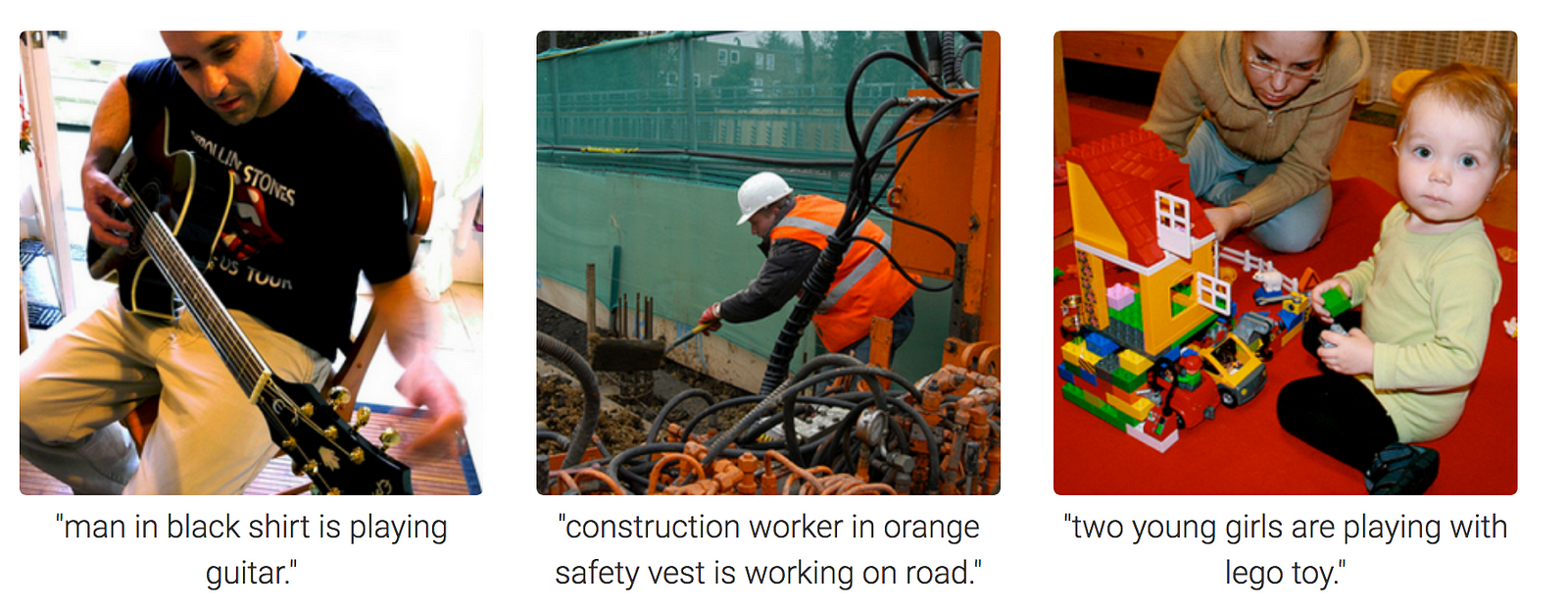
Image Credits : Towardsdatascience
## Table of Contents
1. [Requirements](#1-requirements)
2. [Training parameters and results](#2-training-parameters-and-results)
3. [Generated Captions on Test Images](#3-generated-captions-on-test-images)
4. [Procedure to Train Model](#4-procedure-to-train-model)
5. [Procedure to Test on new images](#5-procedure-to-test-on-new-images)
6. [Configurations (config.py)](#6-configurations-configpy)
7. [Frequently encountered problems](#7-frequently-encountered-problems)
8. [TODO](#8-todo)
9. [References](#9-references)
## 1. Requirements
Recommended System Requirements to train model.
- A good CPU and a GPU with atleast 8GB memory
- Atleast 8GB of RAM
- Active internet connection so that keras can download inceptionv3/vgg16 model weights
Required libraries for Python along with their version numbers used while making & testing of this project
- Python - 3.6.7
- Numpy - 1.16.4
- Tensorflow - 1.13.1
- Keras - 2.2.4
- nltk - 3.2.5
- PIL - 4.3.0
- Matplotlib - 3.0.3
- tqdm - 4.28.1
Flickr8k Dataset: Dataset Request Form
UPDATE (April/2019): The official site seems to have been taken down (although the form still works). Here are some direct download links:
- Flickr8k_Dataset
- Flickr8k_text
Download Link Credits: Jason Brownlee
Important: After downloading the dataset, put the reqired files in train_val_data folder
## 2. Training parameters and results
#### NOTE
- `batch_size=64` took ~14GB GPU memory in case of *InceptionV3 + AlternativeRNN* and *VGG16 + AlternativeRNN*
- `batch_size=64` took ~8GB GPU memory in case of *InceptionV3 + RNN* and *VGG16 + RNN*
- **If you're low on memory**, use google colab or reduce batch size
- In case of BEAM Search, `loss` and `val_loss` are same as in case of argmax since the model is same
| Model & Config | Argmax | BEAM Search |
| :--- | :--- | :--- |
| **InceptionV3 + AlternativeRNN**
- Epochs = 20
- Batch Size = 64
- Optimizer = Adam
- **Crossentropy loss**
- loss(train_loss): 2.4050
- val_loss: 3.0527 **BLEU Scores on Validation data**
- BLEU-1: 0.596818
- BLEU-2: 0.356009
- BLEU-3: 0.252489
- BLEU-4: 0.129536
*(Lower the better)*
*(Higher the better)*
- **k = 3**
- BLEU-1: 0.606086
- BLEU-2: 0.359171
- BLEU-3: 0.249124
- BLEU-4: 0.126599
**BLEU Scores on Validation data**
*(Higher the better)*
| **InceptionV3 + RNN**
- Epochs = 11
- Batch Size = 64
- Optimizer = Adam
- **Crossentropy loss**
- loss(train_loss): 2.5254
- val_loss: 3.1769 **BLEU Scores on Validation data**
- BLEU-1: 0.601791
- BLEU-2: 0.344289
- BLEU-3: 0.230025
- BLEU-4: 0.108898
*(Lower the better)*
*(Higher the better)*
- **k = 3**
- BLEU-1: 0.605097
- BLEU-2: 0.356094
- BLEU-3: 0.251132
- BLEU-4: 0.129900
**BLEU Scores on Validation data**
*(Higher the better)*
| **VGG16 + AlternativeRNN**
- Epochs = 18
- Batch Size = 64
- Optimizer = Adam
- **Crossentropy loss**
- loss(train_loss): 2.2880
- val_loss: 3.1889 **BLEU Scores on Validation data**
- BLEU-1: 0.596655
- BLEU-2: 0.342127
- BLEU-3: 0.229676
- BLEU-4: 0.108707
*(Lower the better)*
*(Higher the better)*
- **k = 3**
- BLEU-1: 0.593876
- BLEU-2: 0.348569
- BLEU-3: 0.242063
- BLEU-4: 0.123221
**BLEU Scores on Validation data**
*(Higher the better)*
| **VGG16 + RNN**
- Epochs = 7
- Batch Size = 64
- Optimizer = Adam
- **Crossentropy loss**
- loss(train_loss): 2.6297
- val_loss: 3.3486 **BLEU Scores on Validation data**
- BLEU-1: 0.557626
- BLEU-2: 0.317652
- BLEU-3: 0.216636
- BLEU-4: 0.105288
*(Lower the better)*
*(Higher the better)*
- **k = 3**
- BLEU-1: 0.568993
- BLEU-2: 0.326569
- BLEU-3: 0.226629
- BLEU-4: 0.113102
**BLEU Scores on Validation data**
*(Higher the better)*
## 3. Generated Captions on Test Images
**Model used** - *InceptionV3 + AlternativeRNN*
| Image | Caption |
| :---: | :--- |
|  |
|
-
Argmax: A man in a blue shirt is riding a bike on a dirt path. -
BEAM Search, k=3: A man is riding a bicycle on a dirt path.
|
 |
| -
Argmax: A man in a red kayak is riding down a waterfall. -
BEAM Search, k=3: A man on a surfboard is riding a wave.
## 4. Procedure to Train Model
1. Clone the repository to preserve directory structure.
`git clone https://github.com/dabasajay/Image-Caption-Generator.git`
2. Put the required dataset files in `train_val_data` folder (files mentioned in readme there).
3. Review `config.py` for paths and other configurations (explained below).
4. Run `train_val.py`.
## 5. Procedure to Test on new images
1. Clone the repository to preserve directory structure.
`git clone https://github.com/dabasajay/Image-Caption-Generator.git`
2. Train the model to generate required files in `model_data` folder (steps given above).
3. Put the test images in `test_data` folder.
4. Review `config.py` for paths and other configurations (explained below).
5. Run `test.py`.
## 6. Configurations (config.py)
**config**
1. **`images_path`** :- Folder path containing flickr dataset images
2. `train_data_path` :- .txt file path containing images ids for training
3. `val_data_path` :- .txt file path containing imgage ids for validation
4. `captions_path` :- .txt file path containing captions
5. `tokenizer_path` :- path for saving tokenizer
6. `model_data_path` :- path for saving files related to model
7. **`model_load_path`** :- path for loading trained model
8. **`num_of_epochs`** :- Number of epochs
9. **`max_length`** :- Maximum length of captions. This is set manually after training of model and required for test.py
10. **`batch_size`** :- Batch size for training (larger will consume more GPU & CPU memory)
11. **`beam_search_k`** :- BEAM search parameter which tells the algorithm how many words to consider at a time.
11. `test_data_path` :- Folder path containing images for testing/inference
12. **`model_type`** :- CNN Model type to use -> inceptionv3 or vgg16
13. **`random_seed`** :- Random seed for reproducibility of results
**rnnConfig**
1. **`embedding_size`** :- Embedding size used in Decoder(RNN) Model
2. **`LSTM_units`** :- Number of LSTM units in Decoder(RNN) Model
3. **`dense_units`** :- Number of Dense units in Decoder(RNN) Model
4. **`dropout`** :- Dropout probability used in Dropout layer in Decoder(RNN) Model
## 7. Frequently encountered problems
- **Out of memory issue**:
- Try reducing `batch_size`
- **Results differ everytime I run script**:
- Due to stochastic nature of these algoritms, results *may* differ slightly everytime. Even though I did set random seed to make results reproducible, results *may* differ slightly.
- **Results aren't very great using beam search compared to argmax**:
- Try higher `k` in BEAM search using `beam_search_k` parameter in config. Note that higher `k` will improve results but it'll also increase inference time significantly.
## 8. TODO
- [X] Support for VGG16 Model. Uses InceptionV3 Model by default.
- [X] Implement 2 architectures of RNN Model.
- [X] Support for batch processing in data generator with shuffling.
- [X] Implement BEAM Search.
- [X] Calculate BLEU Scores using BEAM Search.
- [ ] Implement Attention and change model architecture.
- [ ] Support for pre-trained word vectors like word2vec, GloVe etc.
## 9. References
-
Show and Tell: A Neural Image Caption Generator - Oriol Vinyals, Alexander Toshev, Samy Bengio, Dumitru Erhan -
Where to put the Image in an Image Caption Generator - Marc Tanti, Albert Gatt, Kenneth P. Camilleri - How to Develop a Deep Learning Photo Caption Generator from Scratch