https://github.com/dadecoza/pidgin-meshtastic
a Meshtastic plugin for Pidgin
https://github.com/dadecoza/pidgin-meshtastic
meshtastic nanopb pidgin pidgin-plugin
Last synced: 11 months ago
JSON representation
a Meshtastic plugin for Pidgin
- Host: GitHub
- URL: https://github.com/dadecoza/pidgin-meshtastic
- Owner: dadecoza
- License: mit
- Created: 2024-12-03T19:12:31.000Z (over 1 year ago)
- Default Branch: main
- Last Pushed: 2024-12-11T23:46:59.000Z (over 1 year ago)
- Last Synced: 2024-12-12T00:28:02.579Z (over 1 year ago)
- Topics: meshtastic, nanopb, pidgin, pidgin-plugin
- Language: C
- Homepage: https://github.com/dadecoza/pidgin-meshtastic
- Size: 311 KB
- Stars: 9
- Watchers: 3
- Forks: 4
- Open Issues: 1
-
Metadata Files:
- Readme: README.md
- License: LICENSE
Awesome Lists containing this project
- awesome-meshtastic - Meshtastic Plugin for Pidgin - A plugin to enable you to use Meshtastic with Pidgin (a multiplatform chat client) (Local Software / Regional)
README

# a Meshtastic plugin for Pidgin
Make sure you already have [Pidgin](https://pidgin.im/install/) installed.
The Windows installer for the plugin is available [here](https://github.com/dadecoza/pidgin-meshtastic/releases/latest/download/pidgin-meshtastic-setup.exe).
Precompiled libraries for Windows and Linux can be found under [releases](https://github.com/dadecoza/pidgin-meshtastic/releases).
## Installation
### Debian
```shell
sudo apt-get update
sudo apt-get install pidgin-dev git
git clone https://github.com/dadecoza/pidgin-meshtastic.git --recursive
cd pidgin-meshtastic
make
sudo make install
sudo adduser $USER dialout
```
### Arch
[AUR Package](https://aur.archlinux.org/packages/pidgin-meshtastic-git) (Thanks [timttmy](https://github.com/timttmy))
### Windows
[Windows Installer](https://github.com/dadecoza/pidgin-meshtastic/releases/latest/download/pidgin-meshtastic-setup.exe)
# Adding the account
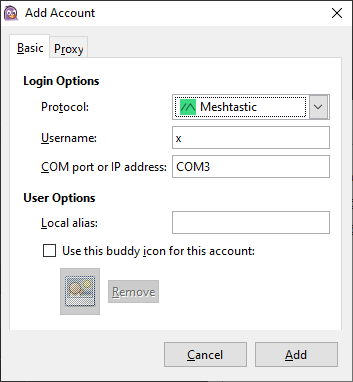
* *Protocol*: Meshtastic
* *Username*: this can be anything, your radio will update the username once connected
* *COM port or IP address*: Typically "COMx" on Windows, or "/dev/ttyUSBx" on Linux. It can also be a valid IPv4 address for socket connections.
* *Local Alias*: Can be left empty, it will populate on first connect.
# Usage
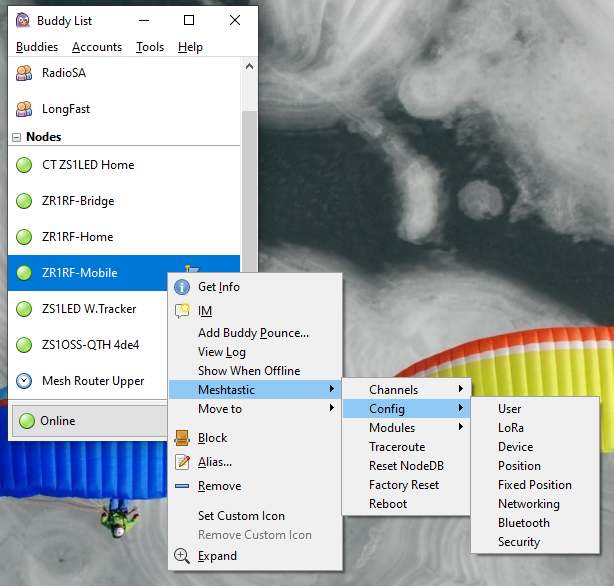
* Right-click on a node and navigate to the "Meshtastic" menu item for Meshtastic-specific actions.
* These actions will be applied to your local node (indicated by the blue flag) or any remote node where you have admin access.
* A note on admin access: The legacy admin channel will take precedence over admin keys. This means that if you want to administer newer nodes with admin keys configured, you must ensure the admin channel is disabled or you will get the "no channel" error message.