https://github.com/damachine/coolerdash
Monitor telemetry data on an AIO liquid cooler with an integrated LCD display
https://github.com/damachine/coolerdash
cooler cooling cpu-monitoring gpu-monitoring hwmon kraken lcd linux liquid liquidctl nzxt watercooling
Last synced: 5 days ago
JSON representation
Monitor telemetry data on an AIO liquid cooler with an integrated LCD display
- Host: GitHub
- URL: https://github.com/damachine/coolerdash
- Owner: damachine
- License: mit
- Created: 2025-07-07T22:59:28.000Z (12 months ago)
- Default Branch: master
- Last Pushed: 2026-01-24T23:31:04.000Z (5 months ago)
- Last Synced: 2026-01-25T16:19:58.788Z (5 months ago)
- Topics: cooler, cooling, cpu-monitoring, gpu-monitoring, hwmon, kraken, lcd, linux, liquid, liquidctl, nzxt, watercooling
- Language: C
- Homepage:
- Size: 5.43 MB
- Stars: 24
- Watchers: 2
- Forks: 0
- Open Issues: 7
-
Metadata Files:
- Readme: README.md
- Changelog: CHANGELOG.md
- Contributing: CONTRIBUTING.md
- Funding: .github/FUNDING.yml
- License: LICENSE
- Code of conduct: CODE_OF_CONDUCT.md
- Security: SECURITY.md
Awesome Lists containing this project
README


---
# CoolerDash 🐧
#### This tool allows you to monitoring (display) real-time telemetry data from sensors on an AIO liquid cooler with an integrated LCD display.
> Use it successfully myself – maybe it will help you too! ❤️
---
## Features
- **Plug-In that extends the LCD functionality of [CoolerControl](https://gitlab.com/coolercontrol/coolercontrol)**
- **Support for additional sensor values (CPU/GPU/Liquid)**
- **Integrated UI interface for customizing all settings**
- **Display modes - for now**
- **Dual Mode (default):** Shows CPU and GPU temperatures simultaneously
- **Circle Mode (beta):** Alternates between CPU and GPU switch every 5 sec
> ##### Special thanks to [@codifryed](https://github.com/codifryed), the founder of CoolerControl

https://github.com/user-attachments/assets/3fc71b81-8c6a-4e81-a600-4b2dcff2452a
---
## System Requirements
> [!WARNING]
> Version 2.0.4+ runs as a CoolerControl plugin.
> This requires CoolerControl >=3.1.0 with plugin support.
- **OS**: Linux (systemd or OpenRC)
- **CoolerControl**: Version >=3.1.0 REQUIRED - must be installed and running [Installation Guide](https://gitlab.com/coolercontrol/coolercontrol/-/blob/main/README.md)
- **CPU**: x86-64-v3 compatible (Intel Haswell+ / AMD Excavator+)
- **LCD**: AIO liquid cooler LCD displays **(NZXT, etc.)**
> See the [Supported Devices](https://github.com/damachine/coolerdash/blob/master/docs/devices.md) for confirmed working hardware. In principle, all devices supported by CoolerControl/[liquidctl](https://github.com/liquidctl/liquidctl?tab=readme-ov-file#supported-devices) should work with CoolerDash. You can [submit a device confirmation](https://github.com/damachine/coolerdash/issues/new?template=device-confirmation.yml) to help expand the list.
---
## Installation
#### Arch-based distributions
[](https://aur.archlinux.org/packages/coolerdash-git)
```bash
# STEP 1: Install
yay -S coolerdash-git
#OR any other AUR helper
```
**Distributions pre-builted packages:**
[](https://github.com/damachine/coolerdash/releases/latest)
[](https://github.com/damachine/coolerdash/releases/latest)
[](https://github.com/damachine/coolerdash/releases/latest)
[](https://github.com/damachine/coolerdash/releases/latest)
#### Manual installation: All distributions
[](https://github.com/damachine/coolerdash/actions/workflows/install.yml)
```bash
# STEP 1: Clone repository
git clone https://github.com/damachine/coolerdash.git
cd coolerdash
# STEP 2: Build and install (auto-detects Linux distribution and installs dependencies)
make install
```
> For manual installations, make sure all required dependencies are installed correctly. Manual installations need to be updated manually.
---
## Configuration
**Start CoolerControl Service (if not already enabled):**
```bash
# systemd
systemctl enable --now coolercontrold.service
# OpenRC
rc-update add coolercontrold default
rc-service coolercontrold start
```
**CoolerDash Configuration (optional):**
In the CoolerControl settings menu, under the plugin tab (beta), you can now use the CoolerDash UI to make your custome settings.
Restart CoolerControl to apply changes: `systemctl restart coolercontrold.service` or `rc-service coolercontrold restart`.
Screenshots
comming soon...
---
## Advanced Usage
Expand
#### Build Commands
```bash
make # Standard C99 build
make clean # Clean up
make install # System installation with dependency auto-detection
make uninstall # Remove installation (service, binary, files)
make debug # Debug build with AddressSanitizer
make help # Show all options
```
#### Debugging Steps
```bash
# 1. Check CoolerControl status
systemctl status coolercontrold
# or on OpenRC:
rc-service coolercontrold status
curl http://localhost:11987/devices
# 2. Test CoolerDash manually (with clean output)
/usr/libexec/coolerdash/coolerdash
# 3. Test CoolerDash with detailed verbose logging
/usr/libexec/coolerdash/coolerdash --verbose
# or short form:
/usr/libexec/coolerdash/coolerdash -v
# 4. Debug build and installation (recommended)
# Option A — Build and install with ASan in one command (safe):
sudo make debug install
# Option B — Build as your user and install the debug binary manually (recommended):
make clean && make debug
sudo install -Dm755 bin/coolerdash /usr/libexec/coolerdash/coolerdash
# Notes:
# • Avoid running `make debug` followed by `sudo make install` — the separate `sudo make install` may trigger a rebuild without debug flags and cause linker errors (missing ASan symbols).
# • If you previously built as root and own files are root-owned, fix ownership before rebuilding:
# sudo chown -R $USER:$USER build bin
# 5. Check plugin logs (STATUS messages always visible)
journalctl -xeu coolercontrold.service -f
# On OpenRC, inspect your configured system logger for CoolerControl/coolerdash output.
# 6. View recent logs with context
journalctl -u coolercontrold.service -n 50
```
---
## Troubleshooting
Expand
#### Installation Issues
If you see errors like "conflicting files" or "manual installation detected" during Arch/AUR `makepkg -si`, CoolerDash was previously installed manually via `make install`.
**Solution:**
```bash
sudo make uninstall
```
#### Check CoolerControl devices
```bash
liquidctl --version
# Expected: liquidctl v1.15.0 (or newer)
```
```bash
curl http://localhost:11987/devices | jq
```
```json
{
"name": "NZXT Kraken 2023",
"type": "Liquidctl",
"type_index": 1,
"uid": "8d4becb03bca2a8e8d4213ac376a1094f39d2786f688549ad3b6a591c3affdf9",
"lc_info": {
"driver_type": "KrakenZ3",
"firmware_version": "2.0.0",
"unknown_asetek": false
}
}
```
---
## Documentation
Expand
- **[Configuration Guide](https://github.com/damachine/coolerdash/blob/master/docs/config-guide.md)** - All configuration options
- **[Supported Devices](https://github.com/damachine/coolerdash/blob/master/docs/devices.md)** - Confirmed working hardware
- **[Display Modes Guide](https://github.com/damachine/coolerdash/blob/master/docs/display-modes.md)** - Dual and Circle mode reference
- **[Developer Guide](https://github.com/damachine/coolerdash/blob/master/docs/developer-guide.md)** - Architecture and API integration
- **[Display Detection](https://github.com/damachine/coolerdash/blob/master/docs/display-detection.md)** - Display shape detection
- **[CoolerControl API Guide](https://github.com/damachine/coolerdash/blob/master/docs/coolercontrol-api.md)** - API module documentation
---
## Community & Support
**Questions or ideas?** Join our [Discussions](https://github.com/damachine/coolerdash/discussions) or open an [Issue](https://github.com/damachine/coolerdash/issues).


**Support the project:**
• ⭐ Star this repo
• 🐛 Report bugs
• 🔄 Share with others
• 📝 Contribute
• [](https://github.com/sponsors/damachine)
[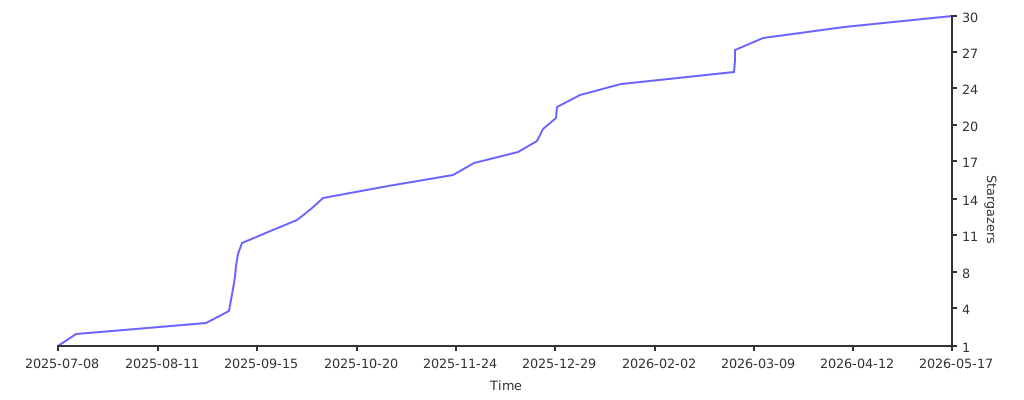](https://starchart.cc/damachine/coolerdash)