https://github.com/damiancodes/kikao
A multi-platform job aggregator that scrapes job listings from LinkedIn, Glassdoor, Indeed, and other job sites. Built with Django, Selenium, and Docker for production deployment.
https://github.com/damiancodes/kikao
django django-rest-framework python selenium webcrawler webdriver
Last synced: about 2 months ago
JSON representation
A multi-platform job aggregator that scrapes job listings from LinkedIn, Glassdoor, Indeed, and other job sites. Built with Django, Selenium, and Docker for production deployment.
- Host: GitHub
- URL: https://github.com/damiancodes/kikao
- Owner: damiancodes
- Created: 2025-09-01T21:03:08.000Z (10 months ago)
- Default Branch: master
- Last Pushed: 2025-09-05T22:42:30.000Z (10 months ago)
- Last Synced: 2025-09-06T00:20:49.471Z (10 months ago)
- Topics: django, django-rest-framework, python, selenium, webcrawler, webdriver
- Language: Python
- Homepage:
- Size: 48.8 KB
- Stars: 0
- Watchers: 0
- Forks: 0
- Open Issues: 0
-
Metadata Files:
- Readme: README.md
Awesome Lists containing this project
README
# Job Scraper Dashboard
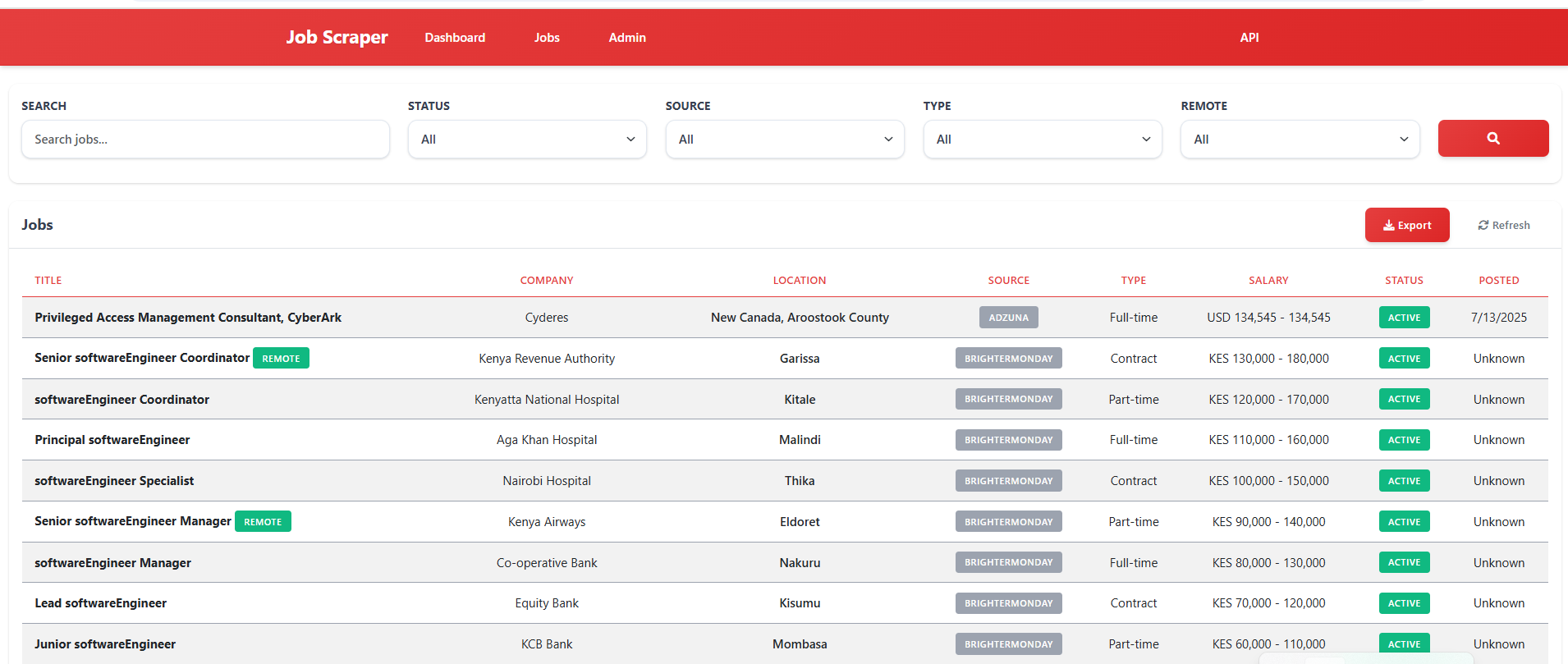
A comprehensive multi-platform job aggregator that scrapes job listings from various job sites including LinkedIn, Glassdoor, Indeed, RemoteOK, BrighterMonday, Fuzu, and Jobright. Built with Django, Selenium, and Docker for production deployment with a modern Kenya Airways-inspired red and white theme.
## Table of Contents
- [Features](#features)
- [Tech Stack](#tech-stack)
- [Project Structure](#project-structure)
- [Quick Start](#quick-start)
- [Configuration](#configuration)
- [API Documentation](#api-documentation)
- [Job Sources](#job-sources)
- [Development](#development)
- [Deployment](#deployment)
- [Troubleshooting](#troubleshooting)
- [Contributing](#contributing)
- [License](#license)
## Features
### Core Functionality
- **Multi-platform job scraping** from LinkedIn, Glassdoor, Indeed, RemoteOK, BrighterMonday, Fuzu, and Jobright
- **Real-time job search** with instant results
- **API integration** with Adzuna and custom Kenya Jobs API
- **Duplicate job detection** and intelligent merging
- **Advanced filtering** by location, company, salary, and job type
- **CSV/Excel export** functionality for job data
- **RESTful API** for data consumption and integration
### User Interface
- **Modern dashboard** with Kenya Airways-inspired red and white theme
- **Responsive design** that works on desktop and mobile
- **Real-time search results** with loading indicators
- **Interactive job listings** with detailed information
- **Admin panel** for system management
- **Statistics overview** with job counts and metrics
### Technical Features
- **Asynchronous task processing** with Celery and Redis
- **Docker containerization** for easy deployment
- **Anti-detection measures** for reliable scraping
- **Comprehensive logging** and error handling
- **Database optimization** with proper indexing
- **Caching strategies** for improved performance
## Tech Stack
### Backend
- **Django 4.2.7** - Web framework
- **Django REST Framework** - API development
- **PostgreSQL** - Primary database (production)
- **SQLite** - Development database
- **Celery** - Asynchronous task queue
- **Redis** - Message broker and caching
### Scraping & Data Processing
- **Selenium** - Web browser automation
- **BeautifulSoup** - HTML parsing
- **requests** - HTTP client for API calls
- **Chrome WebDriver** - Browser automation engine
### Frontend
- **Django Templates** - Server-side rendering
- **Bootstrap 5.3.0** - CSS framework
- **jQuery** - JavaScript library
- **Font Awesome** - Icon library
- **Custom CSS** - Kenya Airways theme
### Infrastructure
- **Docker** - Containerization
- **Docker Compose** - Multi-container orchestration
- **Nginx** - Web server (production)
- **Gunicorn** - WSGI server
## Project Structure
```
job-scraper-dashboard/
├── backend/ # Django backend application
│ ├── apps/ # Django applications
│ │ ├── jobs/ # Job management and search
│ │ │ ├── management/commands/ # Custom management commands
│ │ │ ├── migrations/ # Database migrations
│ │ │ ├── models.py # Job and search models
│ │ │ ├── serializers.py # API serializers
│ │ │ ├── views.py # API and web views
│ │ │ ├── urls.py # URL routing
│ │ │ ├── filters.py # Query filtering
│ │ │ └── admin.py # Admin interface
│ │ ├── companies/ # Company management
│ │ │ ├── migrations/ # Database migrations
│ │ │ ├── models.py # Company models
│ │ │ ├── serializers.py # API serializers
│ │ │ ├── views.py # API views
│ │ │ ├── urls.py # URL routing
│ │ │ ├── filters.py # Query filtering
│ │ │ └── admin.py # Admin interface
│ │ └── scraping/ # Web scraping engine
│ │ ├── api_clients/ # External API integrations
│ │ │ ├── adzuna.py # Adzuna API client
│ │ │ ├── jobright.py # Jobright API client
│ │ │ └── kenya_jobs.py # Custom Kenya Jobs API
│ │ ├── scrapers/ # Web scrapers
│ │ │ ├── base.py # Base scraper class
│ │ │ ├── indeed.py # Indeed scraper
│ │ │ ├── glassdoor.py # Glassdoor scraper
│ │ │ ├── linkedin.py # LinkedIn scraper
│ │ │ ├── remoteok.py # RemoteOK scraper
│ │ │ ├── brightermonday.py # BrighterMonday scraper
│ │ │ └── fuzu.py # Fuzu scraper
│ │ ├── management/commands/ # Custom management commands
│ │ ├── migrations/ # Database migrations
│ │ ├── models.py # Scraping models
│ │ ├── tasks.py # Celery tasks
│ │ ├── views.py # API views
│ │ ├── urls.py # URL routing
│ │ ├── serializers.py # API serializers
│ │ ├── utils.py # Utility functions
│ │ └── admin.py # Admin interface
│ ├── config/ # Django configuration
│ │ ├── settings/ # Environment-specific settings
│ │ │ ├── base.py # Base settings
│ │ │ ├── development.py # Development settings
│ │ │ └── production.py # Production settings
│ │ ├── urls.py # Main URL configuration
│ │ ├── wsgi.py # WSGI configuration
│ │ ├── asgi.py # ASGI configuration
│ │ └── celery.py # Celery configuration
│ ├── requirements/ # Python dependencies
│ │ ├── base.txt # Base requirements
│ │ ├── dev.txt # Development requirements
│ │ └── prod.txt # Production requirements
│ └── manage.py # Django management script
├── frontend/ # Frontend assets and templates
│ ├── static/ # Static files
│ │ ├── css/ # Stylesheets
│ │ │ └── main.css # Main stylesheet with Kenya Airways theme
│ │ └── js/ # JavaScript files
│ │ └── main.js # Main JavaScript file
│ └── templates/ # Django templates
│ ├── base.html # Base template
│ ├── jobs/ # Job-related templates
│ │ ├── dashboard.html # Main dashboard
│ │ └── job_list.html # Job listings page
│ └── django_filters/ # Filter templates
│ └── rest_framework/
│ └── form.html # Filter form template
├── scripts/ # Utility scripts
│ ├── docker-logs.sh # Docker logs script (Linux/Mac)
│ ├── docker-logs.ps1 # Docker logs script (Windows)
│ └── setup.sh # Setup script
├── docker-compose.yml # Docker Compose configuration
├── Dockerfile # Docker image definition
├── env.example # Environment variables example
└── README.md # This file
```
## Quick Start
### Prerequisites
- Docker and Docker Compose
- Git
- Modern web browser
### Local Development
1. **Clone the repository**
```bash
git clone
cd job-scraper-dashboard
```
2. **Set up environment variables**
```bash
cp env.example .env
# Edit .env with your configuration
```
3. **Build and run with Docker**
```bash
docker-compose up --build
```
4. **Access the application**
- Dashboard: http://localhost:8000
- API: http://localhost:8000/api/
- Admin: http://localhost:8000/admin/
### Cloud Deployment
**Recommended Platforms:**
- **Railway** (Best for this project) - [Deploy Guide](docs/DEPLOYMENT.md#railway-recommended)
- **DigitalOcean App Platform** - [Deploy Guide](docs/DEPLOYMENT.md#digitalocean-app-platform)
- **Heroku** - [Deploy Guide](docs/DEPLOYMENT.md#heroku)
**Not Suitable:**
- ❌ Vercel (No persistent database, 10s timeout limit)
- ❌ Firebase (No Python runtime, no Selenium support)
### First-time Setup
1. **Create a superuser account**
```bash
docker-compose exec web python manage.py createsuperuser
```
2. **Initialize job sources**
```bash
docker-compose exec web python manage.py init_sources
```
3. **Run initial migrations**
```bash
docker-compose exec web python manage.py migrate
```
## Configuration
### Environment Variables
Create a `.env` file in the root directory with the following variables:
```env
# Django Settings
DEBUG=True
SECRET_KEY=your-secret-key-here
ALLOWED_HOSTS=localhost,127.0.0.1
# Database
DATABASE_URL=postgresql://user:password@db:5432/jobscraper
# Redis
REDIS_URL=redis://redis:6379/0
# API Keys
ADZUNA_APP_ID=your-adzuna-app-id
ADZUNA_APP_KEY=your-adzuna-app-key
# Scraping Settings
CHROME_HEADLESS=True
SCRAPING_DELAY=2
MAX_CONCURRENT_SCRAPERS=3
```
### Job Sources Configuration
The system supports multiple job sources:
- **Indeed** - Global job search
- **Glassdoor** - Company reviews and jobs
- **LinkedIn** - Professional network jobs
- **RemoteOK** - Remote job opportunities
- **BrighterMonday** - Kenya job market
- **Fuzu** - East Africa job platform
- **Jobright** - AI-powered job matching
- **Adzuna** - Job search API
## API Documentation
### Base URL
```
http://localhost:8000/api/
```
### Authentication
Currently uses `AllowAny` permissions. For production, implement proper authentication.
### Endpoints
#### Jobs
- `GET /api/jobs/` - List all jobs
- `GET /api/jobs/{id}/` - Get specific job
- `GET /api/jobs/statistics/` - Get job statistics
- `GET /api/jobs/export/` - Export jobs to CSV
#### Companies
- `GET /api/companies/` - List all companies
- `GET /api/companies/{id}/` - Get specific company
- `GET /api/companies/statistics/` - Get company statistics
#### Scraping Sessions
- `GET /api/sessions/` - List scraping sessions
- `GET /api/sessions/{id}/` - Get specific session
- `POST /api/sessions/{id}/execute/` - Execute scraping session
#### Job Sources
- `GET /api/sources/` - List job sources
- `GET /api/sources/{id}/` - Get specific source
### Example API Usage
```python
import requests
# Get all jobs
response = requests.get('http://localhost:8000/api/jobs/')
jobs = response.json()
# Search jobs with filters
params = {
'search': 'python developer',
'location': 'Nairobi',
'employment_type': 'Full-time'
}
response = requests.get('http://localhost:8000/api/jobs/', params=params)
filtered_jobs = response.json()
# Export jobs to CSV
response = requests.get('http://localhost:8000/api/jobs/export/')
with open('jobs.csv', 'wb') as f:
f.write(response.content)
```
## Job Sources
### Supported Platforms
1. **Indeed** - Global job search engine
- Countries: US, UK, Canada, Australia, Kenya
- Features: Salary information, company details, location filtering
2. **Glassdoor** - Company reviews and job listings
- Features: Company ratings, salary insights, interview reviews
3. **LinkedIn** - Professional network job board
- Features: Professional networking, company connections
4. **RemoteOK** - Remote job opportunities
- Features: Remote work focus, global opportunities
5. **BrighterMonday** - Kenya job market
- Features: Local Kenyan jobs, company profiles
6. **Fuzu** - East Africa job platform
- Features: Regional focus, career development
7. **Jobright** - AI-powered job matching
- Features: Smart matching, personalized recommendations
8. **Adzuna** - Job search API
- Features: Real-time data, comprehensive coverage
### Scraping Strategy
- **Anti-detection measures**: Random user agents, delays, stealth mode
- **Rate limiting**: Respectful scraping with delays
- **Error handling**: Comprehensive logging and retry mechanisms
- **Data validation**: Clean and normalize scraped data
- **Duplicate detection**: Intelligent merging of similar jobs
## Development
### Local Development Setup
1. **Install Python dependencies**
```bash
pip install -r backend/requirements/dev.txt
```
2. **Set up database**
```bash
python backend/manage.py migrate
python backend/manage.py createsuperuser
```
3. **Run development server**
```bash
python backend/manage.py runserver
```
4. **Run Celery worker** (in separate terminal)
```bash
celery -A backend.config worker --loglevel=info
```
5. **Run Celery beat** (in separate terminal)
```bash
celery -A backend.config beat --loglevel=info
```
### Running Tests
```bash
python backend/manage.py test
```
### Code Quality
- **Linting**: Use flake8 or black for code formatting
- **Type hints**: Add type annotations for better code clarity
- **Documentation**: Follow Django documentation standards
- **Testing**: Write unit tests for new features
### Adding New Job Sources
1. **Create scraper class** in `backend/apps/scraping/scrapers/`
2. **Inherit from BaseScraper** and implement required methods
3. **Add to scrapers dictionary** in `tasks.py`
4. **Update models** if new fields are needed
5. **Add tests** for the new scraper
Example:
```python
# backend/apps/scraping/scrapers/new_source.py
from .base import BaseScraper
class NewSourceScraper(BaseScraper):
def __init__(self):
super().__init__()
self.base_url = "https://example.com"
def scrape_jobs(self, query, location=None, max_results=50):
# Implement scraping logic
pass
```
## Deployment
### Production Deployment
1. **Set up production environment**
```bash
cp env.example .env.production
# Configure production settings
```
2. **Build production image**
```bash
docker-compose -f docker-compose.prod.yml build
```
3. **Deploy with Docker Compose**
```bash
docker-compose -f docker-compose.prod.yml up -d
```
### Environment-specific Settings
- **Development**: Debug enabled, SQLite database, local Redis
- **Production**: Debug disabled, PostgreSQL database, Redis cluster
- **Testing**: In-memory database, mock external services
### Monitoring and Logging
- **Application logs**: Available via Docker logs
- **Error tracking**: Implement Sentry or similar service
- **Performance monitoring**: Use Django Debug Toolbar in development
- **Health checks**: Implement health check endpoints
## Troubleshooting
### Common Issues
1. **Docker build fails**
- Check Docker and Docker Compose versions
- Ensure sufficient disk space
- Verify network connectivity
2. **Database connection errors**
- Check database service status
- Verify connection credentials
- Ensure database is accessible
3. **Scraping fails**
- Check internet connectivity
- Verify target websites are accessible
- Review anti-detection measures
- Check Chrome WebDriver installation
4. **Static files not loading**
- Run `python manage.py collectstatic`
- Check static file configuration
- Verify web server configuration
### Debugging
1. **View application logs**
```bash
docker-compose logs -f web
```
2. **Access container shell**
```bash
docker-compose exec web bash
```
3. **Check database**
```bash
docker-compose exec web python manage.py dbshell
```
4. **Run management commands**
```bash
docker-compose exec web python manage.py
```
### Performance Optimization
1. **Database optimization**
- Add proper indexes
- Use database connection pooling
- Implement query optimization
2. **Caching strategies**
- Redis caching for frequently accessed data
- Template fragment caching
- API response caching
3. **Scraping optimization**
- Implement concurrent scraping
- Use headless browser mode
- Optimize selectors and parsing
## Contributing
### Development Workflow
1. **Fork the repository**
2. **Create a feature branch**
3. **Make your changes**
4. **Add tests for new features**
5. **Ensure all tests pass**
6. **Submit a pull request**
### Code Standards
- Follow PEP 8 for Python code
- Use meaningful variable and function names
- Add docstrings for functions and classes
- Write comprehensive tests
- Update documentation for new features
### Pull Request Guidelines
- Provide clear description of changes
- Include screenshots for UI changes
- Ensure all tests pass
- Update documentation as needed
- Follow the existing code style
## License
This project is licensed under the MIT License - see the [LICENSE](LICENSE) file for details.
## Support
For support and questions:
- Create an issue in the GitHub repository
- Check the troubleshooting section
- Review the API documentation
- Contact the development team
## Changelog
### Version 1.0.0
- Initial release with multi-platform job scraping
- Kenya Airways-inspired theme
- Docker containerization
- REST API implementation
- Admin dashboard
- CSV export functionality
---
**Built with Django, Selenium, and Docker for reliable job scraping and management.**