https://github.com/danielkov/qcss
Framework agnostic styling pipeline and convenient use options.
https://github.com/danielkov/qcss
Last synced: about 1 year ago
JSON representation
Framework agnostic styling pipeline and convenient use options.
- Host: GitHub
- URL: https://github.com/danielkov/qcss
- Owner: danielkov
- License: mit
- Created: 2020-02-27T12:06:34.000Z (over 6 years ago)
- Default Branch: master
- Last Pushed: 2023-01-05T08:28:23.000Z (over 3 years ago)
- Last Synced: 2025-04-08T22:02:02.645Z (about 1 year ago)
- Language: JavaScript
- Size: 1.49 MB
- Stars: 0
- Watchers: 1
- Forks: 0
- Open Issues: 13
-
Metadata Files:
- Readme: README.md
- Contributing: CONTRIBUTING.md
- License: LICENSE
- Code of conduct: CODE_OF_CONDUCT.md
Awesome Lists containing this project
README
# Styling (name TBD)
## Motivation
CSS in JS is hard. A new way of styling in React appears at least once a month. Popular options out there tend to lean towards one or two different APIs and multiple different engines to do essentially the same thing. At the end of the day we just want to add some colour to our `div`s. What if you could **rely on the same API** for adding styles to your components while being free to **switch the underlying implementation** - even at run time? What if you could treat styling as a pipeline, instead of treating it like something static? Imagine coming up with a nice new pattern to convert your code into CSS and being able to **instantly apply** that to your styling library of choice, without having to fork the library.
I propose all this is possible, and here's how:
[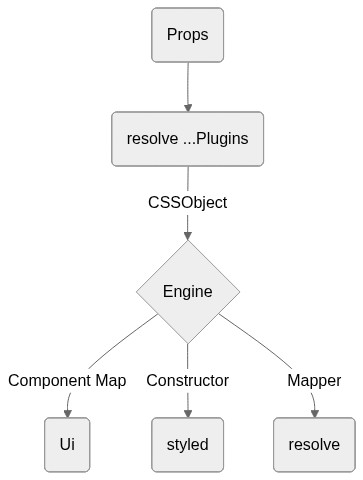](https://mermaid-js.github.io/mermaid-live-editor/#/edit/eyJjb2RlIjoiZ3JhcGggVERcbkEoUHJvcHMpIC0tPiBCKHJlc29sdmUgLi4uUGx1Z2lucylcbkIgLS0-fENTU09iamVjdHwgQ3tFbmdpbmV9XG5DIC0tPnxDb21wb25lbnQgTWFwfCBEKFVpKVxuQyAtLT58Q29uc3RydWN0b3J8IEUoc3R5bGVkKVxuQyAtLT58TWFwcGVyfCBGKHJlc29sdmUpXG4iLCJtZXJtYWlkIjp7InRoZW1lIjoibmV1dHJhbCJ9LCJ1cGRhdGVFZGl0b3IiOmZhbHNlfQ)
## `combine`
Creates generator for constructors that consume the output parsed by plugins
The returned function should be called with an engine that recieves a single
parameter: `resolve`, which is a utility that pipes its input through its plugins
By default a "passthrough" plugin is applied in case the plugins array is empty.
### Example with `styled-components`
```ts
import combine from '@styling/core';
import styledEngine from '@styling/engine-styled-components';
const plugins = [];
const creator = combine(plugins);
const { styled } = creator(styledEngine);
export default styled;
```
### Example with `emotion`
```ts
import combine from '@styling/core';
import emotionEngine from '@styling/engine-emotion';
const plugins = [];
const creator = combine(plugins);
const { styled } = creator(emotionEngine);
export default styled;
```
### Example with `glamorous`
```ts
import combine from '@styling/core';
import glamorousEngine from '@styling/engine-glamorous';
const plugins = [];
const creator = combine(plugins);
const { styled } = creator(glamorousEngine);
export default styled;
```
## Engine
An engine is a consumer of resolve that returns the interface that should be interacted with when using the library. For example the most basic engine for React would be the following:
```ts
import { generateUi } from '@styling/core';
const reactEngine = resolve => {
const styled = component => styles => ({ children, ...props }) => {
const style = resolve({ ...styles, ...props });
return React.createElement(component, { style }, children);
};
const Ui = generateUi(styled, resolve);
return { Ui, styled, resolve };
};
```
This concept means that the surface API (e.g.: props) depends entirely on what the plugins are doing and not on the engine, while the way of consumation is defined only by the engine, which allows you to switch engines seamlessly without having to change your components and maintain functionality so long as the plugins are working as intended.
This means that by having this setup code:
```ts
// @my-lib/styling
import combine from '@styling/core';
import alias from '@styling/plugin-alias';
import theme from '@styling/plugin-theme';
const plugins = [alias, theme];
export const creator = combine(plugins);
```
Considering the following two examples:
```tsx
// @my-lib/styled-example
import { creator } from '@my-lib/styling';
import styledEngine from '@styling/engine-styled-components';
const { Ui } = creator(styledEngine);
const Example = () => (
Example
Description of this example
);
```
```tsx
// @my-lib/emotion-example
import { creator } from '@my-lib/styling';
import emotionEngine from '@styling/engine-emotion';
const { Ui } = creator(emotionEngine);
const Example = () => (
Example
Description of this example
);
```
Should both yield the exact same result in terms of what the UI looks like. The only difference should be the underlying implementation, here named the `engine`.
### Engine concepts
#### _`Ui`_
Define components inline, while applying all the transformations defined
by the plugins array. The input object that gets parsed is everything
that's passed as props.
Example:
```tsx
import { Ui } from '@my-lib/ui';
const MyArticle: FC = ({ title, description, image, ...rest }) => (
{title}
{description}
);
export default MyArticle;
```
#### `styled`
Works the same way the `styled` constructor from `styled-components` or `emotion`.
This should be used to define styles on components outside render and to wrap
already existing components.
Example:
```tsx
import { styled } from '@my-lib/styled';
import MyArticle from 'previous-example';
const Article = styled(MyArticle)({
bg: 'purple',
c: 'white',
});
const Example: FC = () => {
const { title, description, image } = useArticle();
return ;
};
```
#### `resolve`
The underlying mechanism, that applies the transformations from plugins
to the style object. This is exported, to help interop between multiple
style libraries.
Example:
```tsx
import { resolve } from '@my-lib/resolve';
import styled from 'styled-components';
const Example = styled.section(resolve);
```