https://github.com/danielkummer/nixon-pi
Control ogilumen nixie tubes with raspberry pi and abiocard shield
https://github.com/danielkummer/nixon-pi
Last synced: 10 months ago
JSON representation
Control ogilumen nixie tubes with raspberry pi and abiocard shield
- Host: GitHub
- URL: https://github.com/danielkummer/nixon-pi
- Owner: danielkummer
- License: mit
- Created: 2012-10-16T12:03:44.000Z (over 13 years ago)
- Default Branch: master
- Last Pushed: 2015-07-15T21:04:46.000Z (almost 11 years ago)
- Last Synced: 2025-04-05T10:33:30.237Z (about 1 year ago)
- Language: C
- Size: 14.2 MB
- Stars: 7
- Watchers: 6
- Forks: 0
- Open Issues: 1
-
Metadata Files:
- Readme: README.md
- License: LICENSE.txt
Awesome Lists containing this project
README
# NIXON-Π :: The Raspberry Pi based Nixie Display
The Nixon-π Display consists of **Nixie Tubes** provided by [Ogilumen](http://www.ogilumen.com/), driven by a **Raspberry Pi Model B** with an **I/O expansion card** from [Axiris](http://www.axiris.be/).
It's driven by a multi-threaded ruby application consisting of I/O drivers, state machines, a sinatra based web app and json api connected by message queues.
What started out as a private idea found it's way into a mini-project on a __LAB__ team event from [Namics](http://www.namics.com).
Many thanks to all who contributed and hopefully will contribute to this project!
--------------------------
**Jump to**
- [Components](#components)
- [Case](#case)
- [Installation](#installation)
- [Service](#service)
- [Web Server](#web_server)
- [API](#api)
--------------------------
The following main components were used for assembly, not mentioning wiring and tools.
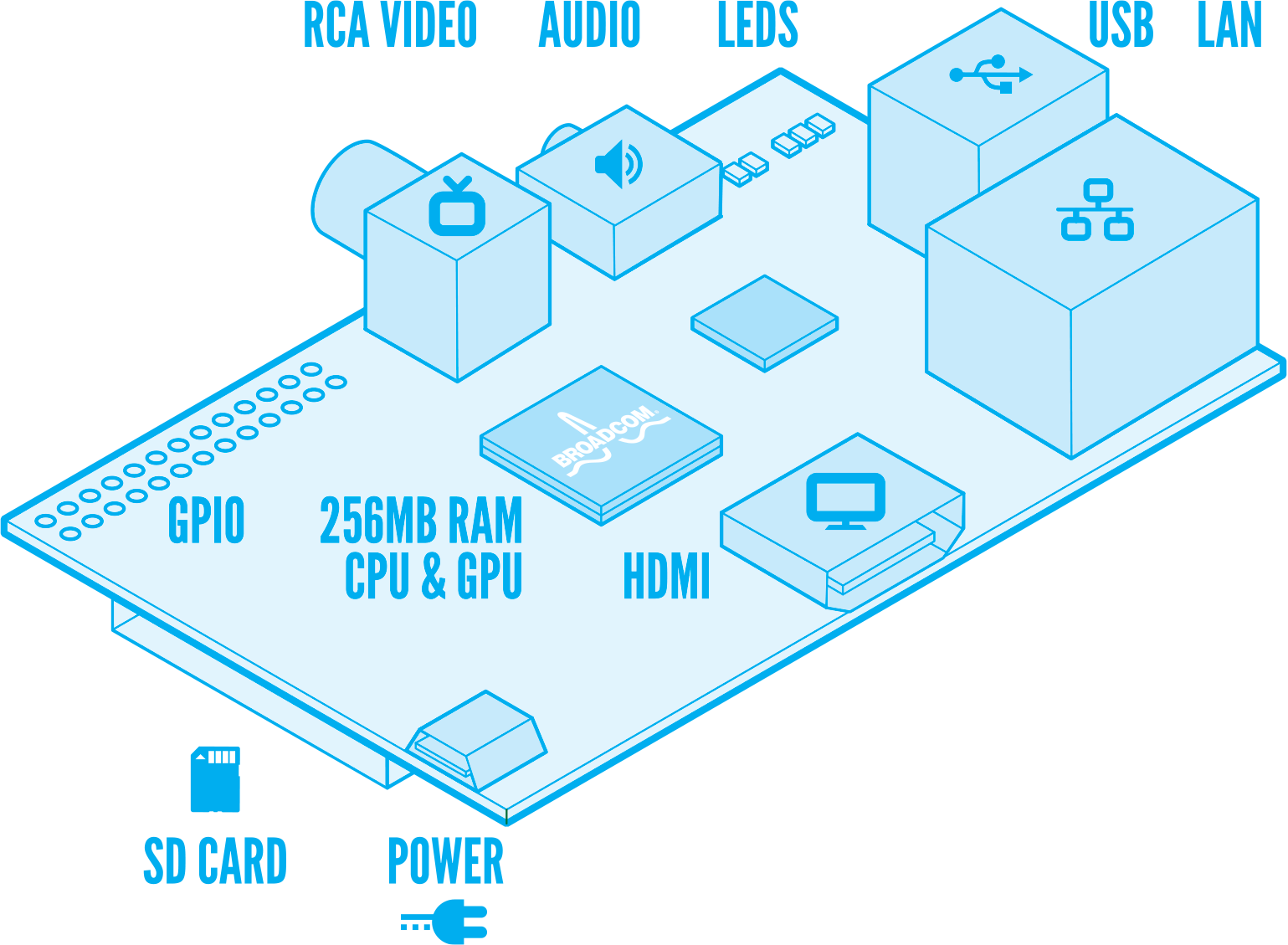
### 1x Raspberry Pi Model B
---
The [Raspberry Pi](http://www.raspberrypi.org/) is ideal for the project as it's a fully flegded mini computer which is capable of running all the things we need.
A standard installation with Debian Wheezy is recommended.
Install Ruby using the tutorial on [elinux](http://elinux.org/RPi_Ruby_on_Rails)
Also, use the overclock to increase the processor speed, but keep it in a normal range unless you've got good cooling on the 5v power limiter/supply.
Here's a condensed list of the commands:
sudo apt-get install -y git curl zlib1g-dev subversion
sudo apt-get install -y openssl libreadline6-dev git-core zlib1g libssl-dev
sudo apt-get install -y libyaml-dev libsqlite3-dev sqlite3
sudo apt-get install -y libxml2-dev libxslt-dev
sudo apt-get install -y autoconf automake libtool bison
curl -L get.rvm.io | bash -s stable
### 1x [Axiris](http://www.axiris.be/) I/O Card for Raspberry Pi

---
Because the Raspberry Pi only has [limited IO capabilites](http://elinux.org/RPi_Low-level_peripherals) the [Axisis I/O card](http://www.axiris.be/en/index.php?option=com_content&view=article&id=51:i2c-io-card-for-use-with-raspberry-pi-computer&catid=14:io-cards&Itemid=34) is the perfect addition to fully satisfy our needs. It adds:
* a very high accuracy real-time clock based on the PCF2129A with CR2032 backup battery.
* 8 quasi bidirectional I/O lines (PCF8574), 5V levels.
* 8 12-bit ADC inputs (MAX11614EEE+), 0 - 4.096V range.
* 16 output channels providing 12-bit pulse-width modulation (PWM) output channels at about 40 to 1000 Hz with LED drive capability, 10 mA source, 25 mA sink, 5 V levels.
The repository contains a modified driver to allow direct console output - without the need to start a telnet server in order to control the expansion card.
However, you're still able to use the telnet server while developing - with it you can remotely execute the code with a live connection.

1 lowel left, 2 upper left
1. IO Ports
1. I/O channel 0
2. I/O channel 1
3. I/O channel 2
4. I/O channel 3
5. I/O channel 4
6. I/O channel 5
7. I/O channel 6
8. I/O channel 7
9. GND
10. 5 V output
2. timestamp input
1. PCF2129A TS input
2. GND
3. ADC input
1. Analog input 0
2. Analog input 1
3. Analog input 2
4. Analog input 3
5. Analog input 4
6. Analog input 5
7. Analog input 6
8. Analog input 7
9. GND
10. 5 V output
4. PWM8-PWM15
1. PWM driver pin PWM8
2. PWM driver pin PWM9
3. PWM driver pin PWM10
4. PWM driver pin PWM11
5. PWM driver pin PWM12
6. PWM driver pin PWM13
7. PWM driver pin PWM14
8. PWM driver pin PWM15
9. GND
10. 5 V output
5. PWM0-PWM7
1. PWM driver pin PWM0
2. PWM driver pin PWM1
3. PWM driver pin PWM2
4. PWM driver pin PWM3
5. PWM driver pin PWM4
6. PWM driver pin PWM5
7. PWM driver pin PWM6
8. PWM driver pin PWM7
9. GND
10. 5 V output
### 6x Nixie Duo Kits

---
[Ogilumen](http://www.ogilumen.com/) sells beautiful, compact and easy to assemble nixie tube kits containing two IN-12A tubes each.
Some electronics are needed so we're able to drive them using the 12-bit PWM channels.
**Electric diagram**

### 4x IN-13 Bar Graphs

---
The IN-13 Neon Bar Graphs sold by Ogilumen are a beautiful way to display a variable length glowing bar.
**Electric diagram**

### 5x IN-1 Neon

---
The IN-1 Neon Lamps are simply a nice LED-alternative and they have a nice warm orange glow...
**Electric diagram**

## 1x 50 mA Nixie Tube Power Supply

---
In the end we need a power supply to drive all our high-voltage Nixie goodness. Luckly ogilumen provides us with a readily assembled power supply capable of providing all the power we need...
If you want to power everything with a 12V power supply, use a voltage divider and a modified micro-usb jack to power the raspberry pi.
**Voltage divider electric diagram**

The casing gives the nixon-pi a retro look - it should remind one of a sixties radio. A swiss carpentry manufactured the wooden casing - the rest was assembled by hand.

Although nixon-pi can be packed as a gem it's currently suggested to install it by cloning the repository.
The master branch contains the newest production release.
--------------------------
The easiest way to deploy nixon-pi is using the capistrano deploy script. It locally packs you application and sends it to your raspberry pi using sftp.
Edit the the deploy.rb script to suit your needs. For a start, edit the target server
server 'nixonpi', :app, :web, :db
or add an appropriate vhost entry.
Deploy via
cap deploy:setup #first time
cap deploy
which executes the following tasks
- Normal application deployment
- Links the database from shared/db/settings.db to your current release
- Exports the foreman init script to a bluepill file called nixon-pi.pill
- Symlinks the init script bluepill-init.sh to /etc/init.d/nixon-pi
You can control it with the "start, stop, restart" commands
I recommend you add it to your runtime configuration, after the rabbitmq server is started
#TODO add correct statement
update-rc.d nixonpi
The following restictions apply (at the moment):
- The service must be run as root due to a limitation in the bluepill gem (no rights create directory under /var/run)
A telnet based client to drive nixie tubes via rest interface
## Comand line options
bin/nixon-pi -h
Usage: nixon-pi [options]
-e env set the environment (default is development, others are test and production)
-m force the usage of the telnet mock interface
-p port set the webserver port (default is 8080)
-h, --help Display help
The application drops a .yml configuration file in the users home directory. Review and adjust if neccessary...
Use foreman to start and stop the service and the web application.
foreman start
foreman start -f ./Procfile.production
Export start and stop scripts using either
rvmsudo bundle exec foreman export bluepill ./config -f ./Procfile.production -a nixon-pi -u root -l /home/pi/nixonpi/shared/log
or the capistrano deploy script.
**NOTE** Most probably the ctrl+c combination will not suffice to stop the webrick server started by sinatra. In this case use ctrl+z to stop
### Controlling
The whole device is controlled via sinatra web application, see the example page at [server ip]:[port]
## The Gem
The Nixon-π Service is packed as a standalone gem which can be run as a daemon.
### Build
Build with
gem build nixon-pi.gemspec
### Install
$ gem install nixie-berry-service
### State machines
The service uses a state machine to handle local executions.
Generate state machine diagrams with the following command:
rake state_machine:draw FILE=./lib/nixonpi/state_machines/tube_state_machine.rb CLASS=NixonPi::TubeStateMachine
rake state_machine:draw FILE=./lib/nixonpi/state_machines/bar_state_machine.rb CLASS=NixonPi::BarStateMachine
rake state_machine:draw FILE=./lib/nixonpi/state_machines/lamp_state_machine.rb CLASS=NixonPi::LampStateMachine
**Tube State Machine**

**Bar State Machine**

**Lamp State Machine**

--------------------------
The Sinatra based web server exposes a json api to control the service as well as a simple web application.
As well as the service, the web application can be started using foreman.
Before you do however, be sure to set the RACK_ENV variable to the necessary environment.
Set it for example in the .bash_profile file
RACK_ENV=production
--------------------------
All api requests can be made as either .html or .json.
**JSONP** is returned to support 3rd party apps.
## Port
The web server port can be configured in the Procfile.production file inside your home directory.
web: thin start -p 80 -c web
--------------------------
## POST Requests
Post requests to control the nixon-pi.
### POST /tubes
Control the IN-12A digit tubes.
The Tubes allow values from 0 to 9 including _ (Space) for no value.
| Parameters | Values | Data Type | Description | Required |
| ---------- | ------ | --------- | ------------ | -------- |
| state | time, free_value, animation, countdown | String | State of the state machine | * |
| value | 0-9 or _ (Space) | String | Max. length 12 | * |
| time_format | ex: "%H%M%S" | String | only in state "time" | |
| animation_name | single_fly_in, count_from_to, switch_numbers | String | | |
| options | | JSON | Advanced options hash | hash with the following keys: start_value, goto_target, goto_state |
| initial_mode | true, false | Boolean | Load on startup | |
### POST /lamps
Control the IN-1 neon tubes.
The neon tubes can either be turned on or off - they're like orange LEDs.
| Parameters | Values | Data Type | Description | Required |
| ---------- | ------ | --------- | ------------ | -------- |
| state | free_value, animation | String | State of the state machine | * |
| values | Array of 0 or 1 | Array of Integer | Max. length 5 | * |
| animation_name | single_fly_in, count_from_to, switch_numbers | String | | |
| options | | JSON |Advanced options hash | hash with the following keys: start_value, goto_target, goto_state |
| initial_mode | true, false | Boolean |Load on startup | |
### POST /bars
Control the IN-13 bargraph tubes.
The bargraphs are a linear display to visualize a value between 0 (off) and 255 (full width).
| Parameters | Values | Data Type | Description | Required |
| ---------- | ------ | --------- | ------------ | -------- |
| state | free_value, animation | String | State of the state machine | * |
| values | Array of 0 to 255 | Array of Integer |Max. length 4 | * |
| animation_name | ramp_up_down | String | | |
| options | | JSON | Advanced options hash | hash with the following keys: start_value, goto_target, goto_state |
| initial_mode | true, false | Boolean |Load on startup | |
### POST /say
Synthesize text to speech.
| Parameters | Values | Data Type | Description | Required |
| ---------- | ------ | --------- | ------------ | -------- |
| value | Hello World | String | TTS String | * |
### POST /power
Control the high-voltage power supply.
| Parameters | Values | Data Type | Description | Required |
| ---------- | ------ | --------- | ------------ | -------- |
| value | 0 or 1 | String | Turn on or off the high voltage power supply | * |
### POST /scheduler
--------------------------
## GET Requests
Get requests to get information about the nixon-pi.
### GET /info/:target.:format
Get information about the current state of a specified state machine.
| Parameters | Values |
| ---------- | ------ |
| :target | tubes, bars, lamps, power |
| :format | html, json |
**Example:**
wget http://localhost:3000/info/tubes.json
Returns:
{
"info": {
"animation_name": "single_fly_in",
"options": {},
"last_value": "214740",
"last_state": "animation",
"state": "time",
"last_time": "2013-01-16T21:47:40+01:00"
},
"message": "tubes set to",
"success": true
}
### GET /info/:target/:id.:format
Get information about the current state of a specified state machine.
| Parameters | Values |
| ---------- | ------ |
| :target | state machine |
| :id | numeric identifier |
| :format | html, json |
**Example:**
wget http://localhost:3000/info/lamp/0.json
Returns:
{
"value": 0,
"last_state": "startup",
"state": "free_value",
"last_value": 0,
"message": [
"lamp0 set to"
],
"success": true
}
### GET /info/hw.:format
Get hardware information about the Raspberry-Pi I/O expansion card.
Information include:
* RTC - Real time clock
* IO - GPIO driver
* ADC - Analog digital converter driver
* PWM - Pulse width modulation driver
| Parameters | Values |
| ---------- | ------ |
| :format | html, json |
**Example:**
wget http://localhost:3000/info.json
Returns:
{
"info": {
"rtc": "1",
"io": "1",
"adc": "1",
"pwm": "1"
},
"message": "Hardware information",
"success": true
}
### GET /command/:target.:format
Get a json containing all available commands for a specified target.
| Parameters | Values |
| ---------- | ------ |
| :target | tubes, bars, lamps, power, say |
| :format | html, json |
**Example:**
curl http://localhost:3000/command/tubes.json
Returns:
{
"state": null,
"value": null,
"time_format": null,
"animation_name": null,
"options": null,
"initial_mode": null
}
### GET /commands.:format
Get a json of all available commands.
| Parameters | Values |
| ---------- | ------ |
| :format | html, json |
Return a json of available commands and parameters.
**Example:**
curl http://localhost:3000/commands.json
Returns:
{
"tubes": {
"state": null,
"value": null,
"time_format": null,
"animation_name": null,
"options": null,
"time": null,
"initial_mode": null
},
"bars": {
"state": null,
"values": null,
"animation_name": null,
"options": null,
"time": null,
"initial_mode": null
},
"lamps": {
"state": null,
"values": null,
"animation_name": null,
"options": null,
"time": null,
"initial_mode": null
},
"power": {
"value": null,
"time": null
},
"say": {
"value": null,
"time": null
},
"message": "Available commands",
"success": true
}
--------------------------
## DELETE Requests
Delete saved values.
### DELETE /schedule/:id
Delete a saved schedule.
| Parameters | Values |
| ---------- | ------ |
| :id | id of an existing schedule |
**Example**
curl -X DELETE http://localhost/schedule/1
Returns:
{
"success":true,
"message":"Schedule deleted"
}