https://github.com/danielrs/botellier
A distributed key-value data store.
https://github.com/danielrs/botellier
db distributed-systems in-memory in-memory-database nosql
Last synced: about 1 year ago
JSON representation
A distributed key-value data store.
- Host: GitHub
- URL: https://github.com/danielrs/botellier
- Owner: danielrs
- License: mit
- Created: 2017-04-15T06:12:20.000Z (over 9 years ago)
- Default Branch: master
- Last Pushed: 2017-12-30T06:36:48.000Z (over 8 years ago)
- Last Synced: 2025-04-14T06:55:06.296Z (over 1 year ago)
- Topics: db, distributed-systems, in-memory, in-memory-database, nosql
- Language: Kotlin
- Homepage:
- Size: 474 KB
- Stars: 11
- Watchers: 1
- Forks: 1
- Open Issues: 0
-
Metadata Files:
- Readme: README.md
- License: LICENSE
Awesome Lists containing this project
README
[zookeeper]: https://github.com/apache/zookeeper
[](https://travis-ci.org/danielrs/botellier)
## Botellier
A distributed key-value data store. It aims to be a simple Redis clone for the JVM.
### Replication Scheme
To keep things simple, Botellier uses single-leader replication. Each replica is a whole copy of the leader, and no sharding/partitioning is used.
All the nodes that form the quorum can be either three types: `leader`, `synced replica` or `replica`. All writes request go through the leader, who waits for the synced replica to proccess the same requests before returning to the client. All other replicas process the requests asynchronously.
#### Election process
Initially, all nodes are of type `replica` which then try to become the `synced replica`, usually the most up-to-date node is the one to do it. After that, the only node that can become a `leader` is a synced replica; so in the event that the leader dies, the synced replica automatically becomes the leader, and the next most up-to-date common replica takes its place.
Here's a flowchart that shows the process:
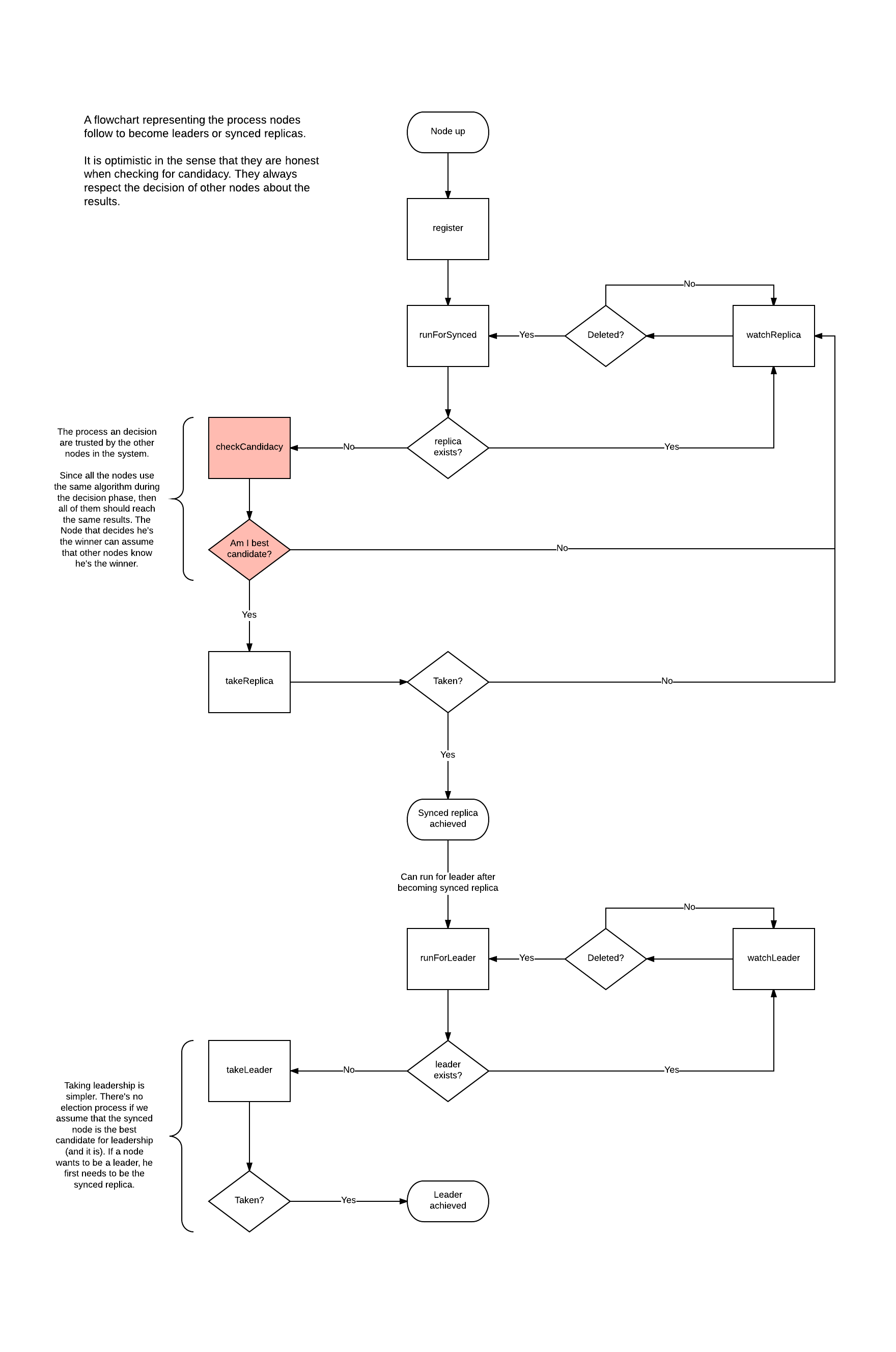
Coordination between proccesses is done using [Zookeper][zookeeper].
### Command support
As of now, most commonly used commands are supported, such as connection, strings, lists and general ones like delete,
rename, etc. For a complete list of supported commands check [here](https://github.com/danielrs/botellier/blob/master/src/main/kotlin/org/botellier/command/commands.kt).
### Testing
The project includes an entry point that starts a server on the default port (6679) with the
password set to 'password'. After starting the server try [corkscrew](https://github.com/danielrs/corkscrew) for
connecting to it and executing commands. Here's an example:
[](https://asciinema.org/a/b5yhrwnsu8v4rkna08yoa3wre)