https://github.com/danijelgrabez/responsively
Responsive styles with atomic CSS declarations.
https://github.com/danijelgrabez/responsively
css css-in-js emotion media-query react styles
Last synced: 6 months ago
JSON representation
Responsive styles with atomic CSS declarations.
- Host: GitHub
- URL: https://github.com/danijelgrabez/responsively
- Owner: danijelgrabez
- License: mit
- Created: 2018-07-17T12:49:11.000Z (almost 8 years ago)
- Default Branch: master
- Last Pushed: 2018-12-16T17:42:03.000Z (over 7 years ago)
- Last Synced: 2025-10-26T03:53:53.982Z (8 months ago)
- Topics: css, css-in-js, emotion, media-query, react, styles
- Language: JavaScript
- Homepage: https://www.npmjs.com/package/responsively
- Size: 26.4 KB
- Stars: 6
- Watchers: 2
- Forks: 1
- Open Issues: 0
-
Metadata Files:
- Readme: README.md
- License: LICENSE
Awesome Lists containing this project
README
# Responsively
Responsively is created with the intention to easily adjust components with a responsive, mobile-first approach in mind; it may resemble single purpose classes (e.g. `.mt-0`, or `.mt-0--mobile`).
This library plays nicely with libraries such 👩🎤 [Emotion](https://emotion.sh/) and 💅 [Styled Components](https://www.styled-components.com/) since the code output is string.
## Table of contents
- [Usage](#usage)
- [Simple flow](#simple-flow)
* [1. Configure breakpoints](#1-configure-breakpoints)
* [2. Implementation](#2-implementation)
* [Option 1: Pass props to component with supported functions](#option-1-pass-props-to-component-with-supported-functions)
* [Option 2: Call the function with desired property and its responsive values in style declaration
](#option-2-call-the-function-with-desired-property-and-its-responsive-values-in-style-declaration)
* [Option 3: Pass property and values props to the component for single purpose usage](#option-3-pass-property-and-values-props-to-the-component-for-single-purpose-usage)
- [Try it out](#try-it-out)
- [Install](#install)
- [API](#api)
* [Arguments](#arguments)
* [`breakpointsArray` and `propertyArrayValues` values](#breakpointsarray-and-propertyarrayvalues-values)
* [Warning message](#warning-message)
* [Skipping breakpoints](#skipping-breakpoints)
- [TODO](#todo)
- [Suggestions](#suggestions)
## Usage
This library adjust the `value` of the passed property according to passed `breakpoints`. Breakpoints can be defined on a component/page basis, but it can also be defined across the whole app, depending on one's needs.
## Simple flow
1. Configure breakpoints
2. Implement responsively in one of the following ways:
- Pass props to component with supported [functions](documentation/Property-list.md)
- Call the function with desired property and its responsive values via styles, or
- Pass `property` and `values` props to the component for single purpose usage
3. Done 😇
### 1. Configure breakpoints
```javascript
/**
* Configure breakpoints in any file which is being called
* on the top aplication level (e.g. App.js, utils.js, etc.)
*/
import Responsively from 'responsively';
Responsively.configureBreakpoints([480, 768, 990, 1170]);
```
### 2. Implementation
#### Option 1: Pass props to component with supported functions
With this handy approach we can integrate responsively functions which would provide an option to pass multiple responsive props to component. Check the documentation for all available [functions](documentation/Property-list.md).
```javascript
import React from 'react';
import styled from '@emotion/styled';
import { css } from '@emotion/core';
import { background, text } from 'responsively';
const SectionStyles = styled('section')(
...background,
...text,
);
/**
* Section component
*/
const Section = props => ;
export default Section;
```
then, define as many properties as you need:
```javascript
import Section from '../ui';
...
Section Heading
```
#### Option 2: Call the function with desired property and its responsive values in style declaration
```javascript
import React from 'react';
import { css } from '@emotion/core';
import Responsively from 'responsively';
const baseStyles = css`${Responsively.responsive('margin-top')([10, 20, 30, 40, 50])};`;
// or, add responsively directly to the component
```
#### Option 3: Pass `property` and `values` props to the component for single purpose usage
```javascript
import React from 'react';
import PropTypes from 'prop-types';
import styled from '@emotion/styled';
import { css } from '@emotion/core';
import Responsively from 'responsively';
const baseStyles = ({ property, values }) =>
css`
${Responsively.responsive(property)(values)};
`;
const SectionStyles = styled('div')(baseStyles);
/**
* Section component
*/
const Section = ({ property, values }) => ;
Section.propTypes = {
property: PropTypes.string.isRequired,
values: PropTypes.array.isRequired,
};
export default Section;
```
then, define its property and values as props:
```javascript
import Section from '../ui';
...
Section Heading
```
## Try It Out
Try the examples on CodeSandbox:
- Option 1: 👩🎤 [Emotion](https://codesandbox.io/s/zn41vw6n9p)
- Option 2: 👩🎤 [Emotion](https://codesandbox.io/s/xjyr0ox38w) | 💅 [Styled Components](https://codesandbox.io/s/7mo04o1361)
- Option 3: 👩🎤 [Emotion](https://codesandbox.io/s/wqjymvnyjw) | 💅 [Styled Components](https://codesandbox.io/s/1qwzy9mq)
## Install
```npm i responsively -S```
or,
```yarn add responsively```
## API
```javascript
Responsively.responsive([breakpointsArray])(propertyName)([propertyArrayValues]);
```
### Arguments
* `breakpointsArray` — An array of breakpoint values
* `propertyName` — CSS property name
* `propertyArrayValues` — An array of values which maps to provided breakpoints. By default, the first value is applied without a media query, while the rest of the values are applied as children of media query selectors.
### `breakpointsArray` and `propertyArrayValues` values
* Support all unit kinds (px, em, rem, vw, vh, %, etc.).
If a unitless value is passed, it will automatically be converted to `px`. CSS properties with unitless values are processed as is (e.g. `line-height: 1.5;` or `flex: 1;`).
```javascript
Responsively.responsive('margin-top')([10, 20, 30, '4em', '5rem']);
```
will yield:
```css
margin-top: 10px;
@media screen and (min-width: 480px) {
margin-top: 20px;
}
@media screen and (min-width: 768px) {
margin-top: 30px;
}
@media screen and (min-width: 990px) {
margin-top: 4em;
}
@media screen and (min-width: 1170px) {
margin-top: 5rem;
}
```
* Clean output
The number of generated breakpoints depends on the number of passed property values.
```javascript
const { responsive } = Responsively;
responsive('margin')([10]);
responsive('padding')([10, 20]);
```
will yield:
```css
margin: 10px;
padding: 10px;
@media screen and (min-width: 480px) {
margin-top: 20px;
}
```
* Shorthand values per breakpoint
```javascript
Responsively.responsive('margin')(['10px 20px']);
```
will yield:
```css
margin: 10px 20px;
```
* Correction for common typos
```javascript
const { responsive } = Responsively;
Responsively.responsive('margin')(['10 20']);
Responsively.responsive('padding')(['10px']);
```
will yield:
```css
margin: 10px 20px;
padding: 10px;
```
### Warning message
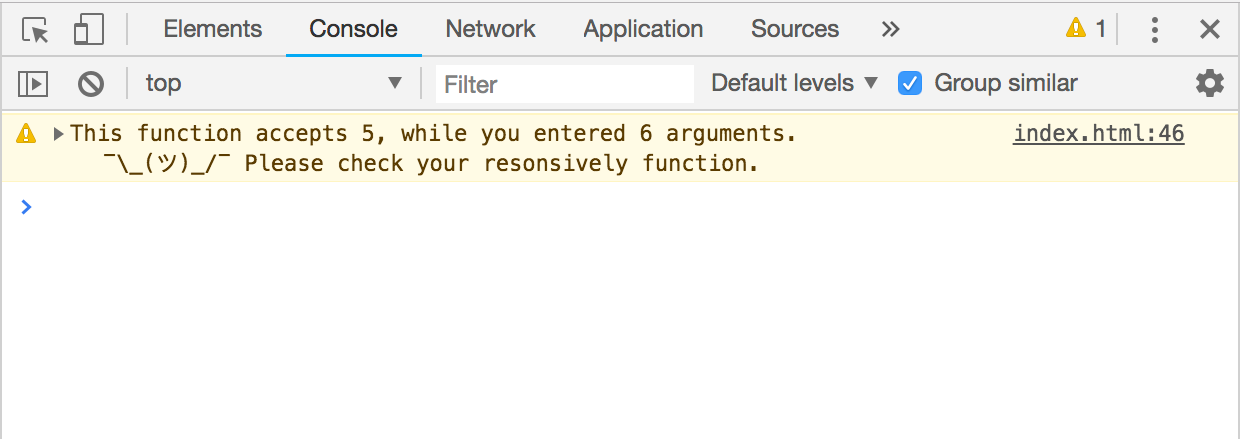
In case one passed more property values then there are breakpoint values, responsively provides the warning in the browser's console.
```javascript
Responsively.configureBreakpoints([480, 768, 990, 1170]);
Responsively.responsive('padding')([10, 20, 30, 40, 50, 60]); // first argument is `default value`
```
will compile the code, but the last value will be nested in undefined breakpoint:
```css
...
@media screen and (max-width: undefined) {
padding: 60px;
}
```
Console warning message:
### Skipping breakpoints
If particular breakpoint needs to be skipped, `undefined` value should be passed:
```javascript
Responsively.configureBreakpoints([480, 768, 990, 1170]);
Responsively.responsive('padding')([undefined, 20, undefined, undefined, 60]);
```
will yield:
```css
...
@media screen and (max-width: 480px) {
padding: 20px;
}
@media screen and (max-width: 1170px) {
padding: 60px;
}
```
## TODO
- [ ] Merge exact shorthand values, e.g. `'10 10' → 10px`
- [ ] Add shorthand properties, e.g. `m → margin`, or `p → padding`
- [ ] 
## Suggestions?
[Shoot me an email](mailto:danijel.grabez@gmail.com), or [submit an issue](https://github.com/danijelgrabez/responsively/issues) 🚀