https://github.com/danpoynor/python-basketball-team-stats-tool
Demo console-based basketball team statistics app that divides a group of players into teams and presents statistics about each team.
https://github.com/danpoynor/python-basketball-team-stats-tool
basketball-stats console-application python3 statistics unit-testing
Last synced: 19 days ago
JSON representation
Demo console-based basketball team statistics app that divides a group of players into teams and presents statistics about each team.
- Host: GitHub
- URL: https://github.com/danpoynor/python-basketball-team-stats-tool
- Owner: danpoynor
- Created: 2022-08-22T16:38:20.000Z (almost 4 years ago)
- Default Branch: main
- Last Pushed: 2022-08-22T17:05:24.000Z (almost 4 years ago)
- Last Synced: 2025-01-17T02:11:50.496Z (over 1 year ago)
- Topics: basketball-stats, console-application, python3, statistics, unit-testing
- Language: Python
- Homepage:
- Size: 8.79 KB
- Stars: 0
- Watchers: 1
- Forks: 0
- Open Issues: 0
-
Metadata Files:
- Readme: README.md
Awesome Lists containing this project
README
# Python Basketball Team Stats Tool
Demo console-based basketball team statistics app that divides a group of players into teams and presents statistics about each team.
Features
- Uses various Python data types to store and manipulate data into organized team structures.
- Cleans data from `constants.py` without changing the original data.
- Converts string data into integer or float values.
- Converts string data into Boolean values.
- Converts string data into lists of strings.
- Organizes player data evenly into teams ensuring each team has the same number of experienced and inexperienced players.
- Provides Dunder Main usage examples in `app.py` entry point and `dm.py` module.
- Presents data in a nice readable format using extra spaces and line breaks ('\n') to break up lines.
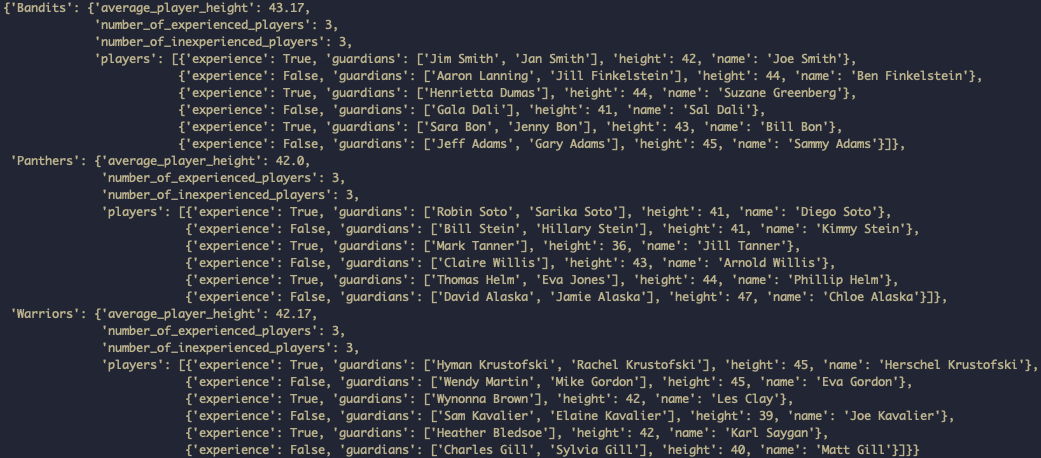
- Team stats are saved to each teams data structure.
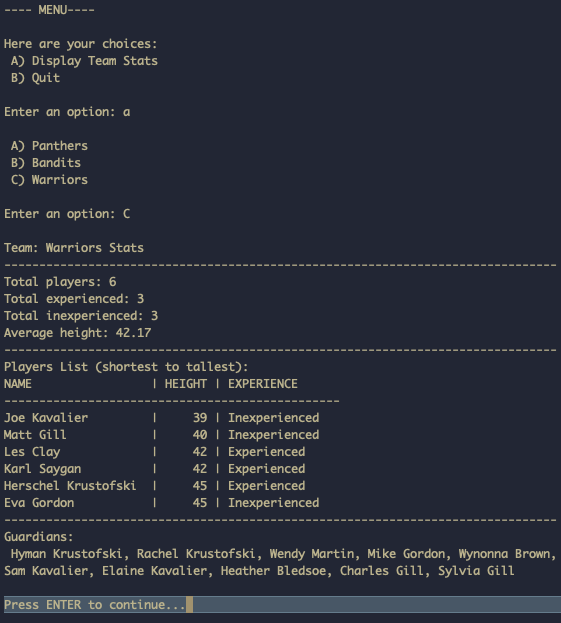
- Stats presentation includes players sorted by height (shortest to tallest).
- User is re-prompted with the main menu until they decide to "Quit the program".
## Run the app
```bash
python3 app.py
```
NOTE: Python 3.10 was used to develop and test this app.
---
## Run Unit Tests
Some basic unit tests are included to test the `dm.py` module.
Expand/Collapse
To run the tests, use something like:
```bash
python3 -m unittest -v dm.py
```
and you should see some test result output like this:
```bash
test_balance_teams (dm.Tests) ... ok
test_calculate_avg_height (dm.Tests) ... ok
test_cleaned_players (dm.Tests) ... ok
test_create_string_from_list_of_lists (dm.Tests) ... ok
test_show_menu_options (dm.ToDoTests) ... skipped "TODO: When there's more time, test this"
test_show_team_stats (dm.ToDoTests) ... skipped "TODO: When there's more time, test this"
----------------------------------------------------------------------
Ran 6 tests in 0.001s
OK (skipped=2)
```
Note: If you run `dm.py` directly, with something like:
```bash
python3 dm.py
```
You should see test result output like this:
```bash
....ss
----------------------------------------------------------------------
Ran 6 tests in 0.000s
OK (skipped=2)
```
The `....ss` indicates four tests ran and two were skipped.
---
## Screenshot Showing Example Program States
---
## Screenshot Showing Composed Data Structure