https://github.com/dantleech/pttlog
Plain Text Time Logger
https://github.com/dantleech/pttlog
Last synced: about 1 year ago
JSON representation
Plain Text Time Logger
- Host: GitHub
- URL: https://github.com/dantleech/pttlog
- Owner: dantleech
- License: mit
- Created: 2022-10-23T12:42:22.000Z (over 3 years ago)
- Default Branch: main
- Last Pushed: 2025-03-26T23:33:50.000Z (over 1 year ago)
- Last Synced: 2025-03-27T00:26:58.755Z (over 1 year ago)
- Language: Rust
- Size: 192 KB
- Stars: 7
- Watchers: 2
- Forks: 0
- Open Issues: 4
-
Metadata Files:
- Readme: README.md
- Changelog: CHANGELOG.md
- License: LICENSE
Awesome Lists containing this project
README
Plain Text Time Logger
======================
This is a project to create a plain text time logger in Rust.
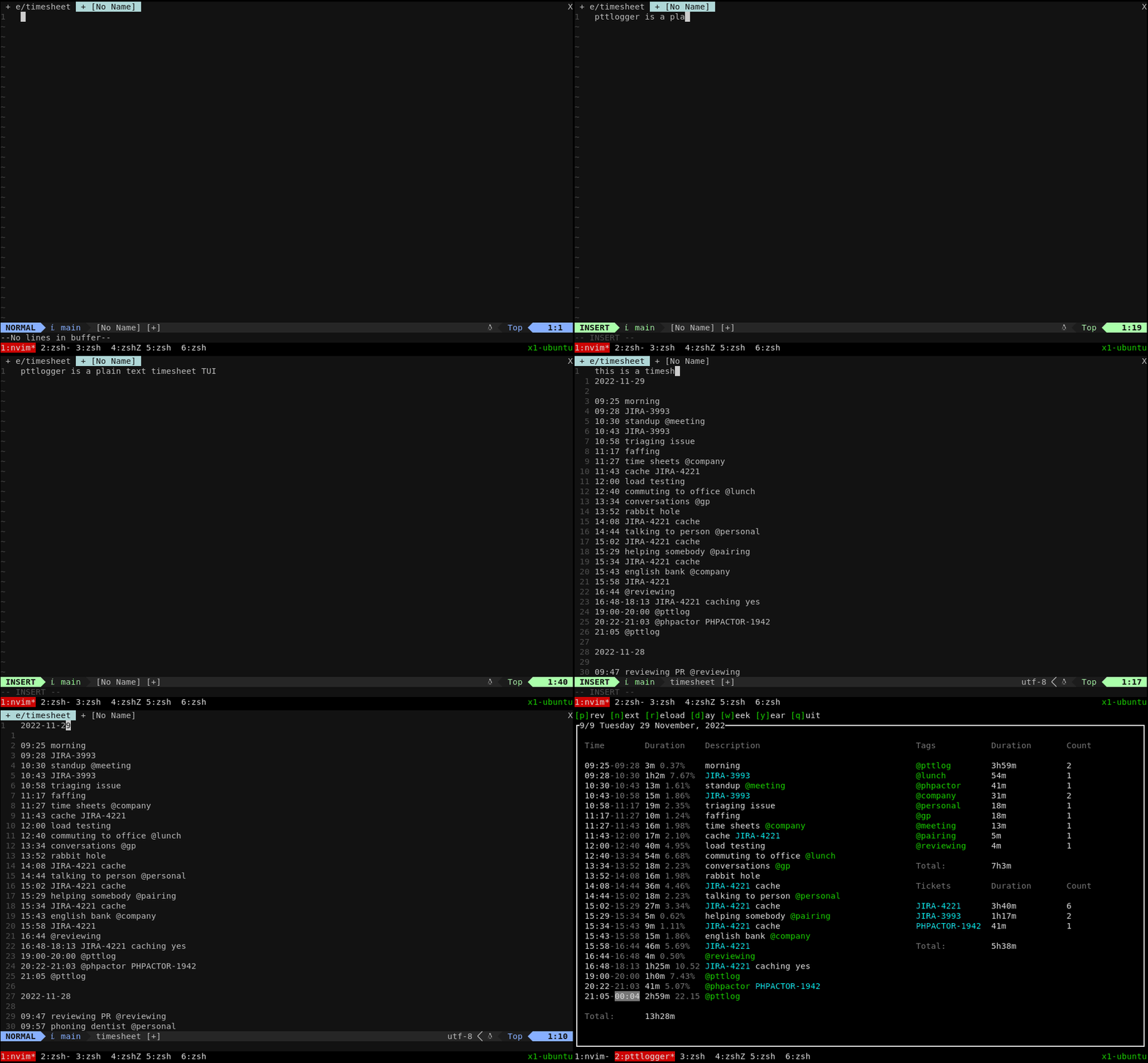
- Read-only TUI for a **plain-text timesheet**.
- Supports parsing tags and tickets.
- Day, week and year views.
This is my first Rust project, it's not pretty, but it's useful 😅
Usage
-----
Create a plain text file, and add entries to it, an entry is a `YYYY-MM-DD`
date followed by time ranges and descriptions. The `@` symbol can be used to
categorise the entry:
```
2022-11-06
09:00 talking to family @personal
09:10 walking the cat @personal
10:45-12:00 working on @pttlog
15:00 pairing on that difficult task @pairing
15:23 reviewing JIRA-1234 @reviewing
16:00 @commuting to the office
2022-11-06
09:00 shouting at clouds @personal
09:30-09:40 eating breakfast @personal
10:00 ...
```
Now run `pttlogger` with the path to your timesheet:
```
$ pttlogger mytimesheet
```
Filter
------
You can filter the entries by hitting `f`. The grammar is _something_ like
this:
```
TICKET: "-.*"
TAG: alphanumeric*
CRITERIA: TICKET|TAG|OR|AND
OR: CRITERIA CRITERIA
AND: CRITERIA CRITERIA
NOT: CRITERIA
```
Show only entries tagged with `@pttlog`:
```
@pttlog
```
With `@pttlog` and part of ticket `JIRA-1234`:
```
AND @pttlog JIRA-1234
```
With `@pttlog` and part of ticket `JIRA-1234` OR anything which is not
`@lunch`:
```
OR AND @pttlog JIRA-1234 NOT @lunch
```
Installation
------------
Grab the latest release from the [releases](https://github.com/dantleech/pttlog/releases) page.
Configuration
-------------
In order for `pttlogger` to parse and report on ticket identifiers create or
modify:
```toml
[[projects]]
name="My Work Project"
ticket_prefix="JIRA-"
[[projects]]
name="Phpactor"
ticket_prefix="PHPACTOR-"
```
In the above example "ticket" identiiers such as `JIRA-1234` and `PHPACTOR-1`
will be recognized and time will be summarised for them.
Contributing
------------
Any contributions are welcome.