https://github.com/darkseal/downpicker
A lightweight DropDownList / ComboBox for iOS, written in Objective-C
https://github.com/darkseal/downpicker
cocoapods control-wrapper dropdownlist ios objective-c uitextfield
Last synced: about 1 year ago
JSON representation
A lightweight DropDownList / ComboBox for iOS, written in Objective-C
- Host: GitHub
- URL: https://github.com/darkseal/downpicker
- Owner: Darkseal
- License: mit
- Created: 2015-03-28T23:15:03.000Z (about 11 years ago)
- Default Branch: master
- Last Pushed: 2021-07-19T14:10:43.000Z (almost 5 years ago)
- Last Synced: 2025-03-31T10:09:46.467Z (about 1 year ago)
- Topics: cocoapods, control-wrapper, dropdownlist, ios, objective-c, uitextfield
- Language: Objective-C
- Homepage:
- Size: 208 KB
- Stars: 202
- Watchers: 8
- Forks: 54
- Open Issues: 21
-
Metadata Files:
- Readme: README.md
- License: LICENSE
Awesome Lists containing this project
README
# DownPicker
DownPicker is an extremely light-weight class library for creating *DropDownList* / *ComboBox* controls for iOS that will behave like their HTML / Android counterparts.
You'll only need a standard **UITextField** and few lines of code.
## What does it do
It takes any **UITextField** already present in your code (including those added to a *Storyboard*):

and turns it into this:
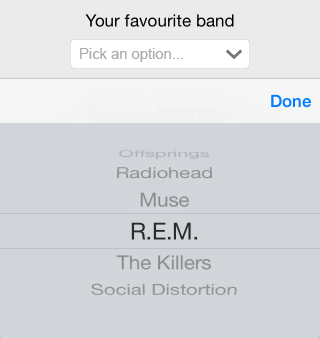
It's as simple as that. You only need to provide an array of data.
**NOTE**: If you don't like the *control wrapper* approach, you can also use it as a *custom control* via the included **UIDownPicker** class: read the following paragraph for more info.
## How does it work
DownPicker is basically a *control interface wrapper*, meaning that you won't use it as a control - it will use an existing UITextField control instead.
This is a good thing, because you'll be able to design, positioning and skin your UITextField like you always do, programmatically or inside a *Storyboard* UI, depending on how you are used to work. You won't change your style, as it will adapt to suit yours.
However, if you don't like the *control wrapper* pattern, you can just use it as a *custom control* using the included **UIDownPicker** class. It's entirely up to you (and very easy to install in both scenarios).
## Installation
### Using CocoaPods
DownPicker is available through [CocoaPods](http://cocoapods.org). To install it, simply add the following line to your Podfile:
`pod "DownPicker"`
[](https://travis-ci.org/Darkseal/DownPicker)
[](http://cocoapods.org/pods/DownPicker)
[](http://cocoapods.org/pods/DownPicker)
[](http://cocoapods.org/pods/DownPicker)
### Manual Installation
Download the latest version from [this link](https://github.com/Darkseal/DownPicker/archive/master.zip),
then unzip & drag-drop the /DownPicker/ folder inside your iOS project. You can do that directly within Xcode,
just be sure you have the **copy items if needed** and the **create groups** options checked.
## How to Use
Once you have DownPicker installed and included in your project, you can either use it as a Control Wrapper or as a Custom Control: the choice is up to you, depending on your programming style.
### As a Control Wrapper
Add (or choose) a **UITextField** you would like to transform to a DownPicker. You can use the Storyboard designer tool or do it programmatically; you can also set up constraints, custom placement/coords, font, colors and anything else you like. When you're done, open your controller's .h file and create a property for the DownPicker wrapper:
#import "DownPicker.h";
@property (strong, nonatomic) DownPicker *downPicker;
Then switch to the .m file and add these lines to your controller's **viewDidAppear** method:
// create the array of data
NSMutableArray* bandArray = [[NSMutableArray alloc] init];
// add some sample data
[bandArray addObject:@"Offsprings"];
[bandArray addObject:@"Radiohead"];
[bandArray addObject:@"Muse"];
[bandArray addObject:@"R.E.M."];
[bandArray addObject:@"The Killers"];
[bandArray addObject:@"Social Distortion"];
// bind yourTextField to DownPicker
self.downPicker = [[DownPicker alloc] initWithTextField:self.yourTextField withData:bandArray];
That's it. You can retrieve the user's choice at any time using `self.datePicker.text` or `textField.text`.
### As a Custom Control
If you'd like to use DownPicker as a custom control instead, just instantiate the included **UIDownPicker** class programmatically and attach it to your view like any other legacy UI control:
@interface YourViewController () {
UIDownPicker *_dp;
}
@end
@end
- (void)viewDidLoad
{
[super viewDidLoad];
self._dp = [[UIDownPicker] initWithData:yourMutableArray];
[self.view addSubview:self._dp];
}
You can then customize it using the inner DownPicker public property.
## Status Change event handling
You can bind your own delegate function to DownPicker's status change by using the `UIControlEventValueChanged` Control action in the following way:
[self.yourDownPicker addTarget:self
action:@selector(dp_Selected:)
forControlEvents:UIControlEventValueChanged];
and then:
-(void)dp_Selected:(id)dp {
NSString* selectedValue = [self.youtDownPicker text];
// do what you want
}
## Additional Features
You can also:
- defer data loading using the `[self.downPicker setData:array]` method.
- disable the right arrow image using the `[self.downPicker showArrowImage:bool]` method.
- use a custom right arrow image using the `[self.downPicker setArrowImage:UIImage*]` method.
You can use `[UIImage imageNamed:@"yourCustomImage.png"]` to set any image in your project.
- configure (and/or localize) the placeholder text string using the `[self.downPicker setPlaceholder:NSString*]` and `[self.downPicker setPlaceholderWhileSelecting:NSString]` methods.
- retrieve, customize and hook on the inner **UIPickerView** control using the `[self.downPicker getPickerView]` method (use at your own risk).
- retrieve, customize and hook on the inner **UITextField** control using the `[self.downPicker getTextField]` method (use at your own risk). Remember that it's the exact same control you passed, so you might prefer to use your main reference instead.
- the cancel button can be removed if the boolean flag property `shouldDisplayCancelButton` is set to `NO` after DownPicker is instantiated
## Upcoming Features
- More customization options (give me your suggestions).
- Dynamic data-binding.
... and more!
## Useful Links
- [DownPicker project page](http://darkseal.github.io/DownPicker/) on [GitHub](https://github.com)
- [DownPicker main repository](https://github.com/Darkseal/DownPicker) on [GitHub](https://github.com)
- [DownPicker pod page](http://cocoapods.org/pods/DownPicker) at [CocoaPods](http://cocoapods.org/)
- [DownPicker project page](https://www.cocoacontrols.com/controls/downpicker) at [CocoaControls](https://www.cocoacontrols.com)
- [DownPicker developer page](http://www.ryadel.com/works/downpicker/) at [Ryadel.com](http://www.ryadel.com/)
- [DownPicker installation guide](http://www.ryadel.com/downpicker-dropdownlist-combobox-ios-xcode-in-objective-c/) at [Ryadel.com](http://www.ryadel.com/)
- [Donation & support page](https://www.paypal.com/cgi-bin/webscr?cmd=_s-xclick&hosted_button_id=F576E73P5X526)
## Support
You can support this project's development by clicking on the following button.
[ ](https://www.paypal.com/cgi-bin/webscr?cmd=_s-xclick&hosted_button_id=F576E73P5X526)
Thanks a lot!
## Author
Ryan, ryan@ryadel.com
## License
DownPicker is available under the MIT license. See the LICENSE file for more info.