https://github.com/darmie/kito
Declarative state machines & reactive animations for Dart/Flutter
https://github.com/darmie/kito
animation dart flutter flutter-package flutter-ui interaction-design interactive keyframe-animation ux-design
Last synced: 24 days ago
JSON representation
Declarative state machines & reactive animations for Dart/Flutter
- Host: GitHub
- URL: https://github.com/darmie/kito
- Owner: darmie
- License: bsd-3-clause
- Created: 2025-11-08T09:36:59.000Z (7 months ago)
- Default Branch: main
- Last Pushed: 2025-11-10T11:51:04.000Z (7 months ago)
- Last Synced: 2026-05-04T15:37:39.554Z (about 2 months ago)
- Topics: animation, dart, flutter, flutter-package, flutter-ui, interaction-design, interactive, keyframe-animation, ux-design
- Language: Dart
- Homepage: https://darmie.github.io/kito/
- Size: 7.78 MB
- Stars: 7
- Watchers: 0
- Forks: 0
- Open Issues: 0
-
Metadata Files:
- Readme: README.md
- Changelog: CHANGELOG.md
- License: LICENSE
Awesome Lists containing this project
README

# Kito 🎬
**Declarative state machines & reactive animations for Dart/Flutter**
A comprehensive interaction design framework combining finite state machines, reactive primitives, and composable atomic patterns. Build powerful, type-safe UI interactions and animations from simple building blocks.
## ✨ Features
- 🔄 **Fine-grained Reactivity**: Built on reactive signals, computed values, and effects with automatic dependency tracking
- 🤖 **State Machines**: Hierarchical FSMs with event bubbling, guards, and animation integration
- 🎨 **Atomic Primitives**: 22+ pre-built motion, enter/exit, and timing animation primitives
- 🎭 **UI Patterns**: Ready-to-use state machines for buttons, forms, drawers, modals, and more
- 🤏 **Interactive Patterns**: Pull-to-refresh, drag-shuffle lists/grids with physics-based animations
- 🎯 **Type-safe API**: Strongly-typed states, events, and contexts throughout
- 🌊 **Flexible Easing**: 30+ built-in easing functions plus custom bezier curves
- ⏱️ **Timeline Control**: Keyframes, sequences, chaining, and parallel animations
- ⚡ **High Performance**: Optimized for 60fps with minimal overhead
- 🎪 **Composable**: Mix and match primitives to create complex effects
## 📦 Packages
Kito is organized into focused, composable packages:
### Core Packages
- **`kito`** - Core animation engine with timeline, keyframes, and easing
- **`kito_reactive`** - Reactive primitives (signals, effects, computed values)
- **`kito_fsm`** - Finite state machines with hierarchical states and event bubbling
### Extension Packages
- **`kito_patterns`** - Pre-built UI patterns and atomic animation primitives
- **Motion primitives**: elastic, bounce, shake, pulse, flash, swing, jello, heartbeat
- **Enter/exit primitives**: fade, slide, scale, zoom, flip, rotate, combinations
- **Timing primitives**: chain, parallel, spring, yoyo, ping-pong, stagger
- **UI state machines**: button, form, drawer, modal, pull-to-refresh
- **Interactive patterns**: drag-shuffle lists and grids with multiple reposition modes
### Demo
- **`demo`** - Interactive Flutter web app showcasing all Kito capabilities ([Live demo](https://darmie.github.io/kito) | [View docs](#-demo))
## 🚀 Installation
Add to your `pubspec.yaml`:
```yaml
dependencies:
kito:
git:
url: https://github.com/darmie/kito.git
path: .
kito_reactive:
git:
url: https://github.com/darmie/kito.git
path: packages/kito_reactive
kito_fsm:
git:
url: https://github.com/darmie/kito.git
path: packages/kito_fsm
kito_patterns:
git:
url: https://github.com/darmie/kito.git
path: packages/kito_patterns
```
Or install from local path:
```yaml
dependencies:
kito:
path: ../kito
kito_patterns:
path: ../kito/packages/kito_patterns
```
## Quick Start
### Using Atomic Primitives
Atomic primitives are pure, composable animation functions you can apply to any component:
```dart
import 'package:kito_patterns/kito_patterns.dart';
// Create animatable property
final scale = animatableDouble(1.0);
// Apply elastic bounce primitive
final animation = createElastic(
scale,
1.5,
config: ElasticConfig.strong,
);
animation.play();
// Use in widget
Transform.scale(
scale: scale.value,
child: YourWidget(),
)
```
### Motion Primitives
```dart
// Elastic rubber band effect
createElastic(scale, 1.5, config: ElasticConfig.medium);
// Bounce with gravity
createBounce(translateY, -100, config: BounceConfig.heavy);
// Shake for errors
createShake(translateX, config: ShakeConfig.strong);
// Pulse effect
createPulse(scale, config: PulseConfig.medium);
// Heartbeat
createHeartbeat(scale);
// Swing pendulum
createSwing(rotation);
// Jello wobble
createJello(scale);
// Flash opacity
createFlash(opacity);
```
### Enter/Exit Primitives
```dart
// Fade transitions
fadeIn(opacity);
fadeOut(opacity);
// Slide transitions (8 directions)
slideInFromRight(translateX, distance: 200);
slideInFromLeft(translateX, distance: 200);
slideInFromTop(translateY, distance: 200);
slideInFromBottom(translateY, distance: 200);
// Scale transitions
scaleIn(scale);
scaleOut(scale);
// Combination effects
fadeScaleIn(opacity, scale);
slideFadeIn(translateX, opacity, distance: 200);
zoomIn(scale, opacity); // Scale + fade with bounce
flipIn(rotateY); // 3D-like rotation
```
### Timing Primitives
```dart
// Chain animations sequentially
chain([anim1, anim2, anim3], gap: 100);
// Run animations in parallel
parallel([anim1, anim2, anim3]);
// Physics-based spring
spring(
property: translateY,
target: 0,
stiffness: 180.0,
damping: 12.0,
);
// Ping-pong oscillation
pingPong(
property: rotation,
from: -0.1,
to: 0.1,
times: -1, // infinite
);
// Stagger with delays
staggerStart([anim1, anim2, anim3], delayMs: 100);
```
### Basic Animation
```dart
import 'package:kito/kito.dart';
// Create animatable properties
final props = AnimatedWidgetProperties(
scale: 1.0,
rotation: 0.0,
opacity: 1.0,
);
// Create and run animation
final animation = animate()
.to(props.scale, 1.5, easing: Easing.easeOutBack)
.to(props.rotation, 3.14159)
.to(props.opacity, 0.5)
.withDuration(1000)
.build();
animation.play();
// Use in a widget
KitoAnimatedWidget(
properties: props,
child: YourWidget(),
)
```
### Reactive State Management
```dart
import 'package:kito_reactive/kito_reactive.dart';
// Create a signal (reactive primitive)
final count = signal(0);
// Create computed values that automatically update
final doubled = computed(() => count.value * 2);
final message = computed(() =>
count.value > 10 ? 'High!' : 'Low'
);
// Create effects that run when dependencies change
final dispose = effect(() {
print('Count is: ${count.value}');
print('Message: ${message.value}');
});
// Update the signal - effects run automatically
count.value = 5; // Prints: Count is: 5, Message: Low
count.value = 15; // Prints: Count is: 15, Message: High
// Clean up
dispose();
```
### State Machines with Animations
```dart
import 'package:kito_fsm/kito_fsm.dart';
import 'package:kito_patterns/kito_patterns.dart';
// Use pre-built button state machine
final buttonFsm = createButtonStateMachine(
scale: animatableDouble(1.0),
opacity: animatableDouble(1.0),
);
// Handle button interactions
GestureDetector(
onTapDown: (_) => buttonFsm.dispatch(ButtonEvent.pressDown),
onTapUp: (_) => buttonFsm.dispatch(ButtonEvent.pressUp),
onTapCancel: () => buttonFsm.dispatch(ButtonEvent.pressCancel),
child: Transform.scale(
scale: buttonFsm.context.scale.value,
child: Opacity(
opacity: buttonFsm.context.opacity.value,
child: YourButton(),
),
),
)
```
### Interactive Patterns
```dart
import 'package:kito_patterns/kito_patterns.dart';
// Pull-to-refresh
final pullToRefreshFsm = createPullToRefreshStateMachine(
onRefresh: () async {
await fetchData();
},
);
// Drag-shuffle list with multiple reposition modes
final items = ['Item 1', 'Item 2', 'Item 3', 'Item 4'];
final positions = List.generate(items.length, (i) =>
animatableOffset(Offset(0, i * 80.0))
);
final dragShuffleFsm = createDragShuffleListStateMachine(
items: items,
positions: positions,
repositionMode: RepositionMode.swap, // or shift, push
);
```
### Timeline Sequences
```dart
// Create multiple animations
final anim1 = animate()
.to(box1.translateX, 100)
.withDuration(500)
.build();
final anim2 = animate()
.to(box2.scale, 2.0)
.withDuration(800)
.build();
final anim3 = animate()
.to(box3.rotation, 6.28)
.withDuration(1000)
.build();
// Sequence them
final tl = timeline()
..add(anim1)
..add(anim2) // Plays after anim1
..add(anim3, position: TimelinePosition.concurrent) // Plays with anim2
..play();
```
### Keyframe Animations
```dart
final colorProp = animatableColor(Colors.blue);
final colorKeyframes = keyframes()
.at(0.0, Colors.blue)
.at(0.33, Colors.red, easing: Easing.easeInOut)
.at(0.66, Colors.yellow, easing: Easing.easeInOut)
.at(1.0, Colors.green)
.build();
animate()
.withKeyframes(colorProp, colorKeyframes)
.withDuration(3000)
.loopInfinitely()
.build()
.play();
```
### Flutter AnimationController Integration
Kito seamlessly integrates with Flutter's native animation system:
```dart
import 'package:kito/kito.dart';
// Option 1: Drive Kito properties with AnimationController
final controller = AnimationController(
vsync: this,
duration: Duration(milliseconds: 500),
);
final scale = animatableDouble(1.0);
final driver = AnimatableAnimationDriver(
property: scale,
animation: CurvedAnimation(parent: controller, curve: Curves.elasticOut),
startValue: 1.0,
endValue: 1.5,
);
controller.forward();
// Option 2: KitoAnimationController (unified controller)
final kitoController = KitoAnimationController.create(
vsync: this,
duration: Duration(milliseconds: 500),
curve: Curves.easeInOutBack,
properties: {
scale: 1.5,
opacity: 0.5,
rotation: 3.14159,
},
);
kitoController.forward();
kitoController.reverse();
kitoController.reset();
// Option 3: Use Flutter Curves with Kito animations
final animation = animate()
.to(scale, 1.5)
.withDuration(500)
.withEasing(Curves.bounceOut.toEasing()) // Convert Flutter Curve
.build();
// Use Kito easing as Flutter Curve
final curve = Easing.easeOutElastic.toCurve();
final curvedAnimation = CurvedAnimation(
parent: controller,
curve: curve,
);
```
**Why integrate with AnimationController?**
- Use Flutter's built-in curves and animations with Kito's reactive system
- Leverage existing Flutter widgets that expect AnimationController
- Bidirectional conversion between Kito and Flutter animation systems
- Access to both ecosystems' strengths
### SVG Path Morphing
Morph between any SVG paths with automatic normalization and interpolation:
```dart
import 'package:kito/kito.dart';
// Parse SVG path data strings
final star = SvgPath.fromString(
'M 50,10 L 61,35 L 88,35 L 67,52 L 76,79 L 50,62 L 24,79 L 33,52 L 12,35 L 39,35 Z'
);
final pentagon = SvgPath.fromString(
'M 50,10 L 90,35 L 73,75 L 27,75 L 10,35 Z'
);
// Create properties for morphing
final props = SvgAnimationProperties(
morphProgress: 0.0,
fillColor: Colors.blue,
);
// Create morphable SVG widget
final widget = svgMorphPath(
startPath: star,
endPath: pentagon,
properties: props,
);
// Animate the morph
animate()
.to(props.morphProgress, 1.0)
.withDuration(1000)
.withEasing(Easing.easeInOutCubic)
.build()
.play();
// Or use animatable SVG paths directly
final animPath = animatableSvgPath(star);
animate()
.to(animPath, pentagon)
.withDuration(1000)
.build()
.play();
```
**Features:**
- Automatic path normalization (converts all commands to cubic beziers)
- Compatible path generation (handles different command counts)
- Parse SVG path data strings (M, L, H, V, C, Q, A, Z commands)
- Smooth interpolation between any shapes
- Type-safe animatable SVG path property
### Performance Profiling
Profile animations to optimize performance and detect bottlenecks:
```dart
import 'package:kito/kito.dart';
// Enable automatic profiling
AnimationProfiler().enableAutoProfiling();
// Profile a specific animation
final animation = animate()
.to(scale, 1.5)
.withDuration(1000)
.build()
.withProfiling('my-animation');
animation.onComplete(() {
final metrics = AnimationProfiler().getMetrics('my-animation');
print('Average FPS: ${metrics?.averageFps}');
print('Dropped frames: ${metrics?.droppedFrames}');
print('Is performant: ${metrics?.isPerformant}');
});
animation.play();
// Use performance overlay for real-time monitoring
KitoPerformanceOverlay(
enabled: true,
position: PerformanceOverlayPosition.topRight,
child: YourApp(),
);
// View detailed metrics with stats widget
PerformanceStats(metrics: metrics);
// Visualize frame timings
FrameTimeline(frameTimings: metrics.frameTimings);
```
**Features:**
- Real-time FPS monitoring overlay with graph
- Detailed per-animation metrics (FPS, frame times, dropped frames)
- Automatic performance issue detection
- Frame timeline visualization
- Batch profiling for multiple animations
- Performance thresholds and warnings
- Zero overhead when disabled
## 🎯 Showcase
Kito enables powerful interactive animations with minimal code:
### Match-3 Game
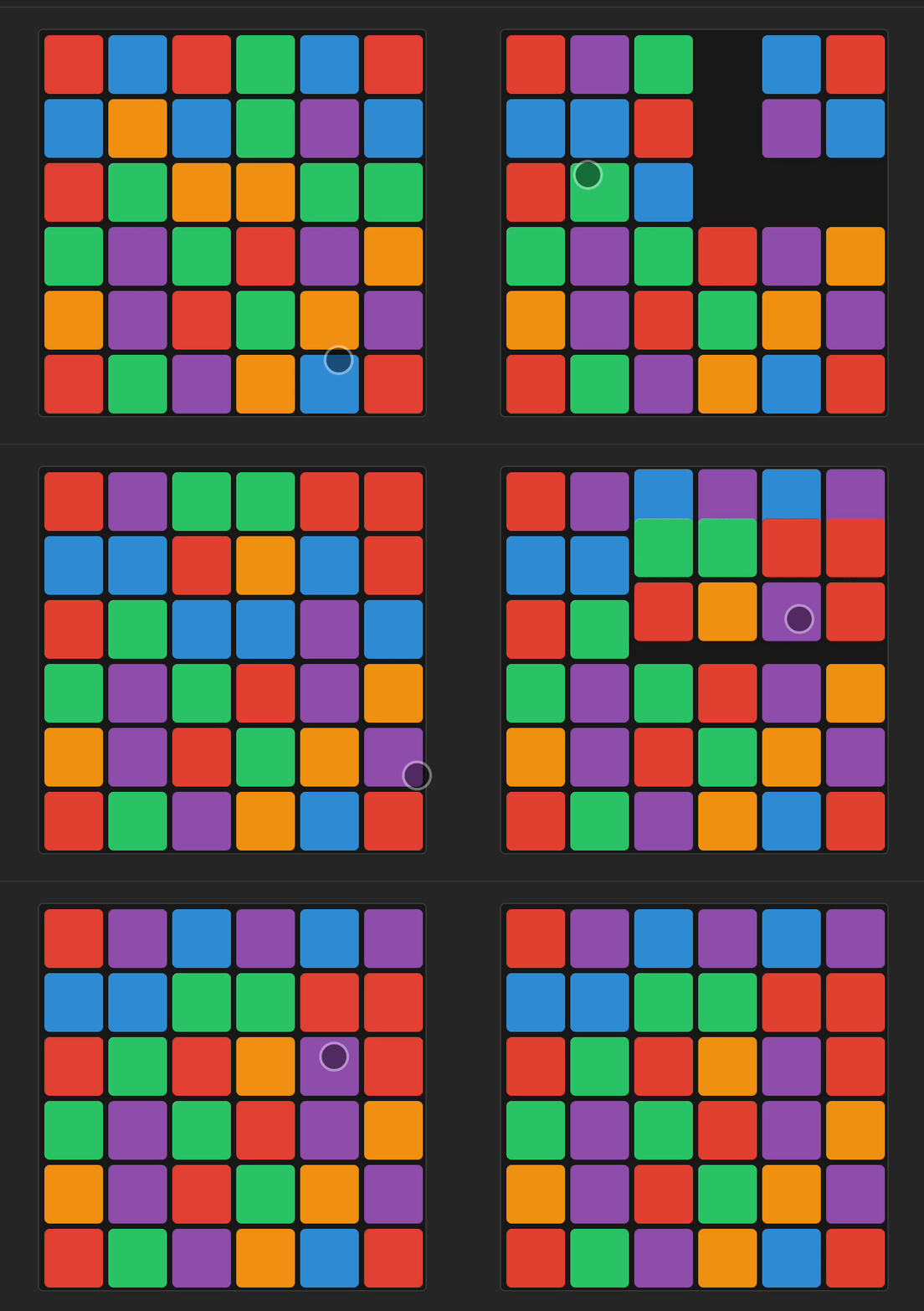
Fully playable tile-matching game with cascades, combos, and win/loss detection:
- Tile selection with adjacency validation
- Invalid move swap-back animations
- Match detection with combo multipliers
- Gravity-based tile dropping with stagger
- Particle effects for matched tiles
### Card Stack (Tinder-style)
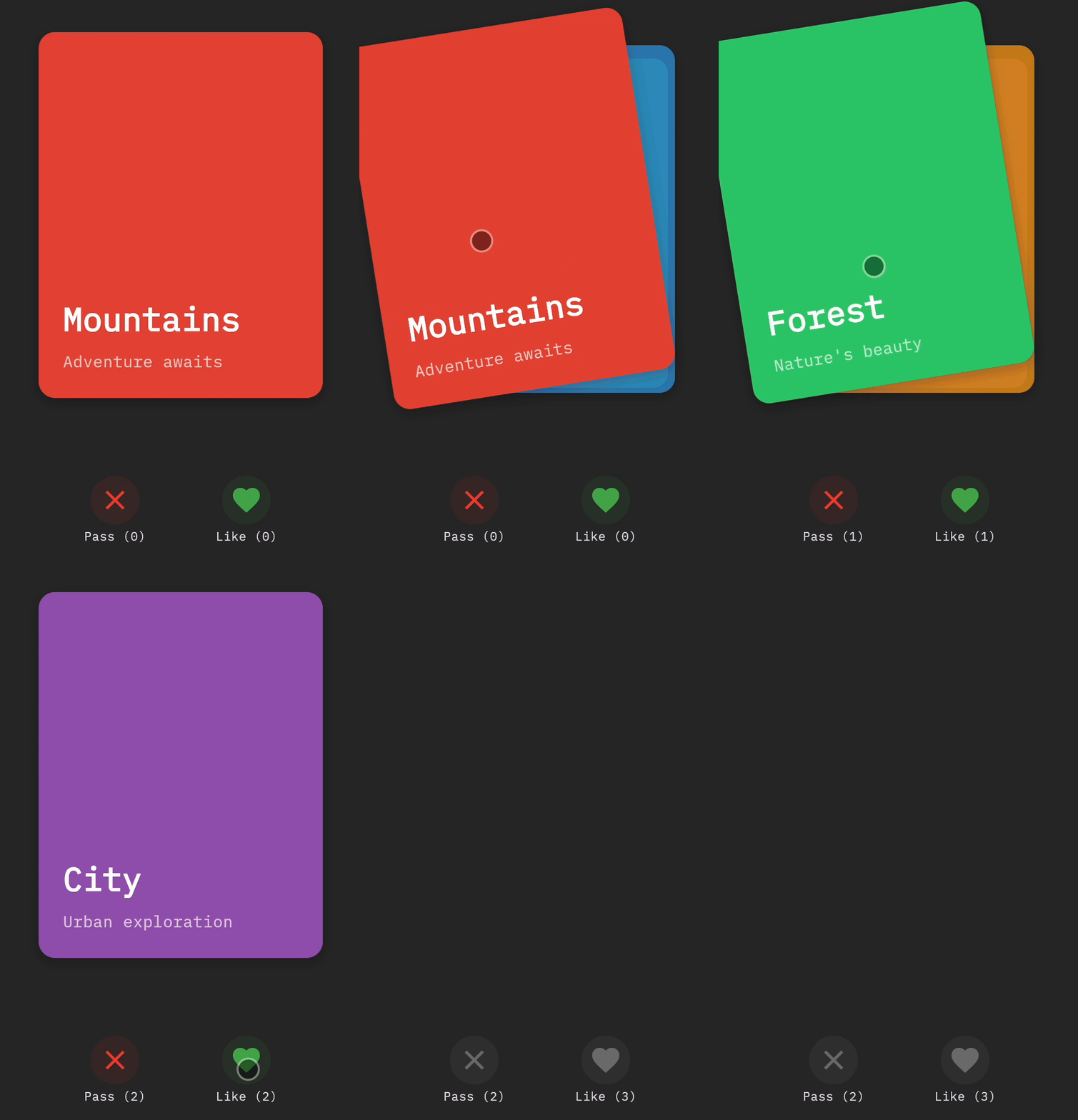
Gesture-driven card swiping with smooth animations:
```dart
void _onPanUpdate(DragUpdateDetails details) {
final delta = details.localPosition - dragStart!;
card.position.value = delta;
card.rotation.value = (delta.dx / 200).clamp(-0.26, 0.26);
}
// Threshold-based swipe completion
if (card.position.value.dx.abs() > swipeThreshold) {
_swipeCard(right: card.position.value.dx > 0);
} else {
_snapBack();
}
```
### Photo Gallery
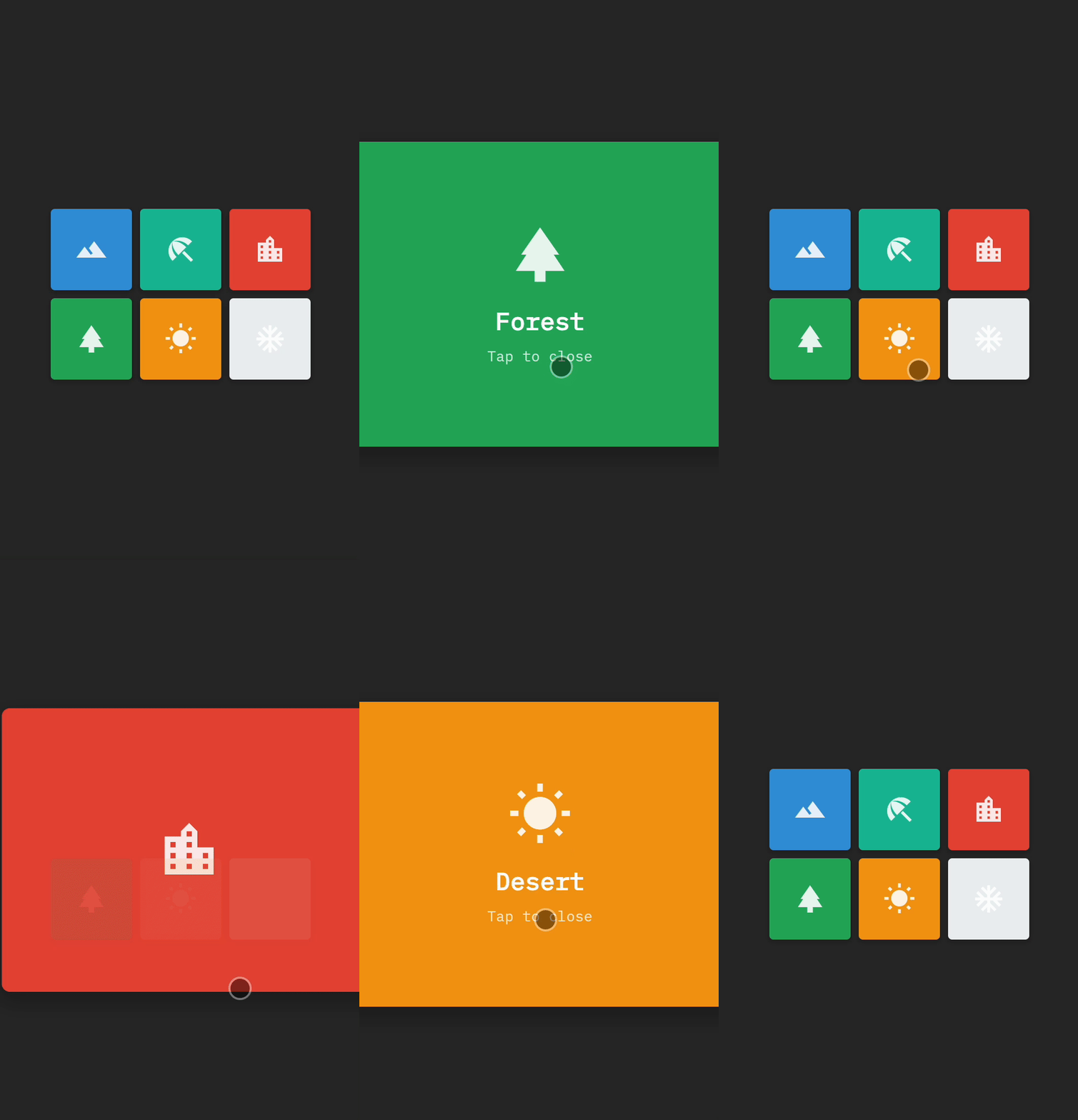
Shared element transitions with expand/collapse animations:
```dart
final expandAnim = animate()
.to(photo.position, targetPosition)
.to(photo.size, targetSize)
.withDuration(400)
.build();
// Coordinated parallel animations
final fadeAnims = otherPhotos.map((p) =>
animate().to(p.opacity, 0.0).build()
);
parallel([expandAnim, ...fadeAnims]);
```
### Onboarding Flow
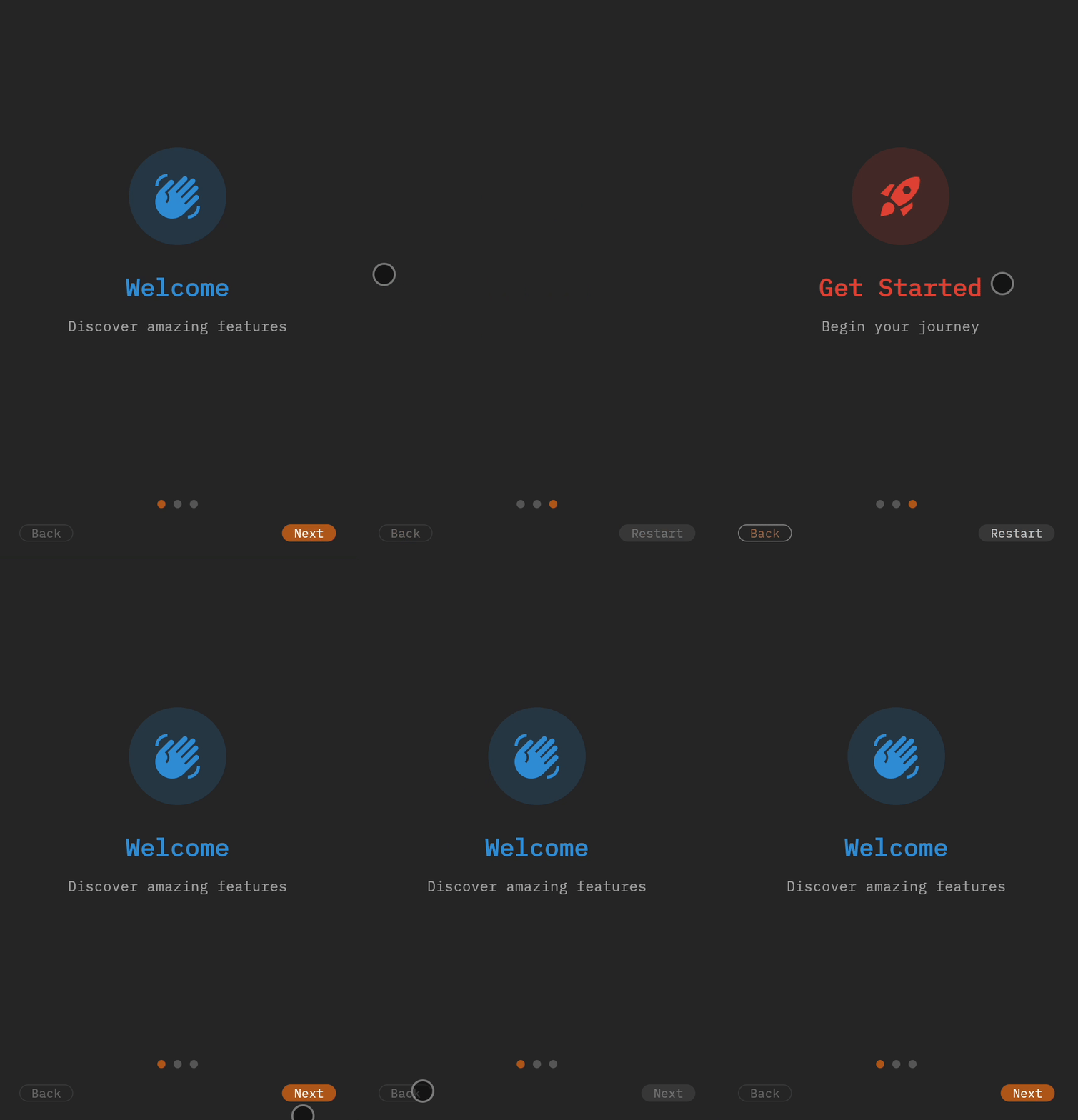
Multi-step wizard with directional page transitions and smooth navigation.
### Pull-to-Refresh & List Drag
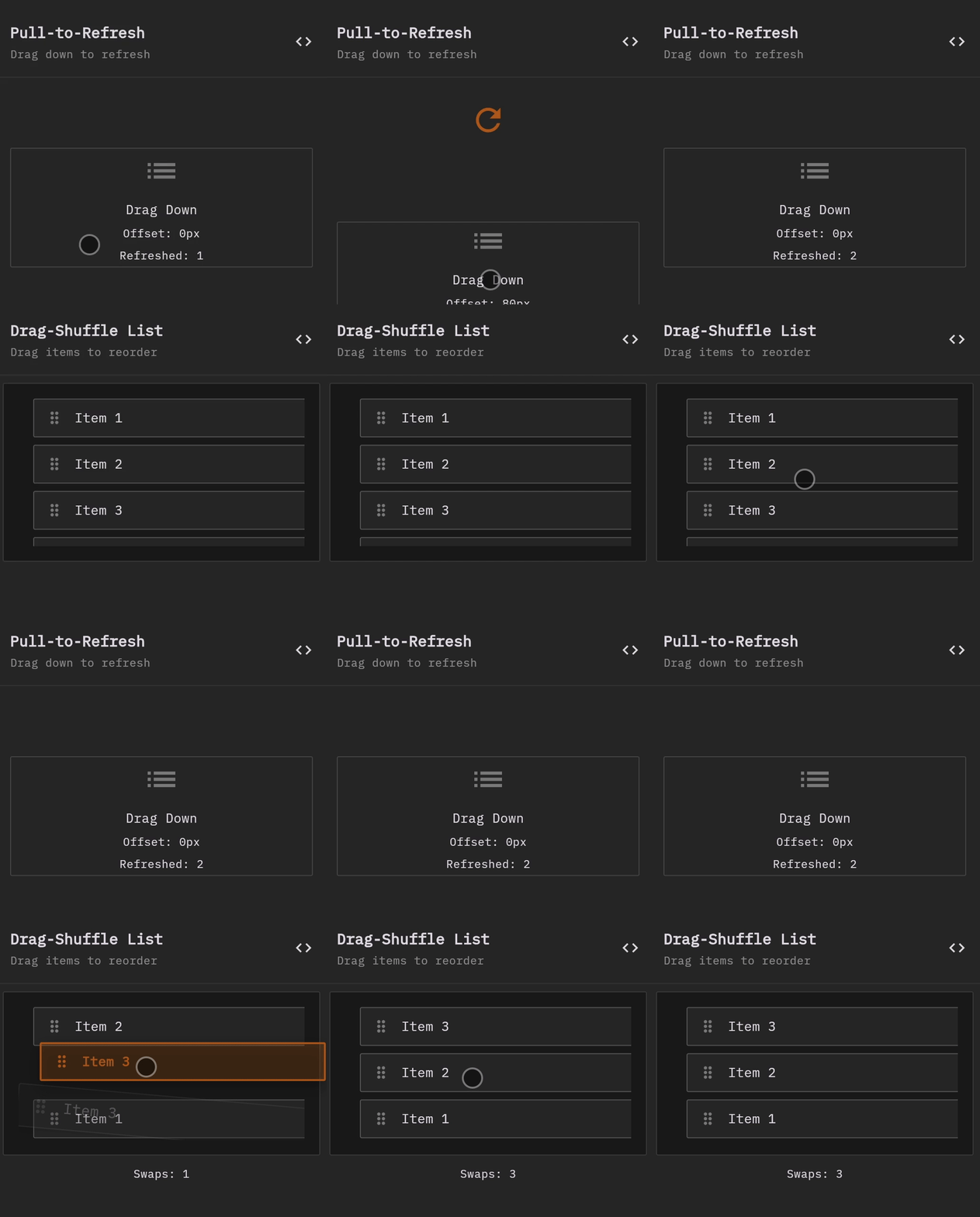
Gesture-driven interactions with threshold detection and reorderable lists:
- Pull-to-refresh with physics-based spring animations
- Drag-shuffle list with swap/shift/push modes
### Drag-Shuffle Grid & Swipe to Delete
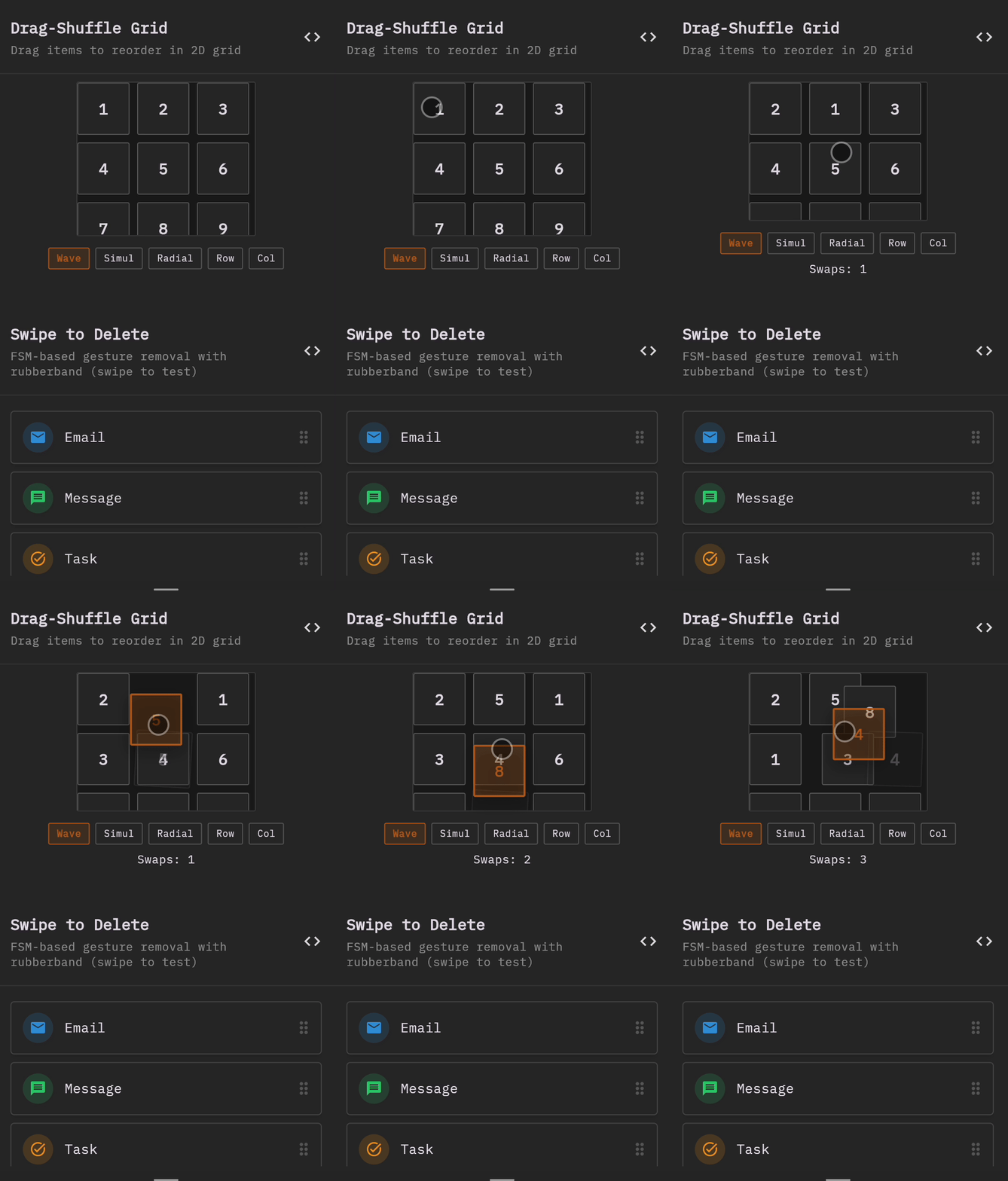
Advanced interactive patterns:
- Drag-shuffle grid with wave/radial/row/column repositioning
- Swipe-to-delete with progressive visual feedback
```dart
// Progressive visual feedback during swipe
final swipeProgress = (offset.dx.abs() / threshold).clamp(0.0, 1.0);
// Smooth delete animation
animate()
.to(item.swipeOffset, Offset(targetX, 0))
.to(item.opacity, 0.0)
.to(item.scale, 0.8)
.withDuration(300)
.build()
.play();
```
## 🎮 Demo
The interactive Flutter web demo showcases 30+ live examples organized by category:
### Primitives Demos
- **Motion Tab**: Elastic, Bounce, Shake, Pulse, Flash, Swing, Jello, Heartbeat
- **Enter/Exit Tab**: Fade, Slide, Scale, FadeScale, SlideFade, Zoom, Flip, Rotate
- **Timing Tab**: Chain, Parallel, Spring, Crossfade, Ping-Pong, Stagger
### UI Patterns
- **Button Pattern**: Press states with bouncy/elastic animations
- **Form Pattern**: Multi-field validation with animated feedback
- **Drawer Pattern**: Slide-in/out transitions with backdrop
- **Modal Pattern**: Multiple animation types (fade, scale, slide, bounce)
- **Toast Notifications**: Auto-dismissing notifications with slide animations
### Interactive Patterns
- **Pull-to-Refresh**: Gesture-driven refresh with threshold detection
- **Drag-Shuffle List**: Reorderable list with swap/shift/push modes
- **Drag-Shuffle Grid**: Reorderable grid with wave/radial/row/column repositioning
- **Swipe to Delete**: List items with swipe-to-remove gesture
### Complex Compositions
- **Match-3 Game**: Fully playable tile-matching game with cascades and combos
- **Card Stack**: Tinder-style swipeable cards with gesture-driven rotation
- **Photo Gallery**: Shared element transitions with expand/collapse
- **Onboarding Flow**: Multi-step wizard with directional page transitions
Run the demo:
```bash
cd demo
flutter run -d chrome
```
## Architecture
Kito is built on three core pillars:
### 1. Reactive State Management
Fine-grained reactive primitives inspired by SolidJS:
- **Signal**: Mutable reactive value
- **Computed**: Derived reactive value with automatic dependency tracking
- **Effect**: Side effect that runs when dependencies change
- **Batch**: Group multiple updates to run effects only once
```dart
final x = signal(10);
final y = signal(20);
final sum = computed(() => x.value + y.value);
effect(() {
print('Sum is: ${sum.value}');
});
// Batch multiple updates
batch(() {
x.value = 100;
y.value = 200;
}); // Effect runs once: "Sum is: 300"
```
### 2. Finite State Machines
Hierarchical state machines with:
- **Type-safe states and events**: Strongly-typed state definitions
- **Event bubbling**: Child states can bubble events to parents
- **Entry/exit callbacks**: Animations and side effects on transitions
- **Guards**: Conditional transitions with validation
- **Context**: Type-safe state-specific data
```dart
final fsm = StateMachine(
initialState: MyState.idle,
context: MyContext(),
);
fsm.defineState(
MyState.idle,
onEnter: (ctx) => print('Entering idle'),
onExit: (ctx) => fadeOut(ctx.opacity).play(),
);
fsm.addTransition(
from: MyState.idle,
to: MyState.active,
event: MyEvent.start,
guard: (ctx) => ctx.isValid,
);
```
### 3. Animation Engine
Timeline-based animation system with:
- **Animatable Properties**: Type-safe animated values
- **Easing Functions**: 30+ built-in easing functions
- **Keyframes**: Multi-step animations with per-keyframe easing
- **Direction Control**: Forward, reverse, alternate
- **Loop Control**: Finite or infinite loops
- **Callbacks**: onBegin, onUpdate, onComplete
```dart
animate()
.to(property, endValue)
.withDuration(1000)
.withEasing(Easing.easeOutElastic)
.withLoop(3)
.onComplete(() => print('Done!'))
.build()
.play();
```
## Easing Functions
Kito includes 30+ easing functions:
**Linear**: `linear`
**Quadratic**: `easeInQuad`, `easeOutQuad`, `easeInOutQuad`
**Cubic**: `easeInCubic`, `easeOutCubic`, `easeInOutCubic`
**Quartic**: `easeInQuart`, `easeOutQuart`, `easeInOutQuart`
**Quintic**: `easeInQuint`, `easeOutQuint`, `easeInOutQuint`
**Sinusoidal**: `easeInSine`, `easeOutSine`, `easeInOutSine`
**Exponential**: `easeInExpo`, `easeOutExpo`, `easeInOutExpo`
**Circular**: `easeInCirc`, `easeOutCirc`, `easeInOutCirc`
**Back**: `easeInBack`, `easeOutBack`, `easeInOutBack`
**Elastic**: `easeInElastic`, `easeOutElastic`, `easeInOutElastic`
**Bounce**: `easeInBounce`, `easeOutBounce`, `easeInOutBounce`
**Custom**: `cubicBezier(x1, y1, x2, y2)`, `steps(count)`
## API Reference
### Atomic Primitives
```dart
// Motion primitives
createElastic(property, target, {config})
createBounce(property, target, {config})
createShake(property, {config})
createPulse(property, {config})
createHeartbeat(property, {config})
createSwing(property, {config})
createJello(property, {config})
createFlash(property, {config})
// Enter/exit primitives
fadeIn(opacity, {config})
fadeOut(opacity, {config})
slideInFrom[Direction](property, {distance, config})
slideOutTo[Direction](property, {distance, config})
scaleIn(scale, {config})
scaleOut(scale, {config})
fadeScaleIn(opacity, scale, {config})
slideFadeIn(translate, opacity, {distance, config})
zoomIn(scale, opacity, {config})
flipIn(rotation, {config})
// Timing primitives
chain(animations, {gap})
parallel(animations)
spring({property, target, stiffness, damping})
pingPong({property, from, to, times})
staggerStart(animations, {delayMs})
```
### Animation Builder
```dart
animate()
.to(property, endValue, {easing, duration, delay})
.withKeyframes(property, keyframes, {easing, duration, delay})
.withDuration(milliseconds)
.withDelay(milliseconds)
.withEasing(easingFunction)
.withLoop(count) // or .loopInfinitely()
.withDirection(AnimationDirection.forward | reverse | alternate)
.withAutoplay()
.onBegin(callback)
.onUpdate(callback)
.onComplete(callback)
.build()
```
### Animation Control
```dart
animation.play() // Start or resume
animation.pause() // Pause
animation.restart() // Restart from beginning
animation.seek(0.5) // Seek to 50%
animation.stop() // Stop and reset
animation.dispose() // Clean up
```
### Timeline
```dart
timeline()
.add(animation, {offset, position})
.play()
.pause()
.restart()
.seek(milliseconds)
.stop()
.dispose()
```
### Reactive Primitives
```dart
// Signal
final sig = signal(initialValue)
sig.value = newValue
final current = sig.value
final peeked = sig.peek() // Read without tracking
// Computed
final comp = computed(() => expression)
final value = comp.value
// Effect
final dispose = effect(() => sideEffect)
dispose() // Stop the effect
// Batch
batch(() {
signal1.value = value1
signal2.value = value2
}) // Effects run once after batch
```
### State Machine Patterns
```dart
// Button with press animations
createButtonStateMachine(scale, opacity, {config})
// Form with validation
createFormStateMachine(fields, {onValidationComplete})
// Drawer with slide transition
createDrawerStateMachine(position, {config})
// Modal with multiple animation types
createModalStateMachine(scale, opacity, {animationType})
// Pull-to-refresh
createPullToRefreshStateMachine({threshold, onRefresh})
// Drag-shuffle list/grid
createDragShuffleListStateMachine(items, positions, {repositionMode})
createDragShuffleGridStateMachine(items, positions, {rows, cols, mode})
```
### Flutter AnimationController Integration
```dart
// Drive Kito properties with AnimationController
AnimatableAnimationDriver({
property: Animatable,
animation: Animation,
startValue: T,
endValue: T,
})
// Unified controller for multiple properties
KitoAnimationController.create({
vsync: TickerProvider,
duration: Duration,
properties: Map,
curve: Curve,
})
controller.forward()
controller.reverse()
controller.reset()
controller.dispose()
// Convert between Kito and Flutter
Curve.toEasing() → EasingFunction
EasingFunction.toCurve() → Curve
// Common Flutter curves as Kito easing functions
FlutterCurves.linear
FlutterCurves.easeIn / easeOut / easeInOut
FlutterCurves.bounceIn / bounceOut / bounceInOut
FlutterCurves.elasticIn / elasticOut / elasticInOut
FlutterCurves.fastOutSlowIn
FlutterCurves.decelerate
```
### SVG Path Morphing
```dart
// Parse SVG path data
SvgPath.fromString(pathData)
// Create animatable SVG path
animatableSvgPath(initialPath)
animatableSvgPathString(pathData)
// SVG path operations
path.normalize() // Convert to cubic beziers
path.toPath() // Convert to Flutter Path
SvgPathInterpolator.interpolate(from, to, t)
// Create morph widgets
svgMorphPath({
startPath: SvgPath,
endPath: SvgPath?,
properties: SvgAnimationProperties,
})
svgMorphPathString({
startPathData: String,
endPathData: String?,
properties: SvgAnimationProperties,
})
// SVG path commands supported:
// M/m - Move
// L/l - Line
// H/h - Horizontal line
// V/v - Vertical line
// C/c - Cubic bezier
// Q/q - Quadratic bezier
// A/a - Arc
// Z/z - Close path
```
### Performance Profiling
```dart
// Enable/disable profiling
AnimationProfiler().enableAutoProfiling()
AnimationProfiler().disableAutoProfiling()
// Profile animations
animation.withProfiling(animationId)
AnimationProfiler().startProfiling(animationId)
AnimationProfiler().recordFrame(animationId, frameDuration)
AnimationProfiler().stopProfiling(animationId)
// Get metrics
AnimationProfiler().getMetrics(animationId) → AnimationMetrics?
AnimationProfiler().getAllMetrics() → Map
AnimationProfiler().getSummary() → ProfilingSummary
// Performance overlay
KitoPerformanceOverlay({
child: Widget,
enabled: bool,
position: PerformanceOverlayPosition,
})
// Metrics widgets
PerformanceStats(metrics: AnimationMetrics)
FrameTimeline(frameTimings: List)
// Batch profiling
BatchProfiler.startBatch(animationIds)
BatchProfiler.stopBatch() → List
BatchProfiler.getSummary()
// Performance thresholds
PerformanceThresholds({
minFps: double, // default: 55.0
maxDroppedFramePercent: double, // default: 0.05
maxFrameTimeMs: double, // default: 16.67
})
```
## Examples
The `demo/` directory contains comprehensive examples organized by complexity:
- **Primitives**: 22 interactive atomic primitive demos
- **UI Patterns**: Common UI component state machines
- **Interactive Patterns**: Drag-based interactions
- **Complex Compositions**: Multi-step orchestrations
Run the demo app:
```bash
cd demo
flutter run -d chrome
```
## Performance Tips
1. **Use `batch()`** when updating multiple signals
2. **Dispose animations** when done to prevent memory leaks
3. **Use `peek()`** to read signals without tracking dependencies
4. **Prefer computed values** over manual calculations
5. **Mark canvas painters** with `isComplex: true` for caching
6. **Use atomic primitives** instead of building animations from scratch
## Testing
Kito has comprehensive test coverage:
- **kito**: 30/30 tests passing
- **kito_reactive**: 15/15 tests passing
- **kito_fsm**: 56/56 tests passing
Run tests:
```bash
# Test all packages
flutter test
# Test specific package
cd packages/kito_fsm
flutter test
```
## Roadmap
- [x] Core animation engine with timeline and keyframes
- [x] Reactive primitives (signals, computed, effects)
- [x] Hierarchical state machines with event bubbling
- [x] Atomic animation primitives (22+ primitives)
- [x] UI state machine patterns (button, form, drawer, modal, toast)
- [x] Interactive drag patterns (pull-to-refresh, drag-shuffle, swipe-to-delete)
- [x] Flutter web demo app with 30+ examples
- [x] Gesture-driven animations (swipe, drag, pan gestures)
- [x] Complex compositions (games, card stacks, galleries, onboarding)
- [x] Spring physics animations (basic implementation complete)
- [x] Integration with Flutter's AnimationController
- [x] SVG path morphing (advanced)
- [x] Performance profiling tools
- [ ] Enhanced documentation and tutorials
## Contributing
Contributions are welcome! Please read our contributing guidelines and submit pull requests to our repository.
## License
BSD 3-Clause License - see LICENSE file for details
## Credits
Inspired by:
- [anime.js](https://animejs.com/) - The amazing JavaScript animation library
- [SolidJS](https://www.solidjs.com/) - Fine-grained reactive system
- [Framer Motion](https://www.framer.com/motion/) - Declarative animations
- [XState](https://xstate.js.org/) - State machine patterns
Built with ❤️ for the Flutter community