https://github.com/darshan-vijay/study-group-manager
Studious - Study group manager, Match students with similar academic interests and schedules for collaborative learning. Provide features like real-time chat, email notifications, friend management, and help with group events.
https://github.com/darshan-vijay/study-group-manager
firebase google-cloud-platform kubernetes nodejs rabbit reactjs redis terraform
Last synced: 3 months ago
JSON representation
Studious - Study group manager, Match students with similar academic interests and schedules for collaborative learning. Provide features like real-time chat, email notifications, friend management, and help with group events.
- Host: GitHub
- URL: https://github.com/darshan-vijay/study-group-manager
- Owner: darshan-vijay
- Created: 2024-11-15T19:12:52.000Z (over 1 year ago)
- Default Branch: main
- Last Pushed: 2025-03-28T06:41:49.000Z (over 1 year ago)
- Last Synced: 2025-03-28T07:22:49.895Z (over 1 year ago)
- Topics: firebase, google-cloud-platform, kubernetes, nodejs, rabbit, reactjs, redis, terraform
- Language: JavaScript
- Homepage:
- Size: 9.87 MB
- Stars: 0
- Watchers: 1
- Forks: 0
- Open Issues: 0
-
Metadata Files:
- Readme: README.md
Awesome Lists containing this project
README
# Study Group Manager – Studious
> **Team Members:**
> Darshan Vijayaraghavan, Ruban Chakaravarthi, Vignesh Kumar Karthikeyan
---
## Demo Video
[](https://www.youtube.com/watch?v=hWxHUJqYAns)
🔗 [Watch Full Demo](https://www.youtube.com/watch?v=hWxHUJqYAns)
---
## Project Goals
Studious is a cloud-native web application that helps students form and manage study groups easily and efficiently. It supports:
- Student matching based on academic interests and availability
- Creation of online (Zoom) or offline study groups
- Real-time chat and private messaging
- Group event management and reminders
- Email notifications and friend management
---
## Architecture Overview
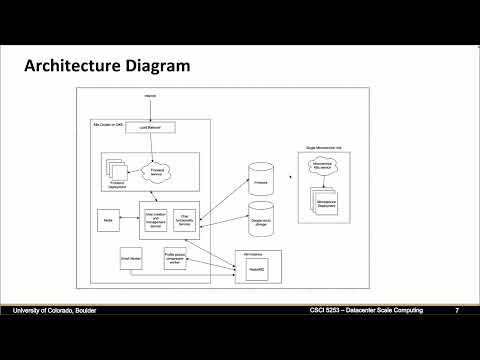
> **Microservice-based architecture deployed on Google Cloud using Kubernetes**
### Architecture Diagram

### Key Technologies
| Component | Technology | Description |
| -------------- | ------------------------ | ------------------------------------------ |
| Frontend | React.js (GKE) | Dynamic and responsive user interface |
| Backend | Node.js + REST API (GKE) | Handles authentication, groups, scheduling |
| Real-time Chat | Socket.IO + Redis (GKE) | Enables real-time messaging |
| Async Tasks | RabbitMQ (GCP VM) | Background jobs like emails/uploads |
| Database | Firestore | Stores user data, groups, chat logs |
| Media Storage | Google Cloud Storage | Stores profile pictures, documents |
| Infrastructure | Terraform | Automates infrastructure provisioning |
| Orchestration | Kubernetes (GKE) | Manages and scales all services |
---
## System Workflow
1. **User Registration & Authentication** – Signup with email verification, login to dashboard
2. **Study Group Creation** – Online/offline group creation with Zoom links for online
3. **Group Management** – Join, leave, view upcoming events
4. **Chat & Messaging** – Real-time private/group chat via WebSockets + Redis
5. **Email Notifications** – Sent via RabbitMQ workers
6. **Media Uploads** – Profile picture compression and upload to Cloud Storage
---
## Setup Instructions
### Prerequisites
- Google Cloud account
- Terraform Cloud account
- Docker
- Google Cloud SDK (gcloud)
- Kubernetes CLI (kubectl)
---
### 1. Create Service Account in GCP
- IAM & Admin > Service Accounts → Create new
- Assign roles:
- Compute Admin
- Kubernetes Engine Admin
- Firestore Admin
- Storage Admin
- Download the JSON key
---
### 2. Configure Terraform Cloud
- Go to Terraform Cloud
- Create a workspace
- Upload service account JSON as variable GOOGLE_CREDENTIALS
---
### 3. Deploy Infrastructure with Terraform
Run the following commands:
cd terraform/
terraform init
terraform plan
terraform apply
---
### 4. Authenticate with Google Cloud CLI
gcloud auth login
gcloud config set project [PROJECT_ID]
gcloud container clusters get-credentials [CLUSTER_NAME] --zone [ZONE]
---
### 5. Deploy Kubernetes Services
./deploy-services.sh
kubectl get services
---
### 6. Configure & Deploy Kubernetes Deployments
kubectl get services
# Update .env files with new endpoints
./deploy-deployments.sh
kubectl get deployments
---
### 7. (Optional) Push Docker Images
docker build -t gcr.io/[PROJECT_ID]/[IMAGE_NAME]:[TAG] .
docker push gcr.io/[PROJECT_ID]/[IMAGE_NAME]:[TAG]
---
### 8. Install RabbitMQ on VM
sudo apt-get update
sudo apt-get install rabbitmq-server -y
sudo systemctl start rabbitmq-server
sudo systemctl enable rabbitmq-server
sudo rabbitmqctl status
---
## Access the Application
kubectl get services | grep frontend-service
Visit the external IP in your browser to access the Studious platform.
---
## Testing & Debugging
- Integration + regression tests
- Local testing with Minikube
- Logging in backend + workers
kubectl logs [POD_NAME]
Google Cloud Monitoring used for runtime errors and performance.
---
## Performance & Monitoring
- WebSocket + Redis pub/sub for real-time chat
- RabbitMQ for async job handling
- Kubernetes handles:
- Auto-scaling
- Self-healing
- Rolling updates
---
## Known Limitations
- Steep learning curve for Kubernetes/Terraform
- No CI/CD pipeline (yet)
- Redis + WebSocket scaling needs tuning
- Cost management on cloud services
---
## Future Enhancements
- CI/CD using GitHub Actions or Jenkins
- AI-based group suggestions
- Admin analytics dashboard
- Multilingual and accessibility support