https://github.com/datadavev/t-zones
Web component for figuring time zones
https://github.com/datadavev/t-zones
scheduling timezones webcomponent
Last synced: about 2 months ago
JSON representation
Web component for figuring time zones
- Host: GitHub
- URL: https://github.com/datadavev/t-zones
- Owner: datadavev
- License: mit
- Created: 2021-09-25T14:07:19.000Z (over 4 years ago)
- Default Branch: main
- Last Pushed: 2023-03-23T17:57:22.000Z (about 3 years ago)
- Last Synced: 2025-03-28T08:44:19.428Z (about 1 year ago)
- Topics: scheduling, timezones, webcomponent
- Language: JavaScript
- Homepage: https://datadavev.github.io/t-zones/
- Size: 672 KB
- Stars: 0
- Watchers: 1
- Forks: 0
- Open Issues: 0
-
Metadata Files:
- Readme: README.md
- License: LICENSE
Awesome Lists containing this project
README
# \
Provides a view of times in different time zones for 24 hours on a date of choice.
This webcomponent follows the [open-wc](https://github.com/open-wc/open-wc) recommendation.
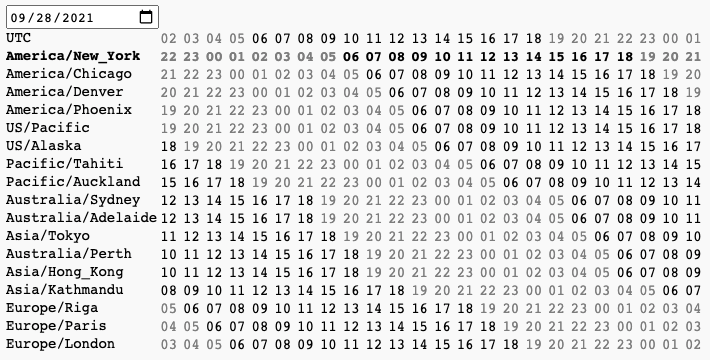
Demo at https://datadavev.github.io/t-zones
Source at https://github.com/datadavev/t-zones
## Installation
```bash
npm i t-zones
```
## Usage
```html
import 't-zones/t-zones.js';
```
or using a CDN:
```html
```
## Linting and formatting
To scan the project for linting and formatting errors, run
```bash
npm run lint
```
To automatically fix linting and formatting errors, run
```bash
npm run format
```
## Testing with Web Test Runner
To execute a single test run:
```bash
npm run test
```
To run the tests in interactive watch mode run:
```bash
npm run test:watch
```
## Demoing with Storybook
To run a local instance of Storybook for your component, run
```bash
npm run storybook
```
To build a production version of Storybook, run
```bash
npm run storybook:build
```
## Tooling configs
For most of the tools, the configuration is in the `package.json` to minimize the amount of files in your project.
If you customize the configuration a lot, you can consider moving them to individual files.
## Local Demo with `web-dev-server`
```bash
npm start
```
To run a local development server that serves the basic demo located in `demo/index.html`