https://github.com/datadog/cloudcraft-python
Python client for the Cloudcraft developer API.
https://github.com/datadog/cloudcraft-python
api-client cloudcraft python python3 sdk sdk-python
Last synced: about 1 year ago
JSON representation
Python client for the Cloudcraft developer API.
- Host: GitHub
- URL: https://github.com/datadog/cloudcraft-python
- Owner: DataDog
- License: apache-2.0
- Created: 2024-01-26T18:36:10.000Z (over 2 years ago)
- Default Branch: main
- Last Pushed: 2025-01-17T19:15:04.000Z (over 1 year ago)
- Last Synced: 2025-04-24T03:14:20.042Z (about 1 year ago)
- Topics: api-client, cloudcraft, python, python3, sdk, sdk-python
- Language: Python
- Homepage: http://www.cloudcraft.co/
- Size: 114 KB
- Stars: 6
- Watchers: 5
- Forks: 0
- Open Issues: 0
-
Metadata Files:
- Readme: README.md
- Contributing: CONTRIBUTING.md
- License: LICENSE-3rdparty.csv
Awesome Lists containing this project
README
# Cloudcraft API Client for Python
[](LICENSE.md)
[](https://www.python.org/downloads/release/python-3100/)
[](https://github.com/DataDog/cloudcraft-python/actions?query=branch%3Amain)
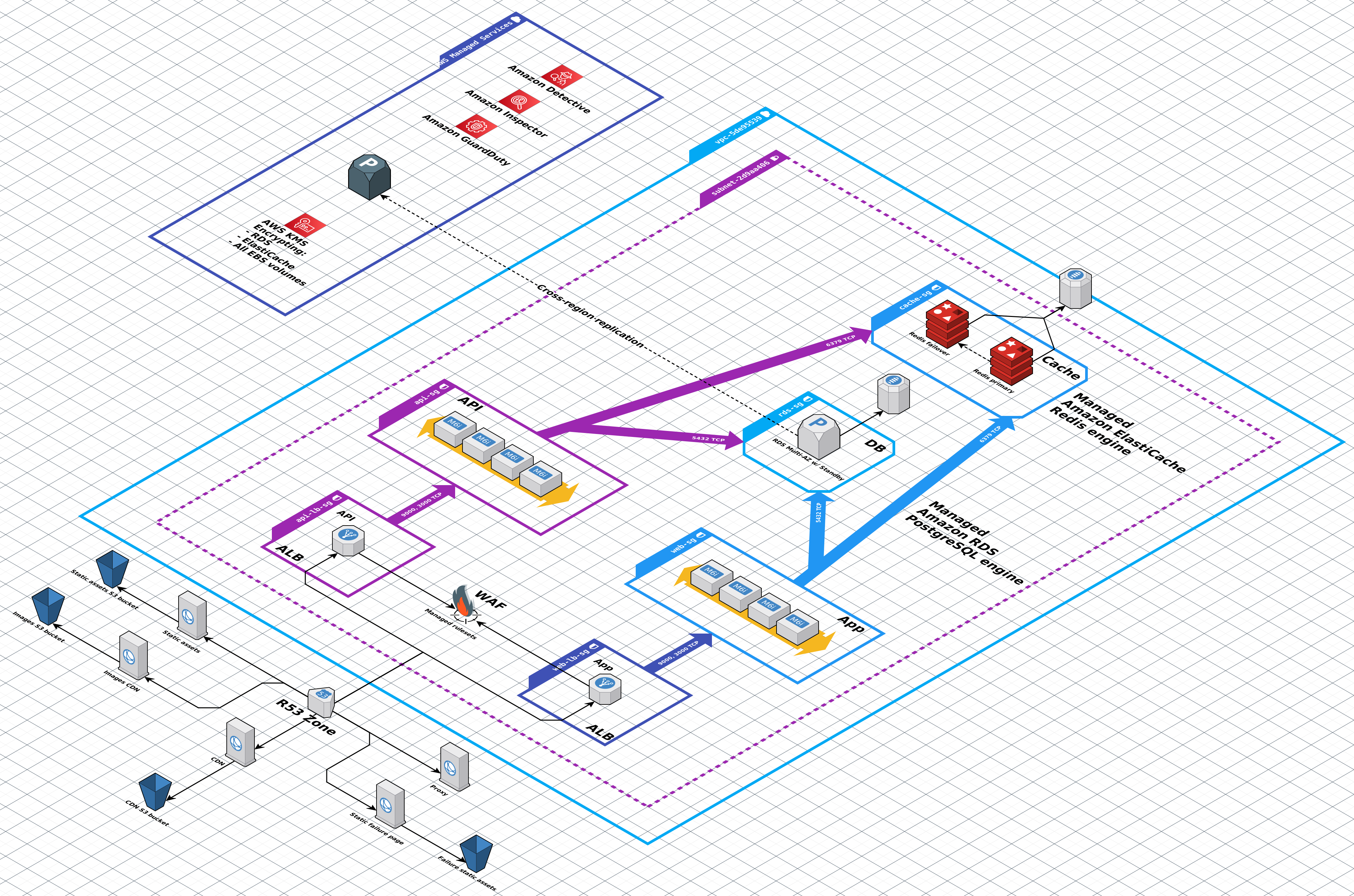
Visualize your cloud architecture with Cloudcraft by Datadog, [the best way to create smart AWS and Azure diagrams](https://www.cloudcraft.co/).
Cloudcraft supports both manual and programmatic diagramming, as well as automatic reverse engineering of existing cloud environments into
beautiful system architecture diagrams.
This `cloudcraftco` Python library provides an easy-to-use native Python SDK for interacting with [the Cloudcraft API](https://developers.cloudcraft.co/).
Use case examples:
- Snapshot and visually compare your live AWS or Azure environment before and after a deployment, in your app or as part of your automated CI pipeline
- Download an inventory of all your cloud resources from a linked account as JSON
- Write a converter from a third party data format to Cloudcraft diagrams
- Backup, export & import your Cloudcraft data
- Programmatically create Cloudcraft diagrams
This SDK requires a [Cloudcraft API key](https://developers.cloudcraft.co/#authentication) to use. [A free trial of Cloudcraft Pro](https://www.cloudcraft.co/pricing) with API access is available.
## Requirements
- Python 3.10
- Requests 2.28
## Installation
```
python3.10 -m pip install cloudcraftco
```
## Usage
The API is accessed through the `Cloudcraft` class. An API key available through the Cloudcraft user interface is required when instantiating `Cloudcraft`. It can be passed to the class as an argument or through the `CLOUDCRAFT_API_KEY` environment variable:
```python
from cloudcraftco.cloudcraft import Cloudcraft
# assumes CLOUDCRAFT_API_KEY exported
cloudcraft = Cloudcraft()
profile = cloudcraft.read_user_profile()
```
### Configuration
#### Initialize with config object
The package can be initialized with several options:
```python
from cloudcraftco.cloudcraft import Cloudcraft
cloudcraft = Cloudcraft({"api_key": "api-key-value", "timeout": 30000})
```
`api_key` must be provided via config object or environment variable.
| Option | Default | Description |
| ------------------- | --------------------- | ----------------------------------------------- |
| `api_key` | | API Key associated with Cloudcraft account |
| `maxNetworkRetries` | 10 | The amount of times a request should be retried |
| `timeout` | 80000 | Maximum time each request can take in ms |
| `host` | `'api.cloudcraft.co'` | Host that requests are made to |
| `port` | 443 | Port that requests are made to |
| `protocol` | `'https'` | `'https'` or `'http'` |
Options may also be specified by environment variable...
| Option | Environment Variable |
| ------------------- | ----------------------------------- |
| `api_key` | `CLOUDCRAFT_API_KEY` |
| `maxNetworkRetries` | `CLOUDCRAFT_MAX_NETWORK_RETRIES` |
| `timeout` | `CLOUDCRAFT_TIMEOUT` |
| `host` | `CLOUDCRAFT_HOST` |
| `port` | `CLOUDCRAFT_PORT` |
| `protocol` | `CLOUDCRAFT_PROTOCOL` |
### Blueprints
#### List blueprints
```python
from cloudcraftco.cloudcraft import Cloudcraft
# assumes CLOUDCRAFT_API_KEY exported
cloudcraft = Cloudcraft()
blueprints = cloudcraft.list_blueprints()
```
#### Retrieve blueprint
```python
from cloudcraftco.cloudcraft import Cloudcraft
# assumes CLOUDCRAFT_API_KEY exported
cloudcraft = Cloudcraft()
blueprint_id = "BLUEPRINT-ID" # valid blueprint uuid
blueprint = cloudcraft.read_blueprint(blueprint_id)
```
#### Create blueprint
```python
from cloudcraftco.cloudcraft import Cloudcraft
# assumes CLOUDCRAFT_API_KEY exported
cloudcraft = Cloudcraft()
data = {"data": {"grid": "standard", "name": "New blueprint"}}
blueprint = cloudcraft.create_blueprint(data)
```
#### Update blueprint
```python
from cloudcraftco.cloudcraft import Cloudcraft
# assumes CLOUDCRAFT_API_KEY exported
cloudcraft = Cloudcraft()
blueprint_id = "BLUEPRINT-ID" # valid blueprint uuid
data = {"data": {"grid": "standard", "name": "Updated blueprint"}}
cloudcraft.update_blueprint(blueprint_id, data)
```
#### Delete blueprint
```python
from cloudcraftco.cloudcraft import Cloudcraft
# assumes CLOUDCRAFT_API_KEY exported
cloudcraft = Cloudcraft()
blueprint_id = "BLUEPRINT-ID" # valid blueprint uuid
cloudcraft.delete_blueprint(blueprint_id)
```
#### Export blueprint as image
```python
from cloudcraftco.cloudcraft import Cloudcraft
# assumes CLOUDCRAFT_API_KEY exported
cloudcraft = Cloudcraft()
script_dir = os.path.dirname(os.path.realpath(__file__)) + os.sep
bp_id = "BLUEPRINT-ID" # valid blueprint uuid
bp_format = "svg"
bp_file = script_dir + bp_id + "." + bp_format
export = cloudcraft.export_blueprint(bp_id, bp_format)
with open(bp_file, "wb") as binary_file:
binary_file.write(export)
```
### AWS Accounts
#### Add AWS account
```python
from cloudcraftco.cloudcraft import Cloudcraft
# assumes CLOUDCRAFT_API_KEY exported
cloudcraft = Cloudcraft()
# role must exist and match your api_key/account
role = "arn:aws:iam::{}:role/cloudcraft".format(aws_account_id)
data = {"name": "New AWS Account", "roleArn": role}
result = cloudcraft.create_aws_account(data)
```
#### List AWS accounts
```python
from cloudcraftco.cloudcraft import Cloudcraft
# assumes CLOUDCRAFT_API_KEY exported
cloudcraft = Cloudcraft()
accounts = cloudcraft.list_aws_accounts()
```
#### Update AWS account
```python
from cloudcraftco.cloudcraft import Cloudcraft
# assumes CLOUDCRAFT_API_KEY exported
cloudcraft = Cloudcraft()
account_id = "AWS-ACCOUNT" # valid account uuid for api-key
role = "AWS-ROLE" # valid role for AWS Account
data = {"name": "Updated Playground AWS Account", "roleArn": role}
result = cloudcraft.update_aws_account(account_id, data)
```
#### Delete AWS account
```python
from cloudcraftco.cloudcraft import Cloudcraft
# assumes CLOUDCRAFT_API_KEY exported
cloudcraft = Cloudcraft()
account_id = "AWS-ACCOUNT" # valid account uuid for api-key
cloudcraft.delete_aws_account(account_id)
```
#### Get my AWS IAM Role parameters
```python
from cloudcraftco.cloudcraft import Cloudcraft
# assumes CLOUDCRAFT_API_KEY exported
cloudcraft = Cloudcraft()
iam_parameters = cloudcraft.read_aws_role_parameters()
```
#### Snapshot AWS account
```python
from cloudcraftco.cloudcraft import Cloudcraft
# assumes CLOUDCRAFT_API_KEY exported
cloudcraft = Cloudcraft()
script_dir = os.path.dirname(os.path.realpath(__file__)) + os.sep
ss_account = "AWS-ACCOUNT" # valid account uuid for api-key
ss_region = "us-west-2"
ss_format = "png"
ss_file = script_dir + ss_region + "." + ss_format
snapshot = cloudcraft.snapshot_aws_account(ss_account, ss_region, ss_format)
with open(ss_file, "wb") as binary_file:
binary_file.write(snapshot)
```
### Azure Accounts
#### Add Azure account
```python
from cloudcraftco.cloudcraft import Cloudcraft
# assumes CLOUDCRAFT_API_KEY exported
cloudcraft = Cloudcraft()
# id and secret values must be valid
data = {
"name": "Azure Account",
"subscriptionId": "subscriptionId",
"directoryId": "directoryId",
"applicationId": "applicationId",
"clientSecret": "clientSecret"
}
result = cloudcraft.create_azure_account(data)
```
#### List Azure accounts
```python
from cloudcraftco.cloudcraft import Cloudcraft
# assumes CLOUDCRAFT_API_KEY exported
cloudcraft = Cloudcraft()
accounts = cloudcraft.list_azure_accounts()
```
#### Update Azure account
```python
from cloudcraftco.cloudcraft import Cloudcraft
# assumes CLOUDCRAFT_API_KEY exported
cloudcraft = Cloudcraft()
account_id = "AZURE-ACCOUNT" # valid account uuid for api-key
data = {
"name": "Updated Azure Account",
"subscriptionId": "subscriptionId",
"directoryId": "directoryId",
"applicationId": "applicationId",
}
result = cloudcraft.update_azure_account(account_id, data)
```
#### Delete Azure account
```python
from cloudcraftco.cloudcraft import Cloudcraft
# assumes CLOUDCRAFT_API_KEY exported
cloudcraft = Cloudcraft()
account_id = "AZURE-ACCOUNT" # valid account uuid for api-key
cloudcraft.delete_azure_account(account_id)
```
#### Snapshot Azure account
```python
from cloudcraftco.cloudcraft import Cloudcraft
# assumes CLOUDCRAFT_API_KEY exported
cloudcraft = Cloudcraft()
script_dir = os.path.dirname(os.path.realpath(__file__)) + os.sep
ss_account = "AZURE-ACCOUNT" # valid account uuid for api-key
ss_location = "canadaeast"
ss_format = "png"
ss_file = script_dir + ss_location + "." + ss_format
snapshot = cloudcraft.snapshot_azure_account(ss_account, ss_location, ss_format)
with open(ss_file, "wb") as binary_file:
binary_file.write(snapshot)
```
### Budgets
#### Export budget for a blueprint
```python
from cloudcraftco.cloudcraft import Cloudcraft
# assumes CLOUDCRAFT_API_KEY exported
cloudcraft = Cloudcraft()
script_dir = os.path.dirname(os.path.realpath(__file__)) + os.sep
bp_id = "BLUEPRINT-ID" # valid blueprint uuid
bp_format = "csv"
bp_file = script_dir + bp_id + "." + bp_format
export = cloudcraft.export_blueprint_budget(bp_id, bp_format)
with open(bp_file, "wb") as binary_file:
binary_file.write(export)
```
### Users
#### Get Cloudcraft account info
```python
from cloudcraftco.cloudcraft import Cloudcraft
# assumes CLOUDCRAFT_API_KEY exported
cloudcraft = Cloudcraft()
profile = cloudcraft.read_user_profile()
```
## More information
See the [Cloudcraft Developer API docs](https://developers.cloudcraft.co/).
## Development
### Host Environment
`cloudcraft-python` was developed using...
- Python 3.7.15
- Poetry 1.1.14
- Tox 3.25.1
Host environment was macOS 12, but the other environments should work.
Earlier versions may work, but Python 3.10 is minimum supported version.
### Running Playground (Examples)
Development examples showing how Cloudcraft API works running source code.
Testing accounts requires care, since creating an account requires valid role.
```
% cd {repo-directory}
% poetry env use python3.10
% poetry shell
% poetry install
% export CLOUDCRAFT_API_KEY={{ api-key }}
% python3 dev_playgrounds/blueprints.py
% python3 dev_playgrounds/budgets.py
% python3 dev_playgrounds/exports.py
% python3 dev_playgrounds/snapshots_aws.py
% python3 dev_playgrounds/snapshots_azure.py
% python3 dev_playgrounds/users.py
% export CLOUDCRAFT_TEST_ROLE={{ your-role-arn }}
% python3 dev_playgrounds/accounts_aws.py
% export CLOUDCRAFT_TEST_SUBSCRIPTION={{ your-subscription-id }}
% export CLOUDCRAFT_TEST_DIRECTORY={{ your-directory-id }}
% export CLOUDCRAFT_TEST_APPLICATION={{ your-application-id }}
% export CLOUDCRAFT_TEST_SECRET={{ your-client-secret }}
% python3 dev_playgrounds/accounts_azure.py
```
### Running Tests
```
% poetry run pytest tests/unit
% poetry run pytest tests/functional
% tox
```
### Formatting Code
```
% poetry run isort . --profile black
% poetry run black .
```
### Checking Test Coverage
```
% poetry run coverage run --source=cloudcraftco --branch -m pytest .
% poetry run coverage html
```