https://github.com/datalayer/vscode-datalayer
👨💻 ☰ VS Code extension for Datalayer.
https://github.com/datalayer/vscode-datalayer
ai data gpu jupyter runtimes vscode vscode-extension
Last synced: 5 months ago
JSON representation
👨💻 ☰ VS Code extension for Datalayer.
- Host: GitHub
- URL: https://github.com/datalayer/vscode-datalayer
- Owner: datalayer
- License: other
- Created: 2025-09-24T14:14:26.000Z (10 months ago)
- Default Branch: main
- Last Pushed: 2026-02-04T04:40:03.000Z (5 months ago)
- Last Synced: 2026-02-04T14:23:34.037Z (5 months ago)
- Topics: ai, data, gpu, jupyter, runtimes, vscode, vscode-extension
- Language: TypeScript
- Homepage: https://marketplace.visualstudio.com/items?itemName=Datalayer.datalayer-jupyter-vscode
- Size: 3.64 MB
- Stars: 4
- Watchers: 0
- Forks: 0
- Open Issues: 40
-
Metadata Files:
- Readme: README.md
- Changelog: CHANGELOG.md
- License: LICENSE.txt
Awesome Lists containing this project
README

[](https://github.com/sponsors/datalayer)
[](https://github.com/datalayer/vscode-datalayer/actions/workflows/build-extension.yml)
[](https://marketplace.visualstudio.com/items?itemName=Datalayer.datalayer-jupyter-vscode)
[](https://marketplace.visualstudio.com/items?itemName=Datalayer.datalayer-jupyter-vscode)
[](https://opensource.org/licenses/MIT)
[](https://vscode-datalayer.netlify.app)
# Datalayer for Visual Studio Code
**🚀 Transform VS Code into a collaborative data science platform with seamless local-to-cloud scaling and rich document creation in just 2 clicks.**
💻 Execute notebooks on cloud compute, 📝 create beautiful reports with Notion-like collaborative documents, and 🔄 switch effortlessly between local and remote environments - all within your familiar VS Code interface.
**See it in action:**
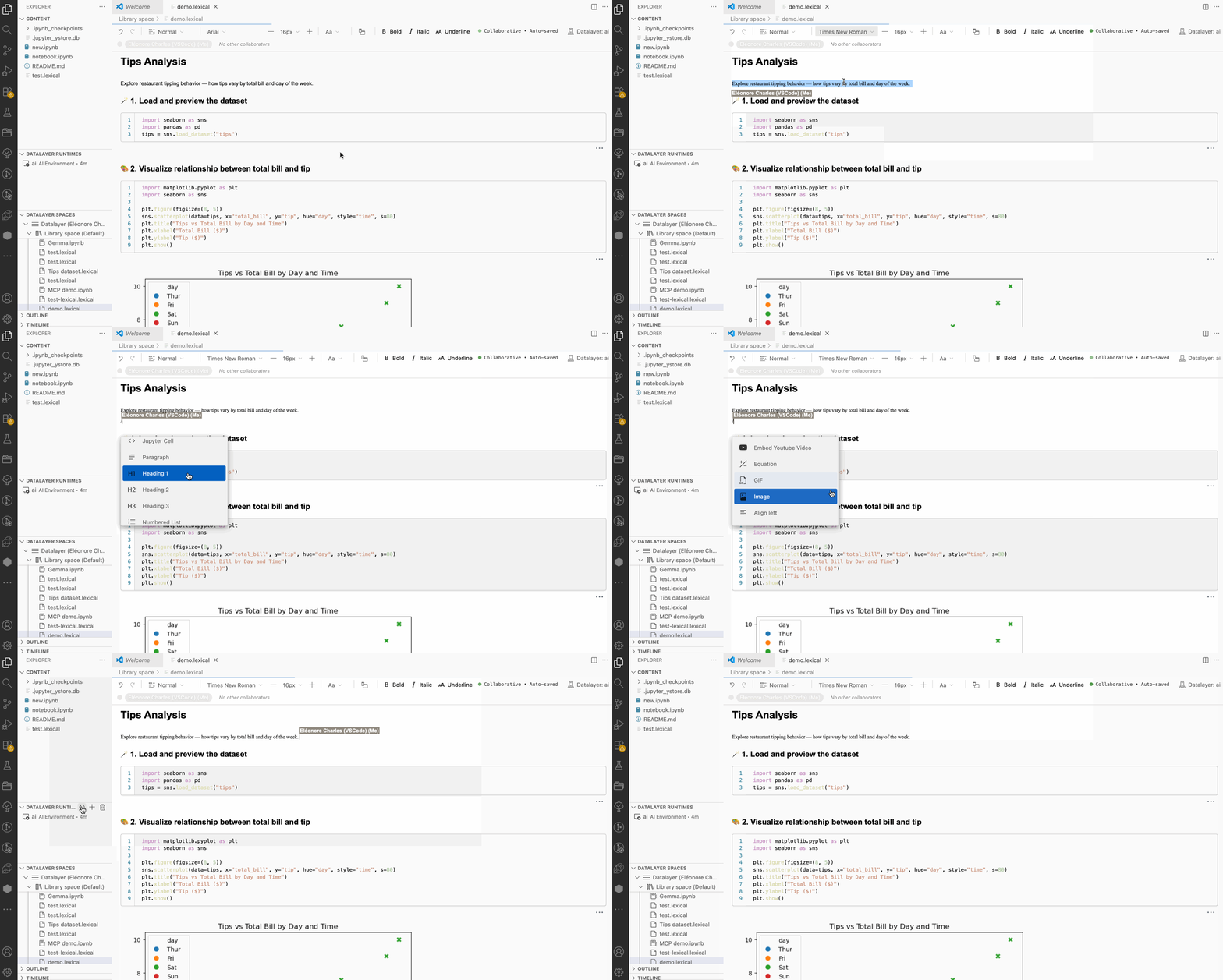
## 🚀 Key Benefits
### ⚡ **Instant Cloud Scaling**
- **Zero-setup cloud execution** - Run workloads on cloud CPUs or GPUs without any local Python installation
- **2-click scaling** - Switch from local development to cloud compute instantly via the kernel picker
- **Smart resource management** - Automatic runtime creation and reuse to optimize compute costs
### 📝 **Collaborative Rich Documents**
- **Notion-like documents** with rich formatting - Create beautiful reports with headings, lists, images, tables, executable code blocks, etc.
- **Real-time collaboration** - Multiple users can edit documents simultaneously with live updates
- **Mixed content support** - Seamlessly combine executable code, images, text, and more in a single document
### 🔀 **Ultimate Flexibility**
- **Seamless local ↔ cloud switching** - Start locally, scale to cloud, then return to local development
- **Multiple runtime support** - Connect to Datalayer cloud, local Python, or existing Jupyter servers
- **Code preservation** - Your code runs identically across local and cloud environments
- **Hybrid workflows** - Use the best of both worlds without vendor lock-in
## ⚡ Quick Start
1. **Create a free account** at [datalayer.app](https://datalayer.app).
2. **Install** from [VS Code Marketplace](https://marketplace.visualstudio.com/items?itemName=Datalayer.datalayer-jupyter-vscode)
3. **Login**: `Ctrl+Shift+P` → "Datalayer: Login to Datalayer" → select your type of OAuth login (GitHub)
4. **Scale instantly**: Open any `.ipynb` file with the Datalayer Editor → click kernel picker → select cloud runtime
5. **Create rich docs**: Create `.dlex` files for Notion-like collaborative reports with code, images and rich formatting
## 🎯 Core Features
### 📊 **Advanced Document Editors**
#### Jupyter Notebooks
- Full-featured notebook editing with syntax highlighting and IntelliSense
- Execute on cloud GPUs/CPUs, local Python kernels, or remote Jupyter servers
- Seamless kernel switching between cloud, local, and remote runtimes
- Native ZMQ integration for local Python execution (no Jupyter server required)
#### Datalayer Documents
- Notion-like rich text editor with real-time collaborative editing
- Support for images, tables, code blocks, mathematical equations, and formatted text
- Perfect for creating data science reports, documentation, and presentations
### 🗂️ **Integrated Workspace Management**
**Datalayer Spaces** (Explorer Sidebar)
- Browse and manage your cloud documents and notebooks
- Create, rename, delete files directly in the cloud
- Virtual file paths: `datalayer://Space Name/document.ipynb`
- Access to shared workspaces
**Datalayer Runtimes** (Explorer Sidebar)
- Real-time monitoring of all active cloud environments
- One-click runtime creation and termination
- Environment type indicators (CPU/GPU, memory, duration)
- Health status monitoring
**Datalayer Settings** (Explorer Sidebar)
- **Datasources** - Manage connections to external data sources (Athena, BigQuery, MS Sentinel, Splunk)
- Create and configure datasources with database and output bucket settings
- Click to edit datasource properties
- Quick access via right-click context menu
- Type indicator shows datasource variant (athena, bigquery, mssentinel, splunk)
- **Secrets** - Secure credential management for datasource authentication
### ⚙️ **Smart Runtime Management**
- **Auto-connect** - Documents automatically connect to available runtimes (configurable)
- **On-demand creation** - Create runtimes through the kernel picker when needed
- **Intelligent reuse** - Existing healthy runtimes are reused to conserve credits
- **Health verification** - Automatic checks ensure runtime reliability
- **Flexible duration** - Configure runtime lifetime (1-1440 minutes)
### 🎨 **Native VS Code Integration**
- **Theme synchronization** - Documents automatically match your VS Code theme
- **Unified kernel picker** - Access Datalayer cloud runtimes, local Python environments (via Python extension), and existing Jupyter servers
- **Native local execution** - Direct ZMQ kernel communication without Jupyter server
- **Rich status indicators** - Connection status and runtime info in status bar
- **Command palette integration** - All features accessible via `Ctrl+Shift+P`
- **GitHub Copilot integration** - Use natural language to create notebooks and insert cells (e.g., "Create a local notebook and add a plot")
## 💡 Common Questions
**Do I need Python locally?** No! Cloud runtimes handle all execution with zero local setup. You can still connect to local Python/Jupyter environments if preferred for hybrid workflows.
**Can I edit cloud documents?** Yes! Cloud documents are fully editable. Create, modify, and collaborate on notebooks and Datalayer documents directly in your cloud spaces.
**How do credits work?** Runtimes consume credits while active. The extension intelligently reuses existing healthy runtimes to minimize costs and maximize your credit efficiency.
**Can I use without a Datalayer account?** Absolutely! Use it for local `.ipynb` files and connecting to your existing Python/Jupyter environments. Cloud features require an account.
**How do I get an access token?** Visit [datalayer.app](https://datalayer.app), navigate to account settings, and generate a token for VS Code integration.
**How fast is the local ↔ cloud switching?** Switching between local and cloud execution takes just 2 clicks via the kernel picker - no configuration or setup required.
**What makes Datalayer Documents special?** Think Notion meets Jupyter! Unlike traditional notebooks, Datalayer Documents provide a Notion-like editing experience with rich formatting, real-time collaboration, and support for images, tables, and formatted text alongside executable code - perfect for creating professional reports and documentation.
## Installation
**From Marketplace:**
1. Open Extensions view (`Ctrl+Shift+X` / `Cmd+Shift+X`)
2. Search "Datalayer Platform"
3. Click Install
**From `.vsix` file:**
1. Download from [releases](https://github.com/datalayer/vscode-datalayer/releases)
2. Open Command Palette (`Ctrl+Shift+P` / `Cmd+Shift+P`) → "Extensions: Install from VSIX..."
## Key Commands
**Authentication:**
- Login/Logout
- Show Authentication Status
**Documents:**
- Create New Jupyter Notebook (local or cloud)
- Create New Datalayer Document (local or cloud)
- Context menu in Spaces tree: New Notebook/Datalayer Document in cloud workspace
- Context menu: Open, Rename, Delete
**Runtimes:**
- Select/Switch Runtime (local ↔ cloud switching)
- Terminate Runtime(s)
- View Runtime Controllers Status
- Monitor resource usage and costs
## Configuration
Open settings (`Ctrl+,` / `Cmd+,`) and search "Datalayer":
**Service URLs** - Default to `https://prod1.datalayer.run`:
- `datalayer.services.iamUrl`
- `datalayer.services.runtimesUrl`
- `datalayer.services.spacerUrl`
- `datalayer.services.spacerWsUrl` (WebSocket: `wss://prod1.datalayer.run`)
**Runtime:**
- `datalayer.runtime.defaultMinutes` - Duration (default: 10, max: 1440)
- `datalayer.autoConnect.strategies` - Auto-connect strategies when opening documents (default: `["Active Runtime", "Ask"]`)
- `["Active Runtime"]` - Automatically connect to runtime with most time remaining
- `["Active Runtime", "Ask"]` - Try active runtime, then ask user if none available
- `["Ask"]` - Always show runtime selection dialog
- `[]` - No auto-connect, manual selection required
**Logging:**
- `datalayer.logging.level` - trace/debug/info/warn/error (default: info)
- `datalayer.logging.includeTimestamps` - Add timestamps (default: true)
- `datalayer.logging.enableSDKLogging` - Log API calls (default: true)
- `datalayer.logging.enablePerformanceMonitoring` - Track performance (default: false)
## Recent Updates
### Runtime Controller Improvements
- **Smart Runtime Switching**: Kernel picker now shows individual runtime controllers for seamless switching between cloud environments
- **Automatic Kernel Selection**: Selecting a runtime automatically activates it as the notebook kernel
- **Proper Cleanup**: Switching between runtimes properly disposes old WebSocket connections
- **Tree View Sync**: Runtime tree automatically refreshes when runtimes are created or selected
### Documentation & Quality
- **TypeDoc API Documentation**: Complete API documentation now available at [vscode-datalayer.netlify.app](https://vscode-datalayer.netlify.app)
- **Zero TypeDoc Warnings**: All exported types properly documented
- **Node.js 22 Compatibility**: Fully updated to match VS Code 1.107.0 runtime requirements
## Developer Resources
- [DEVELOPMENT.md](./dev/docs/DEVELOPMENT.md) - Setup, debugging, architecture, jupyter package workflow
- [CONTRIBUTING.md](./dev/docs/CONTRIBUTING.md) - Contribution guidelines
- [TESTING.md](./dev/docs/TESTING.md) - Test infrastructure (41 tests, 100% pass)
- [CHANGELOG.md](./CHANGELOG.md) - Version history
- [API Documentation](https://vscode-datalayer.netlify.app) - Complete TypeScript API reference
## Support & Community
- [GitHub Issues](https://github.com/datalayer/vscode-datalayer/issues) - Bug reports and features
- [Datalayer Docs](https://docs.datalayer.ai) - Platform documentation
- [Website](https://datalayer.ai) - Learn more
## License
MIT License - See [LICENSE](./LICENSE.txt)