https://github.com/datalust/seq-extensions-logging
Add centralized log collection to ASP.NET Core apps with one line of code.
https://github.com/datalust/seq-extensions-logging
aspnetcore seq
Last synced: about 1 year ago
JSON representation
Add centralized log collection to ASP.NET Core apps with one line of code.
- Host: GitHub
- URL: https://github.com/datalust/seq-extensions-logging
- Owner: datalust
- License: apache-2.0
- Created: 2016-07-13T04:41:58.000Z (almost 10 years ago)
- Default Branch: dev
- Last Pushed: 2024-12-20T22:46:24.000Z (over 1 year ago)
- Last Synced: 2025-04-01T05:35:14.278Z (about 1 year ago)
- Topics: aspnetcore, seq
- Language: C#
- Homepage: https://datalust.co/seq
- Size: 2 MB
- Stars: 94
- Watchers: 8
- Forks: 13
- Open Issues: 5
-
Metadata Files:
- Readme: README.md
- License: LICENSE
Awesome Lists containing this project
README
# Seq.Extensions.Logging [](https://ci.appveyor.com/project/datalust/seq-extensions-logging) [](https://nuget.org/packages/Seq.Extensions.Logging)
[Seq](https://datalust.co/seq) is a flexible self-hosted back-end for the ASP.NET Core logging subsystem (_Microsoft.Extensions.Logging_). Log events generated by the framework and application code are sent over HTTP to a Seq server, where the structured data associated with each event is used for powerful filtering, correlation, and analysis.
For an example, see [the _dotnetconf_ deep dive session](https://channel9.msdn.com/Events/dotnetConf/2016/ASPNET-Core--deep-dive-on-building-a-real-website-with-todays-bits).
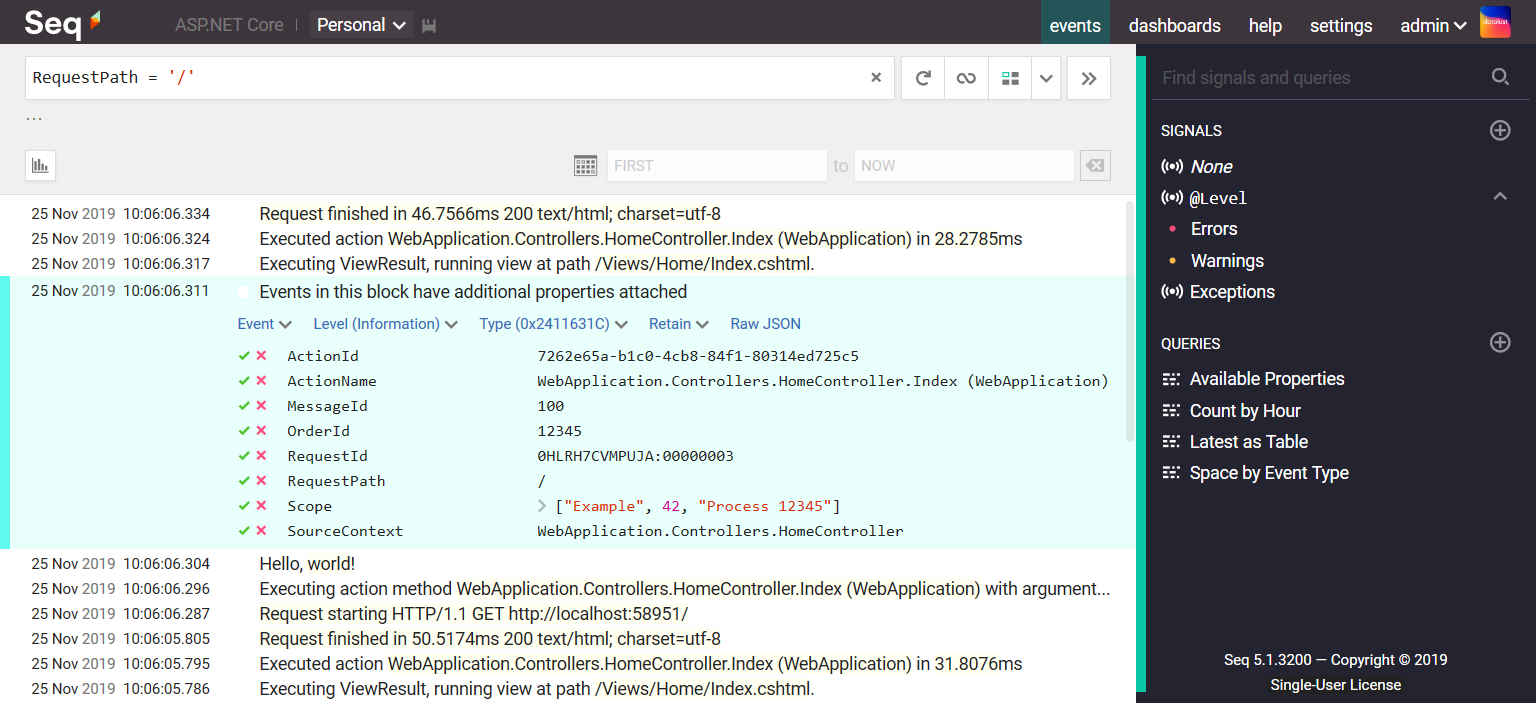
This package makes it a one-liner to configure ASP.NET Core logging with Seq.
### Getting started
The instructions that follow are for **.NET 6.0+** web applications.
Add [the NuGet package](https://nuget.org/packages/seq.extensions.logging) to your project either by editing the CSPROJ file, or using the NuGet package manager:
```
dotnet add package Seq.Extensions.Logging
```
In `Program.cs`, call `AddSeq()` on the host's `ILoggingBuilder`.
```csharp
// Use the Seq logging configuration in appsettings.json
builder.Host.ConfigureLogging(loggingBuilder =>
loggingBuilder.AddSeq());
```
The framework will inject `ILogger` instances into controllers and other classes:
```csharp
class HomeController : Controller
{
readonly ILogger _log;
public HomeController(ILogger log)
{
_log = log;
}
public IActionResult Index()
{
_log.LogInformation("Hello, world!");
}
}
```
Log messages will be sent to Seq in batches and be visible in the Seq user interface. Observe that correlation identifiers added by the framework, like `RequestId`, are all exposed and fully-searchable in Seq.
### Logging with message templates
Seq supports the templated log messages used by _Microsoft.Extensions.Logging_. By writing events with _named format placeholders_, the data attached to the event preserves the individual property values.
```csharp
var fizz = 3, buzz = 5;
log.LogInformation("The current values are {Fizz} and {Buzz}", fizz, buzz);
```
This records an event like:
| Property | Value |
| -------- | ----- |
| `Message` | `"The current values are 3 and 5"` |
| `Fizz` | `3` |
| `Buzz` | `5` |
Seq makes these properties searchable without additional log parsing. For example, a filter expression like `Fizz < 4` would match the event above.
### Additional configuration
The `AddSeq()` method exposes some basic options for controlling the connection and log volume.
| Parameter | Description | Example value |
| --------- | ----------- | ------------- |
| `apiKey` | A Seq [API key](http://docs.datalust.co/docs/api-keys) to authenticate or tag messages from the logger | `"1234567890"` |
| `levelOverrides` | A dictionary mapping logger name prefixes to minimum logging levels | `new Dictionary{ ["Microsoft"] = LogLevel.Warning }` |
| `minimumLevel` | The level below which events will be suppressed (the default is `Information`) | `LogLevel.Trace` |
### JSON configuration
The logging level, Seq server URL, API key and other settings can be read from JSON configuration if desired.
In `appsettings.json` add a `"Seq"` property to `"Logging"` to configure the server URL, API key, and levels for the Seq provider:
```json
{
"Logging": {
"LogLevel": {
"Default": "Information"
},
"Seq": {
"ServerUrl": "http://localhost:5341",
"ApiKey": "1234567890",
"LogLevel": {
"System": "Information",
"Microsoft": "Warning"
}
}
}
}
```
### Dynamic log level control
The logging provider will dynamically adjust the default logging level up or down based on the level associated with an API key in Seq. For further information see
the [Seq documentation](http://docs.datalust.co/docs/using-serilog#dynamic-level-control).
### Including literal JSON strings in log events
The logging provider ships with a `JsonSafeString` type that can be used to communicate to the logger that a string contains valid JSON, which can be safely included in a log event as structured data.
```csharp
var json = "{\"A\": 42}";
_logger.LogInformation("The answer is {Answer}", new JsonSafeString(json));
```
### Trace and span correlation
The Seq logger provider automatically adds trace and span ids to events when present, enabling the _Trace_ drop-down menu in Seq's expanded event view.
ASP.NET Core may add additional top-level `TraceId`, `SpanId`, and `ParentId` properties in its default configuration. You can remove these if you wish, using `ILoggingBuilder.Configure()`:
```csharp
builder.Logging.Configure(opts => {
opts.ActivityTrackingOptions = ActivityTrackingOptions.None;
});
```
### Enrichment
You can add additional structured data to events being sent to Seq by specifying _enricher_ callbacks in the `AddSeq()` method:
```csharp
.AddSeq(enrichers: [evt => evt.AddOrUpdateProperty(
"ThreadId",
Environment.CurrentManagedThreadId)
]))
```
### Troubleshooting
> Nothing showed up, what can I do?
If events don't appear in Seq after pressing the refresh button in the _filter bar_, either your application was unable to contact the Seq server, or else the Seq server rejected the log events for some reason.
#### Server-side issues
The Seq server may reject incoming events if they're missing a required API key, if the payload is corrupted somehow, or if the log events are too large to accept.
Server-side issues are diagnosed using the Seq _Ingestion Log_, which shows the details of any problems detected on the server side. The ingestion log is linked from the _Settings_ > _Diagnostics_ page in the Seq user interface.
#### Client-side issues
If there's no information in the ingestion log, the application was probably unable to reach the server because of network configuration or connectivity issues. These are reported to the application through `SelfLog`.
Add the following line after the logger is configured to print any error information to the console:
```csharp
Seq.Extensions.Logging.SelfLog.Enable(Console.Error);
```
If the console is not available, you can pass a delegate into `SelfLog.Enable()` that will be called with each error message:
```csharp
Seq.Extensions.Logging.SelfLog.Enable(message => {
// Do something with `message`
});
```
#### Troubleshooting checklist
* Check the Seq _Ingestion Log_, as described in the _Server-side issues_ section above.
* Turn on the `SelfLog` as described above to check for connectivity problems and other issues on the client side.
* [Raise an issue](https://github.com/datalust/seq-extensions-logging/issues), ask for help on the [Seq support forum](http://docs.datalust.co/discuss) or email **support@datalust.co**.
### Versioning policy
The major version of this package tracks the major version of its _Microsoft.Extensions.Logging_ dependency. So, if your
application (on any target runtime) is targeting `net6.0`, use the latest 6.* version of this package. Likewise, if
you're targeting `net8.0`, target a 8.* version of _Seq.Extensions.Logging_ for the best experience.
### Credits
This package is based on a subset of the powerful [Serilog](https://serilog.net) library. Not all of the options supported by the Serilog and Seq client libraries are present in
the _Seq.Extensions.Logging_ package.