https://github.com/datalust/seq-forwarder
Local collection and reliable forwarding of log data to Seq
https://github.com/datalust/seq-forwarder
seq serilog
Last synced: 11 months ago
JSON representation
Local collection and reliable forwarding of log data to Seq
- Host: GitHub
- URL: https://github.com/datalust/seq-forwarder
- Owner: datalust
- License: apache-2.0
- Created: 2016-06-15T01:57:16.000Z (about 10 years ago)
- Default Branch: dev
- Last Pushed: 2024-02-22T07:08:27.000Z (over 2 years ago)
- Last Synced: 2025-06-05T00:52:01.315Z (about 1 year ago)
- Topics: seq, serilog
- Language: C#
- Size: 1.83 MB
- Stars: 61
- Watchers: 13
- Forks: 17
- Open Issues: 7
-
Metadata Files:
- Readme: README.md
- License: LICENSE
Awesome Lists containing this project
README
# Seq Forwarder [](https://ci.appveyor.com/project/datalust/seq-forwarder) [](https://gitter.im/datalust/seq) [](https://github.com/datalust/seq-forwarder/releases)
Seq Forwarder is a client-side log collector that receives events over its local HTTP API and persists them to its own
internal storage until a remote Seq server can be reached.
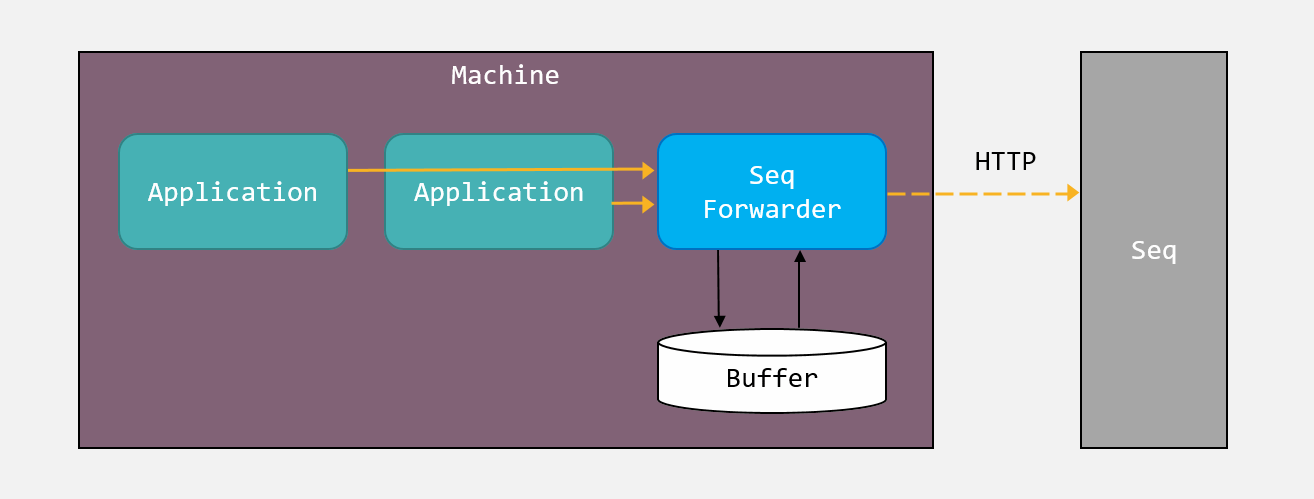
Seq Forwarder listens on port `15341` by default. The HTTP ingestion API is identical to
the Seq one, so standard client libraries like _Serilog.Sinks.Seq_ can write to
it directly.
```csharp
Log.Logger = new LoggerConfiguration()
.WriteTo.Seq("http://localhost:15341")
.CreateLogger();
Log.Information("Hello, Seq Forwarder!");
```
Client applications can specify an API key when logging to Seq Forwarder. In this case the API key supplied by the client
will be forwarded along to the target Seq server.
Alternatively, Seq Forwarder can be configured with an API key, and will use this to log to Seq when client applications do not specify one.
## Getting started
First, download the release bundle for your platform, and extract it to a suitable location.
The instructions below use the `seqfwd` command-line. To learn about available commands, try `seqfwd help`.
### On Windows
To set up Seq Forwarder as a Windows service, from an administrative PowerShell prompt in the Seq Forwarder directory,
set the target Seq server URL and an optional API key:
```powershell
./seqfwd config -k output.serverUrl --value="http://seq.example.com/"
./seqfwd config -k output.apiKey --value="1a2b3c4d5e6f"
./seqfwd config -k storage.bufferSizeBytes -v 1073741824
./seqfwd install
./seqfwd start
```
The default buffer size limit is 64 MB. In the example, this is increased to 1 GB.
To upgrade, stop the service, overwrite the forwarder release bundle, and restart the service.
On Windows, Seq Forwarder will used machine-scoped DPAPI to encrypt the default API key and any API keys supplied by
clients.
## On macOS or Linux
On Linux, you'll need `liblmdb`:
```
apt install liblmdb-dev
```
To run Seq Forwarder, configure the target Seq server URL, and optionally, an API key:
```shell
./seqfwd config -k output.serverUrl --value="http://seq.example.com/"
./seqfwd config -k output.apiKey --value="1a2b3c4d5e6f"
./seqfwd config -k storage.bufferSizeBytes -v 1073741824
./seqfwd run
```
**Note** that on macOS and Linux, the output API key and any API keys provided by clients will be stored in plain text.
The default buffer size cap is 64 MB. In the example, this is increased to 1 GB.
## Development
Seq Forwarder is a .NET Core application that can be built using the .NET Core SDK on Windows, macOS, and Linux.
To debug, `F5` will work, but on Windows you will need to either run the `install` command (see below) to create an HTTP namespace
reservation, or run as Administrator.
## Troubleshooting
By default the "forwarder" logs will be stored under `%PROGRAMDATA%\Seq\Logs`. If the destination Seq server is not
available, an exception will be stored in these log files.
If you need to inspect the current configuration, it can be found at: `%PROGRAMDATA%\Seq\Forwarder\SeqForwarder.json`
## Command line usage
```
> ./seqfwd help
Usage: seqfwd []
Available commands are:
bind-ssl Bind an installed SSL certificate to an HTTPS port served by Seq
Forwarder
config View and set fields in the SeqForwarder.json file; run with no
arguments to list all fields
dump Print the complete log buffer contents as JSON
help Show information about available commands
install Install the Seq Forwarder as a Windows service
restart Restart the Windows service
run Run the server interactively
start Start the Windows service
status Show the status of the Seq Forwarder service
stop Stop the Windows service
truncate Clear the log buffer contents
uninstall Uninstall the Windows service
version Print the current executable version
```
Note that the Windows HTTP and service-related commands (`bind-ssl`, `install`, `restart`, `start`, `status`, `stop`,
and `uninstall`) are only available on that platform.
## _SeqForwarder.json_ configuration example
The `seqfwd config` command reads and writes _SeqForwarder.json_:
```json
{
"diagnostics": {
"internalLogPath": "C:\\ProgramData\\Seq\\Logs\\",
"internalLoggingLevel": "Information"
},
"output": {
"serverUrl": "http://localhost:5341",
"eventBodyLimitBytes": 262144,
"rawPayloadLimitBytes": 10485760,
"apiKey": null
},
"storage": {
"bufferSizeBytes": 67108864
},
"api": {
"listenUri": "http://localhost:15341"
}
}
```
On Windows, this file lives in `C:\ProgramData\Seq\Forwarder`.