https://github.com/datalust/seq-input-gelf
Ingest GELF payloads into Seq
https://github.com/datalust/seq-input-gelf
docker gelf seq
Last synced: 12 months ago
JSON representation
Ingest GELF payloads into Seq
- Host: GitHub
- URL: https://github.com/datalust/seq-input-gelf
- Owner: datalust
- License: apache-2.0
- Created: 2018-11-30T03:46:07.000Z (over 7 years ago)
- Default Branch: dev
- Last Pushed: 2024-08-15T02:56:40.000Z (almost 2 years ago)
- Last Synced: 2025-05-12T05:05:18.948Z (about 1 year ago)
- Topics: docker, gelf, seq
- Language: Rust
- Homepage: https://datalust.co/seq
- Size: 8.93 MB
- Stars: 16
- Watchers: 5
- Forks: 8
- Open Issues: 3
-
Metadata Files:
- Readme: README.md
- License: LICENSE
Awesome Lists containing this project
README
# Seq GELF Input [](https://ci.appveyor.com/project/datalust/sqelf) [](https://nuget.org/packages/Seq.Input.Gelf) [](https://hub.docker.com/r/datalust/seq-input-gelf)
Ingest [Graylog Extended Log Format (GELF) messages](http://docs.graylog.org/en/2.5/pages/gelf.html) via UDP or TCP into [Seq](https://datalust.co/seq). The app is packaged both as a plug-in Seq App for all platforms, and as a standalone Docker container that forwards events to Seq via its HTTP API.
## Getting started on Windows (requires Seq 5.1+)
On Windows, the GELF input is installed into Seq as a [Seq App](https://docs.getseq.net/docs/installing-seq-apps).
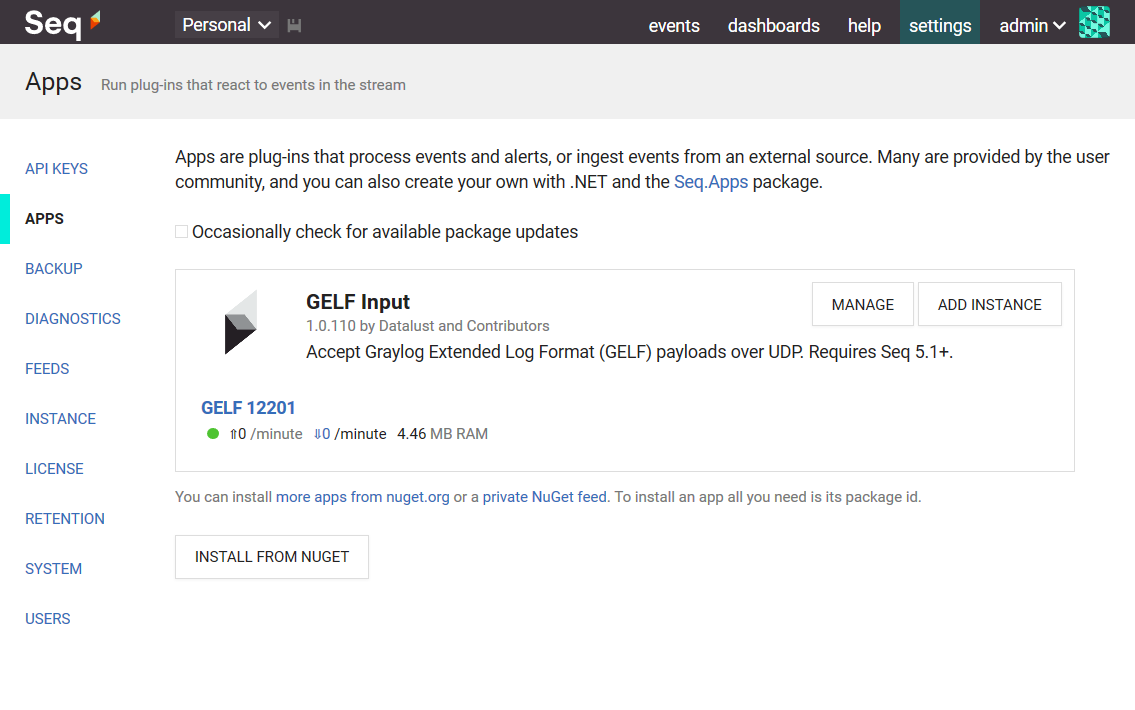
**1. Install the app package**
In _Settings_ > _Apps_, choose _Install from NuGet_. The app package id is [Seq.Input.Gelf](https://nuget.org/packages/Seq.Input.Gelf).
**2. Start an instance of the app**
From the apps screen, choose _Add Instance_ and give the new GELF input a name.
The default settings will cause the GELF input to listen on localhost port 12201. Choose a different port if required.
Select _Save Changes_ to start the input.
**3. Configure Windows Firewall**
Ensure UDP port 12201 (or the selected port, if you specified a different one), is allowed through Windows Firewall.
**4. Log some events!**
That's all there is to it. Events ingested through the input will appear in the _Events_ stream. If the input doesn't work, check for diagnostic events raised by the input app (there is some status information shown under the app instance name).
Events ingested by the input will be associated with the default _None_ [API key](https://docs.getseq.net/docs/api-keys), which can be used to attach properties, apply filters, or set a minimum level for the ingested events.
## Getting started with Docker (all versions)
For Docker, the app is deployed as a Docker container that is expected to run alongside the Seq container. The `datalust/seq-input-gelf` container accepts GELF messages (via UDP on port 12201 by default), and forwards them to the Seq ingestion endpoint specified in the `SEQ_ADDRESS` environment variable.
To run the container:
```shell
$ docker run \
--rm \
-it \
-p 12201:12201/udp \
-e SEQ_ADDRESS=https://seq.example.com:5341 \
datalust/seq-input-gelf
```
The container is published on Docker Hub as [`datalust/seq-input-gelf`](https://hub.docker.com/r/datalust/seq-input-gelf), previously [`datalust/sqelf` (still updated, for backwards-compatibility)](https://hub.docker.com/r/datalust/sqelf).
### Container configuration
A `seq-input-gelf` container can be configured using the following environment variables:
| Variable | Description | Default |
|-------------------------------------|------------------------------------------------------------------------------|-------------------------|
| `SEQ_ADDRESS` | The address of the Seq server to forward events to | `http://localhost:5341` |
| `SEQ_API_KEY` | The API key to use | - |
| `GELF_ADDRESS` | The address to bind the GELF server to. The protocol may be `udp` or `tcp` | `udp://0.0.0.0:12201` |
| `GELF_ENABLE_DIAGNOSTICS` | Whether to enable diagnostic logs and metrics (accepts `True` or `False`) | `False` |
| `GELF_CERTIFICATE_PATH` | The path to a `.pem` file containing a certificate (TCP only) | |
| `GELF_CERTIFICATE_PRIVATE_KEY_PATH` | The path to a `.pem` file containing a PKCS8 private key for the certificate | `GELF_CERTIFICATE_PATH` |
### Quick local setup with `docker-compose`
The following is an example `docker-compose` file that can be used to manage a local Seq container alongside `seq-input-gelf` in your development environment to collect log events from other containers:
```yaml
version: '3'
services:
seq-input-gelf:
image: datalust/seq-input-gelf:latest
depends_on:
- seq
ports:
- "12201:12201/udp"
environment:
SEQ_ADDRESS: "http://seq:5341"
restart: unless-stopped
seq:
image: datalust/seq:latest
ports:
- "5341:80"
environment:
ACCEPT_EULA: "Y"
restart: unless-stopped
volumes:
- ./seq-data:/data
```
The service can be started using `docker-compose up`.
### Collecting Docker container logs
The output from any Docker container can be collected by configuring its logging driver on startup:
```shell
$ docker run \
--rm \
-it \
--log-driver gelf \
--log-opt gelf-address=udp://seq-input-gelf.example.com:12201 \
my-app:latest
```
In this case the `gelf-address` option needs to resolve to the running `seq-input-gelf` container.