https://github.com/datalust/seqcli
The Seq command-line client. Administer, log, ingest, search, from any OS.
https://github.com/datalust/seqcli
seq
Last synced: 9 months ago
JSON representation
The Seq command-line client. Administer, log, ingest, search, from any OS.
- Host: GitHub
- URL: https://github.com/datalust/seqcli
- Owner: datalust
- License: apache-2.0
- Created: 2018-02-05T23:12:41.000Z (over 8 years ago)
- Default Branch: dev
- Last Pushed: 2025-03-28T00:05:49.000Z (about 1 year ago)
- Last Synced: 2025-03-28T16:05:23.890Z (about 1 year ago)
- Topics: seq
- Language: C#
- Homepage: https://datalust.co/seq
- Size: 11.6 MB
- Stars: 151
- Watchers: 7
- Forks: 22
- Open Issues: 18
-
Metadata Files:
- Readme: README.md
- Contributing: CONTRIBUTING.md
- License: LICENSE
Awesome Lists containing this project
README
# `seqcli` [](https://github.com/datalust/seqcli/actions/workflows/ci.yml) [](https://github.com/datalust/seqcli/releases)
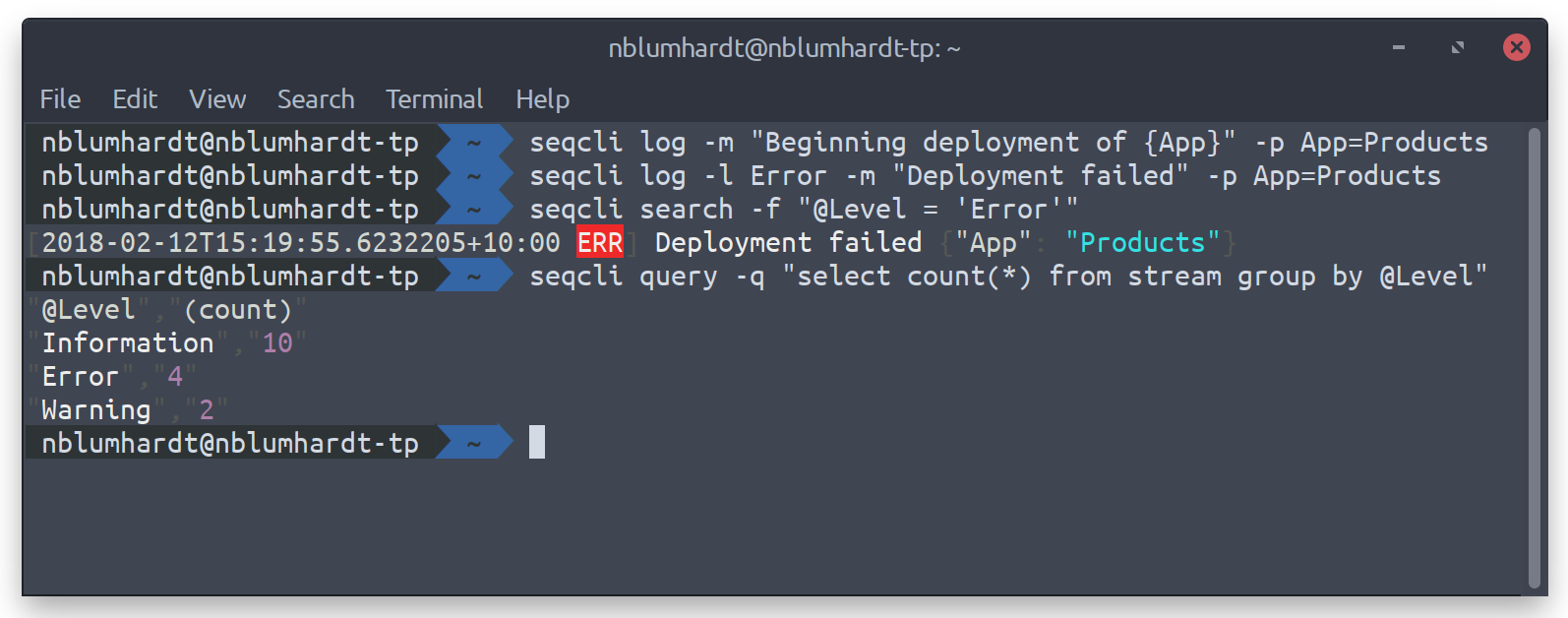
The [Seq](https://datalust.co/seq) client command-line app. Supports logging (`seqcli log`), searching (`search`), tailing (`tail`), querying (`query`) and [JSON or plain-text log file](https://github.com/serilog/serilog-formatting-compact) ingestion (`ingest`), and [much more](https://github.com/datalust/seqcli#commands).
## Getting started
The Seq installer for Windows includes `seqcli`. Otherwise, download the [release for your operating system](https://github.com/datalust/seqcli/releases). Or, if you have `dotnet` installed, `seqcli` can be installed as a global tool using:
```
dotnet tool install --global seqcli
```
To set a default server URL and API key, run:
```
seqcli config set -k connection.serverUrl -v https://your-seq-server
seqcli config set -k connection.apiKey -v your-api-key
```
The API key will be stored in your `SeqCli.json` configuration file; on Windows, this is encrypted using DPAPI; on Mac/Linux the key is stored in plain text unless an encryptor is defined in `encryption.encryptor`. As an alternative to storing the API key in configuration, it can be passed to each command via the `--apikey=` argument.
`seqcli` is also available as a Docker container under [`datalust/seqcli`](https://store.docker.com/community/images/datalust/seqcli):
```
docker run --rm datalust/seqcli:latest []
```
To connect to Seq in a docker container on the local machine use the machine's IP address (not localhost) or specify [docker host networking](https://docs.docker.com/network/host/) with `--net host`.
Use Docker networks and volumes to make local files and other containers accessible to `seqcli` within its container.
### Environment variable overrides
Each setting value can be overridden at runtime by specifying an environment variable of the form `SEQCLI_`, where contains one element for each dotted segment of the setting name, separated by underscores.
For example the setting `connection.serverUrl` can overridden with the `SEQCLI_CONNECTION_SERVERURL` variable.
### Connecting without an API key
If you're automating Seq setup, chances are you won't have an API key yet for `seqcli` to use. During the initial Seq server configuration, you can specify `firstRun.adminUsername` and `firstRun.adminPasswordHash` (or the equivalent environment variables `SEQ_FIRSTRUN_ADMINUSERNAME` and `SEQ_FIRSTRUN_ADMINPASSWORDHASH`) to set an initial username and password for the administrator account. You can use these to create an API key, and then use the API key token with the remaining `seqcli` commands.
The `seqcli apikey create` command accepts `--connect-username` and `--connect-password-stdin`, and prints the new API key token to `STDOUT` (PowerShell syntax is used below):
```
$user = "admin"
$pw = "thepassword"
$token = (
echo $pw |
seqcli apikey create `
-t CLI `
--permissions="Read,Write,Project,Organization,System" `
--connect-username $user --connect-password-stdin
)
```
## Contributing
See `CONTRIBUTING.md`.
## Permissions
When connecting with an API key the allowed operations are determined by the [permissions assigned to that API key](https://docs.datalust.co/docs/api-keys#api-keys-and-permissions).
To determine the permission required for a command check the 'Permission demand' column of the [equivalent server API operation](https://docs.datalust.co/docs/server-http-api). For example, the command `apikey create` uses the [`POST api/apikeys` endpoint](https://docs.datalust.co/docs/server-http-api#apiapikeys), which requires the `Write` permission.
## Usage
All `seqcli` commands follow the same pattern:
```
seqcli []
```
### Command help
The complete list of supported commands can be viewed by running:
```
seqcli help
```
To show usage information for a specific command, run `seqcli help `, for example:
```
seqcli help apikey create
```
This also works for command groups; to list all `apikey` sub-commands, run:
```
seqcli help apikey
```
Available commands:
- `apikey`
- [`apikey create`](#apikey-create) — Create an API key for automation or ingestion.
- [`apikey list`](#apikey-list) — List available API keys.
- [`apikey remove`](#apikey-remove) — Remove an API key from the server.
- [`apikey update`](#apikey-update) — Update an existing API key.
- `app`
- [`app define`](#app-define) — Generate an app definition for a .NET `[SeqApp]` plug-in.
- [`app install`](#app-install) — Install an app package.
- [`app list`](#app-list) — List installed app packages.
- [`app run`](#app-run) — Host a .NET `[SeqApp]` plug-in.
- [`app uninstall`](#app-uninstall) — Uninstall an app package.
- [`app update`](#app-update) — Update an installed app package.
- `appinstance`
- [`appinstance create`](#appinstance-create) — Create an instance of an installed app.
- [`appinstance list`](#appinstance-list) — List instances of installed apps.
- [`appinstance remove`](#appinstance-remove) — Remove an app instance from the server.
- [`appinstance update`](#appinstance-update) — Update an existing app instance.
- [`bench`](#bench) — Measure query performance.
- [`cluster health`](#cluster-health) — Probe a Seq node's `/health/cluster` endpoint, and print the returned status. This command can also be used to wait on a timeout until the cluster is healthy..
- `config`
- [`config clear`](#config-clear) — Clear fields in the `SeqCli.json` file.
- [`config get`](#config-get) — View a field from the `SeqCli.json` file.
- [`config list`](#config-list) — View all fields in the `SeqCli.json` file.
- [`config set`](#config-set) — Set a field in the `SeqCli.json` file.
- `dashboard`
- [`dashboard list`](#dashboard-list) — List dashboards.
- [`dashboard remove`](#dashboard-remove) — Remove a dashboard from the server.
- [`dashboard render`](#dashboard-render) — Produce a CSV or JSON result set from a dashboard chart.
- [`diagnostics ingestionlog`](#diagnostics-ingestionlog) — Retrieve the ingestion log.
- `expressionindex`
- [`expressionindex create`](#expressionindex-create) — Create an expression index.
- [`expressionindex list`](#expressionindex-list) — List expression indexes.
- [`expressionindex remove`](#expressionindex-remove) — Remove an expression index from the server.
- `feed`
- [`feed create`](#feed-create) — Create a NuGet feed.
- [`feed list`](#feed-list) — List NuGet feeds.
- [`feed remove`](#feed-remove) — Remove a NuGet feed from the server.
- [`feed update`](#feed-update) — Update an existing NuGet feed.
- `forwarder`
- [`forwarder install`](#forwarder-install) — Install the forwarder as a Windows service.
- [`forwarder restart`](#forwarder-restart) — Restart the forwarder Windows service.
- [`forwarder run`](#forwarder-run) — Listen on an HTTP endpoint and forward ingested logs to Seq.
- [`forwarder start`](#forwarder-start) — Start the forwarder Windows service.
- [`forwarder status`](#forwarder-status) — Show the status of the forwarder Windows service.
- [`forwarder stop`](#forwarder-stop) — Stop the forwarder Windows service.
- [`forwarder truncate`](#forwarder-truncate) — Empty the forwarder's persistent log buffer.
- [`forwarder uninstall`](#forwarder-uninstall) — Uninstall the forwarder Windows service.
- [`help`](#help) — Show information about available commands.
- `index`
- [`index list`](#index-list) — List indexes.
- [`index suppress`](#index-suppress) — Suppress an index.
- [`ingest`](#ingest) — Send log events from a file or `STDIN`.
- `license`
- [`license apply`](#license-apply) — Apply a license to the Seq server.
- [`license show`](#license-show) — Shows license applied to the Seq server.
- [`log`](#log) — Send a structured log event to the server.
- `node`
- [`node health`](#node-health) — Probe a Seq node's `/health` endpoint, and print the returned HTTP status code, or 'Unreachable' if the endpoint could not be queried; note that no API key is required.
- [`node list`](#node-list) — List nodes in the Seq cluster.
- [`print`](#print) — Pretty-print events in CLEF/JSON format, from a file or `STDIN`.
- `profile`
- [`profile create`](#profile-create) — Create or replace a connection profile.
- [`profile list`](#profile-list) — List connection profiles.
- [`profile remove`](#profile-remove) — Remove a connection profile.
- [`query`](#query) — Execute an SQL query and receive results in CSV format.
- `retention`
- [`retention create`](#retention-create) — Create a retention policy.
- [`retention list`](#retention-list) — List retention policies.
- [`retention remove`](#retention-remove) — Remove a retention policy from the server.
- [`retention update`](#retention-update) — Update an existing retention policy.
- `sample`
- [`sample ingest`](#sample-ingest) — Log sample events into a Seq instance.
- [`sample setup`](#sample-setup) — Configure a Seq instance with sample dashboards, signals, users, and so on.
- [`search`](#search) — Retrieve log events that match a given filter.
- `setting`
- [`setting clear`](#setting-clear) — Clear a runtime-configurable server setting.
- [`setting names`](#setting-names) — Print the names of all supported settings.
- [`setting set`](#setting-set) — Change a runtime-configurable server setting.
- [`setting show`](#setting-show) — Print the current value of a runtime-configurable server setting.
- `signal`
- [`signal create`](#signal-create) — Create a signal.
- [`signal import`](#signal-import) — Import signals in newline-delimited JSON format.
- [`signal list`](#signal-list) — List available signals.
- [`signal remove`](#signal-remove) — Remove a signal from the server.
- [`signal update`](#signal-update) — Update an existing signal.
- [`tail`](#tail) — Stream log events matching a filter.
- `template`
- [`template export`](#template-export) — Export entities into template files.
- [`template import`](#template-import) — Import entities from template files.
- `user`
- [`user create`](#user-create) — Create a user.
- [`user list`](#user-list) — List users.
- [`user remove`](#user-remove) — Remove a user from the server.
- [`user update`](#user-update) — Update an existing user.
- [`version`](#version) — Print the current executable version.
- `workspace`
- [`workspace create`](#workspace-create) — Create a workspace.
- [`workspace list`](#workspace-list) — List available workspaces.
- [`workspace remove`](#workspace-remove) — Remove a workspace from the server.
- [`workspace update`](#workspace-update) — Update an existing workspace.
### `apikey create`
Create an API key for automation or ingestion.
Example:
```
seqcli apikey create -t 'Test API Key' -p Environment=Test
```
| Option | Description |
| ------ | ----------- |
| `-t`, `--title=VALUE` | A title for the API key |
| `--token=VALUE` | A pre-allocated API key token; by default, a new token will be generated and written to `STDOUT` |
| `-p`, `--property=NAME=VALUE` | Specify name/value properties, e.g. `-p Customer=C123 -p Environment=Production` |
| `--filter=VALUE` | A filter to apply to incoming events |
| `--minimum-level=VALUE` | The minimum event level/severity to accept; the default is to accept all events |
| `--use-server-timestamps` | Discard client-supplied timestamps and use server clock values |
| `--permissions=VALUE` | A comma-separated list of permissions to delegate to the API key; valid permissions are `Ingest` (default), `Read`, `Write`, `Project`, `Organization`, and `System` |
| `--connect-username=VALUE` | A username to connect with, useful primarily when setting up the first API key; servers with an 'Individual' subscription only allow one simultaneous request with this option |
| `--connect-password=VALUE` | When `connect-username` is specified, a corresponding password |
| `--connect-password-stdin` | When `connect-username` is specified, read the corresponding password from `STDIN` |
| `-s`, `--server=VALUE` | The URL of the Seq server; by default the `connection.serverUrl` config value will be used |
| `-a`, `--apikey=VALUE` | The API key to use when connecting to the server; by default the `connection.apiKey` config value will be used |
| `--profile=VALUE` | A connection profile to use; by default the `connection.serverUrl` and `connection.apiKey` config values will be used |
| `--json` | Print output in newline-delimited JSON (the default is plain text) |
| `--no-color` | Don't colorize text output |
| `--force-color` | Force redirected output to have ANSI color (unless `--no-color` is also specified) |
| `--storage=VALUE` | The folder where `SeqCli.json` and other data will be stored; falls back to `SEQCLI_STORAGE_PATH` from the environment, then the `seqcli forwarder` service's configured storage path (Windows only), then the current user's home directory |
### `apikey list`
List available API keys.
Example:
```
seqcli apikey list
```
| Option | Description |
| ------ | ----------- |
| `-t`, `--title=VALUE` | The title of the API key(s) to list |
| `-i`, `--id=VALUE` | The id of a single API key to list |
| `--json` | Print output in newline-delimited JSON (the default is plain text) |
| `--no-color` | Don't colorize text output |
| `--force-color` | Force redirected output to have ANSI color (unless `--no-color` is also specified) |
| `--storage=VALUE` | The folder where `SeqCli.json` and other data will be stored; falls back to `SEQCLI_STORAGE_PATH` from the environment, then the `seqcli forwarder` service's configured storage path (Windows only), then the current user's home directory |
| `-s`, `--server=VALUE` | The URL of the Seq server; by default the `connection.serverUrl` config value will be used |
| `-a`, `--apikey=VALUE` | The API key to use when connecting to the server; by default the `connection.apiKey` config value will be used |
| `--profile=VALUE` | A connection profile to use; by default the `connection.serverUrl` and `connection.apiKey` config values will be used |
### `apikey remove`
Remove an API key from the server.
Example:
```
seqcli apikey remove -t 'Test API Key'
```
| Option | Description |
| ------ | ----------- |
| `-t`, `--title=VALUE` | The title of the API key(s) to remove |
| `-i`, `--id=VALUE` | The id of a single API key to remove |
| `-s`, `--server=VALUE` | The URL of the Seq server; by default the `connection.serverUrl` config value will be used |
| `-a`, `--apikey=VALUE` | The API key to use when connecting to the server; by default the `connection.apiKey` config value will be used |
| `--profile=VALUE` | A connection profile to use; by default the `connection.serverUrl` and `connection.apiKey` config values will be used |
| `--storage=VALUE` | The folder where `SeqCli.json` and other data will be stored; falls back to `SEQCLI_STORAGE_PATH` from the environment, then the `seqcli forwarder` service's configured storage path (Windows only), then the current user's home directory |
### `apikey update`
Update an existing API key.
Example:
```
seqcli apikey update --json '{...}'
```
| Option | Description |
| ------ | ----------- |
| `--json=VALUE` | The updated API key in JSON format; this can be produced using `seqcli apikey list --json` |
| `--json-stdin` | Read the updated API key as JSON from `STDIN` |
| `-s`, `--server=VALUE` | The URL of the Seq server; by default the `connection.serverUrl` config value will be used |
| `-a`, `--apikey=VALUE` | The API key to use when connecting to the server; by default the `connection.apiKey` config value will be used |
| `--profile=VALUE` | A connection profile to use; by default the `connection.serverUrl` and `connection.apiKey` config values will be used |
| `--storage=VALUE` | The folder where `SeqCli.json` and other data will be stored; falls back to `SEQCLI_STORAGE_PATH` from the environment, then the `seqcli forwarder` service's configured storage path (Windows only), then the current user's home directory |
### `app define`
Generate an app definition for a .NET `[SeqApp]` plug-in.
Example:
```
seqcli app define -d "./bin/Debug/netstandard2.2"
```
| Option | Description |
| ------ | ----------- |
| `-d`, `--directory=VALUE` | The directory containing .NET Standard assemblies; defaults to the current directory |
| `--type=VALUE` | The [SeqApp] plug-in type name; defaults to scanning assemblies for a single type marked with this attribute |
| `--indented` | Format the definition over multiple lines with indentation |
### `app install`
Install an app package.
Example:
```
seqcli app install --package-id 'Seq.App.JsonArchive'
```
| Option | Description |
| ------ | ----------- |
| `--package-id=VALUE` | The package id of the app to install |
| `--version=VALUE` | The package version to install; the default is to install the latest version |
| `--feed-id=VALUE` | The id of the NuGet feed to install the package from; may be omitted if only one feed is configured |
| `-s`, `--server=VALUE` | The URL of the Seq server; by default the `connection.serverUrl` config value will be used |
| `-a`, `--apikey=VALUE` | The API key to use when connecting to the server; by default the `connection.apiKey` config value will be used |
| `--profile=VALUE` | A connection profile to use; by default the `connection.serverUrl` and `connection.apiKey` config values will be used |
| `--json` | Print output in newline-delimited JSON (the default is plain text) |
| `--no-color` | Don't colorize text output |
| `--force-color` | Force redirected output to have ANSI color (unless `--no-color` is also specified) |
| `--storage=VALUE` | The folder where `SeqCli.json` and other data will be stored; falls back to `SEQCLI_STORAGE_PATH` from the environment, then the `seqcli forwarder` service's configured storage path (Windows only), then the current user's home directory |
### `app list`
List installed app packages.
Example:
```
seqcli app list
```
| Option | Description |
| ------ | ----------- |
| `--package-id=VALUE` | The package id of the app(s) to list |
| `-i`, `--id=VALUE` | The id of a single app to list |
| `--json` | Print output in newline-delimited JSON (the default is plain text) |
| `--no-color` | Don't colorize text output |
| `--force-color` | Force redirected output to have ANSI color (unless `--no-color` is also specified) |
| `--storage=VALUE` | The folder where `SeqCli.json` and other data will be stored; falls back to `SEQCLI_STORAGE_PATH` from the environment, then the `seqcli forwarder` service's configured storage path (Windows only), then the current user's home directory |
| `-s`, `--server=VALUE` | The URL of the Seq server; by default the `connection.serverUrl` config value will be used |
| `-a`, `--apikey=VALUE` | The API key to use when connecting to the server; by default the `connection.apiKey` config value will be used |
| `--profile=VALUE` | A connection profile to use; by default the `connection.serverUrl` and `connection.apiKey` config values will be used |
### `app run`
Host a .NET `[SeqApp]` plug-in.
Example:
```
seqcli tail --json | seqcli app run -d "./bin/Debug/netstandard2.2" -p ToAddress=example@example.com
```
| Option | Description |
| ------ | ----------- |
| `-d`, `--directory=VALUE` | The directory containing .NET Standard assemblies; defaults to the current directory |
| `--type=VALUE` | The [SeqApp] plug-in type name; defaults to scanning assemblies for a single type marked with this attribute |
| `-p`, `--property=NAME=VALUE` | Specify name/value settings for the app, e.g. `-p ToAddress=example@example.com -p Subject="Alert!"` |
| `--storage=VALUE` | A directory in which app-specific data can be stored; defaults to the current directory |
| `-s`, `--server=VALUE` | The URL of the Seq server, used only for app configuration (no connection is made to the server); by default the `connection.serverUrl` value will be used |
| `--server-instance=VALUE` | The instance name of the Seq server, used only for app configuration; defaults to no instance name |
| `-t`, `--title=VALUE` | The app instance title, used only for app configuration; defaults to a placeholder title. |
| `--id=VALUE` | The app instance id, used only for app configuration; defaults to a placeholder id. |
| `--read-env` | Read app configuration and settings from environment variables, as specified in https://docs.datalust.co/docs/seq-apps-in-other-languages; ignores all options except --directory and --type |
### `app uninstall`
Uninstall an app package.
Example:
```
seqcli app uninstall --package-id 'Seq.App.JsonArchive'
```
| Option | Description |
| ------ | ----------- |
| `--package-id=VALUE` | The package id of the app package to uninstall |
| `-i`, `--id=VALUE` | The id of a single app package to uninstall |
| `-s`, `--server=VALUE` | The URL of the Seq server; by default the `connection.serverUrl` config value will be used |
| `-a`, `--apikey=VALUE` | The API key to use when connecting to the server; by default the `connection.apiKey` config value will be used |
| `--profile=VALUE` | A connection profile to use; by default the `connection.serverUrl` and `connection.apiKey` config values will be used |
| `--storage=VALUE` | The folder where `SeqCli.json` and other data will be stored; falls back to `SEQCLI_STORAGE_PATH` from the environment, then the `seqcli forwarder` service's configured storage path (Windows only), then the current user's home directory |
### `app update`
Update an installed app package.
Example:
```
seqcli app update -n 'HTML Email'
```
| Option | Description |
| ------ | ----------- |
| `-i`, `--id=VALUE` | The id of a single installed app to update |
| `-n`, `--name=VALUE` | The name of the installed app to update |
| `--all` | Update all installed apps; not compatible with `-i` or `-n` |
| `--version=VALUE` | The package version to update to; the default is to update to the latest version in the associated feed |
| `--force` | Update the app even if the target version is already installed |
| `-s`, `--server=VALUE` | The URL of the Seq server; by default the `connection.serverUrl` config value will be used |
| `-a`, `--apikey=VALUE` | The API key to use when connecting to the server; by default the `connection.apiKey` config value will be used |
| `--profile=VALUE` | A connection profile to use; by default the `connection.serverUrl` and `connection.apiKey` config values will be used |
| `--json` | Print output in newline-delimited JSON (the default is plain text) |
| `--no-color` | Don't colorize text output |
| `--force-color` | Force redirected output to have ANSI color (unless `--no-color` is also specified) |
| `--storage=VALUE` | The folder where `SeqCli.json` and other data will be stored; falls back to `SEQCLI_STORAGE_PATH` from the environment, then the `seqcli forwarder` service's configured storage path (Windows only), then the current user's home directory |
### `appinstance create`
Create an instance of an installed app.
Example:
```
seqcli appinstance create -t 'Email Ops' --app hostedapp-314159 -p To=ops@example.com
```
| Option | Description |
| ------ | ----------- |
| `-t`, `--title=VALUE` | A title for the app instance |
| `--app=VALUE` | The id of the installed app package to instantiate |
| `-p`, `--property=NAME=VALUE` | Specify name/value settings for the app, e.g. `-p ToAddress=example@example.com -p Subject="Alert!"` |
| `--stream[=VALUE]` | Stream incoming events to this app instance as they're ingested; optionally accepts a signal expression limiting which events should be streamed, for example `signal-1,signal-2` |
| `--overridable=VALUE` | Specify setting names that may be overridden by users when invoking the app |
| `-s`, `--server=VALUE` | The URL of the Seq server; by default the `connection.serverUrl` config value will be used |
| `-a`, `--apikey=VALUE` | The API key to use when connecting to the server; by default the `connection.apiKey` config value will be used |
| `--profile=VALUE` | A connection profile to use; by default the `connection.serverUrl` and `connection.apiKey` config values will be used |
| `--json` | Print output in newline-delimited JSON (the default is plain text) |
| `--no-color` | Don't colorize text output |
| `--force-color` | Force redirected output to have ANSI color (unless `--no-color` is also specified) |
| `--storage=VALUE` | The folder where `SeqCli.json` and other data will be stored; falls back to `SEQCLI_STORAGE_PATH` from the environment, then the `seqcli forwarder` service's configured storage path (Windows only), then the current user's home directory |
### `appinstance list`
List instances of installed apps.
Example:
```
seqcli appinstance list
```
| Option | Description |
| ------ | ----------- |
| `-t`, `--title=VALUE` | The title of the app instance(s) to list |
| `-i`, `--id=VALUE` | The id of a single app instance to list |
| `--json` | Print output in newline-delimited JSON (the default is plain text) |
| `--no-color` | Don't colorize text output |
| `--force-color` | Force redirected output to have ANSI color (unless `--no-color` is also specified) |
| `--storage=VALUE` | The folder where `SeqCli.json` and other data will be stored; falls back to `SEQCLI_STORAGE_PATH` from the environment, then the `seqcli forwarder` service's configured storage path (Windows only), then the current user's home directory |
| `-s`, `--server=VALUE` | The URL of the Seq server; by default the `connection.serverUrl` config value will be used |
| `-a`, `--apikey=VALUE` | The API key to use when connecting to the server; by default the `connection.apiKey` config value will be used |
| `--profile=VALUE` | A connection profile to use; by default the `connection.serverUrl` and `connection.apiKey` config values will be used |
### `appinstance remove`
Remove an app instance from the server.
Example:
```
seqcli appinstance remove -t 'Email Ops'
```
| Option | Description |
| ------ | ----------- |
| `-t`, `--title=VALUE` | The title of the app instance(s) to remove |
| `-i`, `--id=VALUE` | The id of a single app instance to remove |
| `-s`, `--server=VALUE` | The URL of the Seq server; by default the `connection.serverUrl` config value will be used |
| `-a`, `--apikey=VALUE` | The API key to use when connecting to the server; by default the `connection.apiKey` config value will be used |
| `--profile=VALUE` | A connection profile to use; by default the `connection.serverUrl` and `connection.apiKey` config values will be used |
| `--storage=VALUE` | The folder where `SeqCli.json` and other data will be stored; falls back to `SEQCLI_STORAGE_PATH` from the environment, then the `seqcli forwarder` service's configured storage path (Windows only), then the current user's home directory |
### `appinstance update`
Update an existing app instance.
Example:
```
seqcli appinstance update --json '{...}'
```
| Option | Description |
| ------ | ----------- |
| `--json=VALUE` | The updated app instance in JSON format; this can be produced using `seqcli appinstance list --json` |
| `--json-stdin` | Read the updated app instance as JSON from `STDIN` |
| `-s`, `--server=VALUE` | The URL of the Seq server; by default the `connection.serverUrl` config value will be used |
| `-a`, `--apikey=VALUE` | The API key to use when connecting to the server; by default the `connection.apiKey` config value will be used |
| `--profile=VALUE` | A connection profile to use; by default the `connection.serverUrl` and `connection.apiKey` config values will be used |
| `--storage=VALUE` | The folder where `SeqCli.json` and other data will be stored; falls back to `SEQCLI_STORAGE_PATH` from the environment, then the `seqcli forwarder` service's configured storage path (Windows only), then the current user's home directory |
### `bench`
Measure query performance.
| Option | Description |
| ------ | ----------- |
| `-r`, `--runs=VALUE` | The number of runs to execute; the default is 10 |
| `-c`, `--cases=VALUE` | A JSON file containing the set of cases to run. Defaults to a standard set of cases. |
| `-s`, `--server=VALUE` | The URL of the Seq server; by default the `connection.serverUrl` config value will be used |
| `-a`, `--apikey=VALUE` | The API key to use when connecting to the server; by default the `connection.apiKey` config value will be used |
| `--profile=VALUE` | A connection profile to use; by default the `connection.serverUrl` and `connection.apiKey` config values will be used |
| `--start=VALUE` | ISO 8601 date/time to query from |
| `--end=VALUE` | ISO 8601 date/time to query to |
| `--timeout=VALUE` | The execution timeout in milliseconds |
| `--reporting-server=VALUE` | The address of a Seq server to send bench results to |
| `--reporting-apikey=VALUE` | The API key to use when connecting to the reporting server |
| `--description=VALUE` | Optional description of the bench test run |
| `--with-ingestion` | Should the benchmark include sending events to Seq |
| `--with-queries` | Should the benchmark include querying Seq |
| `--storage=VALUE` | The folder where `SeqCli.json` and other data will be stored; falls back to `SEQCLI_STORAGE_PATH` from the environment, then the `seqcli forwarder` service's configured storage path (Windows only), then the current user's home directory |
### `cluster health`
Probe a Seq node's `/health/cluster` endpoint, and print the returned status. This command can also be used to wait on a timeout until the cluster is healthy..
Example:
```
seqcli cluster health -s https://seq.example.com --wait-until-healthy
```
| Option | Description |
| ------ | ----------- |
| `--wait-until-healthy` | Wait until the cluster returns a status of healthy |
| `--timeout=VALUE` | The execution timeout in milliseconds |
| `--json` | Print output in newline-delimited JSON (the default is plain text) |
| `--no-color` | Don't colorize text output |
| `--force-color` | Force redirected output to have ANSI color (unless `--no-color` is also specified) |
| `--storage=VALUE` | The folder where `SeqCli.json` and other data will be stored; falls back to `SEQCLI_STORAGE_PATH` from the environment, then the `seqcli forwarder` service's configured storage path (Windows only), then the current user's home directory |
| `-s`, `--server=VALUE` | The URL of the Seq server; by default the `connection.serverUrl` config value will be used |
| `-a`, `--apikey=VALUE` | The API key to use when connecting to the server; by default the `connection.apiKey` config value will be used |
| `--profile=VALUE` | A connection profile to use; by default the `connection.serverUrl` and `connection.apiKey` config values will be used |
### `config clear`
Clear fields in the `SeqCli.json` file.
| Option | Description |
| ------ | ----------- |
| `--storage=VALUE` | The folder where `SeqCli.json` and other data will be stored; falls back to `SEQCLI_STORAGE_PATH` from the environment, then the `seqcli forwarder` service's configured storage path (Windows only), then the current user's home directory |
| `-k`, `--key=VALUE` | The field, for example `connection.serverUrl` |
### `config get`
View a field from the `SeqCli.json` file.
| Option | Description |
| ------ | ----------- |
| `--storage=VALUE` | The folder where `SeqCli.json` and other data will be stored; falls back to `SEQCLI_STORAGE_PATH` from the environment, then the `seqcli forwarder` service's configured storage path (Windows only), then the current user's home directory |
| `-k`, `--key=VALUE` | The field, for example `connection.serverUrl` |
### `config list`
View all fields in the `SeqCli.json` file.
| Option | Description |
| ------ | ----------- |
| `--storage=VALUE` | The folder where `SeqCli.json` and other data will be stored; falls back to `SEQCLI_STORAGE_PATH` from the environment, then the `seqcli forwarder` service's configured storage path (Windows only), then the current user's home directory |
### `config set`
Set a field in the `SeqCli.json` file.
| Option | Description |
| ------ | ----------- |
| `--storage=VALUE` | The folder where `SeqCli.json` and other data will be stored; falls back to `SEQCLI_STORAGE_PATH` from the environment, then the `seqcli forwarder` service's configured storage path (Windows only), then the current user's home directory |
| `-k`, `--key=VALUE` | The field, for example `connection.serverUrl` |
| `-v`, `--value=VALUE` | The field value, comma-separated if multiple values are accepted |
| `--value-stdin` | Read the value from `STDIN` |
### `dashboard list`
List dashboards.
Example:
```
seqcli dashboard list
```
| Option | Description |
| ------ | ----------- |
| `-t`, `--title=VALUE` | The title of the dashboard(s) to list |
| `-i`, `--id=VALUE` | The id of a single dashboard to list |
| `-o`, `--owner=VALUE` | The id of the user to list dashboards for; by default, shared dashboards are listed |
| `--json` | Print output in newline-delimited JSON (the default is plain text) |
| `--no-color` | Don't colorize text output |
| `--force-color` | Force redirected output to have ANSI color (unless `--no-color` is also specified) |
| `--storage=VALUE` | The folder where `SeqCli.json` and other data will be stored; falls back to `SEQCLI_STORAGE_PATH` from the environment, then the `seqcli forwarder` service's configured storage path (Windows only), then the current user's home directory |
| `-s`, `--server=VALUE` | The URL of the Seq server; by default the `connection.serverUrl` config value will be used |
| `-a`, `--apikey=VALUE` | The API key to use when connecting to the server; by default the `connection.apiKey` config value will be used |
| `--profile=VALUE` | A connection profile to use; by default the `connection.serverUrl` and `connection.apiKey` config values will be used |
### `dashboard remove`
Remove a dashboard from the server.
Example:
```
seqcli dashboard remove -i dashboard-159
```
| Option | Description |
| ------ | ----------- |
| `-t`, `--title=VALUE` | The title of the dashboard(s) to remove |
| `-i`, `--id=VALUE` | The id of a single dashboard to remove |
| `-o`, `--owner=VALUE` | The id of the user to remove dashboards for; by default, shared dashboards are removed |
| `-s`, `--server=VALUE` | The URL of the Seq server; by default the `connection.serverUrl` config value will be used |
| `-a`, `--apikey=VALUE` | The API key to use when connecting to the server; by default the `connection.apiKey` config value will be used |
| `--profile=VALUE` | A connection profile to use; by default the `connection.serverUrl` and `connection.apiKey` config values will be used |
| `--storage=VALUE` | The folder where `SeqCli.json` and other data will be stored; falls back to `SEQCLI_STORAGE_PATH` from the environment, then the `seqcli forwarder` service's configured storage path (Windows only), then the current user's home directory |
### `dashboard render`
Produce a CSV or JSON result set from a dashboard chart.
Example:
```
seqcli dashboard render -i dashboard-159 -c 'Response Time (ms)' --last 7d --by 1h
```
| Option | Description |
| ------ | ----------- |
| `-i`, `--id=VALUE` | The id of a single dashboard to render |
| `-c`, `--chart=VALUE` | The title of a chart on the dashboard to render |
| `--last=VALUE` | A duration over which the chart should be rendered, e.g. `7d`; this will be aligned to an interval boundary; either `--last` or `--start` and `--end` must be specified |
| `--by=VALUE` | The time-slice interval for the chart data, as a duration, e.g. `1h` |
| `--start=VALUE` | ISO 8601 date/time to query from |
| `--end=VALUE` | ISO 8601 date/time to query to |
| `--signal=VALUE` | A signal expression or list of intersected signal ids to apply, for example `signal-1,signal-2` |
| `--timeout=VALUE` | The execution timeout in milliseconds |
| `--json` | Print output in newline-delimited JSON (the default is plain text) |
| `--no-color` | Don't colorize text output |
| `--force-color` | Force redirected output to have ANSI color (unless `--no-color` is also specified) |
| `--storage=VALUE` | The folder where `SeqCli.json` and other data will be stored; falls back to `SEQCLI_STORAGE_PATH` from the environment, then the `seqcli forwarder` service's configured storage path (Windows only), then the current user's home directory |
| `-s`, `--server=VALUE` | The URL of the Seq server; by default the `connection.serverUrl` config value will be used |
| `-a`, `--apikey=VALUE` | The API key to use when connecting to the server; by default the `connection.apiKey` config value will be used |
| `--profile=VALUE` | A connection profile to use; by default the `connection.serverUrl` and `connection.apiKey` config values will be used |
### `diagnostics ingestionlog`
Retrieve the ingestion log.
Example:
```
seqcli diagnostics ingestionlog
```
| Option | Description |
| ------ | ----------- |
| `-s`, `--server=VALUE` | The URL of the Seq server; by default the `connection.serverUrl` config value will be used |
| `-a`, `--apikey=VALUE` | The API key to use when connecting to the server; by default the `connection.apiKey` config value will be used |
| `--profile=VALUE` | A connection profile to use; by default the `connection.serverUrl` and `connection.apiKey` config values will be used |
| `--storage=VALUE` | The folder where `SeqCli.json` and other data will be stored; falls back to `SEQCLI_STORAGE_PATH` from the environment, then the `seqcli forwarder` service's configured storage path (Windows only), then the current user's home directory |
### `expressionindex create`
Create an expression index.
Example:
```
seqcli expressionindex create --expression "ServerName"
```
| Option | Description |
| ------ | ----------- |
| `-e`, `--expression=VALUE` | The expression to index |
| `-s`, `--server=VALUE` | The URL of the Seq server; by default the `connection.serverUrl` config value will be used |
| `-a`, `--apikey=VALUE` | The API key to use when connecting to the server; by default the `connection.apiKey` config value will be used |
| `--profile=VALUE` | A connection profile to use; by default the `connection.serverUrl` and `connection.apiKey` config values will be used |
| `--json` | Print output in newline-delimited JSON (the default is plain text) |
| `--no-color` | Don't colorize text output |
| `--force-color` | Force redirected output to have ANSI color (unless `--no-color` is also specified) |
| `--storage=VALUE` | The folder where `SeqCli.json` and other data will be stored; falls back to `SEQCLI_STORAGE_PATH` from the environment, then the `seqcli forwarder` service's configured storage path (Windows only), then the current user's home directory |
### `expressionindex list`
List expression indexes.
Example:
```
seqcli expressionindex list
```
| Option | Description |
| ------ | ----------- |
| `-i`, `--id=VALUE` | The id of a single expression index to list |
| `--json` | Print output in newline-delimited JSON (the default is plain text) |
| `--no-color` | Don't colorize text output |
| `--force-color` | Force redirected output to have ANSI color (unless `--no-color` is also specified) |
| `--storage=VALUE` | The folder where `SeqCli.json` and other data will be stored; falls back to `SEQCLI_STORAGE_PATH` from the environment, then the `seqcli forwarder` service's configured storage path (Windows only), then the current user's home directory |
| `-s`, `--server=VALUE` | The URL of the Seq server; by default the `connection.serverUrl` config value will be used |
| `-a`, `--apikey=VALUE` | The API key to use when connecting to the server; by default the `connection.apiKey` config value will be used |
| `--profile=VALUE` | A connection profile to use; by default the `connection.serverUrl` and `connection.apiKey` config values will be used |
### `expressionindex remove`
Remove an expression index from the server.
Example:
```
seqcli expressionindex -i expressionindex-2529
```
| Option | Description |
| ------ | ----------- |
| `-i`, `--id=VALUE` | The id of an expression index to remove |
| `-s`, `--server=VALUE` | The URL of the Seq server; by default the `connection.serverUrl` config value will be used |
| `-a`, `--apikey=VALUE` | The API key to use when connecting to the server; by default the `connection.apiKey` config value will be used |
| `--profile=VALUE` | A connection profile to use; by default the `connection.serverUrl` and `connection.apiKey` config values will be used |
| `--storage=VALUE` | The folder where `SeqCli.json` and other data will be stored; falls back to `SEQCLI_STORAGE_PATH` from the environment, then the `seqcli forwarder` service's configured storage path (Windows only), then the current user's home directory |
### `feed create`
Create a NuGet feed.
Example:
```
seqcli feed create -n 'CI' --location="https://f.feedz.io/example/ci" -u Seq --password-stdin
```
| Option | Description |
| ------ | ----------- |
| `-n`, `--name=VALUE` | A unique name for the feed |
| `-l`, `--location=VALUE` | The feed location; this may be a NuGet v2 or v3 feed URL, or a local filesystem path on the Seq server |
| `-u`, `--username=VALUE` | The username Seq should supply when connecting to the feed, if authentication is required |
| `-p`, `--password=VALUE` | A feed password, if authentication is required; note that `--password-stdin` is more secure |
| `--password-stdin` | Read the feed password from `STDIN` |
| `-s`, `--server=VALUE` | The URL of the Seq server; by default the `connection.serverUrl` config value will be used |
| `-a`, `--apikey=VALUE` | The API key to use when connecting to the server; by default the `connection.apiKey` config value will be used |
| `--profile=VALUE` | A connection profile to use; by default the `connection.serverUrl` and `connection.apiKey` config values will be used |
| `--json` | Print output in newline-delimited JSON (the default is plain text) |
| `--no-color` | Don't colorize text output |
| `--force-color` | Force redirected output to have ANSI color (unless `--no-color` is also specified) |
| `--storage=VALUE` | The folder where `SeqCli.json` and other data will be stored; falls back to `SEQCLI_STORAGE_PATH` from the environment, then the `seqcli forwarder` service's configured storage path (Windows only), then the current user's home directory |
### `feed list`
List NuGet feeds.
Example:
```
seqcli feed list
```
| Option | Description |
| ------ | ----------- |
| `-n`, `--name=VALUE` | The name of the feed to list |
| `-i`, `--id=VALUE` | The id of a single feed to list |
| `--json` | Print output in newline-delimited JSON (the default is plain text) |
| `--no-color` | Don't colorize text output |
| `--force-color` | Force redirected output to have ANSI color (unless `--no-color` is also specified) |
| `--storage=VALUE` | The folder where `SeqCli.json` and other data will be stored; falls back to `SEQCLI_STORAGE_PATH` from the environment, then the `seqcli forwarder` service's configured storage path (Windows only), then the current user's home directory |
| `-s`, `--server=VALUE` | The URL of the Seq server; by default the `connection.serverUrl` config value will be used |
| `-a`, `--apikey=VALUE` | The API key to use when connecting to the server; by default the `connection.apiKey` config value will be used |
| `--profile=VALUE` | A connection profile to use; by default the `connection.serverUrl` and `connection.apiKey` config values will be used |
### `feed remove`
Remove a NuGet feed from the server.
Example:
```
seqcli feed remove -n CI
```
| Option | Description |
| ------ | ----------- |
| `-n`, `--name=VALUE` | The name of the feed to remove |
| `-i`, `--id=VALUE` | The id of a single feed to remove |
| `-s`, `--server=VALUE` | The URL of the Seq server; by default the `connection.serverUrl` config value will be used |
| `-a`, `--apikey=VALUE` | The API key to use when connecting to the server; by default the `connection.apiKey` config value will be used |
| `--profile=VALUE` | A connection profile to use; by default the `connection.serverUrl` and `connection.apiKey` config values will be used |
| `--storage=VALUE` | The folder where `SeqCli.json` and other data will be stored; falls back to `SEQCLI_STORAGE_PATH` from the environment, then the `seqcli forwarder` service's configured storage path (Windows only), then the current user's home directory |
### `feed update`
Update an existing NuGet feed.
Example:
```
seqcli feed update --json '{...}'
```
| Option | Description |
| ------ | ----------- |
| `--json=VALUE` | The updated NuGet feed in JSON format; this can be produced using `seqcli feed list --json` |
| `--json-stdin` | Read the updated NuGet feed as JSON from `STDIN` |
| `-s`, `--server=VALUE` | The URL of the Seq server; by default the `connection.serverUrl` config value will be used |
| `-a`, `--apikey=VALUE` | The API key to use when connecting to the server; by default the `connection.apiKey` config value will be used |
| `--profile=VALUE` | A connection profile to use; by default the `connection.serverUrl` and `connection.apiKey` config values will be used |
| `--storage=VALUE` | The folder where `SeqCli.json` and other data will be stored; falls back to `SEQCLI_STORAGE_PATH` from the environment, then the `seqcli forwarder` service's configured storage path (Windows only), then the current user's home directory |
### `forwarder install`
> Preview command: only available when the `--pre` command-line flag is specified. This command is supported on **Windows** platforms only.
Install the forwarder as a Windows service.
| Option | Description |
| ------ | ----------- |
| `--storage=VALUE` | The folder where `SeqCli.json` and other data will be stored; falls back to `SEQCLI_STORAGE_PATH` from the environment, then the `seqcli forwarder` service's configured storage path (Windows only), then the current user's home directory |
| `-l`, `--listen=VALUE` | Set the address `seqcli forwarder` will listen at; http://127.0.0.1:15341/ is used by default. |
| `-u`, `--username=VALUE` | The name of a Windows account to run the service under; if not specified the `NT AUTHORITY\LocalService` account will be used |
| `-p`, `--password=VALUE` | The password for the Windows account to run the service under |
### `forwarder restart`
> Preview command: only available when the `--pre` command-line flag is specified. This command is supported on **Windows** platforms only.
Restart the forwarder Windows service.
### `forwarder run`
> Preview command: only available when the `--pre` command-line flag is specified.
Listen on an HTTP endpoint and forward ingested logs to Seq.
| Option | Description |
| ------ | ----------- |
| `--nologo` | |
| `-l`, `--listen=VALUE` | Set the address `seqcli forwarder` will listen at; http://127.0.0.1:15341/ is used by default. |
| `-s`, `--server=VALUE` | The URL of the Seq server; by default the `connection.serverUrl` config value will be used |
| `-a`, `--apikey=VALUE` | The API key to use when connecting to the server; by default the `connection.apiKey` config value will be used |
| `--profile=VALUE` | A connection profile to use; by default the `connection.serverUrl` and `connection.apiKey` config values will be used |
| `--storage=VALUE` | The folder where `SeqCli.json` and other data will be stored; falls back to `SEQCLI_STORAGE_PATH` from the environment, then the `seqcli forwarder` service's configured storage path (Windows only), then the current user's home directory |
### `forwarder start`
> Preview command: only available when the `--pre` command-line flag is specified. This command is supported on **Windows** platforms only.
Start the forwarder Windows service.
### `forwarder status`
> Preview command: only available when the `--pre` command-line flag is specified. This command is supported on **Windows** platforms only.
Show the status of the forwarder Windows service.
### `forwarder stop`
> Preview command: only available when the `--pre` command-line flag is specified. This command is supported on **Windows** platforms only.
Stop the forwarder Windows service.
### `forwarder truncate`
> Preview command: only available when the `--pre` command-line flag is specified.
Empty the forwarder's persistent log buffer.
| Option | Description |
| ------ | ----------- |
| `--storage=VALUE` | The folder where `SeqCli.json` and other data will be stored; falls back to `SEQCLI_STORAGE_PATH` from the environment, then the `seqcli forwarder` service's configured storage path (Windows only), then the current user's home directory |
| `-y`, `--confirm` | Answer [y]es when prompted to continue |
### `forwarder uninstall`
> Preview command: only available when the `--pre` command-line flag is specified. This command is supported on **Windows** platforms only.
Uninstall the forwarder Windows service.
### `help`
Show information about available commands.
Example:
```
seqcli help search
```
| Option | Description |
| ------ | ----------- |
| `--pre` | Show preview commands |
| `-m`, `--markdown` | Generate markdown for use in documentation |
### `index list`
List indexes.
Example:
```
seqcli index list
```
| Option | Description |
| ------ | ----------- |
| `-i`, `--id=VALUE` | The id of a single index to list |
| `--json` | Print output in newline-delimited JSON (the default is plain text) |
| `--no-color` | Don't colorize text output |
| `--force-color` | Force redirected output to have ANSI color (unless `--no-color` is also specified) |
| `--storage=VALUE` | The folder where `SeqCli.json` and other data will be stored; falls back to `SEQCLI_STORAGE_PATH` from the environment, then the `seqcli forwarder` service's configured storage path (Windows only), then the current user's home directory |
| `-s`, `--server=VALUE` | The URL of the Seq server; by default the `connection.serverUrl` config value will be used |
| `-a`, `--apikey=VALUE` | The API key to use when connecting to the server; by default the `connection.apiKey` config value will be used |
| `--profile=VALUE` | A connection profile to use; by default the `connection.serverUrl` and `connection.apiKey` config values will be used |
### `index suppress`
Suppress an index.
Example:
```
seqcli index suppress -i index-2191448f1d9b4f22bd32c6edef752748
```
| Option | Description |
| ------ | ----------- |
| `-i`, `--id=VALUE` | The id of an index to suppress |
| `--storage=VALUE` | The folder where `SeqCli.json` and other data will be stored; falls back to `SEQCLI_STORAGE_PATH` from the environment, then the `seqcli forwarder` service's configured storage path (Windows only), then the current user's home directory |
| `-s`, `--server=VALUE` | The URL of the Seq server; by default the `connection.serverUrl` config value will be used |
| `-a`, `--apikey=VALUE` | The API key to use when connecting to the server; by default the `connection.apiKey` config value will be used |
| `--profile=VALUE` | A connection profile to use; by default the `connection.serverUrl` and `connection.apiKey` config values will be used |
### `ingest`
Send log events from a file or `STDIN`.
Example:
```
seqcli ingest -i log-*.txt --json --filter="@Level <> 'Debug'" -p Environment=Test
```
| Option | Description |
| ------ | ----------- |
| `-i`, `--input=VALUE` | File(s) to ingest, including the `*` wildcard; if not specified, `STDIN` will be used |
| `--invalid-data=VALUE` | Specify how invalid data is handled: `fail` (default) or `ignore` |
| `-p`, `--property=NAME=VALUE` | Specify name/value properties, e.g. `-p Customer=C123 -p Environment=Production` |
| `-x`, `--extract=VALUE` | An extraction pattern to apply to plain-text logs (ignored when `--json` is specified) |
| `--json` | Read the events as JSON (the default assumes plain text) |
| `-f`, `--filter=VALUE` | Filter expression to select a subset of events |
| `-m`, `--message=VALUE` | A message to associate with the ingested events; https://messagetemplates.org syntax is supported |
| `-l`, `--level=VALUE` | The level or severity to associate with the ingested events; this will override any level information present in the events themselves |
| `--send-failure=VALUE` | Specify how connection failures are handled: `fail` (default), `retry`, `continue`, or `ignore` |
| `-s`, `--server=VALUE` | The URL of the Seq server; by default the `connection.serverUrl` config value will be used |
| `-a`, `--apikey=VALUE` | The API key to use when connecting to the server; by default the `connection.apiKey` config value will be used |
| `--profile=VALUE` | A connection profile to use; by default the `connection.serverUrl` and `connection.apiKey` config values will be used |
| `--batch-size=VALUE` | The maximum number of events to send in each request to the ingestion endpoint; if not specified a value of `100` will be used |
| `--storage=VALUE` | The folder where `SeqCli.json` and other data will be stored; falls back to `SEQCLI_STORAGE_PATH` from the environment, then the `seqcli forwarder` service's configured storage path (Windows only), then the current user's home directory |
### `license apply`
Apply a license to the Seq server.
Example:
```
seqcli license apply --certificate="license.txt"
```
| Option | Description |
| ------ | ----------- |
| `-c`, `--certificate=VALUE` | Certificate file; the file must be UTF-8 text |
| `--certificate-stdin` | Read the license certificate from `STDIN` |
| `--automatically-refresh` | If the license is for a subscription, periodically check `datalust.co` and automatically refresh the certificate when the subscription is changed or renewed |
| `--storage=VALUE` | The folder where `SeqCli.json` and other data will be stored; falls back to `SEQCLI_STORAGE_PATH` from the environment, then the `seqcli forwarder` service's configured storage path (Windows only), then the current user's home directory |
| `-s`, `--server=VALUE` | The URL of the Seq server; by default the `connection.serverUrl` config value will be used |
| `-a`, `--apikey=VALUE` | The API key to use when connecting to the server; by default the `connection.apiKey` config value will be used |
| `--profile=VALUE` | A connection profile to use; by default the `connection.serverUrl` and `connection.apiKey` config values will be used |
### `license show`
Shows license applied to the Seq server.
Example:
```
seqcli license show
```
| Option | Description |
| ------ | ----------- |
| `-s`, `--server=VALUE` | The URL of the Seq server; by default the `connection.serverUrl` config value will be used |
| `-a`, `--apikey=VALUE` | The API key to use when connecting to the server; by default the `connection.apiKey` config value will be used |
| `--profile=VALUE` | A connection profile to use; by default the `connection.serverUrl` and `connection.apiKey` config values will be used |
| `--json` | Print output in newline-delimited JSON (the default is plain text) |
| `--no-color` | Don't colorize text output |
| `--force-color` | Force redirected output to have ANSI color (unless `--no-color` is also specified) |
| `--storage=VALUE` | The folder where `SeqCli.json` and other data will be stored; falls back to `SEQCLI_STORAGE_PATH` from the environment, then the `seqcli forwarder` service's configured storage path (Windows only), then the current user's home directory |
### `log`
Send a structured log event to the server.
Example:
```
seqcli log -m 'Hello, {Name}!' -p Name=World -p App=Test
```
| Option | Description |
| ------ | ----------- |
| `-m`, `--message=VALUE` | A message to associate with the event (the default is to send no message); https://messagetemplates.org syntax is supported |
| `-l`, `--level=VALUE` | The level or severity of the event (the default is `Information`) |
| `-t`, `--timestamp=VALUE` | The event timestamp as ISO-8601 (the current UTC timestamp will be used by default) |
| `-x`, `--exception=VALUE` | Additional exception or error information to send, if any |
| `-p`, `--property=NAME=VALUE` | Specify name/value properties, e.g. `-p Customer=C123 -p Environment=Production` |
| `-s`, `--server=VALUE` | The URL of the Seq server; by default the `connection.serverUrl` config value will be used |
| `-a`, `--apikey=VALUE` | The API key to use when connecting to the server; by default the `connection.apiKey` config value will be used |
| `--profile=VALUE` | A connection profile to use; by default the `connection.serverUrl` and `connection.apiKey` config values will be used |
| `--storage=VALUE` | The folder where `SeqCli.json` and other data will be stored; falls back to `SEQCLI_STORAGE_PATH` from the environment, then the `seqcli forwarder` service's configured storage path (Windows only), then the current user's home directory |
### `node health`
Probe a Seq node's `/health` endpoint, and print the returned HTTP status code, or 'Unreachable' if the endpoint could not be queried; note that no API key is required.
Example:
```
seqcli node health -s https://seq-2.example.com
```
| Option | Description |
| ------ | ----------- |
| `--wait-until-healthy` | Wait until the node returns a status of healthy |
| `--timeout=VALUE` | The execution timeout in milliseconds |
| `-s`, `--server=VALUE` | The URL of the Seq server; by default the `connection.serverUrl` config value will be used |
| `-a`, `--apikey=VALUE` | The API key to use when connecting to the server; by default the `connection.apiKey` config value will be used |
| `--profile=VALUE` | A connection profile to use; by default the `connection.serverUrl` and `connection.apiKey` config values will be used |
| `--json` | Print output in newline-delimited JSON (the default is plain text) |
| `--no-color` | Don't colorize text output |
| `--force-color` | Force redirected output to have ANSI color (unless `--no-color` is also specified) |
| `--storage=VALUE` | The folder where `SeqCli.json` and other data will be stored; falls back to `SEQCLI_STORAGE_PATH` from the environment, then the `seqcli forwarder` service's configured storage path (Windows only), then the current user's home directory |
### `node list`
List nodes in the Seq cluster.
Example:
```
seqcli node list --json
```
| Option | Description |
| ------ | ----------- |
| `-n`, `--name=VALUE` | The name of the cluster node to list |
| `-i`, `--id=VALUE` | The id of a single cluster node to list |
| `--json` | Print output in newline-delimited JSON (the default is plain text) |
| `--no-color` | Don't colorize text output |
| `--force-color` | Force redirected output to have ANSI color (unless `--no-color` is also specified) |
| `--storage=VALUE` | The folder where `SeqCli.json` and other data will be stored; falls back to `SEQCLI_STORAGE_PATH` from the environment, then the `seqcli forwarder` service's configured storage path (Windows only), then the current user's home directory |
| `-s`, `--server=VALUE` | The URL of the Seq server; by default the `connection.serverUrl` config value will be used |
| `-a`, `--apikey=VALUE` | The API key to use when connecting to the server; by default the `connection.apiKey` config value will be used |
| `--profile=VALUE` | A connection profile to use; by default the `connection.serverUrl` and `connection.apiKey` config values will be used |
### `print`
Pretty-print events in CLEF/JSON format, from a file or `STDIN`.
Example:
```
seqcli print -i log-20201028.clef
```
| Option | Description |
| ------ | ----------- |
| `-i`, `--input=VALUE` | CLEF file to read, including the `*` wildcard; if not specified, `STDIN` will be used |
| `-f`, `--filter=VALUE` | Filter expression to select a subset of events |
| `--template=VALUE` | Specify an output template to control plain text formatting |
| `--invalid-data=VALUE` | Specify how invalid data is handled: `fail` (default) or `ignore` |
| `--no-color` | Don't colorize text output |
| `--force-color` | Force redirected output to have ANSI color (unless `--no-color` is also specified) |
| `--storage=VALUE` | The folder where `SeqCli.json` and other data will be stored; falls back to `SEQCLI_STORAGE_PATH` from the environment, then the `seqcli forwarder` service's configured storage path (Windows only), then the current user's home directory |
### `profile create`
Create or replace a connection profile.
Example:
```
seqcli profile create -n Production -s https://seq.example.com -a th15ISanAPIk3y
```
| Option | Description |
| ------ | ----------- |
| `-n`, `--name=VALUE` | The name of the connection profile |
| `-s`, `--server=VALUE` | The URL of the Seq server |
| `-a`, `--apikey=VALUE` | The API key to use when connecting to the server, if required |
| `--storage=VALUE` | The folder where `SeqCli.json` and other data will be stored; falls back to `SEQCLI_STORAGE_PATH` from the environment, then the `seqcli forwarder` service's configured storage path (Windows only), then the current user's home directory |
### `profile list`
List connection profiles.
Example:
```
seqcli profile list
```
| Option | Description |
| ------ | ----------- |
| `--storage=VALUE` | The folder where `SeqCli.json` and other data will be stored; falls back to `SEQCLI_STORAGE_PATH` from the environment, then the `seqcli forwarder` service's configured storage path (Windows only), then the current user's home directory |
### `profile remove`
Remove a connection profile.
Example:
```
seqcli profile remove -n Production
```
| Option | Description |
| ------ | ----------- |
| `-n`, `--name=VALUE` | The name of the connection profile to remove |
| `--storage=VALUE` | The folder where `SeqCli.json` and other data will be stored; falls back to `SEQCLI_STORAGE_PATH` from the environment, then the `seqcli forwarder` service's configured storage path (Windows only), then the current user's home directory |
### `query`
Execute an SQL query and receive results in CSV format.
Example:
```
seqcli query -q "select count(*) from stream group by @Level" --start="2018-02-28T13:00Z"
```
| Option | Description |
| ------ | ----------- |
| `-q`, `--query=VALUE` | The query to execute |
| `--start=VALUE` | ISO 8601 date/time to query from |
| `--end=VALUE` | ISO 8601 date/time to query to |
| `--signal=VALUE` | A signal expression or list of intersected signal ids to apply, for example `signal-1,signal-2` |
| `--timeout=VALUE` | The execution timeout in milliseconds |
| `--json` | Print output in newline-delimited JSON (the default is plain text) |
| `--no-color` | Don't colorize text output |
| `--force-color` | Force redirected output to have ANSI color (unless `--no-color` is also specified) |
| `--storage=VALUE` | The folder where `SeqCli.json` and other data will be stored; falls back to `SEQCLI_STORAGE_PATH` from the environment, then the `seqcli forwarder` service's configured storage path (Windows only), then the current user's home directory |
| `--trace` | Enable detailed (server-side) query tracing |
| `-s`, `--server=VALUE` | The URL of the Seq server; by default the `connection.serverUrl` config value will be used |
| `-a`, `--apikey=VALUE` | The API key to use when connecting to the server; by default the `connection.apiKey` config value will be used |
| `--profile=VALUE` | A connection profile to use; by default the `connection.serverUrl` and `connection.apiKey` config values will be used |
### `retention create`
Create a retention policy.
Example:
```
seqcli retention create --after 30d --delete-all-events
```
| Option | Description |
| ------ | ----------- |
| `--after=VALUE` | A duration after which the policy will delete events, e.g. `7d` |
| `--delete-all-events` | The policy should delete all events (currently the only supported option) |
| `--delete=VALUE` | Stream incoming events to this app instance as they're ingested; optionally accepts a signal expression limiting which events should be streamed |
| `-s`, `--server=VALUE` | The URL of the Seq server; by default the `connection.serverUrl` config value will be used |
| `-a`, `--apikey=VALUE` | The API key to use when connecting to the server; by default the `connection.apiKey` config value will be used |
| `--profile=VALUE` | A connection profile to use; by default the `connection.serverUrl` and `connection.apiKey` config values will be used |
| `--json` | Print output in newline-delimited JSON (the default is plain text) |
| `--no-color` | Don't colorize text output |
| `--force-color` | Force redirected output to have ANSI color (unless `--no-color` is also specified) |
| `--storage=VALUE` | The folder where `SeqCli.json` and other data will be stored; falls back to `SEQCLI_STORAGE_PATH` from the environment, then the `seqcli forwarder` service's configured storage path (Windows only), then the current user's home directory |
### `retention list`
List retention policies.
Example:
```
seqcli retention list
```
| Option | Description |
| ------ | ----------- |
| `-i`, `--id=VALUE` | The id of a single retention policy to list |
| `--json` | Print output in newline-delimited JSON (the default is plain text) |
| `--no-color` | Don't colorize text output |
| `--force-color` | Force redirected output to have ANSI color (unless `--no-color` is also specified) |
| `--storage=VALUE` | The folder where `SeqCli.json` and other data will be stored; falls back to `SEQCLI_STORAGE_PATH` from the environment, then the `seqcli forwarder` service's configured storage path (Windows only), then the current user's home directory |
| `-s`, `--server=VALUE` | The URL of the Seq server; by default the `connection.serverUrl` config value will be used |
| `-a`, `--apikey=VALUE` | The API key to use when connecting to the server; by default the `connection.apiKey` config value will be used |
| `--profile=VALUE` | A connection profile to use; by default the `connection.serverUrl` and `connection.apiKey` config values will be used |
### `retention remove`
Remove a retention policy from the server.
Example:
```
seqcli retention remove -i retentionpolicy-17
```
| Option | Description |
| ------ | ----------- |
| `-i`, `--id=VALUE` | The id of a single retention policy to remove |
| `-s`, `--server=VALUE` | The URL of the Seq server; by default the `connection.serverUrl` config value will be used |
| `-a`, `--apikey=VALUE` | The API key to use when connecting to the server; by default the `connection.apiKey` config value will be used |
| `--profile=VALUE` | A connection profile to use; by default the `connection.serverUrl` and `connection.apiKey` config values will be used |
| `--storage=VALUE` | The folder where `SeqCli.json` and other data will be stored; falls back to `SEQCLI_STORAGE_PATH` from the environment, then the `seqcli forwarder` service's configured storage path (Windows only), then the current user's home directory |
### `retention update`
Update an existing retention policy.
Example:
```
seqcli retention update --json '{...}'
```
| Option | Description |
| ------ | ----------- |
| `--json=VALUE` | The updated retention policy in JSON format; this can be produced using `seqcli retention list --json` |
| `--json-stdin` | Read the updated retention policy as JSON from `STDIN` |
| `-s`, `--server=VALUE` | The URL of the Seq server; by default the `connection.serverUrl` config value will be used |
| `-a`, `--apikey=VALUE` | The API key to use when connecting to the server; by default the `connection.apiKey` config value will be used |
| `--profile=VALUE` | A connection profile to use; by default the `connection.serverUrl` and `connection.apiKey` config values will be used |
| `--storage=VALUE` | The folder where `SeqCli.json` and other data will be stored; falls back to `SEQCLI_STORAGE_PATH` from the environment, then the `seqcli forwarder` service's configured storage path (Windows only), then the current user's home directory |
### `sample ingest`
Log sample events into a Seq instance.
Example:
```
seqcli sample ingest
```
| Option | Description |
| ------ | ----------- |
| `-y`, `--confirm` | Answer [y]es when prompted to continue |
| `-s`, `--server=VALUE` | The URL of the Seq server; by default the `connection.serverUrl` config value will be used |
| `-a`, `--apikey=VALUE` | The API key to use when connecting to the server; by default the `connection.apiKey` config value will be used |
| `--profile=VALUE` | A connection profile to use; by default the `connection.serverUrl` and `connection.apiKey` config values will be used |
| `--quiet` | Don't echo ingested events to `STDOUT` |
| `--setup` | Configure sample dashboards, signals, users, and so on before starting ingestion |
| `--simulations=VALUE` | Number of concurrent simulations to run; the default runs a single simulation |
| `--batch-size=VALUE` | The maximum number of events to send in each request to the ingestion endpoint; if not specified a value of `100` will be used |
| `--storage=VALUE` | The folder where `SeqCli.json` and other data will be stored; falls back to `SEQCLI_STORAGE_PATH` from the environment, then the `seqcli forwarder` service's configured storage path (Windows only), then the current user's home directory |
### `sample setup`
Configure a Seq instance with sample dashboards, signals, users, and so on.
Example:
```
seqcli sample setup
```
| Option | Description |
| ------ | ----------- |
| `-y`, `--confirm` | Answer [y]es when prompted to continue |
| `-s`, `--server=VALUE` | The URL of the Seq server; by default the `connection.serverUrl` config value will be used |
| `-a`, `--apikey=VALUE` | The API key to use when connecting to the server; by default the `connection.apiKey` config value will be used |
| `--profile=VALUE` | A connection profile to use; by default the `connection.serverUrl` and `connection.apiKey` config values will be used |
| `--storage=VALUE` | The folder where `SeqCli.json` and other data will be stored; falls back to `SEQCLI_STORAGE_PATH` from the environment, then the `seqcli forwarder` service's configured storage path (Windows only), then the current user's home directory |
### `search`
Retrieve log events that match a given filter.
Example:
```
seqcli search -f "@Exception like '%TimeoutException%'" -c 30
```
| Option | Description |
| ------ | ----------- |
| `-f`, `--filter=VALUE` | A filter to apply to the search, for example `Host = 'xmpweb-01.example.com'` |
| `-c`, `--count=VALUE` | The maximum number of events to retrieve; the default is 1 |
| `--start=VALUE` | ISO 8601 date/time to query from |
| `--end=VALUE` | ISO 8601 date/time to query to |
| `--json` | Print output in newline-delimited JSON (the default is plain text) |
| `--no-color` | Don't colorize text output |
| `--force-color` | Force redirected output to have ANSI color (unless `--no-color` is also specified) |
| `--storage=VALUE` | The folder where `SeqCli.json` and other data will be stored; falls back to `SEQCLI_STORAGE_PATH` from the environment, then the `seqcli forwarder` service's configured storage path (Windows only), then the current user's home directory |
| `--signal=VALUE` | A signal expression or list of intersected signal ids to apply, for example `signal-1,signal-2` |
| `--request-timeout=VALUE` | The time allowed for retrieving each page of events, in milliseconds; the default is 100000 |
| `--trace` | Enable detailed (server-side) query tracing |
| `--no-websockets` | Do not use WebSocket-driven streaming searches |
| `-s`, `--server=VALUE` | The URL of the Seq server; by default the `connection.serverUrl` config value will be used |
| `-a`, `--apikey=VALUE` | The API key to use when connecting to the server; by default the `connection.apiKey` config value will be used |
| `--profile=VALUE` | A connection profile to use; by default the `connection.serverUrl` and `connection.apiKey` config values will be used |
### `setting clear`
Clear a runtime-configurable server setting.
| Option | Description |
| ------ | ----------- |
| `-n`, `--name=VALUE` | The setting name, for example `OpenIdConnectClientSecret` |
| `-s`, `--server=VALUE` | The URL of the Seq server; by default the `connection.serverUrl` config value will be used |
| `-a`, `--apikey=VALUE` | The API key to use when connecting to the server; by default the `connection.apiKey` config value will be used |
| `--profile=VALUE` | A connection profile to use; by default the `connection.serverUrl` and `connection.apiKey` config values will be used |
| `--storage=VALUE` | The folder where `SeqCli.json` and other data will be stored; falls back to `SEQCLI_STORAGE_PATH` from the environment, then the `seqcli forwarder` service's configured storage path (Windows only), then the current user's home directory |
### `setting names`
Print the names of all supported settings.
### `setting set`
Change a runtime-configurable server setting.
| Option | Description |
| ------ | ----------- |
| `-n`, `--name=VALUE` | The setting name, for example `OpenIdConnectClientSecret` |
| `-v`, `--value=VALUE` | The setting value, comma-separated if multiple values are accepted |
| `--value-stdin` | Read the value from `STDIN` |
| `-s`, `--server=VALUE` | The URL of the Seq server; by default the `connection.serverUrl` config value will be used |
| `-a`, `--apikey=VALUE` | The API key to use when connecting to the server; by default the `connection.apiKey` config value will be used |
| `--profile=VALUE` | A connection profile to use; by default the `connection.serverUrl` and `connection.apiKey` config values will be used |
| `--storage=VALUE` | The folder where `SeqCli.json` and other data will be stored; falls back to `SEQCLI_STORAGE_PATH` from the environment, then the `seqcli forwarder` service's configured storage path (Windows only), then the current user's home directory |
### `setting show`
Print the current value of a runtime-configurable server setting.
| Option | Description |
| ------ | ----------- |
| `-n`, `--name=VALUE` | The setting name, for example `OpenIdConnectClientSecret` |
| `-s`, `--server=VALUE` | The URL of the Seq server; by default the `connection.serverUrl` config value will be used |
| `-a`, `--apikey=VALUE` | The API key to use when connecting to the server; by default the `connection.apiKey` config value will be used |
| `--profile=VALUE` | A connection profile to use; by default the `connection.serverUrl` and `connection.apiKey` config values will be used |
| `--storage=VALUE` | The folder where `SeqCli.json` and other data will be stored; falls back to `SEQCLI_STORAGE_PATH` from the environment, then the `seqcli forwarder` service's configured storage path (Windows only), then the current user's home directory |
### `signal create`
Create a signal.
Example:
```
seqcli signal create -t 'Exceptions' -f "@Exception is not null"
```
| Option | Description |
| ------ | ----------- |
| `-t`, `--title=VALUE` | A title for the signal |
| `--description=VALUE` | A description for the signal |
| `-f`, `--filter=VALUE` | Filter to associate with the signal |
| `-c`, `--column=VALUE` | Column to associate with the signal; this argument can be used multiple times |
| `--group=VALUE` | An explicit group name to associate with the signal; the default is to infer the group from the filter |
| `--no-group` | Specify that no group should be inferred; the default is to infer the group from the filter |
| `--protected` | Specify that the signal is editable only by administrators |
| `-s`, `--server=VALUE` | The URL of the Seq server; by default the `connection.serverUrl` config value will be used |
| `-a`, `--apikey=VALUE` | The API key to use when connecting to the server; by default the `connection.apiKey` config value will be used |
| `--profile=VALUE` | A connection profile to use; by default the `connection.serverUrl` and `connection.apiKey` config values will be used |
| `--json` | Print output in newline-delimited JSON (the default is plain text) |
| `--no-color` | Don't colorize text output |
| `--force-color` | Force redirected output to have ANSI color (unless `--no-color` is also specified) |
| `--storage=VALUE` | The folder where `SeqCli.json` and other data will be stored; falls back to `SEQCLI_STORAGE_PATH` from the environment, then the `seqcli forwarder` service's configured storage path (Windows only), then the current user's home directory |
### `signal import`
Import signals in newline-delimited JSON format.
Example:
```
seqcli signal import -i ./Exceptions.json
```
| Option | Description |
| ------ | ----------- |
| `--merge` | Update signals that have ids matching those in the imported data; the default is to always create new signals |
| `-i`, `--input=VALUE` | File to import; if not specified, `STDIN` will be used |
| `-o`, `--owner=VALUE` | The id of the user to import signals for; by default, shared signals are imported |
| `-s`, `--server=VALUE` | The URL of the Seq server; by default the `connection.serverUrl` config value will be used |
| `-a`, `--apikey=VALUE` | The API key to use when connecting to the server; by default the `connection.apiKey` config value will be used |
| `--profile=VALUE` | A connection profile to use; by default the `connection.serverUrl` and `connection.apiKey` config values will be used |
| `--storage=VALUE` | The folder where `SeqCli.json` and other data will be stored; falls back to `SEQCLI_STORAGE_PATH` from the environment, then the `seqcli forwarder` service's configured storage path (Windows only), then the current user's home directory |
### `signal list`
List available signals.
Example:
```
seqcli signal list
```
| Option | Description |
| ------ | ----------- |
| `-t`, `--title=VALUE` | The title of the signal(s) to list |
| `-i`, `--id=VALUE` | The id of a single signal to list |
| `-o`, `--owner=VALUE` | The id of the user to list signals for; by default, shared signals are listed |
| `--json` | Print output in newline-delimited JSON (the default is plain text) |
| `--no-color` | Don't colorize text output |
| `--force-color` | Force redirected output to have ANSI color (unless `--no-color` is also specified) |
| `--storage=VALUE` | The folder where `SeqCli.json` and other data will be stored; falls back to `SEQCLI_STORAGE_PATH` from the environment, then the `seqcli forwarder` service's configured storage path (Windows only), then the current user's home directory |
| `-s`, `--server=VALUE` | The URL of the Seq server; by default the `connection.serverUrl` config value will be used |
| `-a`, `--apikey=VALUE` | The API key to use when connecting to the server; by default the `connection.apiKey` config value will be used |
| `--profile=VALUE` | A connection profile to use; by default the `connection.serverUrl` and `connection.apiKey` config values will be used |
### `signal remove`
Remove a signal from the server.
Example:
```
seqcli signal remove -t 'Test Signal'
```
| Option | Description |
| ------ | ----------- |
| `-t`, `--title=VALUE` | The title of the signal(s) to remove |
| `-i`, `--id=VALUE` | The id of a single signal to remove |
| `-o`, `--owner=VALUE` | The id of the user to remove signals for; by default, shared signals are removed |
| `-s`, `--server=VALUE` | The URL of the Seq server; by default the `connection.serverUrl` config value will be used |
| `-a`, `--apikey=VALUE` | The API key to use when connecting to the server; by default the `connection.apiKey` config value will be used |
| `--profile=VALUE` | A connection profile to use; by default the `connection.serverUrl` and `connection.apiKey` config values will be used |
| `--storage=VALUE` | The folder where `SeqCli.json` and other data will be stored; falls back to `SEQCLI_STORAGE_PATH` from the environment, then the `seqcli forwarder` service's configured storage path (Windows only), then the current user's home directory |
### `signal update`
Update an existing signal.
Example:
```
seqcli signal update --json '{...}'
```
| Option | Description |
| ------ | ----------- |
| `--json=VALUE` | The updated signal in JSON format; this can be produced using `seqcli signal list --json` |
| `--json-stdin` | Read the updated signal as JSON from `STDIN` |
| `-s`, `--server=VALUE` | The URL of the Seq server; by default the `connection.serverUrl` config value will be used |
| `-a`, `--apikey=VALUE` | The API key to use when connecting to the server; by default the `connection.apiKey` config value will be used |
| `--profile=VALUE` | A connection profile to use; by default the `connection.serverUrl` and `connection.apiKey` config values will be used |
| `--storage=VALUE` | The folder where `SeqCli.json` and other data will be stored; falls back to `SEQCLI_STORAGE_PATH` from the environment, then the `seqcli forwarder` service's configured storage path (Windows only), then the current user's home directory |
### `tail`
Stream log events matching a filter.
| Option | Description |
| ------ | ----------- |
| `-f`, `--filter=VALUE` | An optional server-side filter to apply to the stream, for example `@Level = 'Error'` |
| `--json` | Print output in newline-delimited JSON (the default is plain text) |
| `--no-color` | Don't colorize text output |
| `--force-color` | Force redirected output to have ANSI color (unless `--no-color` is also specified) |
| `--storage=VALUE` | The folder where `SeqCli.json` and other data will be stored; falls back to `SEQCLI_STORAGE_PATH` from the environment, then the `seqcli forwarder` service's configured storage path (Windows only), then the current user's home directory |
| `--signal=VALUE` | A signal expression or list of intersected signal ids to apply, for example `signal-1,signal-2` |
| `-s`, `--server=VALUE` | The URL of the Seq server; by default the `connection.serverUrl` config value will be used |
| `-a`, `--apikey=VALUE` | The API key to use when connecting to the server; by default the `connection.apiKey` config value will be used |
| `--profile=VALUE` | A connection profile to use; by default the `connection.serverUrl` and `connection.apiKey` config values will be used |
### `template export`
Export entities into template files.
Example:
```
seqcli template export -o ./Templates
```
| Option | Description |
| ------ | ----------- |
| `-o`, `--output=VALUE` | The directory in which to write template files; the directory must exist; any existing files with names matching the exported templates will be overwritten; the default is `.` |
| `-i`, `--include=VALUE` | The id of a signal, dashboard, saved query, workspace, or retention policy to export; this argument may be specified multiple times; the default is to export all shared entities |
| `-s`, `--server=VALUE` | The URL of the Seq server; by default the `connection.serverUrl` config value will be used |
| `-a`, `--apikey=VALUE` | The API key to use when connecting to the server; by default the `connection.apiKey` config value will be used |
| `--profile=VALUE` | A connection profile to use; by default the `connection.serverUrl` and `connection.apiKey` config values will be used |
| `--storage=VALUE` | The folder where `SeqCli.json` and other data will be stored; falls back to `SEQCLI_STORAGE_PATH` from the environment, then the `seqcli forwarder` service's configured storage path (Windows only), then the current user's home directory |
### `template import`
Import entities from template files.
Example:
```
seqcli template import -i ./Templates
```
| Option | Description |
| ------ | ----------- |
| `-i`, `--input=VALUE` | The directory from which to read the set of `.template` files; the default is `.` |
| `--state=VALUE` | The path of a file which will persist a mapping of template names to the ids of the created entities on the target server, avoiding duplicates when multiple imports are performed; by default, `import.state` in the input directory will be used |
| `--merge` | For templates with no entries in the `.state` file, first check for existing entities with matching names or titles; does not support merging of retention policies |
| `-g`, `--arg=NAME=VALUE` | Template arguments, e.g. `-g ownerId=user-314159` |
| `-s`, `--server=VALUE` | The URL of the Seq server; by default the `connection.serverUrl` config value will be used |
| `-a`, `--apikey=VALUE` | The API key to use when connecting to the server; by default the `connection.apiKey` config value will be used |
| `--profile=VALUE` | A connection profile to use; by default the `connection.serverUrl` and `connection.apiKey` config values will be used |
| `--storage=VALUE` | The folder where `SeqCli.json` and other data will be stored; falls back to `SEQCLI_STORAGE_PATH` from the environment, then the `seqcli forwarder` service's configured storage path (Windows only), then the current user's home directory |
### `user create`
Create a user.
Example:
```
seqcli user create -n alice -d 'Alice Example' -r 'User (read/write)' --password-stdin
```
| Option | Description |
| ------ | ----------- |
| `-n`, `--name=VALUE` | A unique username for the user |
| `-d`, `--display-name=VALUE` | A long-form name to aid in identifying the user |
| `-f`, `--filter=VALUE` | A view filter that limits the events visible to the user |
| `-r`, `--role=VALUE` | The title of a role that grants the user permissions on the server; if not specified, the default new user role will be assigned |
| `-e`, `--email=VALUE` | The user's email address (enables a Gravatar image for the user) |
| `-p`, `--password=VALUE` | An initial password for the user, if username/password authentication is in use; note that `--password-stdin` is more secure |
| `--password-stdin` | Read the initial password for the user from `STDIN`, if username/password authentication is in use |
| `--no-password-change` | Don't force the user to change their password at next login |
| `-s`, `--server=VALUE` | The URL of the Seq server; by default the `connection.serverUrl` config value will be used |
| `-a`, `--apikey=VALUE` | The API key to use when connecting to the server; by default the `connection.apiKey` config value will be used |
| `--profile=VALUE` | A connection profile to use; by default the `connection.serverUrl` and `connection.apiKey` config values will be used |
| `--json` | Print output in newline-delimited JSON (the default is plain text) |
| `--no-color` | Don't colorize text output |
| `--force-color` | Force redirected output to have ANSI color (unless `--no-color` is also specified) |
| `--storage=VALUE` | The folder where `SeqCli.json` and other data will be stored; falls back to `SEQCLI_STORAGE_PATH` from the environment, then the `seqcli forwarder` service's configured storage path (Windows only), then the current user's home directory |
### `user list`
List users.
Example:
```
seqcli user list
```
| Option | Description |
| ------ | ----------- |
| `-n`, `--name=VALUE` | The username of the user(s) to list |
| `-i`, `--id=VALUE` | The id of a single user to list |
| `--json` | Print output in newline-delimited JSON (the default is plain text) |
| `--no-color` | Don't colorize text output |
| `--force-color` | Force redirected output to have ANSI color (unless `--no-color` is also specified) |
| `--storage=VALUE` | The folder where `SeqCli.json` and other data will be stored; falls back to `SEQCLI_STORAGE_PATH` from the environment, then the `seqcli forwarder` service's configured storage path (Windows only), then the current user's home directory |
| `-s`, `--server=VALUE` | The URL of the Seq server; by default the `connection.serverUrl` config value will be used |
| `-a`, `--apikey=VALUE` | The API key to use when connecting to the server; by default the `connection.apiKey` config value will be used |
| `--profile=VALUE` | A connection profile to use; by default the `connection.serverUrl` and `connection.apiKey` config values will be used |
### `user remove`
Remove a user from the server.
Example:
```
seqcli user remove -n alice
```
| Option | Description |
| ------ | ----------- |
| `-n`, `--name=VALUE` | The username of the user(s) to remove |
| `-i`, `--id=VALUE` | The id of a single user to remove |
| `-s`, `--server=VALUE` | The URL of the Seq server; by default the `connection.serverUrl` config value will be used |
| `-a`, `--apikey=VALUE` | The API key to use when connecting to the server; by default the `connection.apiKey` config value will be used |
| `--profile=VALUE` | A connection profile to use; by default the `connection.serverUrl` and `connection.apiKey` config values will be used |
| `--storage=VALUE` | The folder where `SeqCli.json` and other data will be stored; falls back to `SEQCLI_STORAGE_PATH` from the environment, then the `seqcli forwarder` service's configured storage path (Windows only), then the current user's home directory |
### `user update`
Update an existing user.
Example:
```
seqcli user update --json '{...}'
```
| Option | Description |
| ------ | ----------- |
| `--json=VALUE` | The updated user in JSON format; this can be produced using `seqcli user list --json` |
| `--json-stdin` | Read the updated user as JSON from `STDIN` |
| `-s`, `--server=VALUE` | The URL of the Seq server; by default the `connection.serverUrl` config value will be used |
| `-a`, `--apikey=VALUE` | The API key to use when connecting to the server; by default the `connection.apiKey` config value will be used |
| `--profile=VALUE` | A connection profile to use; by default the `connection.serverUrl` and `connection.apiKey` config values will be used |
| `--storage=VALUE` | The folder where `SeqCli.json` and other data will be stored; falls back to `SEQCLI_STORAGE_PATH` from the environment, then the `seqcli forwarder` service's configured storage path (Windows only), then the current user's home directory |
### `version`
Print the current executable version.
### `workspace create`
Create a workspace.
Example:
```
seqcli workspace create -t 'My Workspace' -c signal-314159 -c dashboard-628318
```
| Option | Description |
| ------ | ----------- |
| `-t`, `--title=VALUE` | A title for the workspace |
| `--description=VALUE` | A description for the workspace |
| `-c`, `--content=VALUE` | The id of a dashboard, signal, or saved query to include in the workspace |
| `--protected` | Specify that the workspace is editable only by administrators |
| `-s`, `--server=VALUE` | The URL of the Seq server; by default the `connection.serverUrl` config value will be used |
| `-a`, `--apikey=VALUE` | The API key to use when connecting to the server; by default the `connection.apiKey` config value will be used |
| `--profile=VALUE` | A connection profile to use; by default the `connection.serverUrl` and `connection.apiKey` config values will be used |
| `--json` | Print output in newline-delimited JSON (the default is plain text) |
| `--no-color` | Don't colorize text output |
| `--force-color` | Force redirected output to have ANSI color (unless `--no-color` is also specified) |
| `--storage=VALUE` | The folder where `SeqCli.json` and other data will be stored; falls back to `SEQCLI_STORAGE_PATH` from the environment, then the `seqcli forwarder` service's configured storage path (Windows only), then the current user's home directory |
### `workspace list`
List available workspaces.
Example:
```
seqcli workspace list
```
| Option | Description |
| ------ | ----------- |
| `-t`, `--title=VALUE` | The title of the workspace(s) to list |
| `-i`, `--id=VALUE` | The id of a single workspace to list |
| `-o`, `--owner=VALUE` | The id of the user to list workspaces for; by default, shared workspaces are listed |
| `--json` | Print output in newline-delimited JSON (the default is plain text) |
| `--no-color` | Don't colorize text output |
| `--force-color` | Force redirected output to have ANSI color (unless `--no-color` is also specified) |
| `--storage=VALUE` | The folder where `SeqCli.json` and other data will be stored; falls back to `SEQCLI_STORAGE_PATH` from the environment, then the `seqcli forwarder` service's configured storage path (Windows only), then the current user's home directory |
| `-s`, `--server=VALUE` | The URL of the Seq server; by default the `connection.serverUrl` config value will be used |
| `-a`, `--apikey=VALUE` | The API key to use when connecting to the server; by default the `connection.apiKey` config value will be used |
| `--profile=VALUE` | A connection profile to use; by default the `connection.serverUrl` and `connection.apiKey` config values will be used |
### `workspace remove`
Remove a workspace from the server.
Example:
```
seqcli workspace remove -t 'My Workspace'
```
| Option | Description |
| ------ | ----------- |
| `-t`, `--title=VALUE` | The title of the workspace(s) to remove |
| `-i`, `--id=VALUE` | The id of a single workspace to remove |
| `-o`, `--owner=VALUE` | The id of the user to remove workspaces for; by default, shared workspaces are removed |
| `-s`, `--server=VALUE` | The URL of the Seq server; by default the `connection.serverUrl` config value will be used |
| `-a`, `--apikey=VALUE` | The API key to use when connecting to the server; by default the `connection.apiKey` config value will be used |
| `--profile=VALUE` | A connection profile to use; by default the `connection.serverUrl` and `connection.apiKey` config values will be used |
| `--storage=VALUE` | The folder where `SeqCli.json` and other data will be stored; falls back to `SEQCLI_STORAGE_PATH` from the environment, then the `seqcli forwarder` service's configured storage path (Windows only), then the current user's home directory |
### `workspace update`
Update an existing workspace.
Example:
```
seqcli workspace update --json '{...}'
```
| Option | Description |
| ------ | ----------- |
| `--json=VALUE` | The updated workspace in JSON format; this can be produced using `seqcli workspace list --json` |
| `--json-stdin` | Read the updated workspace as JSON from `STDIN` |
| `-s`, `--server=VALUE` | The URL of the Seq server; by default the `connection.serverUrl` config value will be used |
| `-a`, `--apikey=VALUE` | The API key to use when connecting to the server; by default the `connection.apiKey` config value will be used |
| `--profile=VALUE` | A connection profile to use; by default the `connection.serverUrl` and `connection.apiKey` config values will be used |
| `--storage=VALUE` | The folder where `SeqCli.json` and other data will be stored; falls back to `SEQCLI_STORAGE_PATH` from the environment, then the `seqcli forwarder` service's configured storage path (Windows only), then the current user's home directory |
## Extraction patterns
The `seqcli ingest` command can be used for parsing plain text logs into structured log events.
```shell
seqcli ingest -x "{@t:timestamp} [{@l:level}] {@m:*}{:n}{@x:*}"
```
The `-x` argument above is an _extraction pattern_ that will parse events like:
```
2018-02-21 13:29:00.123 +10:00 [ERR] The operation failed
System.DivideByZeroException: Attempt to divide by zero
at SomeClass.SomeMethod()
```
### Syntax
Extraction patterns have a simple high-level syntax:
* Text that appears in the pattern is matched literally - so a pattern like `Hello, world!` will match logging statements that are made up of this greeting only,
* Text between `{curly braces}` is a _match expression_ that identifies a part of the event to be extracted, and
* Literal curly braces are escaped by doubling, so `{{` will match the literal text `{`, and `}}` matches `}`.
Match expressions have the form:
```
{name:matcher}
```
Both the name and matcher are optional, but either one or the other must be specified. Hence `{@t:timestamp}` specifies a name of `@t` and value `timestamp`, `{IPAddress}` specifies a name only, and `{:n}` a value only (in this case the built-in newline matcher).
The _name_ is the property name to be extracted; there are four built-in property names that get special handling:
* `@t` - the event's timestamp
* `@m` - the textual message associated with the event
* `@l` - the event's level
* `@x` - the exception or backtrace associated with the event
Other property names are attached to the event payload, so `{Elapsed:dec}` will extract a property called `Elapsed`, using the `dec` decimal matcher.
Match expressions with no name are consumed from the input, but are not added to the event payload.
### Matchers
Matchers identify chunks of the input event.
Different matchers are needed so that a piece of text like `200OK` can be separated into separate properties, i.e. `{StatusCode:nat}{Status:alpha}`. Here, the `nat` (natural number) matcher also coerces the result into a numeric value, so that it is attached to the event payload numerically as `200` instead of as the text `"200"`.
There are three kinds of matchers:
* Matchers like `alpha` and `nat` are built-in _named_ matchers.
* The special matchers `*`, `**` and so-on, are _non-greedy content_ matchers; these will match any text up until the next pattern element matches (`*`), the next two elements match, and so-on. We saw this in action with the `{@m:*}{:n}` elements in the example - the message is all of the text up until the next newline.
* More complex _compound_ matchers are