https://github.com/datamadsen/nunchux
Smart tmux app launcher with fzf, justfile, and npm integration
https://github.com/datamadsen/nunchux
bash command-palette fzf launcher productivity terminal tmux tmux-plugin
Last synced: 6 months ago
JSON representation
Smart tmux app launcher with fzf, justfile, and npm integration
- Host: GitHub
- URL: https://github.com/datamadsen/nunchux
- Owner: datamadsen
- Created: 2025-12-22T20:47:40.000Z (7 months ago)
- Default Branch: main
- Last Pushed: 2026-01-13T17:43:58.000Z (6 months ago)
- Last Synced: 2026-01-13T22:58:46.085Z (6 months ago)
- Topics: bash, command-palette, fzf, launcher, productivity, terminal, tmux, tmux-plugin
- Language: Shell
- Size: 8.36 MB
- Stars: 56
- Watchers: 0
- Forks: 2
- Open Issues: 0
-
Metadata Files:
- Readme: README.md
- Changelog: CHANGELOG.md
Awesome Lists containing this project
- awesome-tmux - nunchux
README
# Nunchux :-)
A tmux launcher for your often used apps, files, and build tasks.
## What it can do
Invoke nunchux with a shortcut (default: `prefix + g`) to get a fuzzy-searchable
list of your configured:
- **apps**: whatever that may mean to you; TUI app, setting an env var, running
a script.
- **submenues**: groupings of apps, maybe collect system and/or news apps in a
submenu.
- **directory browsers**: quick editing of often used files and directories.
Good for dotfiles.
- **task runner**: quick access to task runner tasks from justfile,
package.json, taskfile.
For each app or submenu it is possible to configure a status message. The
message can be static or dynamic. Are you already now thinking it will be dog
slow? Don't worry, nunchux uses caching to keep things snappy.
## What it looks like
### Screenshot

### Gif
[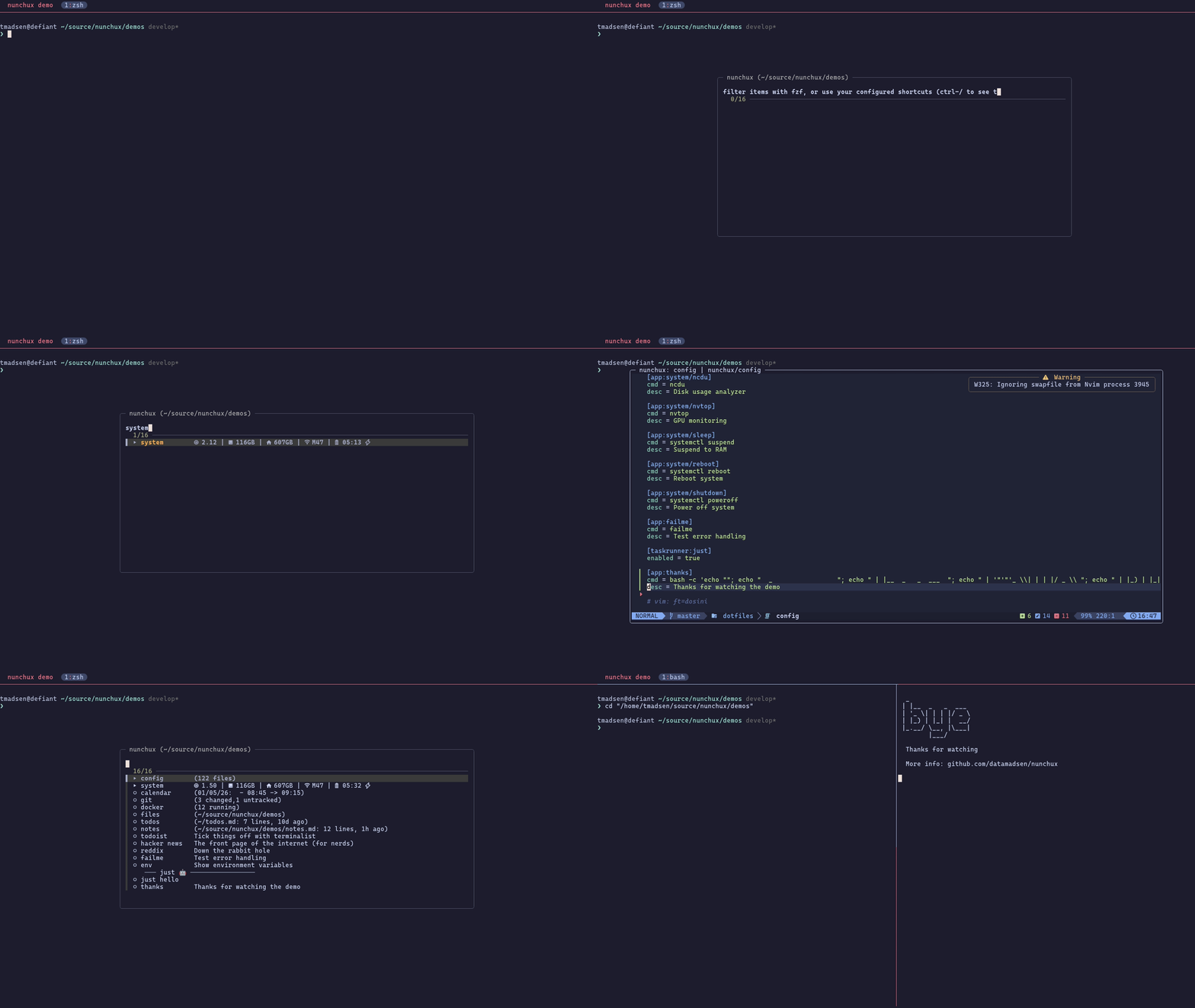](https://vhs.charm.sh/vhs-4H4NyQC5bYtYGpNkb6vIaH.gif)
## How to install it
Use [TPM](https://github.com/tmux-plugins/tpm) for a smooth experience. Add
this to your tmux.conf:
```
set -g @plugin 'datamadsen/nunchux'
```
Then hit `prefix + I` and you're good to go.
To update to the latest version, hit `prefix + U` and type `nunchux` (or `all`
to update all plugins).
## How to invoke it
By default the menu is invoked with `prefix + g`, but you can change it:
```
set -g @nunchux-key 'a'
```
If you want to invoke it without the prefix, e.g. with `Ctrl-Space`:
```
set -g @nunchux-key 'C-Space'
```
## How to configure it
Nunchux searches for config in this order:
1. `.nunchuxrc` in current directory or any parent.
2. `NUNCHUX_RC_FILE` environment variable.
3. `~/.config/nunchux/config`
You can also run nunchux without a config and it will offer to create one for
you.
### Also see
- [docs/configuration.md](docs/configuration.md) for the full reference.
- [docs/examples.md](docs/examples.md) for real-world examples.
### Shell Integration
If you use nvm, pyenv, or other tools that modify your shell environment, you'll
want apps launched via nunchux to inherit that environment.
**Why is this needed?**
Tmux popups run in tmux's *server* environment, not your shell's environment.
When you run `nvm use 18` or `export FOO=bar`, those changes only exist in your
shell - tmux doesn't know about them. There's no tmux API to "run a command
inside a pane's shell context", so we work around it with a shell hook that
saves your environment after each command. When nunchux launches an app, it
reads that saved environment.
Add this to your shell rc file:
**Bash** (`~/.bashrc`):
```bash
source ~/.tmux/plugins/nunchux/shell-init.bash
```
**Zsh** (`~/.zshrc`):
```zsh
source ~/.tmux/plugins/nunchux/shell-init.zsh
```
**Fish** (`~/.config/fish/config.fish`):
```fish
source ~/.tmux/plugins/nunchux/shell-init.fish
```
This saves your environment after each command, so apps launched from nunchux
(even from within vim or lazygit) inherit your current PATH, exports, etc.
## Dependencies
- tmux
- fzf v0.66+
- curl (for menu hot-swap)
### Task runner dependencies
| Task Runner | Required |
|-------------|----------|
| just | [just](https://github.com/casey/just) |
| npm | jq |
| task | [task](https://taskfile.dev) or go-task, jq |