https://github.com/datamonet/sd-webui-colab
https://github.com/datamonet/sd-webui-colab
Last synced: 11 months ago
JSON representation
- Host: GitHub
- URL: https://github.com/datamonet/sd-webui-colab
- Owner: datamonet
- License: mit
- Created: 2023-03-18T19:07:00.000Z (over 3 years ago)
- Default Branch: main
- Last Pushed: 2023-05-02T00:39:27.000Z (about 3 years ago)
- Last Synced: 2025-02-10T03:47:49.464Z (over 1 year ago)
- Language: Jupyter Notebook
- Size: 19.5 KB
- Stars: 1
- Watchers: 1
- Forks: 1
- Open Issues: 0
-
Metadata Files:
- Readme: README.md
- License: LICENSE
Awesome Lists containing this project
README
# About
Pre-configured Google Colab notebooks to run [AUTOMATIC1111/stable-diffusion-webui](https://github.com/AUTOMATIC1111/stable-diffusion-webui) based on [camenduru/stable-diffusion-webui-colab](https://github.com/camenduru/stable-diffusion-webui-colab).
## Versions
| Colab | Version | Description |
| --- | --- | --- |
| [](https://colab.research.google.com/github/datamonet/sd-webui-colab/blob/main/sd_webui_standard.ipynb)| Standard | Basic WebUI with extensions listed below. Standard version takes about 5 minutes to setup |
| [](https://colab.research.google.com/github/datamonet/sd-webui-colab/blob/main/sd_webui_controlnet.ipynb)| ControlNet | Standard + ControlNet extensions and models, which takes 1 or 2 minutes more than the standard version to setup given additional ControlNet models to download |
Click one of the two buttons above to run the Colab Notebook:

Click "Run anyway" in the warning window:
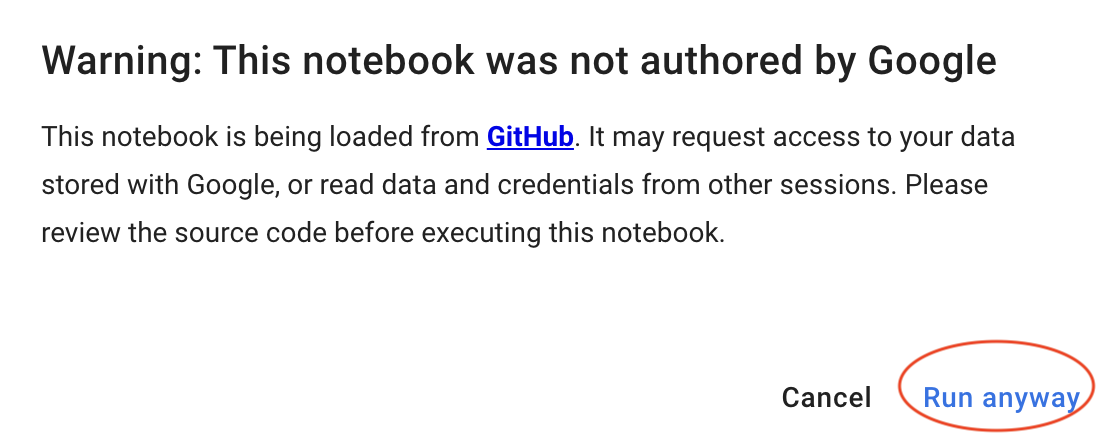
After a few minutes, you should see the following messages in Colab. Click the public link to access WebUI in a new browser window or tab:

## Extensions
The following extensions are pre-configured for all versions.
- https://github.com/AlUlkesh/stable-diffusion-webui-images-browser
- https://github.com/kohya-ss/sd-webui-additional-networks
- https://github.com/etherealxx/batchlinks-webui
The following are additional extensions for ControlNet version.
- https://github.com/Mikubill/sd-webui-controlnet
- https://github.com/camenduru/openpose-editor
- https://github.com/jexom/sd-webui-depth-lib
- https://github.com/hnmr293/posex
## Models
Three models are pre-loaded:
- [Stable Diffusion v1.5 model](https://huggingface.co/runwayml/stable-diffusion-v1-5): [v1-5-pruned-emaonly.safetensors](https://huggingface.co/runwayml/stable-diffusion-v1-5/resolve/main/v1-5-pruned-emaonly.safetensors)
- [Deliberate](https://civitai.com/models/4823/deliberate): [deliberate_v2.safetensors](https://huggingface.co/datamonet/Deliberate/resolve/main/deliberate_v2.safetensors)
- [DreamShaper](https://civitai.com/models/4384/dreamshaper): [dreamshaper_4BakedVae.safetensors](https://huggingface.co/datamonet/DreamShaper/resolve/main/dreamshaper_4BakedVae.safetensors)
Install additional models (checkpoint, lora, embedding, vae, etc.) using pre-installed [batchlinks-webui](https://github.com/etherealxx/batchlinks-webui) extension:

As an exmaple, we show below how you can get one checkpoint from Huggingface and one lora model from CivitAI - please refer to the official [README](https://github.com/etherealxx/batchlinks-webui) to learn how to get model links from other sources and other functions.
The link for the checkpoint "ChilloutMix" on Huggingface is [https://huggingface.co/datamonet/ChilloutMix/tree/main](https://huggingface.co/datamonet/ChilloutMix/tree/main).
**Right click** the model you want to get and choose **Copy Link Address**:

The link for the lora on CivitAI is [https://civitai.com/models/12597/moxin](https://civitai.com/models/12597/moxin) - **NOTE**: this is **NOT** the link for the model.
**Right click** the Download Latest button and choose **Copy Link Address**:
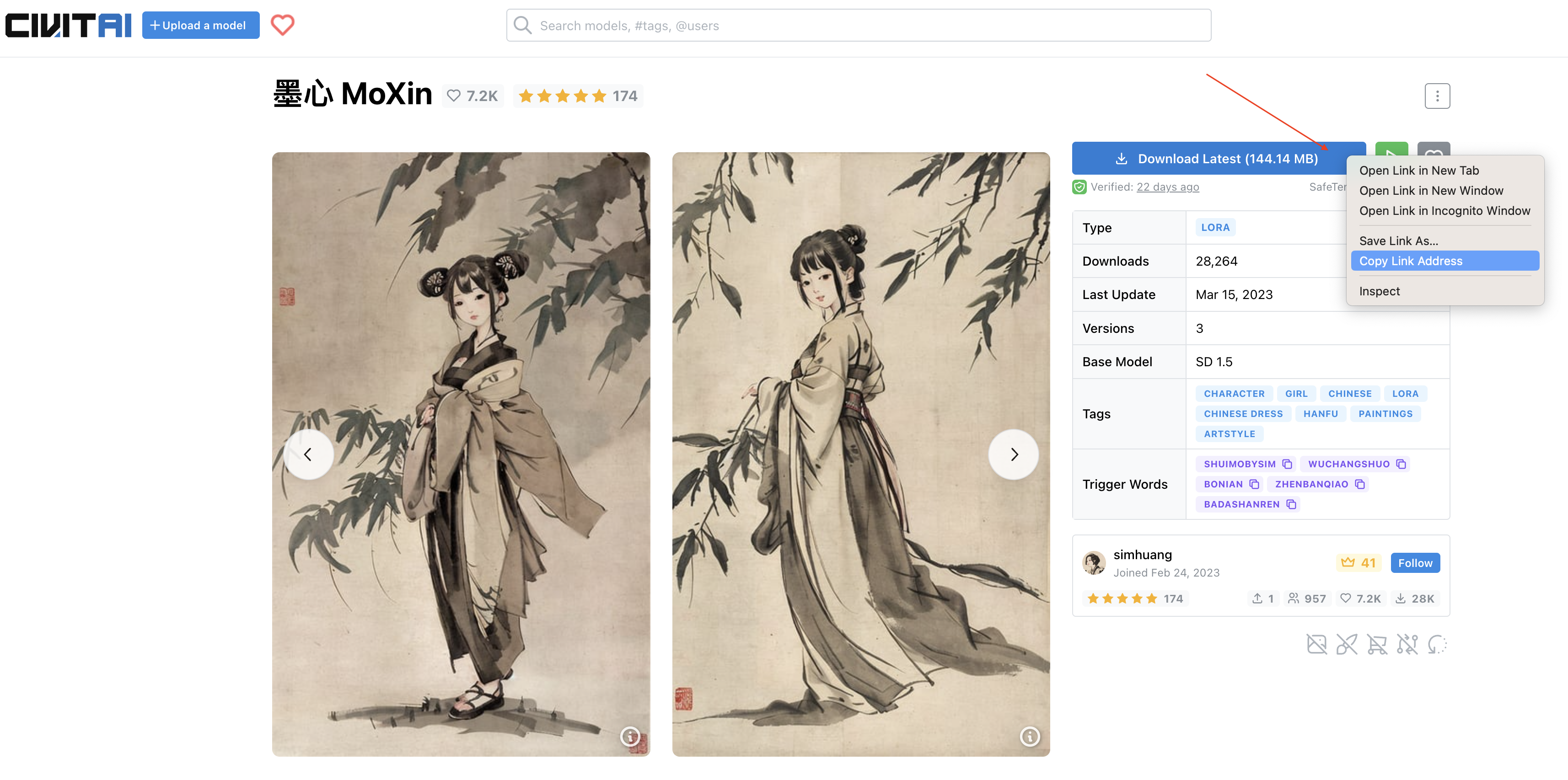
If the model has multiple versions, you can scroll down to get the address in the same way:

Now, you can put the following text to [batchlinks-webui](https://github.com/etherealxx/batchlinks-webui) extension:
```
#model
https://huggingface.co/datamonet/ChilloutMix/resolve/main/chilloutmix_NiPrunedFp16.safetensors
#lora
https://civitai.com/api/download/models/14856
```
Or you can save the text into a `txt` file and load it in:

Then, click Download ALL button to download the models.
You can switch to Colab to check the downloading progress:


Now, you should have the `ChilloutMix` base model and `MoXin` lora:

You can replicate the image below by using the following prompt:
```
portrait of a woman standing , willow branches, (masterpiece, best quality:1.2), traditional chinese ink painting, modelshoot style, peaceful, (smile), looking at viewer, wearing long hanfu, hanfu, song, willow tree in background
Negative prompt: (worst quality:2), (low quality:2), (normal quality:2), lowres, normal quality, skin spots, acnes, skin blemishes, age spot, glans, (watermark:2), hands
Steps: 30, Sampler: DPM++ SDE Karras, CFG scale: 3.5, Seed: 932584919, Size: 640x1024, Model hash: 1db9eb3bc3, Model: chilloutmix_NiPrunedFp16
```
