https://github.com/datastax/astra-db-java
Java Client for DataStax Astra DB and the Data API
https://github.com/datastax/astra-db-java
api client sdk
Last synced: about 1 year ago
JSON representation
Java Client for DataStax Astra DB and the Data API
- Host: GitHub
- URL: https://github.com/datastax/astra-db-java
- Owner: datastax
- License: apache-2.0
- Created: 2024-03-21T15:13:11.000Z (over 2 years ago)
- Default Branch: main
- Last Pushed: 2025-04-11T11:32:06.000Z (over 1 year ago)
- Last Synced: 2025-04-26T03:45:44.584Z (about 1 year ago)
- Topics: api, client, sdk
- Language: Java
- Homepage: https://datastaxdevs.github.io/astra-db-java/latest/
- Size: 5.04 MB
- Stars: 11
- Watchers: 5
- Forks: 3
- Open Issues: 2
-
Metadata Files:
- Readme: README.MD
- Contributing: CONTRIBUTING.md
- License: LICENSE.md
- Code of conduct: CODE_OF_CONDUCT.md
Awesome Lists containing this project
README
# Java Client for Data API
[](http://www.apache.org/licenses/LICENSE-2.0)
[](https://search.maven.org/artifact/com.datastax.astra/astra-db-java)
[](https://sonarcloud.io/summary/new_code?id=clun_db-java)
[](https://sonarcloud.io/summary/overall?id=clun_astra-db-java)
[](https://sonarcloud.io/summary/new_code?id=clun_astra-db-java)
[](https://sonarcloud.io/summary/new_code?id=clun_astra-db-java)
[](https://sonarcloud.io/summary/overall?id=clun_astra-db-java)
[](https://sonarcloud.io/summary/new_code?id=clun_astra-db-java)
[](https://sonarcloud.io/summary/new_code?id=clun_astra-db-java)
[](https://sonarcloud.io/summary/new_code?id=clun_astra-db-java)
This client library provides a simplified way to interact with Data API for AstraDB or local instances. For detailed documentation, each operation comes with a detailed description and examples.
- [`astra-db-ts`](https://github.com/datastax/astra-db-ts) is the equivalent for typescript
- [`astrapy`](https://github.com/datastax/astrapy) is the equivalent in python
This library is under development and is available in Maven Central.
You can build it locally and install it in your local repository.
## 📋 Table Of Content
1. [Installation](#1-installation)
1. [Prerequisites](#11-prerequisites)
2. [Packaging](#12-packaging)
2. [QuickStart with Astra DB](#2-quickstart-with-astra-db)
1. [Sign up for Astra DB](#21-sign-up-for-astra-db)
2. [Create a Database](#22-create-a-database)
3. [Get your credentials](#23-get-your-credentials)
4. [Create a new project and add the dependency](#24-create-a-new-project-and-add-the-dependency)
3. [QuickStart with Local Instances]()
1. [Start Data Api with DSE](#31-start-data-api-with-dse)
2. [Start Data Api with HCD](#32-start-data-api-with-hcd)
3. [Datq Api Information](#33-datq-api-information)
4. [Using Java client with Local Instance](#34-using-java-client-with-local-instance)
4. [What's Next](#4-whats-next)
## 1. Installation
### 1.1 Prerequisites
#### 📦 Java Development Kit (JDK) 11
- Use the [reference documentation](https://docs.oracle.com/javase/8/docs/technotes/guides/install/install_overview.html) to install a **Java Development Kit**
- Validate your installation with
```bash
java --version
```
#### 📦 Apache Maven
- Use the [reference documentation](https://maven.apache.org/install.html) to install **Apache Maven**
- Validate your installation with
```bash
mvn -version
```
#### 📦 Docker (local Installation)
Docker is an open-source project that automates the deployment of software applications inside containers by providing an additional layer of abstraction and automation of OS-level virtualization on Linux.
### 1.2 Packaging
- Clone the repository
```console
git clone git@github.com:datastax/astra-db-java.git
```
- Build the project (java 11 and Maven is required)
> Note: You should skip the tests if you want to speed up the build, to run the test you need to have a bit of setup:
> - An environment variable `ASTRA_DB_APPLICATION_TOKEN` with your an Organization Administrator Astra token (PROD)
> - An environment variable `ASTRA_DB_APPLICATION_TOKEN_DEV` with your an Organization Administrator Astra token (DEV)
> - A running Data API locally with docker (see the `docker-compose.yml` in the root of the project)
```console
mvn clean install -Dtest.skipped=true
```
## 2. QuickStart with Astra DB
### 2.1. Sign up for Astra DB
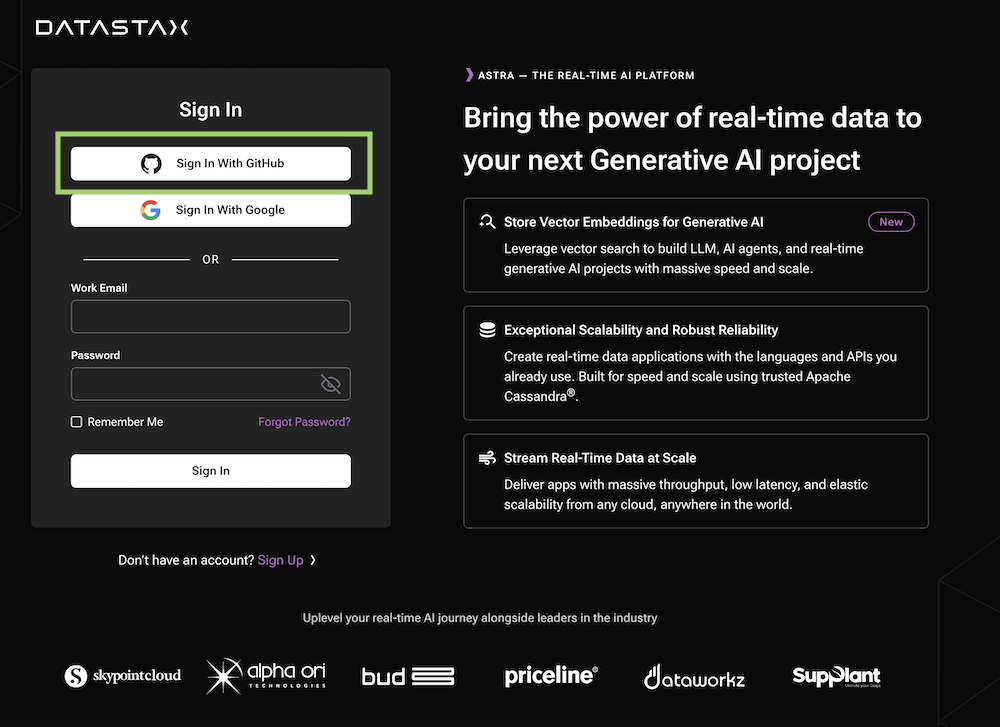
- Access [https://astra.datastax.com](https://astra.datastax.com) and register with `Google` or `Github` account. It is free to use. There is free forever tiers of up to 25$ of consumption every month.
### 2.2. Create a Database
> If you are creating a new account, you will be brought to the DB-creation form directly.
- Get to the databases dashboard (by clicking on Databases in the left-hand navigation bar, expanding it if necessary), and click the `[Create Database]` button on the right.
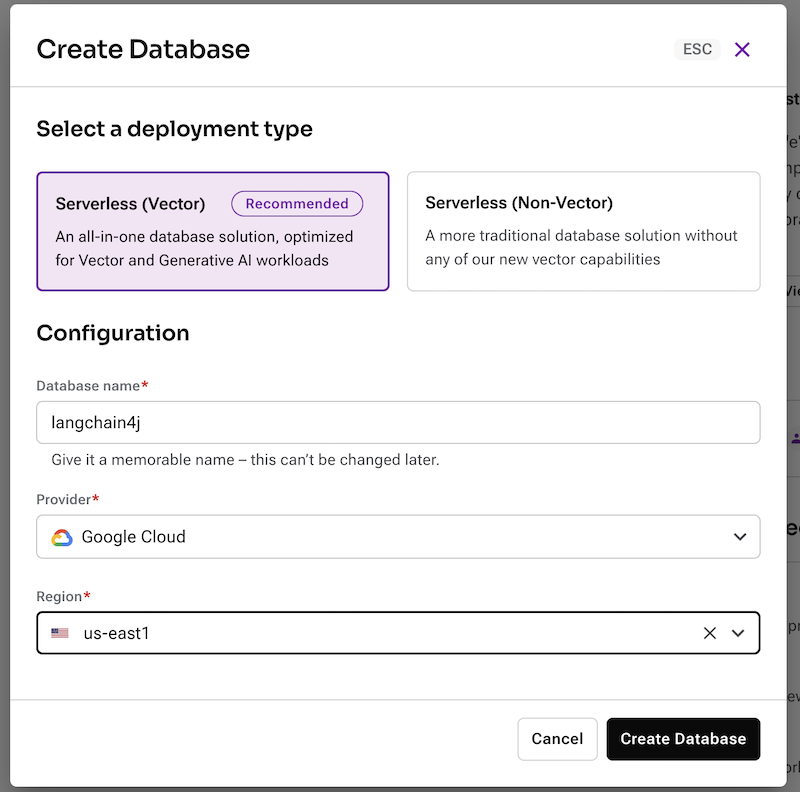
- **ℹ️ Fields Description**
| Field | Description |
|--------------------------------------------|-----------------------------------------------------------------------------------------------------------------------------------------------------------------------------------------------------------------------------------------------|
| **Vector Database vs Serverless Database** | Choose `Vector Database` In june 2023, Cassandra introduced the support of vector search to enable Generative AI use cases. |
| **Database name** | It does not need to be unique, is not used to initialize a connection, and is only a label (keep it between 2 and 50 characters). It is recommended to have a database for each of your applications. The free tier is limited to 5 databases. |
| **Cloud Provider** | Choose whatever you like. Click a cloud provider logo, pick an Area in the list and finally pick a region. We recommend choosing a region that is closest to you to reduce latency. In free tier, there is very little difference. |
| **Cloud Region** | Pick region close to you available for selected cloud provider and your plan. |
If all fields are filled properly, clicking the "Create Database" button will start the process.
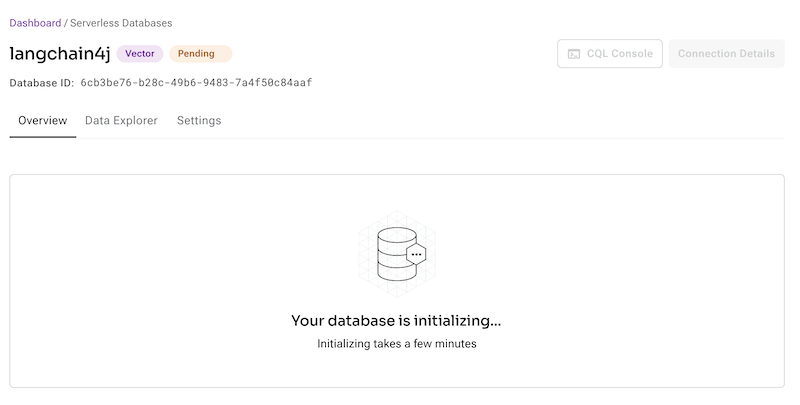
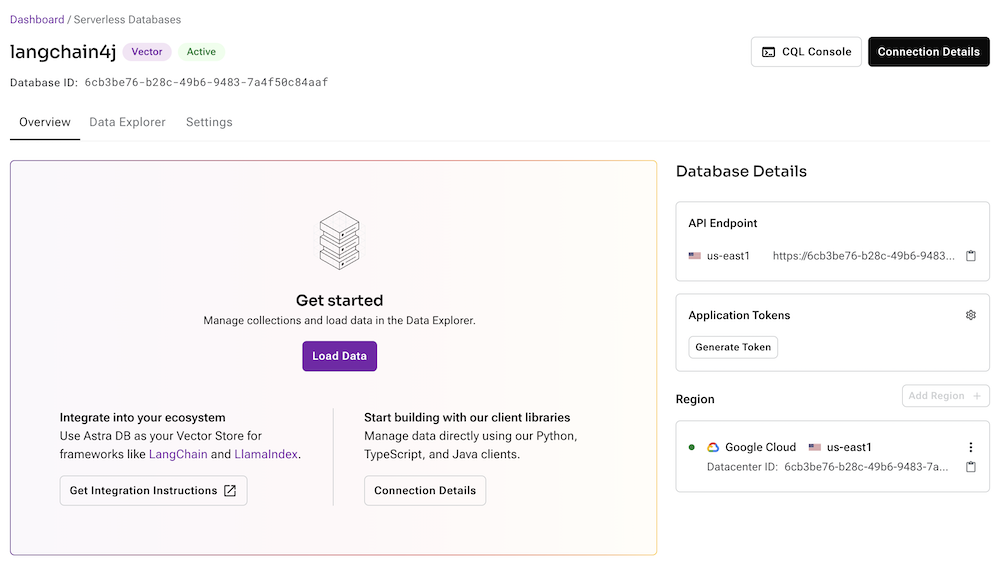
It should take a couple of minutes for your database to become `Active`.
### 2.3. Get your credentials
To connect to your database, you need the API Endpoint and a token. The api endpoint is available on the database screen, there is a little icon to copy the URL in your clipboard. (it should look like `https://-.apps.astra.datastax.com`).
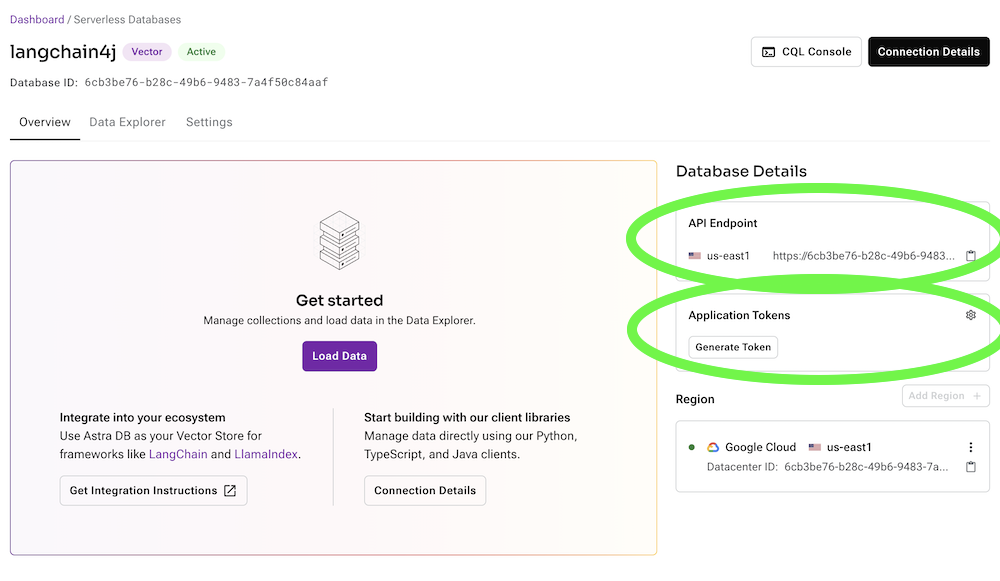
To get a token click the `[Generate Token]` button on the right. It will generate a token that you can copy to your clipboard.
### 2.4 Create a new project and add the dependency
Add the following dependency to your `pom.xml` file:
```xml
com.datastax.astra
astra-db-java
1.3.0
```
Here is a sample class that demonstrates how to use the library:
```java
import com.datastax.astra.client.DataAPIClient;
import com.datastax.astra.client.collections.Collection;
import com.datastax.astra.client.databases.Database;
import com.datastax.astra.client.collections.documents.Document;
import com.datastax.astra.client.core.paging.FindIterable;
import java.util.List;
import static com.datastax.astra.client.core.query.Filters.eq;
import static com.datastax.astra.client.core.vector.SimilarityMetric.cosine;
public class GettingStarted {
public static void main(String[] args) {
// Initializing client with a token
DataAPIClient client = new DataAPIClient("my_token");
// Accessing the Database through the HTTP endpoint
Database db = client.getDatabase("http://db-region.apps.astra.datastax.com");
// Create collection with vector support
Collection col = db.createCollection("demo", 2, cosine);
// Insert records
col.insertMany(List.of(
new Document("doc1").vector(new float[]{.1f, 0.2f}).append("key", "value1"),
new Document().id("doc2").vector(new float[]{.2f, 0.4f}).append("hello", "world"),
new Document("doc3").vector(new float[]{.5f, 0.6f}).append("key", "value1"))
);
// Search
FindIterable docs = col.find(
eq("key", "value1"), // metadata filter
new float[]{.5f, .5f}, //vector
10); // maxRecord
// Iterate and print your results
for (Document doc : docs) System.out.println(doc);
}
}
```
## 3. QuickStart with Local Instances
### 3.1. Start Data Api with DSE
- Start the 2 containers with the following command:
```console
docker-compose up -d
```
### 3.2. Start Data Api with HCD
```
docker-compose -f docker-compose-hcd.yml up -d
```
- Check the status of the containers with the following command:
```console
docker-compose ps
```
### 3.3. Datq Api Information
> _Output_
> ```console
> NAME IMAGE COMMAND
> astra-db-java-coordinator-1 stargateio/coordinator-dse-next:v2.1.0-BETA-9 "./starctl"
> astra-db-java-jsonapi-1 stargateio/jsonapi:v1.0.6
> ```
- Here are the information to connect to the local instance:
| Field | Description |
|--------------------------------------------|-----------------------------------------------------------------------------------------|
| **Data API Spec** | http://localhost:8181/swagger-ui/#/ |
| **Data API Endpoint** | http://localhost:8181 |
| **Token Header Key** | `Token` |
| **Token Header Value** | `Cassandra:Y2Fzc2FuZHJh:Y2Fzc2FuZHJh` (aka `Cassandra:Base64(userName):Base64(password)`) |
| **Authentication API Spec (before 1.0.6)** | http://localhost:8081/swagger-ui/#/ |
- The API will have 3 resources
| Field | Url | Description |
|-----------------------|--------------------------------|---------------------------------------------------|
| **Namespace** | `/v1/` | Interact with namespaces (not available in Astra) |
| **Data API Endpoint** | `/v1/{namespace}` | Interact with collections of a namespace |
| **Token Header Key** | `/v1/{namespace}/{collection}` |Interact with documents of a collection |
- Sample curl to create a namespace:
```console
curl -X 'POST' \
'http://localhost:8181/v1' \
-H 'accept: application/json' \
-H 'Token: Cassandra:Y2Fzc2FuZHJh:Y2Fzc2FuZHJh' \
-H 'Content-Type: application/json' \
-d '{
"createNamespace": {
"name": "default_keyspace"
}
}'
```
### 3.4. Using Java client with Local Instance
```java
public class QuickStartLocal {
public static void main(String[] args) {
// Create a token
String token = new UsernamePasswordTokenProvider("cassandra", "cassandra").getToken();
System.out.println("Token: " + token);
// Initialize the client
DataAPIClient client = new DataAPIClient(token, builder().withDestination(CASSANDRA).build());
System.out.println("Connected to Data API");
// Create a default keyspace
((DataAPIDatabaseAdmin) client
.getDatabase(dataApiUrl)
.getDatabaseAdmin()).createNamespace(keyspaceName, NamespaceOptions.simpleStrategy(1));
System.out.println("Keyspace created ");
Database db = client.getDatabase("http://localhost:8181", "default_keyspace");
System.out.println("Connected to Database");
// Create a collection. The default similarity metric is cosine.
Collection collection = db.createCollection("simple", 5, COSINE);
System.out.println("Created a Collection simple");
// Create a collection with Vector embeddings OPEN AI
Collection collectionLyrics = db.createCollection("vector", CollectionOptions.builder()
.vectorSimilarity(SimilarityMetric.COSINE)
.vectorDimension(1536)
.vectorize("openai", "text-embedding-3-small")
.build(),
new CommandOptions<>().embeddingAPIKey("sk-....."));
}
}
```
## 4. What's Next
This is an the organization of the different classes of the framework.
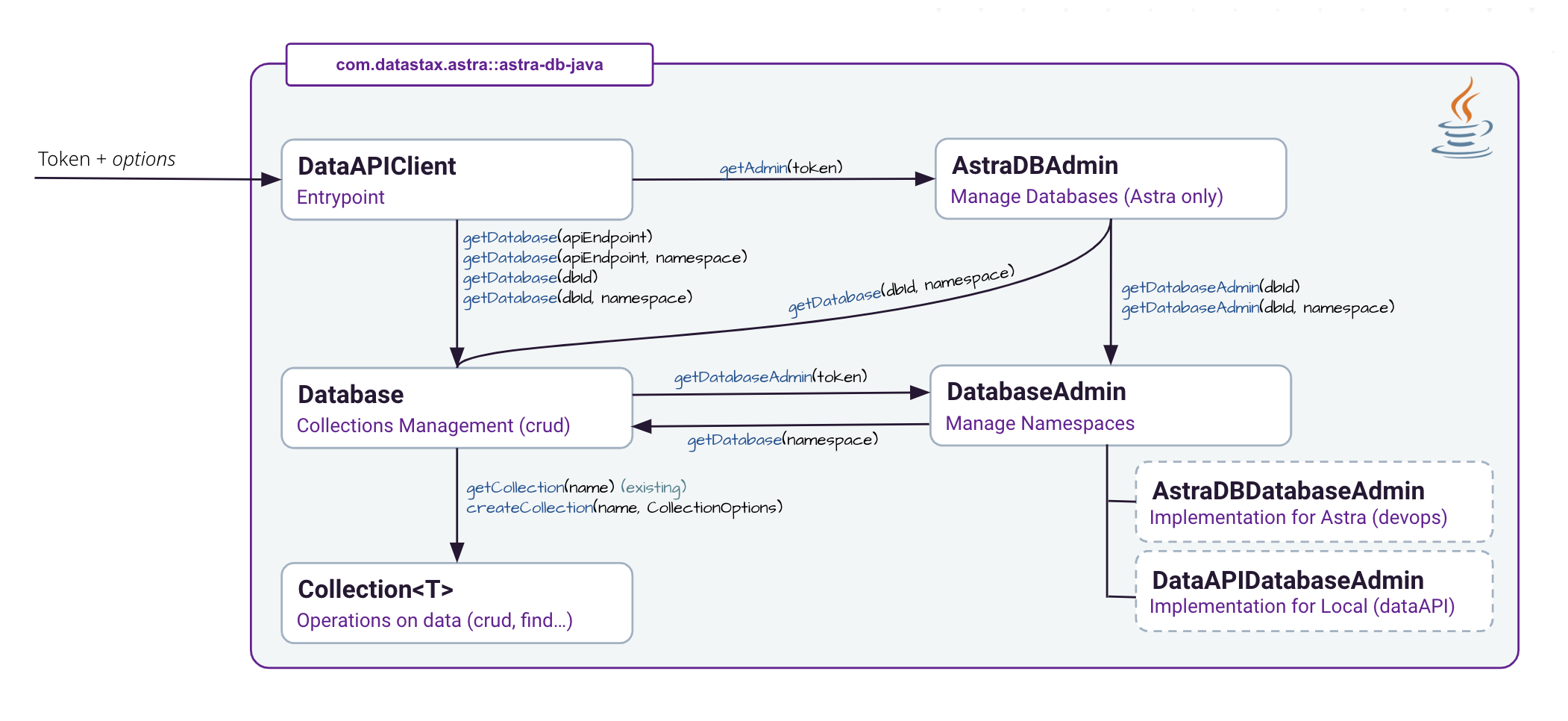
- For more information use the [JAVADOC documentation](https://datastaxdevs.github.io/astra-db-java/latest/)
- The `examples` directory contains more examples on how to use the library.