https://github.com/datavorous/dunefetch
neofetch + falling sand engine for your terminal
https://github.com/datavorous/dunefetch
command-line curses neofetch python terminal
Last synced: about 1 year ago
JSON representation
neofetch + falling sand engine for your terminal
- Host: GitHub
- URL: https://github.com/datavorous/dunefetch
- Owner: datavorous
- License: mit
- Created: 2025-07-15T17:22:08.000Z (about 1 year ago)
- Default Branch: main
- Last Pushed: 2025-07-16T02:27:00.000Z (about 1 year ago)
- Last Synced: 2025-07-16T15:04:59.054Z (about 1 year ago)
- Topics: command-line, curses, neofetch, python, terminal
- Language: Python
- Homepage:
- Size: 12.7 KB
- Stars: 24
- Watchers: 0
- Forks: 0
- Open Issues: 0
-
Metadata Files:
- Readme: README.md
- License: LICENSE
Awesome Lists containing this project
README
# dunefetch
neofetch + falling sand engine for your terminal
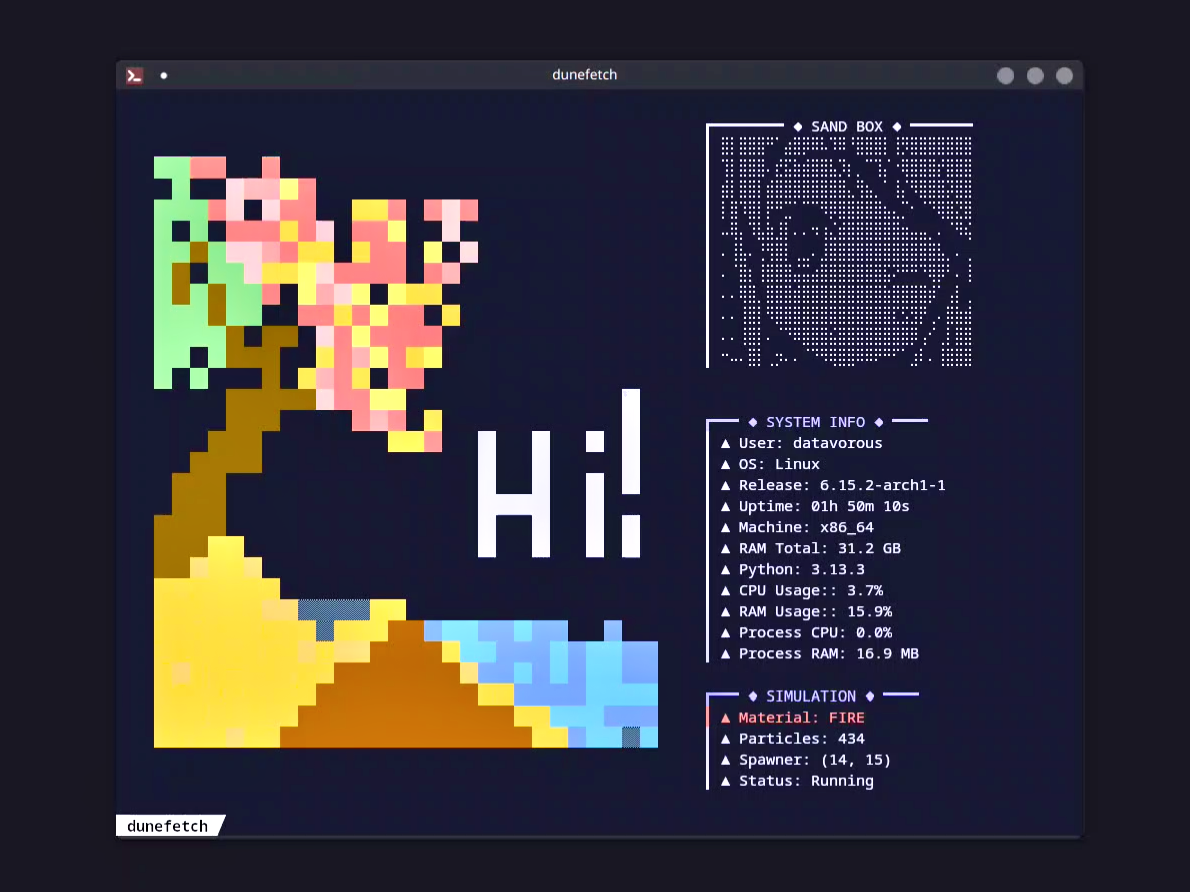
[**Video Demo**](https://www.youtube.com/watch?v=tfzAKLan-mQ)
Future improvements will focus on customizability.
# Install
Make sure to have [Python](https://www.python.org/downloads/) installed.
Recommended Terminal Emulator: [kitty](https://sw.kovidgoyal.net/kitty/binary/)
```
git clone https://github.com/datavorous/dunefetch
cd dunefetch-main
cd dunefetch-main
python -m venv .venv
source .venv/bin/activate
pip install .
dunefetch
```
# Help
```
dunefetch --help
dunefetch --help-controls
dunefetch --version
```
| Key(s) | Action |
|--------------|--------------------------------|
| Arrow Keys | Move spawn cursor |
| `Space` | Place selected material |
| `1` | Select SAND |
| `2` | Select WATER |
| `3` | Select WALL |
| `4` | Select OIL |
| `5` | Select FIRE |
| `6` | Select PLANT |
| `7` | Select STEAM |
| `8` | Select WOOD |
| `p` | Pause/unpause simulation |
| `c` | Clear particles near cursor |
| `r` | Reset simulation |
| `q` | Quit |
# Explanation
## Components
There are 3 important modules:
1. `cursu` -> visual I/O, color, character rendering
2. `sand_core` -> simulation logic, material specific behaviour
3. `sand_utils` -> grid setup, access helpers
4. `elements` -> pariticle definitions (name, symbol, color, index)
`cursu` is a small wrapper around python's curses to provide an easier api for drawing elements on the terminal, more info can be found [here](https://docs.python.org/3/howto/curses.html).
`sand_utils` handles grid creation, index validation, and get, set, swap cell values functionalities.
`sand_core` is the main heart. The class SandCore inherits the properites from SandUtils class.
It contains the update rules for each type of element, allows adding particles, and updating them.
```bash
+----------------------+
| Terminal Display | -> (cursu.py)
+----------------------+
| Particle Engine | -> (sand_core.py)
+----------------------+
| Grid Manager | -> (sand_utils.py)
+----------------------+
| Material Database | -> (elements.py)
+----------------------+
```
## Data Structures
The grid is the main data structure around which everything revolves around.
```py
self.grid = [[EMPTY for x in range(width)] for y in range(height)]
```
It is a 2D array of dimensions height x width; each cell is an integer containing the index number of the particle in `ELEMENTS`, viz.
```py
EMPTY = 0
SAND = 1
WATER = 2
```
Additionally there is a life state buffer used for managing fire life time,
```py
self.life = [[0 for x in range(width)] for y in range(height)]
```
## Core Update Cycle
Every tick/frame, the engine runs the following:
```py
for y in reversed(range(height)):
for x in range(width):
update_cell(y, x)
```
Bottom up traversal prevents particles (which go downwar) to directly teleport at the bottom. Similarly for the particles of type `STEAM`, we do top down traveral, to prevent teleporting directly at the top.
Each cell's type is checked, and corresponding update logic is run.
The system avoids out-of-bounds errors via `is_valid(y, x)` checks.
Each particle has a set of local rules based on its neighborhood:
```py
neighbors = {
"below": (y+1, x),
"left": (y, x-1),
"right": (y, x+1),
"below_left": (y+1, x-1),
"below_right": (y+1, x+1),
}
```
Then, based on the material type at y, x, we apply material-specific rules.
## Particle Update Logic
We'll take the example of `SAND`, `WATER` and `FIRE` here.
### Sand
We check three neighbouring cells (below, below_left, below_right), if there is any `EMPTY` cell, we swap that with our sand particle.
```py
if cell_below == EMPTY:
swap(y, x, y+1, x)
elif below_left == EMPTY:
swap(y, x, y+1, x-1)
elif below_right == EMPTY:
swap(y, x, y+1, x+1)
```
This gives those natural looking piles or _dunes_.
### Water
These flow downward, then sideways, and seeks equilibrium (spreads horizontally). We added randomness to prevent gridlocked water.
Additionally, checking column wise water level would be another idea to make it more natural, but we are yet to try that out.
```py
if below == EMPTY:
swap(y, x, y+1, x)
elif left == EMPTY and right == EMPTY:
swap with random(left or right)
elif left == EMPTY:
swap(y, x, y, x-1)
elif right == EMPTY:
swap(y, x, y, x+1)
```
### Fire
Fire is perhaps the hardest one to implement. It burns for a few frames and spreads to flammable neighbors. Eventually leaves empty cell behind.
The life time grid is updated accordingly.
```py
def update_fire(self, y, x):
if self.life[y][x] <= 0:
self.set(y, x, EMPTY)
return False
for dy, dx in [(-1, -1), (-1, 1), (1, -1), (1, 1), (-1, 0), (1, 0), (0, -1), (0, 1)]:
# checking the neighbours
target = self.get(y + dy, x + dx)
if target == WATER:
# changing the particle type upon interaction
self.set(y + dy, x + dx, STEAM)
if target in (OIL, PLANT):
self.set(y+dy, x+dx, FIRE)
# giving fire a full life or a boosted one
self.life[y+dy][x+dx] = self.max_fire_life + 2
if target == WOOD:
if random.random() < 0.7:
self.set(y+dy, x+dx, FIRE)
self.life[y+dy][x+dx] = self.max_fire_life + 5
# wood burns longer hence this
# occasionally it can leap two cells, the more randomised the more chaotic
if random.random() < 0.0001:
dy, dx = random.choice([(-2,0), (2,0), (0,-2), (0,2)])
ny, nx = y + dy, x + dx
if 0 < ny < self.height-1 and 0 < nx < self.width-1:
if self.get(ny, nx) == EMPTY:
self.set(ny, nx, FIRE)
self.life[ny][nx] = self.max_fire_life
decay = random.randint(1, 2)
self.life[y][x] = max(0, self.life[y][x] - decay)
return True
```
The `sand_core.py` is pretty much self explanatory, do check out the code for a better grasp of the concepts.
## Interaction
Totally dependent upon keys(pressed) matching.
## Extras
We had tried to develop a sand based game 4 years ago (but failed, unfortunately), and had watched/read these videos/articles:
1. [MARF's Youtube Video](https://youtu.be/5Ka3tbbT-9E?si=vabzB_Z2n9OEhH2E) :: _How To Code a Falling Sand Simulation (like Noita) with Cellular Automata_
2. [Winterdev's Youtube Video](https://youtu.be/wZJCQQPaGZI?si=o7YyMqOzug5BFUx9) :: _Making games with Falling Sand part 1_
3. [John Jackson's Youtube Video](https://youtu.be/VLZjd_Y1gJ8?si=lecmiGLE74tPjtsf) :: _Recreating Noita's Sand Simulation in C and OpenGL | Game Engineering_
Some recent additions:
4. [Jason's Blog](https://jason.today/falling-fire) :: _Adding fire to our falling sand simulator_