https://github.com/datumbrain/go-dataframe
A simple package to abstract away the process of creating usable DataFrames for data analytics. This package is heavily inspired by the amazing Python library, Pandas.
https://github.com/datumbrain/go-dataframe
Last synced: 5 months ago
JSON representation
A simple package to abstract away the process of creating usable DataFrames for data analytics. This package is heavily inspired by the amazing Python library, Pandas.
- Host: GitHub
- URL: https://github.com/datumbrain/go-dataframe
- Owner: datumbrain
- License: mit
- Fork: true (kfultz07/go-dataframe)
- Created: 2023-07-08T09:19:00.000Z (almost 3 years ago)
- Default Branch: main
- Last Pushed: 2024-08-16T08:18:17.000Z (almost 2 years ago)
- Last Synced: 2025-08-31T16:04:12.660Z (9 months ago)
- Language: Go
- Homepage:
- Size: 3.97 MB
- Stars: 0
- Watchers: 0
- Forks: 5
- Open Issues: 3
-
Metadata Files:
- Readme: README.md
- License: LICENSE
Awesome Lists containing this project
README
# go-dataframe
A simple package to abstract away the process of creating usable DataFrames for data analytics. This package is heavily inspired by the amazing Python library, Pandas.
## Generate DataFrame
Utilize the CreateDataFrame function to create a DataFrame from an existing CSV file or create an empty DataFrame with the CreateNewDataFrame function. The user can then iterate over the DataFrame to perform the intended tasks. All data in the DataFrame is a string by default. There are various methods to provide additional functionality including: converting data types, update values, filter, concatenate, and more. Please use the below examples or explore the code to learn more.
## Import Package
```go
import (
"fmt"
dataframe "github.com/datumbrain/go-dataframe"
)
```
## Load CSV into DataFrame, create a new field, and save
```go
path := "/Users/Name/Desktop/"
// Create the DataFrame
df := dataframe.CreateDataFrame(path, "TestData.csv")
// Create new field
df.NewField("CWT")
// Iterate over DataFrame
for _, row := range df.FrameRecords {
cost := row.ConvertToFloat("Cost", df.Headers)
weight := row.ConvertToFloat("Weight", df.Headers)
// Results must be converted back to string
result := fmt.Sprintf("%f", cwt(cost, weight))
// Update the row
row.Update("CWT", result, df.Headers)
}
df.SaveDataFrame(path, "NewFileName")
```
## Concurrently load multiple CSV files into DataFrames
Tests performed utilized four files with a total of 5,746,452 records and a varing number of columns. Results indicated an average total load time of 8.81 seconds when loaded sequentially and 4.06 seconds when loaded concurrently utilizing the LoadFrames function. An overall 54% speed improvement. Files must all be in the same directory. Results are returned in a
slice in the same order as provided in the files parameter.
```go
filePath := "/Users/Name/Desktop/"
files := []string{
"One.csv",
"Two.csv",
"Three.csv",
"Four.csv",
"Five.csv",
}
results, err := LoadFrames(filePath, files)
if err != nil {
log.Fatal(err)
}
dfOne := results[0]
dfTwo := results[1]
dfThree := results[2]
dfFour := results[3]
dfFive := results[4]
```
## Stream CSV data
Stream rows of data from a csv file to be processed. Streaming data is preferred when dealing with large files and memory usage needs to be considered. Results are streamed via a channel with a StreamingRecord type. A struct with only desired fields could be created and either operated on sequentially or stored in a slice for later use.
```go
type Product struct {
name string
cost float64
weight float64
}
func (p Product) CostPerLb() float64 {
if p.weight == 0.0 {
return 0.0
}
return p.cost / p.weight
}
filePath := "/Users/Name/Desktop/"
var products []Product
c := make(chan StreamingRecord)
go Stream(filePath, "TestData.csv", c)
for row := range c {
prod := Product{
name: row.Val("Name"),
cost: row.ConvertToFloat("Cost"),
weight: row.ConvertToInt("Weight"),
}
products = append(products, prod)
}
```
## AWS S3 Cloud Storage
```go
// Download a DataFrame from an S3 bucket
path := "/Users/Name/Desktop/" // File path
fileName := "FileName.csv" // File in AWS Bucket must be .csv
bucketName := "BucketName" // Name of the bucket
bucketRegion := "BucketRegion" // Can be found in the Properties tab in the S3 console (ex. us-west-1)
awsAccessKey := "AwsAccessKey" // Access keys can be loaded from environment variables within you program
awsSecretKey := "AwsSecretKey"
df := CreateDataFrameFromAwsS3(path, fileName, bucketName, bucketRegion, awsAccessKey, awsSecretKey)
// Upload a file to an S3 bucket
err := UploadFileToAwsS3(path, fileName, bucket, region)
if err != nil {
panic(err)
}
```
## Filter Out Dataframe Rows Using .Where()
```go
df = df.Where("Last Name", "==", "Wiedmann")
```
## Various methods to filter DataFrames
```go
// Variadic methods that generate a new DataFrame
dfFil := df.Filtered("Last Name", "McCarlson", "Benison", "Stephenson")
dfFil := df.Exclude("Last Name", "McCarlson", "Benison", "Stephenson")
// Keep only specific columns
columns := [2]string{"First Name", "Last Name"}
dfFil := df.KeepColumns(columns[:])
// Remove multiple columns
dfFil := df.RemoveColumns("ID", "Cost", "First Name")
// Remove a single column
dfFil := df.RemoveColumns("First Name")
// Filter before, after, or between specified dates
dfFil := df.FilteredAfter("Date", "2022-12-31")
dfFil := df.FilteredBefore("Date", "2022-12-31")
dfFil := df.FilteredBetween("Date", "2022-01-01", "2022-12-31")
// Filter a numerical column based on a provided value
df, err := df.GreaterThanOrEqualTo("Cost", float64(value))
if err != nil {
panic(err)
}
df, err := df.LessThanOrEqualTo("Weight", float64(value))
if err != nil {
panic(err)
}
```
## Add record to DataFrame and later update
```go
// Add a new record
data := [6]string{"11", "2022-01-01", "123", "456", "Kevin", "Kevison"}
df = df.AddRecord(data[:])
// Update a value
for _, row := range df.FrameRecords {
// row.Val() is used to extract the value in a specific column while iterating
if row.Val("Last Name", df.Headers) == "McPoyle" {
row.Update("Last Name", "SchmicMcPoyle", df.Headers)
}
}
```
## Concatenate DataFrames
```go
// ConcatFrames uses a pointer to the DataFrame being appended.
// Both DataFrames must have the same columns in the same order.
df, err := df.ConcatFrames(&dfFil)
if err != nil {
panic("ConcatFrames Error: ", err)
}
```
## Rename a Column
```go
// Rename an existing column in a DataFrame
// First parameter provides the original column name to be updated.
// The next parameter is the desired new name.
err := df.Rename("Weight", "Total Weight")
if err != nil {
panic("Rename Column Error: ", err)
}
```
## Merge two DataFrames
```go
df := CreateDataFrame(path, "TestData.csv")
dfRight := CreateDataFrame(path, "TestDataRight.csv")
// Merge all columns found in right DataFrame into left DataFrame.
// User provides the lookup column with the unique values that link the two DataFrames.
df.Merge(&dfRight, "ID")
// Merge only specified columns from right DataFrame into left DataFrame.
// User provides columns immediately after the lookup column.
df.Merge(&dfRight, "ID", "City", "State")
// Inner merge all columns on a specified primary key.
// Results will only include records where the primary key is found in both DataFrames.
df = df.InnerMerge(&dfRight, "ID")
```
## Various Tools
```go
// Total rows
total := df.CountRecords()
// Returns a slice of all unique values in a specified column
lastNames := df.Unique("Last Name")
// Print all columns to console
df.ViewColumns()
// Returns a slice of all columns in order
foundColumns := df.Columns()
// Generates a decoupled copy of an existing DataFrame.
// Changes made in one DataFrame will not be reflected in the other.
df2 := df.Copy()
```
## Mathematics
```go
// Sum a numerical column
sum := df.Sum("Cost")
// Average a numerical column
average := df.Average("Weight")
// Min or Max of a numerical column
minimum := df.Min("Cost")
maximum := df.Max("Cost")
// Calculate the standard deviation of a numerical column
stdev, err := df.StandardDeviation("Cost")
if err != nil {
panic(err)
}
```
# DataFrame Comparison
## Overview
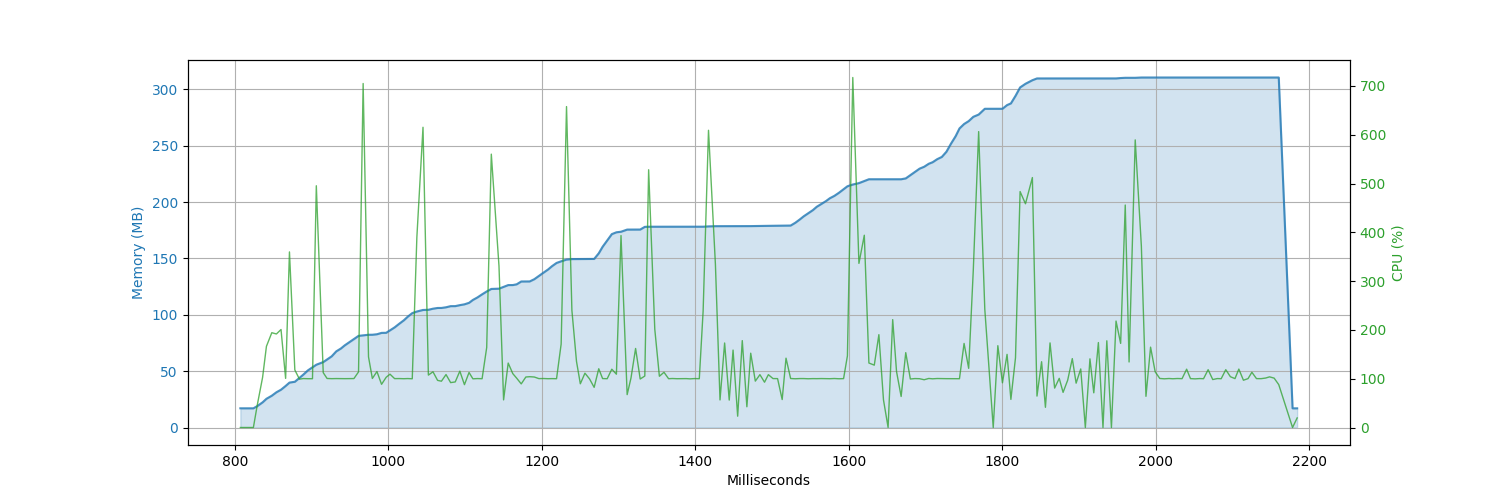
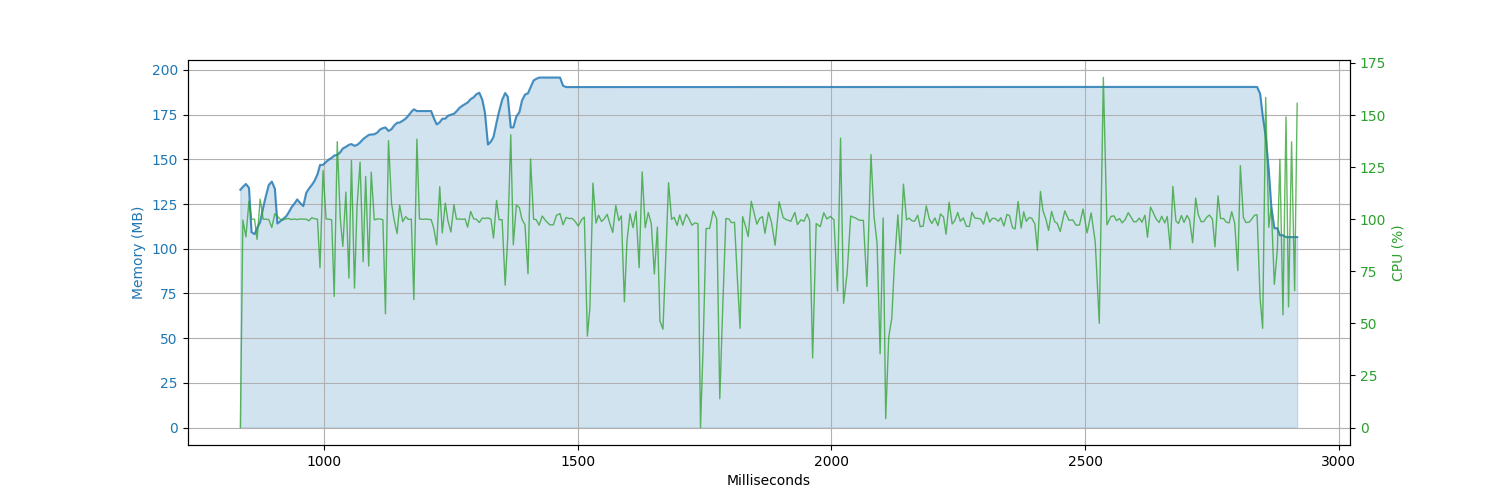
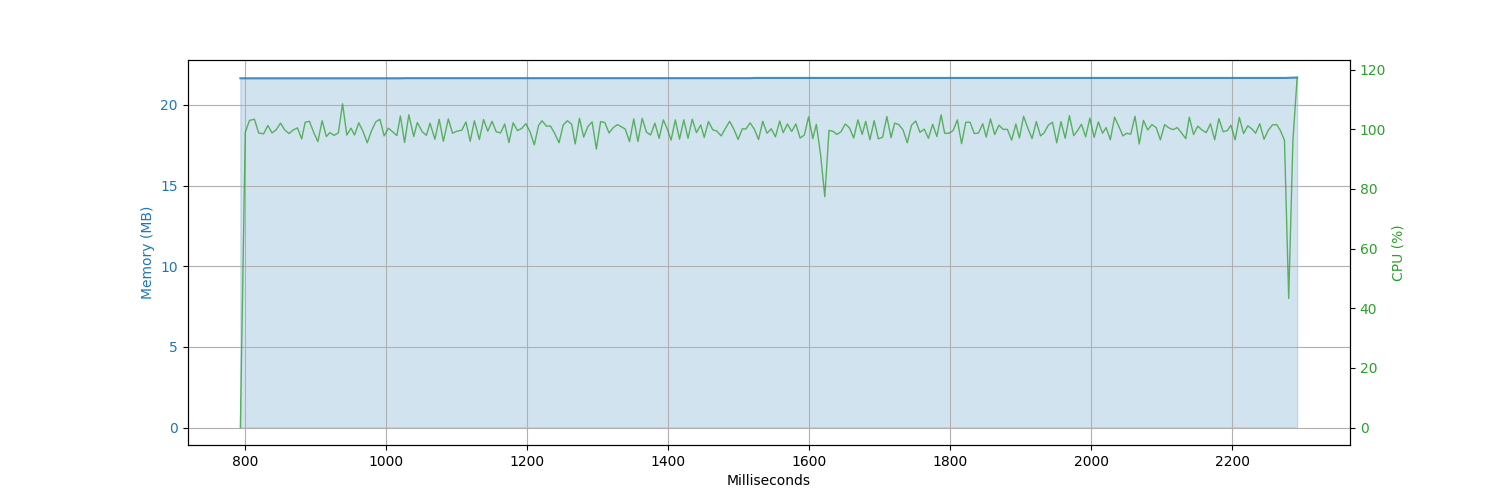
We are performing a task that involves reading multiple CSV files and concatenating them into a dataframe. Subsequently, we are comparing the performance of four different dataframes: go-dataframe (Go), Gota (Go), Pandas (Python), and petl (Python). This issue aims to provide a summary of our findings and compare the CPU consumption of the three approaches.
## Task Details
The task involves the following steps:
1. Reading multiple CSV files into dataframes.
2. Concatenating these dataframes into a dataframe.
3. Writing the data from the dataframe to an output file.
## CSV File Description:
To provide an initial understanding of the CSV files, we executed the following command on one of the files:
```bash
head -n 10 filename.csv
```
Output:
```graphql
first_name,last_name,email,ssn,job,country,phone_number,user_name,zipcode,invalid_ssn,credit_card_number,credit_card_provider,credit_card_security_code,bban
Steven,Moody,tiffanygonzalez@example.org,350-01-9267,"Presenter, broadcasting",Brazil,+1-506-628-4713x59809,barrettdustin,91323,807-49-0000,3547052816387430,JCB 15 digit,035,DARN48905985684949
Jessica,Lee,morgananna@example.net,079-14-8787,"Administrator, arts",Nauru,001-741-688-4308x923,cshaffer,16377,041-36-0000,570340703620,VISA 13 digit,063,MDVS28676684054916
Julia,Salazar,clarkcassidy@example.com,752-80-5107,Industrial buyer,Malawi,(783)902-5253x881,rosstiffany,16346,226-66-0000,3556315847497140,JCB 16 digit,6309,PRRE86261218230808
Gordon,Wilson,wheelerandrea@example.com,506-71-9258,Transport planner,Ethiopia,001-417-632-4676,zharmon,97694,357-00-2323,348183228980368,JCB 16 digit,588,SDSD10099010640237
Jerry,Vega,kenneth30@example.com,482-80-7647,Drilling engineer,Guyana,9406957013,samanthabryant,36140,165-73-0000,4365253782063545,VISA 16 digit,037,ZWLA04927443404778
Gail,King,matthew31@example.net,299-67-3681,Administrator,Egypt,001-307-909-4257x3439,hreynolds,13001,696-02-0000,3538195498327397,JCB 15 digit,048,KIUZ58738028157566
Edwin,Harris,aespinoza@example.com,252-85-5915,"Engineer, production",South Africa,947-484-3427x05066,bridgesnicholas,72419,026-82-0000,3592690115377331,JCB 16 digit,294,QENL33163152289485
Mallory,Richard,amberwalters@example.org,199-53-6757,Energy manager,Slovenia,(624)349-1720x44315,nbrown,91155,569-27-0000,3581282497908686,VISA 13 digit,619,TUAY17591684176399
Melinda,Gray,brandon61@example.net,687-13-1148,Adult nurse,Germany,(851)302-1375x9683,taylor81,51633,212-00-1490,3577099599061586,Mastercard,7736,KLPN65278851131949
```
## CPU Analysis:
### Benchmarking Tool
Hyperfine is a benchmarking tool for the command line that helps you compare the performance of your system's commands. With hyperfine, it becomes easy to see how different command-line tools, scripts, and command arguments affect system performance.
#### How to install
```bash
brew install hyperfine
```
### Results
#### 2 Small Files
_(10 runs | 10 records each)_
| Framework | Mean [s] | Min [s] | Max [s] | Relative |
|:---|---:|---:|---:|---:|
| `go-dataframe` | 1.148 ± 0.081 | 1.070 | 1.288 | 7.74 ± 0.62 |
| `gota` | 0.752 ± 0.096 | 0.690 | 1.021 | 5.07 ± 0.68 |
| `pandas` | 0.485 ± 0.024 | 0.456 | 0.515 | 3.27 ± 0.20 |
| `petl` | 0.148 ± 0.006 | 0.137 | 0.156 | 1.00 |
#### 2 Files
_(10 runs | 100,000 records each)_
| Framework | Mean [s] | Min [s] | Max [s] | Relative |
|:---|---:|---:|---:|---:|
| `go-dataframe` | 1.689 ± 0.089 | 1.579 | 1.874 | 1.00 |
| `gota` | 2.282 ± 0.130 | 2.124 | 2.507 | 1.35 ± 0.10 |
| `pandas` | 2.816 ± 0.100 | 2.693 | 2.997 | 1.67 ± 0.11 |
| `petl` | 2.294 ± 0.049 | 2.257 | 2.404 | 1.36 ± 0.08 |
#### 5 Files
_(10 runs | 100,000 records each)_
| Framework | Mean [s] | Min [s] | Max [s] | Relative |
|:---|---:|---:|---:|---:|
| `go-dataframe` | 2.583 ± 0.204 | 2.349 | 3.086 | 1.00 |
| `gota` | 4.884 ± 0.316 | 4.462 | 5.374 | 1.89 ± 0.19 |
| `pandas` | 6.527 ± 0.349 | 6.209 | 7.235 | 2.53 ± 0.24 |
| `petl` | 8.117 ± 0.616 | 7.290 | 9.225 | 3.14 ± 0.34 |
#### 10 Files
_(10 runs | 100,000 records each)_
| Framework | Mean [s] | Min [s] | Max [s] | Relative |
|:---|---:|---:|---:|---:|
| `go-dataframe` | 3.847 ± 0.253 | 3.585 | 4.280 | 1.00 |
| `gota` | 9.127 ± 0.231 | 8.828 | 9.450 | 2.37 ± 0.17 |
| `pandas` | 14.185 ± 1.546 | 12.161 | 15.737 | 3.69 ± 0.47 |
| `petl` | 24.496 ± 3.328 | 21.238 | 30.702 | 6.37 ± 0.96 |
#### 25 Files
_(10 runs | 100,000 records each)_
| Framework | Mean [s] | Min [s] | Max [s] | Relative |
|:---|---:|---:|---:|---:|
| `go-dataframe` | 8.212 ± 0.559 | 7.521 | 9.105 | 1.00 |
| `gota` | 32.663 ± 1.640 | 30.131 | 35.154 | 3.98 ± 0.34 |
| `pandas` | 30.790 ± 0.572 | 30.060 | 31.684 | 3.75 ± 0.26 |
| `petl` | 107.274 ± 3.292 | 100.848 | 111.170 | 13.06 ± 0.98 |
#### 50 Files
_(5 runs | 100,000 records each)_
| Framework | Mean [s] | Min [s] | Max [s] | Relative |
|:---|---:|---:|---:|---:|
| `go-dataframe` | 16.669 ± 1.990 | 14.858 | 19.575 | 1.00 |
| `gota` | 91.149 ± 4.158 | 88.691 | 98.500 | 5.47 ± 0.70 |
| `pandas` | 60.217 ± 2.036 | 58.558 | 62.916 | 3.61 ± 0.45 |
#### 100 Files
_(5 runs | 100,000 records each)_
| Framework | Mean [s] | Min [s] | Max [s] | Relative |
|:---|---:|---:|---:|---:|
| `go-dataframe` | 26.075 ± 0.522 | 25.426 | 26.518 | 1.00 |
| `pandas` | 116.856 ± 0.334 | 116.315 | 117.220 | 4.48 ± 0.09 |
## CPU Memory Comparison Graphs
### Benchmarking Tool
CMDBench is a quick and easy benchmarking tool for any command's CPU, memory and disk usage.
#### How to install
```bash
git clone https://github.com/manzik/cmdbench.git
cd cmdbench
pip install .
```
### Results
#### 2 Files
_(100,000 records each)_
| go-dataframe | gota | pandas | petl |
|---|---|---|---|
|  |  |  |  |
#### 5 Files
_(100,000 records each)_
| go-dataframe | gota | pandas | petl |
|---|---|---|---|
|  |  |  |  |
#### 10 Files
_(100,000 records each)_
| go-dataframe | gota | pandas | petl |
|---|---|---|---|
|  |  |  |  |
#### 25 Files
_(100,000 records each)_
| go-dataframe | gota | pandas | petl |
|---|---|---|---|
|  |  |  |  |
#### 50 Files
_(100,000 records each)_
| go-dataframe | gota | pandas | petl |
|---|---|---|---|
|  |  |  |  |
#### 100 Files
_(100,000 records each)_
| go-dataframe | pandas |
|---|---|
|  |  |
## References
- [go-dataframe](https://github.com/kfultz07/go-dataframe)
- [Gota](https://github.com/go-gota/gota)
- [Pandas](https://pandas.pydata.org/)
- [petl Docs](https://petl.readthedocs.io/en/stable/)
- [Hyperfine Docs](https://www.linode.com/docs/guides/installing-and-using-hyperfine-on-linux/)
- [CMDBench](https://github.com/manzik/cmdbench)
## Authors
- [Kevin Fultz](https://github.com/kfultz07)
- [Fahad Siddiqui](https://github.com/fahadsiddiqui)
- [Israr Ali](https://github.com/IsrarAliKhan)