https://github.com/datvt243/vscode_settings
Cài đặt cá nhân hóa VSCode
https://github.com/datvt243/vscode_settings
vim vscode-vim whichkey
Last synced: 15 days ago
JSON representation
Cài đặt cá nhân hóa VSCode
- Host: GitHub
- URL: https://github.com/datvt243/vscode_settings
- Owner: datvt243
- Created: 2025-03-02T06:38:31.000Z (over 1 year ago)
- Default Branch: main
- Last Pushed: 2026-05-07T11:24:12.000Z (about 2 months ago)
- Last Synced: 2026-05-26T20:35:07.266Z (29 days ago)
- Topics: vim, vscode-vim, whichkey
- Language: SCSS
- Homepage:
- Size: 10.7 MB
- Stars: 1
- Watchers: 1
- Forks: 0
- Open Issues: 0
-
Metadata Files:
- Readme: README.md
Awesome Lists containing this project
README
# Cài đặt cá nhân hóa VSCode
💡 **Tip**: Kết hợp các Extensions giúp tối ưu trải nghiệm làm việc trong VSCode! 🚀

---
## Settings & Key Bindings
#### 1. Cài đặt giao diện
| Setting | Value |
| ------- | --------------------- |
| Theme | Aura Dracula Spirit |
| File Icon | `material-icon-theme` |
| Product Icon | `developer-icons` |
| Font family | FiraCode Nerd Font Mono |
#### 2. Cấu hình Settings (settings.json)
Mở `settings.json`: `Preferences: Open User Settings (JSON)`
#### 3. Cấu hình Key Bindings (keybinding.json)
Mở `keybinding.json`: `Preferences: Open Keyboard Shortcuts`
---
# Extensions
[1. VIM](#1-vim-extension)
[2. Bookmarks](#2-bookmarks)
[3. Custom CSS and JS Loader](#3-custom-css-and-js-loader)
[4. VSCode Animations](#4-vscode-animations)
[5. Which Key ](#5-which-key)
[6. Fuzzy Search](#6-fuzzy-search)
[7. VSCode Harpoon](#7-vscode-harpoon)
[8. Better Comments](#8-better-comments)
[9. Multi-Command](#9-multi-command)
[10. Command Variable](#10-command-variable)
[11. CodeSnap](#11-codesnap)
[12. Caps Lock State](#12-caps-lock-state)
[13. Peacock](#13-peacock)
[14. Project Manager](#14-project-manager)
[15. Find It Faster](#15-find-it-faster)
## 1. Vim Extension
**Mô tả**: Mang lại trải nghiệm chỉnh sửa văn bản theo phong cách Vim ngay trong VSCode.
🔗 [Vim Extension](https://marketplace.visualstudio.com/items?itemName=vscodevim.vim)
🔗 [Vim Cheatsheet](https://marketplace.visualstudio.com/items?itemName=AndenetAlexander.vim-cheatsheet): Hướng dẫn các motion cơ bản của VIM
**Plugins có sẵn** [🔗](https://github.com/VSCodeVim/Vim?tab=readme-ov-file#-emulated-plugins)
- vim-airline (Thay đổi màu statusBar theo mode)
- vim-easymotion (Di chuyển nhanh)
- vim-surround (Thêm xóa và thay đổi `'`, `"`, `(` ... )
- vim-commentary (comment code)
- vim-indent-object (thao tác với đối tượng object)
- vim-sneak (di chuyển nhanh thông qua 2 kí tự)
**Cài đặt (settings.json)**
```json
// hiển thị số dòng theo cách tương đối - dễ dàng di chuyển với vim
"editor.lineNumbers": "relative",
// Vim settings
"vim.leader": "",
"vim.normalModeKeyBindingsNonRecursive": [],
"vim.visualModeKeyBindings": [],
"vim.insertModeKeyBindings": [],
"vim.handleKeys": {},
"vim.cursorStylePerMode": {
"normal": "block",
"insert": "line",
"visual": "block"
}
"..."
// To improve performance
"extensions.experimental.affinity": {
"vscodevim.vim": 1
},
```
Nếu xài [Peacock](https://marketplace.visualstudio.com/items?itemName=johnpapa.vscode-peacock), setting sau giúp tránh việc ảnh hưởng đến màu sắc thanh statusBar (khi chuyển mode)
```json
// tắt ảnh hưởng đến StatusBar
"peacock.affectStatusBar": false
```
**Motions**
Di chuyển
| Command | Description |
| -------- | ---------------------------------- |
| `:ju[mps]` | The jump list |
| `g;` | Quay lại vị trí chỉnh sửa gần nhất |
| `g,` | Tiến đến vị trí chỉnh sửa sau đó |
| `''` | Quay lại dòng trước đó |
| ` `` ` | Quay lại vị trí con trỏ trước đó |
Search
| Command | Description |
| -------- | ---------------------------------- |
| `*` | Search từ tại vị trí con trỏ (Tìm về trước) |
| `#` | Search từ tại vị trí con trỏ (Tìm về sau) |
| `g*` | Giống `*` (Tìm khớp 1 phần) |
| `g#` | Giống `#` (Tìm khớp 1 phần) |
## 2. Bookmarks
**Mô tả**: Giúp bạn dễ dàng đánh dấu các dòng hoặc đoạn mã quan trọng trong code, giúp quay lại nhanh chóng trong lần làm việc tiếp theo.
🔗 [Bookmarks](https://marketplace.visualstudio.com/items?itemName=alefragnani.Bookmarks)
**Cài đặt (settings.json) cho VIM**
```json
"vim.normalModeKeyBindingsNonRecursive": [
// #Bookmarks - Extension Bookmarks
{ "before": ["m", "t"], "commands": ["bookmarks.toggle"] },
{ "before": ["m", "e"], "commands": ["bookmarks.toggleLabeled"] },
{ "before": ["m", "n"], "commands": ["bookmarks.jumpToNext"] },
{ "before": ["m", "p"], "commands": ["bookmarks.jumpToPrevious"] },
{ "before": ["m", "l"], "commands": ["bookmarks.list"] },
{ "before": ["m", "C"], "commands": ["bookmarks.clear"] },
{ "before": ["m", "L"], "commands": ["bookmarks.listFromAllFiles"] },
]
```
## 3. Custom CSS and JS Loader
**Mô tả**: Cho phép tùy chỉnh giao diện VSCode bằng cách nạp các file CSS và JavaScript bên ngoài.

🔗 [Custom CSS & JS Loader](https://marketplace.visualstudio.com/items?itemName=be5invis.vscode-custom-css)
**Cài đặt (settings.json)**
Dùng 2 file `js` và `css`
- `vscode-script.js`
- `vscode-styles.css`
--- Mac
```json
"vscode_custom_css.imports": [
"file:///Users/_user/vscode-custom/vscode-script.js",
"file:///Users/_user/vscode-custom/vscode-styles.css",
"file:///Users/_user/.vscode/extensions/brandonkirbyson.vscode-animations-2.0.7/dist/updateHandler.js"
]
```
--- Win
```json
"vscode_custom_css.imports": [
"file:///C:/Users/_user/Documents/vscode-settings/vscode-script.js",
"file:///C:/Users/_user/Documents/vscode-settings/vscode-styles.css",
"file:///C:/Users/_user/.vscode/extensions/brandonkirbyson.vscode-animations-2.0.7/dist/updateHandler.js"
]
```
## 4. VSCode Animations
**Mô tả**: Thêm hiệu ứng động cho các thao tác trong VSCode.

🔗 [VSCode Animations](https://marketplace.visualstudio.com/items?itemName=brandonkirbyson.vscode-animations)
## 5. Which Key
**Mô tả**: Hiển thị các tổ hợp phím có sẵn khi nhấn `\`.

🔗 [Which Key](https://marketplace.visualstudio.com/items?itemName=VSpaceCode.whichkey)
**settings.json (cho VIM)**
```json
"vim.normalModeKeyBindingsNonRecursive": [
{ "before": ["\\"], "commands": ["whichkey.show"] },
],
"vim.visualModeKeyBindingsNonRecursive": [
{ "before": ["\\"], "commands": ["whichkey.show"] },
]
"..."
```
**keybinding.json**
```
{
"key": "alt+\",
"command": "whichkey.show",
"when": "editorTextFocus"
},
```
## 6. Fuzzy Search
**Mô tả**: Hỗ trợ tìm kiếm nhanh trong VSCode mà không cần khớp chính xác từ khóa.

🔗 [Fuzzy Search](https://marketplace.visualstudio.com/items?itemName=jacobdufault.fuzzy-search)
**Cài đặt (settings.json) cho VIM**
Ấn `/` để search với fuzzy
```json
"vim.normalModeKeyBindingsNonRecursive": [
{ "before": ["/"], "commands": ["fuzzySearch.activeTextEditor"] },
]
```
## 7. VSCode Harpoon
**Mô tả**: Hỗ trợ ghi nhớ (bookmark) các file đang làm việc để chuyển đổi nhanh chóng giữa chúng.
🔗 [VSCode Harpoon](https://marketplace.visualstudio.com/items?itemName=ThePrimeagen.harpoon)
**Cài đặt (settings.json) cho VIM**
```json
"vim.normalModeKeyBindingsNonRecursive": [
{ "before": ["", "h", "p"], "commands": ["vscode-harpoon.editorQuickPick"] },
{ "before": ["", "h", "a"], "commands": ["vscode-harpoon.addEditor"] },
{ "before": ["", "h", "e"], "commands": ["vscode-harpoon.editEditors"] },
{ "before": ["", "h", "e"], "commands": ["vscode-harpoon.editEditors"] },
]
```
## 8. Better Comments
**Mô tả**: Giúp làm nổi bật các bình luận trong code bằng màu sắc.
🔗 [Better Comments](https://marketplace.visualstudio.com/items?itemName=aaron-bond.better-comments)
**Cài đặt (settings.json)**
```json
"better-comments.tags": [
{ "tag": "!", "color": "#FF2D00", "bold": true },
{ "tag": "?", "color": "#3498DB" },
{ "tag": "TODO", "color": "#FF8C00", "bold": true },
{ "tag": "*", "color": "#98C379" }
]
```
## 9. Multi-Command
**Mô tả**: Cho phép thực thi nhiều lệnh một lúc trong VSCode.
Hỗ trợ cài đặt nhiều combo commands cho VIM
🔗 [Multi-Command](https://marketplace.visualstudio.com/items?itemName=ryuta46.multi-command)
**Ví dụ**: Command xem log git:
Forcus Ter -> New Ter -> nhập lệnh `git log --online`
```json
"multiCommand.commands": [
{
"command": "multiCommand.runGitLog",
"sequence": [
"workbench.action.terminal.focus",
"workbench.action.terminal.new",
{
"command": "workbench.action.terminal.sendSequence",
"args": { "text": "git log --oneline\n" }
}
]
}
]
```
## 10. Command Variable
**Mô tả**: extension hỗ trợ nhập liệu
Hỗ trợ tạo các multiCommand.commands với giá trị được nhập từ người dùng
Ví dụ: `git checkout -b [branch_name]`
🔗 [Command-Variable](https://marketplace.visualstudio.com/items?itemName=rioj7.command-variable)
## 11. CodeSnap
**Mô tả**: Hỗ trợ chụp ảnh mã nguồn đẹp mắt để chia sẻ nhanh chóng.
🔗 [CodeSnap](https://marketplace.visualstudio.com/items?itemName=adpyke.codesnap)
## 12. Caps Lock State
**Mô tả**: Xài keyboard rời và không biết caps đang on/off, ảnh hưởng đến motion của VIM -> Hỗ trợ hiển thị trạng thái của capslock
Hỗ trợ hiển thị trạng thái của capslock (on/off)

🔗 [Caps Lock State](https://marketplace.visualstudio.com/items?itemName=Elling.caps-lock-state)
## 13. Peacock
**Mô tả**: Giúp tùy chỉnh màu sắc của cửa sổ VSCode theo các màu sắc bạn lựa chọn, giúp dễ dàng nhận diện và phân biệt giữa các cửa sổ hoặc dự án đang mở.
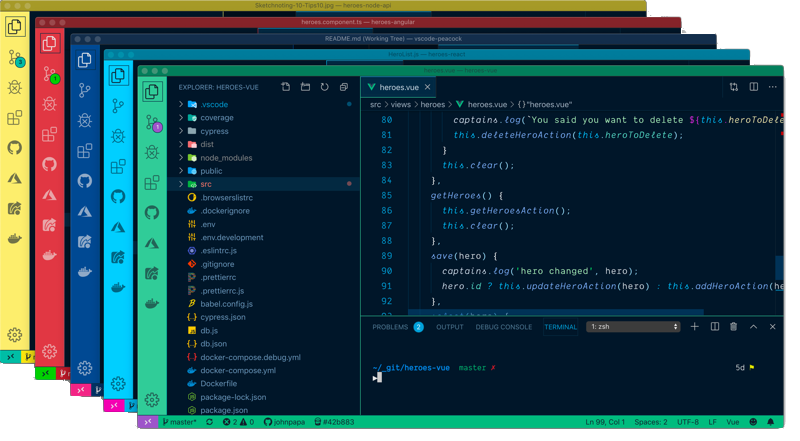
🔗 [Peacock](https://marketplace.visualstudio.com/items?itemName=johnpapa.vscode-peacock)
```json
"peacock.favoriteColors": [
{ "name": "Jazzberry Jam", "value": "#AC1754" },
{ "name": "Dark Cerulean", "value": "#205781" },
{ "name": "Tangerine", "value": "#C14600" },
{ "name": "Persian Blue", "value": "#211C84" },
{ "name": "Rich Lavender", "value": "#AA60C8" },
{ "name": "Blue Lagoon", "value": "#0A97B0" },
{ "name": "Dark Gunmetal", "value": "#343131" },
{ "name": "Medium Aquamarine", "value": "#66D2CE" }
]
```
## 14. Project Manager
**Mô tả**: Giúp quản lý các project, mở và di chuyển qua lại các project dễ dàng
🔗 [Project Manager](https://marketplace.visualstudio.com/items?itemName=alefragnani.project-manager)
## 15. Find It Faster
**Mô tả**: Tìm tệp và văn bản trong tệp, nhưng nhanh hơn VS Code thông thường.
Đảm bảo kiểm tra các Yêu cầu bên dưới (TL; DR: có fzf, rg, bat trên PATH của bạn).
- [`fzf ("command-line fuzzy finder")`](https://github.com/junegunn/fzf)
- [`rg ("ripgrep")`](https://github.com/BurntSushi/ripgrep)
- [`bat ("a cat clone with wings")`](https://github.com/sharkdp/bat)

🔗 [Find it faster](https://marketplace.visualstudio.com/items?itemName=TomRijndorp.find-it-faster#requirements)