https://github.com/davecom/dkverticalcolorpicker
A simple iOS color picker presented as a vertical hue bar.
https://github.com/davecom/dkverticalcolorpicker
Last synced: over 1 year ago
JSON representation
A simple iOS color picker presented as a vertical hue bar.
- Host: GitHub
- URL: https://github.com/davecom/dkverticalcolorpicker
- Owner: davecom
- License: other
- Created: 2015-01-07T23:47:42.000Z (over 11 years ago)
- Default Branch: master
- Last Pushed: 2016-04-17T03:44:52.000Z (over 10 years ago)
- Last Synced: 2025-04-15T14:18:45.368Z (over 1 year ago)
- Language: Objective-C
- Homepage:
- Size: 40 KB
- Stars: 23
- Watchers: 4
- Forks: 7
- Open Issues: 3
-
Metadata Files:
- Readme: README.md
- License: LICENSE
Awesome Lists containing this project
README
# DKVerticalColorPicker
DKVerticalColorPicker is a simple iOS color picker presented as a vertical color bar from which the user can pick a color by its hue. *Wings* on either side of the color bar indicate the currently selected color. A small subclass of UIView, it is useful for simple applications - places where picking saturation, brightness, and alpha don't matter. It is similar in design to the color picker used in SnapChat's photo capture screen.
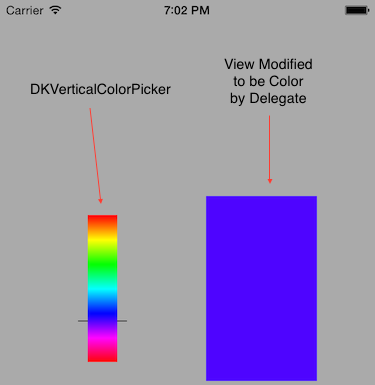
## Features
* Resizable/little space usage - set DKVerticalColorPicker's frame to be whatever makes sense for your application
* Reports color changes to a delegate
* IBDesignable and IBInspectable - set the initial color in IB
* Teeny tiny codebase with no dependencies
## Installation
Simply copy `DKVerticalColorPicker.m` and `DKVerticalColorPicker.h` into your project or use the CocoaPod `DKVerticalColorPicker`.
## Usage
You can drag a `UIView` out in IB and set its class as `DKVerticalColorPicker` or you can instantiate it in code via `initWithFrame`. Make it whatever size suits your app. Either way, you'll want to set its `delegate` property to a class that implements the protocol `DKVerticalColorPickerDelegate`.
`DKVerticalColorPickerDelegate` defines a single method `colorPicked:` which is triggered every time the picker's color changes (either via user interaction or after the `selectedColor` property is set in code).
You can set the color manually by simply setting the property `selectedColor`.
## Tips
* If you use `DKVerticalColorPicker` in IB, set its `backgroundColor` to `ClearColor` for things to look right.
* If you change `selectedColor` programatically, note that the delegate will be notified of a color change
## License and Authorship
Released under the MIT License. Copyright 2015 David Kopec. Please open issues on GitHub.