https://github.com/davesteele/comitup-watch
Monitor Comitup instances on the local network
https://github.com/davesteele/comitup-watch
Last synced: 7 months ago
JSON representation
Monitor Comitup instances on the local network
- Host: GitHub
- URL: https://github.com/davesteele/comitup-watch
- Owner: davesteele
- License: gpl-2.0
- Created: 2021-07-04T15:44:33.000Z (about 5 years ago)
- Default Branch: main
- Last Pushed: 2024-06-09T03:26:48.000Z (about 2 years ago)
- Last Synced: 2025-02-02T08:42:50.840Z (over 1 year ago)
- Language: Python
- Size: 85.9 KB
- Stars: 1
- Watchers: 1
- Forks: 1
- Open Issues: 0
-
Metadata Files:
- Readme: README.md
- License: LICENSE
Awesome Lists containing this project
README
# Comitup-Watch
## Monitor local Comitup-enabled Devices
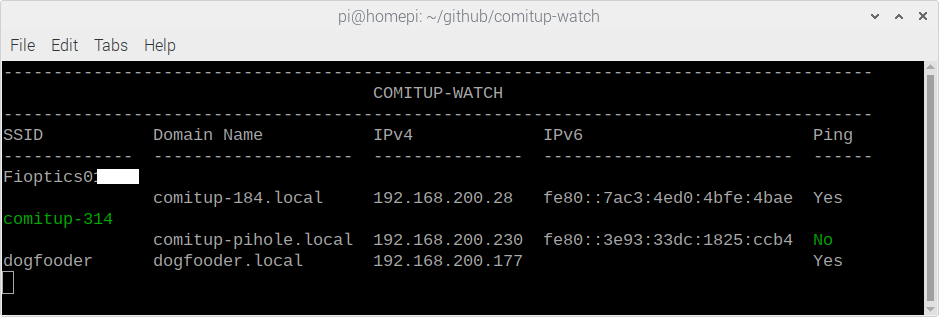
[Comitup](https://davesteele.github.io/comitup/) is a package that allows you to bootstrap headless devices on to the Internet via WiFi. Comitup-Watch lets you see the status of pending and connected Comitup-enabled devices on your local network.
## Installing
Download and install the [deb file](https://davesteele.github.io/comitup/latest/comitup-watch_latest.html).
Or
Add it via the Comitup Repository:
* Download and install [davesteele-comitup-apt-source](https://davesteele.github.io/comitup/latest/davesteele-comitup-apt-source_latest.html).
* Install:
```
sudo apt-get update
sudo apt-get install comitup-watch
```
## Man Page
### NAME
comitup-watch -- monitor local Comitup-enabled devices
#### SYNOPSIS
$ `comitup-watch`
#### DESCRIPTION
The **comitup-watch** program is a terminal utility that displays the status of
local WiFi Access Points and network host names/ip addresses. It is targeted
for showing the status of devices running the _Comitup_ service.
The program collects information from a number of sources, and displays in a
series of columns:
* __SSID__
The name of a visible WiFi Access Point. A Comitup-enabled device will
create an Access Point whenever it is unsuccessful in making an established
WiFi connection. Once a user connects to this AP, a captive portal enables
the definition of a connection for the current environment.
A Comitup device with two WiFi interfaces, running in _appliance mode_, can
show both an active SSID and local network information at the same time.
SSID information is collected from **NetworkManager**.
The accuracy of this column is improved if there is an unconnected WiFi
interface available.
* __Domain Name__
The fully qualified domain name for the device. Any system which supports
mdns can use this name to access the device.
The domain name, and the IP address columns, are extracted from a
Comitup-published Avahi/ZeroConf service. Data in these columns indicates
that the device is accessible on the network.
* __IPv4__
An accessible IPv4 address for the device.
* __IPv6__
An accessible IPv6 address for the device. Recent Comitup versions by
default create only link-local IPv6 addresses for controlled WiFi
connections.
* __Ping__
The program will periodically attempt to ping devices with known addresses.
This column displays the latest result for that test.
Recent information in the table is shown in green.
#### COPYRIGHT
Comitup-watch is Copyright (C) 2021 David Steele <steele@debian.org>
#### SEE ALSO
[comitup(8)](https://davesteele.github.io/comitup/man/comitup.pdf)