https://github.com/david0z/express-api
Express, PostgreSQL, Typescript, JWT example Rest API
https://github.com/david0z/express-api
example-project express jwt node nodejs postgresql rest-api sql typescript
Last synced: 3 months ago
JSON representation
Express, PostgreSQL, Typescript, JWT example Rest API
- Host: GitHub
- URL: https://github.com/david0z/express-api
- Owner: David0z
- Created: 2025-01-24T18:01:03.000Z (over 1 year ago)
- Default Branch: main
- Last Pushed: 2025-01-31T11:47:20.000Z (over 1 year ago)
- Last Synced: 2025-02-11T09:53:46.466Z (over 1 year ago)
- Topics: example-project, express, jwt, node, nodejs, postgresql, rest-api, sql, typescript
- Language: TypeScript
- Homepage:
- Size: 259 KB
- Stars: 0
- Watchers: 1
- Forks: 0
- Open Issues: 0
-
Metadata Files:
- Readme: README.md
Awesome Lists containing this project
README
# Express Api
Express, PostgreSQL, Typescript, JWT example Rest API
## Installation
### Easiest way:
1. Install Docker:
https://docs.docker.com/engine/install/
2. In directory of cloned project folder run:
```
docker-compose up
```
And wait for installation to finish.
You can check by visiting
`localhost:8080/`
## Usage
To be able to access user endpoints, you first need to generate a user token.
You do that by sending a POST request to the following endpoint:
```
localhost:8080/api/auth/register
```
And a required payload like the one below:
```
{
"email": "test@example.com",
"password": "123456789"
}
```
You'll receive an answer object like this:
```
{
"message": "User registered successfully",
"token": "eyJhbGciOiJIUzI1NiIsInR..."
}
```
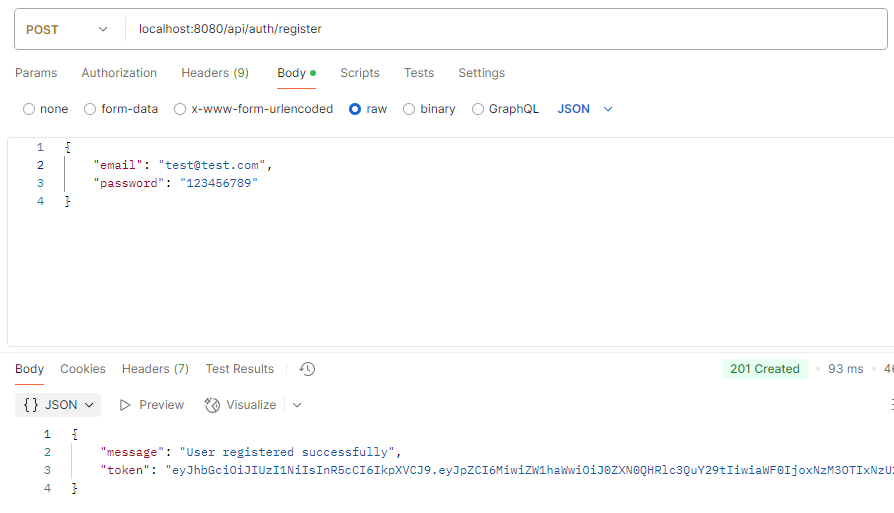
Copy the token value as it will be required in requests to user endpoints.
Now you can try to create a new user with POST request to the route:
```
localhost:8080/api/user
```
With this payload:
```
{
"firstName": "Dawid",
"lastName": "Czesak",
"role": "admin",
"email": "test@test.com"
}
```
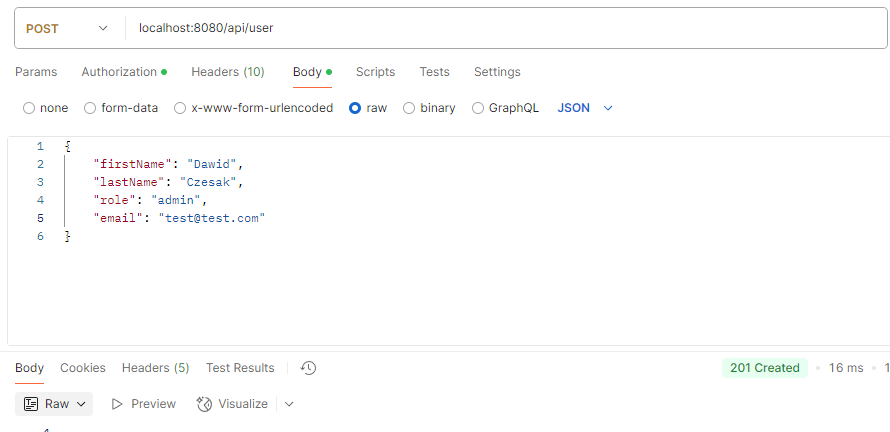
And with Bearer token in the "Authorization" header:
```
Bearer eyJhbGciOiJIUzI1N...
```
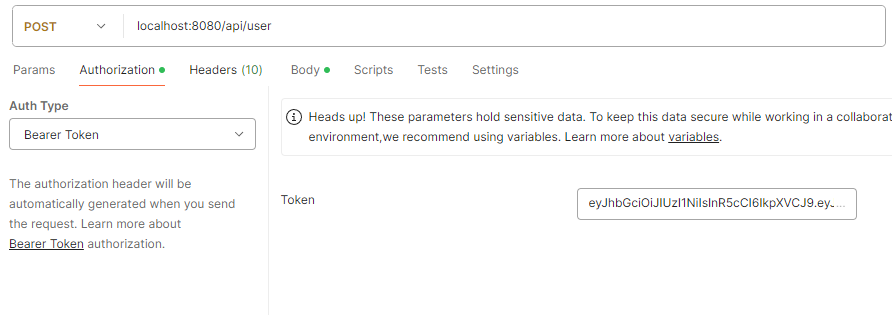
### Tests
To run tests I run:
- docker-compose -f docker-compose.test.yml up
(to set up seperate database)
- npm install
- [optional] npm start
- npm run test (in seperate terminal)
## API Reference
### Auth API
#### - Register User
```http
POST /api/auth/register
```
JSON payload:
```
{
"email": string, **required**
"password": string **required, at least 6 letters**
}
```
Example JSON Response:
```
{
"message": "User registered successfully",
"token": "eyJhbGciOiJIUzI1NiIs..."
}
```
Success response code: **201**
#### - Login User
```http
POST /api/auth/login
```
JSON payload:
```
{
"email": string, **required**
"password": string **required**
}
```
Example JSON Response:
```
{
"token": "eyJhbGciOiJIUzI1NiIs..."
}
```
Success response code: **200**
### User API
Each of the following endpoints require a Bearer Token from **Auth** endpoint.
#### - Create User
```http
POST /api/user
```
JSON payload:
```
{
"firstName": string,
"lastName": string,
"role": string: "admin" | "user", **required**
"email": string **required**
}
```
Success response code: **201**
#### - Get users
```http
GET /api/users
```
Example JSON Response:
```
[
{
"id": 1,
"firstName": "John",
"lastName": "Smith",
"email": "jsmith@gmail.com",
"role": "user"
},
{
"id": 2,
"firstName": "Jan",
"lastName": "Kowalski",
"email": "jkowalski@gmail.com",
"role": "admin"
}
]
```
Success response code: **200**
#### - Get user
```http
GET /api/user/${id}
```
| Parameter | Type | Description |
| :-------- | :------- | :-------------------------------- |
| `id` | `string` | **Required**. Id of user to fetch |
Example JSON Response:
```
{
"id": 3,
"firstName": "",
"lastName": "",
"email": "example@gmail.com",
"role": "user"
}
```
Success response code: **200**
#### - Update User
```http
PATCH /api/user/${id}
```
| Parameter | Type | Description |
| :-------- | :------- | :--------------------------------- |
| `id` | `string` | **Required**. Id of user to update |
JSON payload:
```
{
"firstName": string,
"lastName": string,
"role": string: "admin" | "user"
}
```
Success response code: **200**
#### - Delete User
```http
DELETE /api/user/${id}
```
| Parameter | Type | Description |
| :-------- | :------- | :--------------------------------- |
| `id` | `string` | **Required**. Id of user to delete |
Success response code: **200**