https://github.com/davidestf/sistemo
Self-hosted Firecracker microVMs for your own hardware
https://github.com/davidestf/sistemo
cli firecracker go homelab kvm microvm self-hosted virtualization
Last synced: 4 months ago
JSON representation
Self-hosted Firecracker microVMs for your own hardware
- Host: GitHub
- URL: https://github.com/davidestf/sistemo
- Owner: davidestf
- License: apache-2.0
- Created: 2026-03-15T14:59:08.000Z (4 months ago)
- Default Branch: main
- Last Pushed: 2026-03-26T23:09:21.000Z (4 months ago)
- Last Synced: 2026-03-27T07:18:55.427Z (4 months ago)
- Topics: cli, firecracker, go, homelab, kvm, microvm, self-hosted, virtualization
- Language: Go
- Homepage: https://sistemo.io
- Size: 536 KB
- Stars: 1
- Watchers: 0
- Forks: 0
- Open Issues: 0
-
Metadata Files:
- Readme: README.md
- License: LICENSE
Awesome Lists containing this project
README
Sistemo
Self-hosted Linux microVMs for your own hardware. Powered by Firecracker.




---
**Sistemo** turns your Linux machine into a lightweight VM host. One binary, one command, real VMs — each with its own kernel, systemd, and network stack. No QEMU, no libvirt, no YAML. Deploy a Debian VM in 10 seconds.
## Real VMs, not containers
| | Sistemo | Docker | Proxmox |
|---|---|---|---|
| Isolation | Real VM (KVM) | Shared kernel | Real VM (KVM) |
| Setup | One command | One command | ISO install |
| Binary | ~15 MB, zero deps | Daemon + runtime | Full OS |
| Boot | < 10 seconds | Seconds | Minutes |
| Use case | Dev, homelab, sandboxes | Containers | Production VMs |
## Quick start
```bash
curl -sSL https://get.sistemo.io | sh
sudo sistemo up
sistemo vm deploy debian
sistemo vm ssh debian
```
That's it. Real Debian VM, SSH access, full `apt` + `systemctl`. Running on your hardware via [Firecracker](https://firecracker-microvm.github.io/) microVMs.
## What you can do
```bash
# Deploy from the registry (debian, ubuntu, almalinux)
sistemo vm deploy debian
sistemo vm deploy ubuntu --name dev --vcpus 4 --memory 2G
# Boot from an existing volume (skip image entirely)
sistemo vm deploy --volume web-root --name web2
# Build from any Docker image (openssh-server auto-installed)
sudo sistemo image build node:20
sistemo vm deploy node --name api
# Deploy from a URL or local file
sistemo vm deploy https://example.com/custom.rootfs.ext4
sistemo vm deploy ./my-image.rootfs.ext4
```
Images are cached locally in `~/.sistemo/images/` — first deploy downloads, every deploy after is instant.
### More examples
```bash
# Expose nginx to your network
sistemo vm deploy debian --name web --expose 80
sistemo vm ssh web
apt install -y nginx && systemctl start nginx
# http://your-machine:80 is live
# Isolated network: app + database talk to each other, nothing else can reach them
sistemo network create production
sistemo vm deploy debian --name app --network production --expose 3000
sistemo vm deploy debian --name postgres --network production
# Persistent storage that survives VM delete
sistemo volume create 5G --name pgdata
sistemo vm deploy debian --name db --attach=pgdata
# Resize a volume
sistemo volume resize mydata 10GB
# Attach/detach volumes on a stopped VM
sistemo vm volume attach myvm mydata
sistemo vm volume detach myvm mydata
# Delete a VM but keep its root volume
sistemo vm delete myvm --preserve-storage
# Diagnose your setup
sudo sistemo doctor
```
## Features
- **One binary** -- CLI + daemon, ~15 MB, zero dependencies beyond Linux + KVM
- **SSH + browser terminal** -- `sistemo vm ssh` or open `http://localhost:7777/dashboard` in your browser
- **Named networks** -- Isolated VM groups with `--network production`
- **Port expose** -- `--expose 80` or `--expose 8080:3000`
- **Custom images** -- Build from any Docker image: `sistemo image build nginx:latest`
- **Persistent volumes** -- Create, resize, attach/detach; every VM's rootfs is also tracked as a volume
- **Systemd service** -- `sistemo service install` survives reboots
- **Health check** -- `sistemo doctor` diagnoses your entire setup
- **Audit log** -- `sistemo history` shows every operation
- **JSON output** -- `sistemo vm list -o json` for scripting and automation
- **Command aliases** -- `ls` for list, `rm` for delete, `show` for status
- **Shell completions** -- `sistemo completion bash|zsh|fish`
- **Config validation** -- Bad config? Clear error with fix suggestion
- **x86_64 + ARM64** -- Intel, AMD, Raspberry Pi 5, Hetzner CAX, Graviton
- **Security** -- Seccomp syscall filtering, per-VM cgroup limits, network namespace isolation
## Web Dashboard
Open `http://localhost:7777/dashboard/` after starting the daemon.
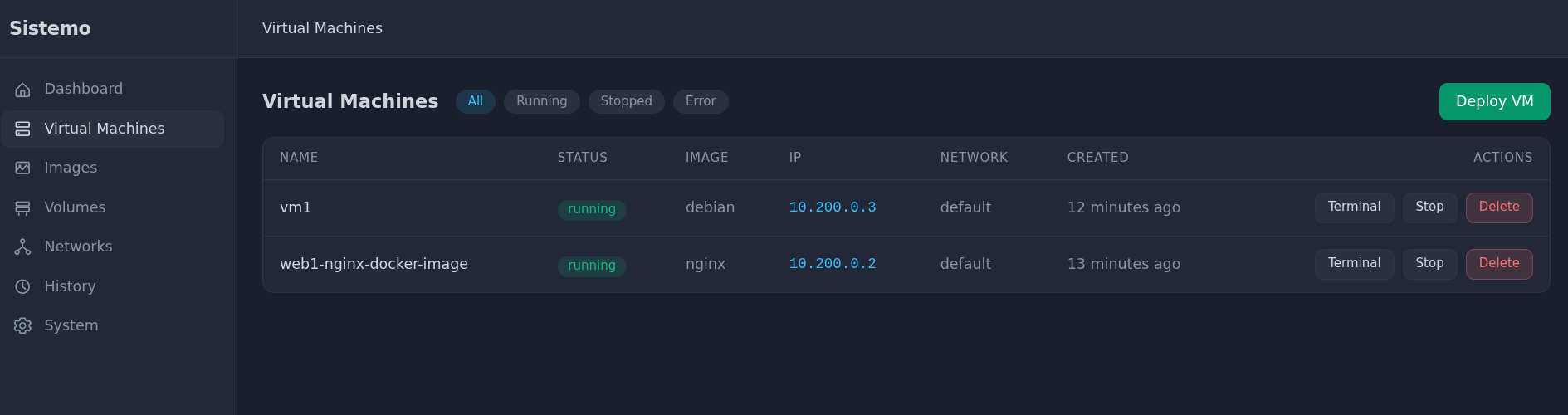
- **Deploy VMs** from registry, Docker images, or URLs — all from the browser
- **Terminal** — full xterm.js SSH terminal embedded in the dashboard
- **Manage everything** — VMs, images, volumes, networks, ports
- **Build Docker images** — type `nginx:latest`, click Build & Deploy
- **Activity history** — full audit log with filters
- **System health** — host CPU, RAM, disk, Firecracker status
- **Authentication** — admin account with JWT sessions (Portainer-style setup)
- **Localhost bypass** — CLI works without auth on the same machine
First visit creates your admin account. After that, login is required for remote access.
## Requirements
- **Linux** (kernel 5.10+) with **KVM** enabled
- CPU with hardware virtualization (Intel VT-x, AMD-V, or ARM64)
- 4 GB+ RAM, 20 GB+ free disk
Works on bare metal, VPS with nested virtualization, and Raspberry Pi 5.
> Sistemo runs on Linux only. It needs `/dev/kvm`.
## Install
```bash
curl -sSL https://get.sistemo.io | sh
```
Or from [GitHub releases](https://github.com/davidestf/sistemo/releases):
```bash
curl -sSLO https://github.com/davidestf/sistemo/releases/latest/download/sistemo-linux-amd64
chmod +x sistemo-linux-amd64
sudo mv sistemo-linux-amd64 /usr/local/bin/sistemo
sistemo install
```
## Commands
```
sistemo up Start the daemon
sistemo doctor Check installation health
sistemo history Show operation history
sistemo vm deploy [flags] Create a VM
--name NAME VM name
--vcpus N --memory SIZE --storage SIZE Resources
--expose PORT Expose port (host:vm or just port)
--network NAME Join a named network
--attach VOLUME Attach persistent volume
--volume VOLUME Boot from an existing volume
sistemo vm list List VMs
sistemo vm list -o json JSON output for scripting
sistemo vm ssh SSH into a VM
sistemo vm exec Run a command
sistemo vm restart|stop|start Lifecycle
sistemo vm delete Remove a VM
sistemo vm delete -y Skip confirmation prompt
--preserve-storage Keep root volume on delete
sistemo vm status Show details
sistemo vm expose --port P Expose port at runtime
sistemo vm unexpose --port P Remove port expose
sistemo vm volume attach Attach volume to stopped VM
sistemo vm volume detach Detach volume from stopped VM
sistemo network create Create isolated network
sistemo network list List networks
sistemo network delete Delete network
sistemo volume create [--name=N] Create persistent volume
sistemo volume list List volumes
sistemo volume delete Delete a volume
sistemo volume resize Resize a volume
sistemo image build Build rootfs from Docker
sistemo image list List available images
sistemo service install Run as systemd service
sistemo admin reset-password Reset dashboard admin password
sistemo config Show configuration
sistemo completion bash|zsh|fish Shell completions
# Aliases: ls=list, rm=delete, show=status
sistemo vm ls # alias for list
sistemo vm rm -y # alias for delete, skip confirm
sistemo vm show # alias for status
# Global flags
--output json / -o json # JSON output (works on list/status)
--yes / -y # Skip confirmation prompts
```
## Configuration
`~/.sistemo/config.yml`:
```yaml
# All settings are optional — these are example overrides, not defaults.
port: 9090 # default: 7777
bridge_subnet: "10.50.0.0/16" # default: 10.200.0.0/16
max_vcpus: 8 # default: 64
default_bandwidth_mbps: 100 # default: 0 (unlimited)
```
Environment variables override YAML: `PORT=9090 sudo sistemo up`
Set `HOST_API_KEY` if exposing the daemon beyond localhost.
## Documentation
**[docs.sistemo.io](https://docs.sistemo.io)** — Full guides and reference:
[Quick start](https://docs.sistemo.io/quickstart/) | [Dashboard](https://docs.sistemo.io/dashboard/) | [Networking](https://docs.sistemo.io/networking/) | [Port expose](https://docs.sistemo.io/port-expose/) | [Volumes](https://docs.sistemo.io/storage/) | [Commands](https://docs.sistemo.io/commands/) | [Configuration](https://docs.sistemo.io/configuration/) | [Building images](https://docs.sistemo.io/building-images/) | [Troubleshooting](https://docs.sistemo.io/troubleshooting/)
## License
[Apache-2.0](LICENSE)